WeChat Bot
English | Simplified Chinese
A WeChat / IM agent project based on Wechaty.
It can route IM messages received from WeChat QR-code login, Lark IM events, Telegram Bot API polling, or WhatsApp Cloud API webhooks to ChatGPT, DeepSeek, Ollama, Claude, Pi, and other services. It can also use OpenCLI wx-cli to access local WeChat chats, contacts, group members, favorites, and Moments cache, then run statistics or AI analysis for a group chat or a specific friend.
If you want to use Pi as the project agent and WeChat, Lark, Telegram, or WhatsApp as the external communication channel, start with Pi Agent + IM Guide.

AutoClaw · An AI agent that works for you, one click to connect WhatsApp / Telegram / Discord
Feature Overview
| Feature |
Command entry |
Status |
| WeChat QR-code IM |
wb agent --im wechat --agent pi / wb start --serve pi |
Available. Logs in by QR code and replies to allowlisted messages |
| Pi as project agent |
wb agent --im wechat/lark/telegram/whatsapp --agent pi |
Available. Single-turn non-interactive replies by default |
| Local WeChat chats / contacts / group members |
wb wx sessions, wb wx history, wb wx members |
Integrated through OpenCLI wx-cli |
| Local Moments cache |
wb wx sns-feed, wb wx sns-search |
Integrated through OpenCLI wx-cli |
| Group / friend analysis |
wb analyze --room "Group name", wb analyze --friend "Friend alias" |
Supports local statistics and AI deep analysis |
| Lark IM |
wb lark login, wb lark messages, wb lark send, wb lark agent |
Supports login, read, search, send, and event-driven auto-replies |
| Telegram IM |
wb telegram agent, wb telegram send |
Supports Bot API long-polling receive and send |
| WhatsApp IM |
wb whatsapp agent, wb whatsapp send |
Supports WhatsApp Cloud API webhook receive and send |
| Multi-model replies |
--serve ChatGPT/deepseek/ollama/pi/... |
Reuses the existing provider mechanism |
Quick Start: Pi + WeChat IM
npm i
cp .env.example .env
npm link
Configure at least the following values in .env:
BOT_NAME='@Your WeChat nickname'
ALIAS_WHITELIST='Friend alias allowed for private chat'
ROOM_WHITELIST='Group name allowed for access'

PI_BIN='pi'
PI_AGENT_ARGS='--print --no-session'
WECHAT_STORE_MESSAGES='true'
Start the agent:
wb agent --im wechat --agent pi
When a QR code appears in the terminal, scan it with WeChat. The message pipeline is:
WeChat QR-code login -> Wechaty receives message -> local JSONL capture -> Pi agent reply -> WeChat IM sends reply
Trigger rules:
- Private chats: the sender alias or nickname must be in
ALIAS_WHITELIST.
- Group chats: the group name must be in
ROOM_WHITELIST, and the message must mention @BOT_NAME.
- Non-text messages are not automatically sent to the reply pipeline.
Note: WeChat Web protocols carry account risk, including warnings or bans. Use this only with accounts and scenarios where you explicitly accept the risk. Keep allowlists and usage scope narrow.
Contributors

PRs for more AI services, better integrations, and stronger implementations are welcome.
Important WeChat Protocol Warning
WeChat has recently become very strict about this type of usage. The default protocol can trigger WeChat warnings or account bans. Use it carefully. The author of the padlocal protocol is no longer maintaining it, so switch to a more stable protocol yourself if needed.

Supported Reply / Agent Services
If you only use wb wx ... to access local WeChat data, or only use wb lark ... to operate Lark IM, you do not need to configure an LLM.
If you want automatic WeChat replies or wb analyze deep analysis, choose a --serve service. Current options include ChatGPT, doubao, deepseek, Kimi, Xunfei, deepseek-free, 302AI, dify, ollama, tongyi, claude, and pi.
pi
Pi is suitable as the project agent and can communicate through WeChat, Lark, Telegram, or WhatsApp IM:
PI_BIN='pi'
PI_NPM_PACKAGE='@earendil-works/pi-coding-agent'
PI_AGENT_ARGS='--print --no-session'
If your machine does not have a global pi command, leave PI_BIN empty. The project will start Pi through npx --yes @earendil-works/pi-coding-agent.
deepseek
Get your api key from the DeepSeek platform, then put it in .env:
DEEPSEEK_FREE_TOKEN='your key'
ChatGPT
Get your api key from OpenAI API keys.
This is a paid service. If requests fail, make sure your terminal proxy works and your OpenAI account has billing available.
# Copy .env.example to .env
cp .env.example .env
# Fill in .env
OPENAI_API_KEY='your key'
Doubao
Doubao Seed 1.6 supports image input and deep thinking. After registering and logging in to Volcano Engine, select a Doubao model, choose API access, and get an API key.
# Copy .env.example to .env
cp .env.example .env
# Fill in .env
DOUBAO_API_KEY='your key'
# Test whether the API works
node src/doubao/__test__.js
Tongyi Qianwen
Tongyi Qianwen is an AI service from Alibaba Cloud. After getting your API key, fill in .env:
# Copy .env.example to .env
cp .env.example .env
# Fill in .env
# Tongyi URL, including the URI path
TONGYI_URL = "https://dashscope.aliyuncs.com/compatible-mode/v1"
# Tongyi API key
TONGYI_API_KEY = ''
# Tongyi model
TONGYI_MODEL='qwen-plus'
Xunfei
Apply for a key from Xunfei. Be careful not to mix up the several Xunfei configuration keys. For service errors, see issues/170 and issues/180.
Kimi
Get a key from Kimi API keys. Kimi is currently integrated at a basic level. PRs for file upload and other improvements are welcome.
dify
Create an app at dify, get your API key, and fill in .env. Self-hosted Dify deployments are also supported.
# Copy .env.example to .env
cp .env.example .env
# Fill in .env
DIFY_API_KEY='your key'
# For self-hosted Dify, update the following value in .env
# DIFY_URL='https://[your self-hosted URL]'
ollama
Ollama is a local AI service. Its API is close to OpenAI's API, but configuration differs from cloud services.
# Copy .env.example to .env
cp .env.example .env
# Fill in .env
OLLAMA_URL='http://127.0.0.1:11434/api/chat'
OLLAMA_MODEL='qwen2.5:7b'
OLLAMA_SYSTEM_MESSAGE='You are a personal assistant.'
302.AI
302.AI is an AI aggregation platform. Add an API from 302.AI APIs, then configure the API key in .env:
_302AI_API_KEY = 'xxxx'
_302AI_MODEL= 'gpt-4o-mini'
You can choose the model yourself. Users should evaluate platform cost, payment flow, and service quality before using it.
claude
Register on the Anthropic Console, get an API key, then configure:
# Copy .env.example to .env if it does not already exist
cp .env.example .env

# Edit .env and add Claude settings
CLAUDE_API_VERSION = '2023-06-01'
CLAUDE_API_KEY = 'your API key'
CLAUDE_MODEL = 'claude-3-5-sonnet-latest'
# System prompt
CLAUDE_SYSTEM = ''
Other
In theory, APIs compatible with OpenAI's format can be used by configuring the corresponding API key, model, and proxy URL in .env.
Development / Usage
Make sure your development environment has nodejs installed. The required version is Node.js >= v18.0. Older versions can fail at runtime. An LTS version is recommended.
1. Install dependencies
For users in mainland China, switching to the Taobao npm mirror before installing dependencies may help: npm config set registry https://registry.npmmirror.com For flexible registry switching, you can use prm-cli.
npm i

# Optional: register wb as a local command
npm link
If you do not want to run npm link, replace every wb ... command below with:
npm run start -- ...
cp .env.example .env
Minimum usable configuration:
BOT_NAME='@Your WeChat nickname'
ALIAS_WHITELIST='Friend alias 1,Friend nickname 2'
ROOM_WHITELIST='Group name 1,Group name 2'
AUTO_REPLY_PREFIX=''

WECHAT_DATA_DIR='.data/wechat'
WECHAT_STORE_MESSAGES='true'

PI_BIN='pi'
PI_AGENT_ARGS='--print --no-session'
3. Start WeChat IM
Pi agent mode:
wb agent --im wechat --agent pi
Equivalent commands:
wb start --serve pi
npm run agent
npm run start -- start --serve pi
Traditional model reply mode:
wb start --serve ollama
wb start --serve ChatGPT
wb start --serve deepseek
After startup, a QR code appears in the terminal. Scan it to log in to WeChat. After login, received WeChat messages are appended to:
.data/wechat/messages.jsonl
4. Local WeChat Data and Moments
OpenCLI wx-cli is passed through by wb wx ... and is used to access local WeChat cache:
wb wx init
wb wx sessions
wb wx history
wb wx search
wb wx contacts
wb wx members
wb wx stats
wb wx favorites
wb wx sns-feed
wb wx sns-search
wb wx sns-notifications
wb wx help
Common flows:
# Initialize local WeChat data access
wb wx init

# View recent sessions and chat history
wb wx sessions
wb wx history

# View group members and chat statistics
wb wx members
wb wx stats

# View Moments cache and search Moments text
wb wx sns-feed
wb wx sns-search
5. Group / Friend Analysis
Command-line analysis:
# Local statistics only, without calling AI
wb analyze --room "Group name" --stats-only
wb analyze --friend "Friend alias" --stats-only

# Call a selected service for deep analysis
wb analyze --room "Group name" --serve pi
wb analyze --friend "Friend alias" --serve ollama
Built-in commands in WeChat chats only work for allowlisted contacts or allowlisted groups by default:
/stats group GroupName
/analyze friend FriendAlias
/stats only reads local JSONL and does not call AI. /analyze sends recent message samples to the current serve service or agent. For private chats, prefer a local model or local Pi configuration.
6. Lark IM
Lark IM is integrated through lark-cli:
# Generate a device-flow authorization link / QR-code info
wb lark login --no-wait

# Check authorization status
wb lark status

# Read / search / send messages
wb lark messages --chat-id oc_xxx
wb lark search --query "keyword"
wb lark send --chat-id oc_xxx --text "hello"
To let Pi or another provider reply to Lark messages through the event stream, configure:
LARK_AGENT_IDENTITY='bot'
LARK_AGENT_EVENT_KEY='im.message.receive_v1'
LARK_AGENT_CHAT_TYPES='p2p,group'
LARK_AGENT_MESSAGE_TYPES='text,post'
LARK_AGENT_CHAT_WHITELIST=''
LARK_AGENT_USER_WHITELIST=''
LARK_AGENT_REPLY_PREFIX=''
LARK_AGENT_GROUP_MENTION_NAME=''
LARK_AGENT_GROUP_AUTO_REPLY='false'
Then start:
wb agent --im lark --agent pi
# or
wb lark agent --agent pi
The Lark event path uses lark-cli event consume im.message.receive_v1 --as bot. Private chats are replied to by default unless you set a chat or user allowlist. Group chats require LARK_AGENT_CHAT_WHITELIST and one of these triggers: LARK_AGENT_REPLY_PREFIX, LARK_AGENT_GROUP_MENTION_NAME, or LARK_AGENT_GROUP_AUTO_REPLY=true.
Before using event replies, make sure the Lark app has enabled the im.message.receive_v1 event in the developer console and has the required IM scopes.
7. Telegram Bot API
Telegram uses the official Bot API with long polling:
TELEGRAM_BOT_TOKEN='123456:bot-token'
TELEGRAM_AGENT_CHAT_TYPES='private,group,supergroup'
TELEGRAM_AGENT_CHAT_WHITELIST=''
TELEGRAM_AGENT_USER_WHITELIST=''
TELEGRAM_AGENT_REPLY_PREFIX=''
TELEGRAM_AGENT_GROUP_MENTION_NAME='@your_bot'
TELEGRAM_AGENT_GROUP_AUTO_REPLY='false'
Start:
wb agent --im telegram --agent pi
# or
wb telegram agent --agent pi
Private chats are replied to by default unless you set a chat or user allowlist. Group and supergroup chats require a chat allowlist and one of these triggers: reply prefix, bot mention name, or TELEGRAM_AGENT_GROUP_AUTO_REPLY=true.
You can send a test message with:
wb telegram send --chat-id 123456 --text "hello"
8. WhatsApp Cloud API
WhatsApp uses the official Cloud API. Incoming messages are received through a webhook, so the local server must be reachable from Meta through a public HTTPS URL.
WHATSAPP_ACCESS_TOKEN='your access token'
WHATSAPP_PHONE_NUMBER_ID='your phone_number_id'
WHATSAPP_VERIFY_TOKEN='your webhook verify token'
WHATSAPP_GRAPH_API_VERSION='v23.0'
WHATSAPP_WEBHOOK_PORT='3000'
WHATSAPP_WEBHOOK_PATH='/webhook/whatsapp'
WHATSAPP_AGENT_REPLY_PREFIX=''
Start the webhook server:
wb agent --im whatsapp --agent pi
# or
wb whatsapp agent --agent pi
Configure the webhook callback URL in Meta as:
https://your-public-domain.example/webhook/whatsapp
Use the same WHATSAPP_VERIFY_TOKEN value in Meta's webhook verification form. WhatsApp replies only support inbound text messages by default.
You can send a test message with:
wb whatsapp send --to 15551234567 --text "hello"
9. Pi / OpenCLI Passthrough
wb pi -- --help
wb pi -- --print "Analyze the current project structure"

wb opencli -- --help
wb opencli -- wx-cli help
10. Tests
npm run test:analysis
node ./cli.js --help
node ./cli.js wx help
node ./cli.js pi -- --help
If you use cloud services such as OpenAI, Claude, or Kimi, make sure the corresponding API key, balance, and network proxy are available.
What You Need to Customize
Many users assume the bot should automatically send and receive every message after startup. It does not. To avoid replying to every incoming message, the project intentionally has trigger restrictions.
Customize the following values:
BOT_NAME: the WeChat nickname of the bot account, in a format similar to @Cola.ALIAS_WHITELIST: friend aliases or nicknames allowed for auto-reply.ROOM_WHITELIST: group chat names allowed for auto-reply.AUTO_REPLY_PREFIX: optional. Auto-reply is triggered only when the message matches this prefix.PI_AGENT_ARGS: arguments used when Pi runs as the IM agent. The default is --print --no-session.- For deeper business logic, see
src/wechaty/sendMessage.js and src/platforms/wechat/commandRouter.js.
Edit these values in .env. Example:
# Allowlist configuration
# Define the bot name. This avoids replying to too many group messages.
# Keep the @ prefix and append the WeChat nickname of the bot account.
BOT_NAME=@Cola
# Contact allowlist
ALIAS_WHITELIST=WeChatName1,Alias2
# Group chat allowlist
ROOM_WHITELIST=Group1,Group2
# Auto-reply prefix matching. For text messages, auto-reply is triggered only
# when the specified prefix matches. Empty or unset values disable this setting.
# Matching rule: group messages remove ${BOT_NAME} and trim before prefix matching;
# private messages are trimmed directly before prefix matching.
AUTO_REPLY_PREFIX=''

# Pi agent
PI_BIN='pi'
PI_AGENT_ARGS='--print --no-session'
Auto-reply is no longer limited to chatgpt. Use --serve to choose different services, such as pi, ollama, deepseek, claude, or ChatGPT.
Notes
Recent WeChat review is strict. Many users have reported plugin warnings. Because the project uses a free Web protocol by default, WeChat can detect it easily. Consider using a pad protocol or buying an enterprise protocol yourself to reduce account-ban risk.
Reference change: https://github.com/wangrongding/wechat-bot/pull/263/files
Pad protocol channel shared by Wechaty, purchase carefully: http://pad-local.com
The underlying wechaty dependency itself is not actively maintained. Community feedback says the pad protocol can currently work, but frequent login/logout can still trigger warnings. Avoid buying a very long subscription at once.
FAQ
The following are the author's WeChat and group QR codes. Please describe your purpose clearly when adding the author.
Runtime errors
First check the following:
Pull the latest code and reinstall dependencies. If necessary, delete the lock file and node_modules.
It is usually better not to set an npm mirror while installing dependencies.
If Puppeteer installation fails, set the environment variable:
# Mac
export PUPPETEER_SKIP_DOWNLOAD='true'

# Windows
SET PUPPETEER_SKIP_DOWNLOAD='true'
If you use a cloud model, make sure the terminal network can access the corresponding model service. Enable a global proxy or configure a terminal proxy manually.
# Set proxy
export https_proxy=http://127.0.0.1:your_proxy_port;export http_proxy=http://127.0.0.1:your_proxy_port;export all_proxy=socks5://127.0.0.1:your_proxy_port
# Then run a service test, or first check whether the CLI works
node ./cli.js --help

If you use OpenAI / Claude / Kimi or another cloud model, confirm that the API key, account balance, model name, and proxy settings are correct.
Configure .env, especially BOT_NAME, allowlists, and parameters required by the current --serve service.
Run npm run test:analysis to verify the local analysis module. Run node ./cli.js --help to verify the CLI.
Run wb agent --im wechat --agent pi or wb start --serve <service> to start WeChat QR-code login.
Run wb agent --im lark --agent pi or wb lark agent --agent pi to start Lark event-based replies.
You can also refer to this issue.
- How to use it? After customization, when someone mentions you in an allowlisted group, or an allowlisted private contact sends you a message, auto-reply is triggered.
- Runtime error? Check whether the Node version meets the requirement. If not, upgrade Node. Check whether dependencies are fully installed. Users in mainland China can switch npm mirrors and reinstall dependencies. prm-cli can switch registries quickly.
- How to adjust conversation mode? Prefer switching services with
--serve. For custom business logic, see sendMessage.js, commandRouter.js, and the corresponding provider implementation.
Docker Deployment
docker build . -t wechat-bot

docker run -d --rm --name wechat-bot -v $(pwd)/.env:/app/.env wechat-bot
- If Node repeatedly times out during
docker build, download a Node.js image to your local image registry first, then change node:19 in Dockerfile to your local Node.js image version.
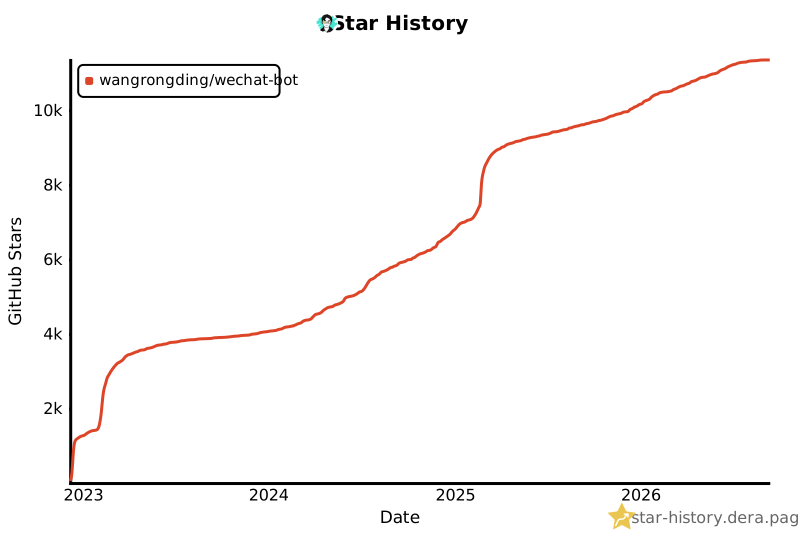
Star History Chart
This project became No. 1 on GitHub Trending on 2023-02-13.
License
MIT.


 wechat-bot is a Node.js CLI agent that bridges WeChat, Telegram, WhatsApp, and Lark messages to AI services like ChatGPT, Claude, DeepSeek, Ollama, Kimi, and Pi for automatic replies, plus local chat and contact analysis.