OpenUI

Building UI components can be a slog. OpenUI aims to make the process fun, fast, and flexible. It's also a tool we're using at W&B to test and prototype our next generation tooling for building powerful applications on top of LLM's.
Overview
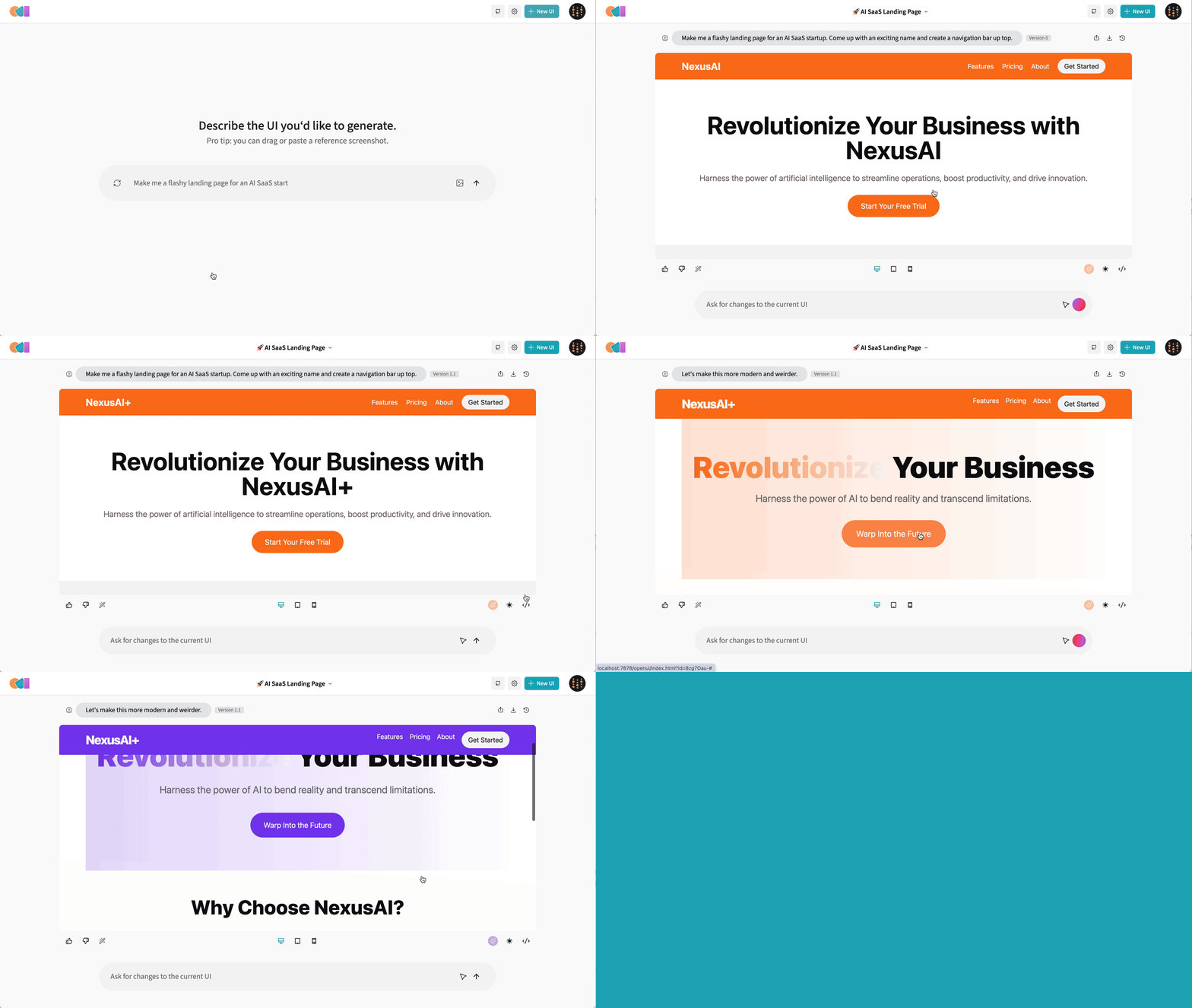
OpenUI let's you describe UI using your imagination, then see it rendered live. You can ask for changes and convert HTML to React, Svelte, Web Components, etc. It's like v0 but open source and not as polished :stuck_out_tongue_closed_eyes:.
Live Demo
Try the demo
Running Locally
OpenUI supports OpenAI, Groq, and any model LiteLLM supports such as Gemini or Anthropic (Claude). The following environment variables are optional, but need to be set in your environment for alternative models to work:
- OpenAI
OPENAI_API_KEY
- Groq
GROQ_API_KEY
- Gemini
GEMINI_API_KEY
- Anthropic
ANTHROPIC_API_KEY
- Cohere
COHERE_API_KEY
- Mistral
MISTRAL_API_KEY
- OpenAI Compatible
OPENAI_COMPATIBLE_ENDPOINT and OPENAI_COMPATIBLE_API_KEY
For example, if you're running a tool like localai you can set OPENAI_COMPATIBLE_ENDPOINT and optionally OPENAI_COMPATIBLE_API_KEY to have the models available listed in the UI's model selector under LiteLLM.
Ollama
You can also use models available to Ollama. Install Ollama and pull a model like Llava. If Ollama is not running on http://127.0.0.1:11434, you can set the OLLAMA_HOST environment variable to the host and port of your Ollama instance. For example when running in docker you'll need to point to http://host.docker.internal:11434 as shown below.
Docker (preferred)
The following command would forward the specified API keys from your shell environment and tell Docker to use the Ollama instance running on your machine.
export ANTHROPIC_API_KEY=xxx
export OPENAI_API_KEY=xxx
docker run --rm --name openui -p 7878:7878 -e OPENAI_API_KEY -e ANTHROPIC_API_KEY -e OLLAMA_HOST=http://host.docker.internal:11434 ghcr.io/wandb/openui
Now you can goto http://localhost:7878 and generate new UI's!
From Source / Python
Assuming you have git and uv installed:
git clone https://github.com/wandb/openui
cd openui/backend
uv sync --frozen --extra litellm
source .venv/bin/activate
# Set API keys for any LLM's you want to use
export OPENAI_API_KEY=xxx
python -m openui
LiteLLM
LiteLLM can be used to connect to basically any LLM service available. We generate a config automatically based on your environment variables. You can create your own proxy config to override this behavior. We look for a custom config in the following locations:
litellm-config.yaml in the current directory/app/litellm-config.yaml when running in a docker container- An arbitrary path specified by the
OPENUI_LITELLM_CONFIG environment variable
For example to use a custom config in docker you can run:
docker run -n openui -p 7878:7878 -v $(pwd)/litellm-config.yaml:/app/litellm-config.yaml ghcr.io/wandb/openui
To use litellm from source you can run:
pip install .[litellm]
export ANTHROPIC_API_KEY=xxx
export OPENAI_COMPATIBLE_ENDPOINT=http://localhost:8080/v1
python -m openui --litellm
Groq
To use the super fast Groq models, set GROQ_API_KEY to your Groq api key which you can find here. To use one of the Groq models, click the settings icon in the nav bar.
Docker Compose
DISCLAIMER: This is likely going to be very slow. If you have a GPU you may need to change the tag of the ollama container to one that supports it. If you're running on a Mac, follow the instructions above and run Ollama natively to take advantage of the M1/M2.
From the root directory you can run:
docker-compose up -d
docker exec -it openui-ollama-1 ollama pull llava
If you have your OPENAI_API_KEY set in the environment already, just remove =xxx from the OPENAI_API_KEY line. You can also replace llava in the command above with your open source model of choice (llava is one of the only Ollama models that support images currently). You should now be able to access OpenUI at http://localhost:7878.
If you make changes to the frontend or backend, you'll need to run docker-compose build to have them reflected in the service.
Development
A dev container is configured in this repository which is the quickest way to get started.
Codespace
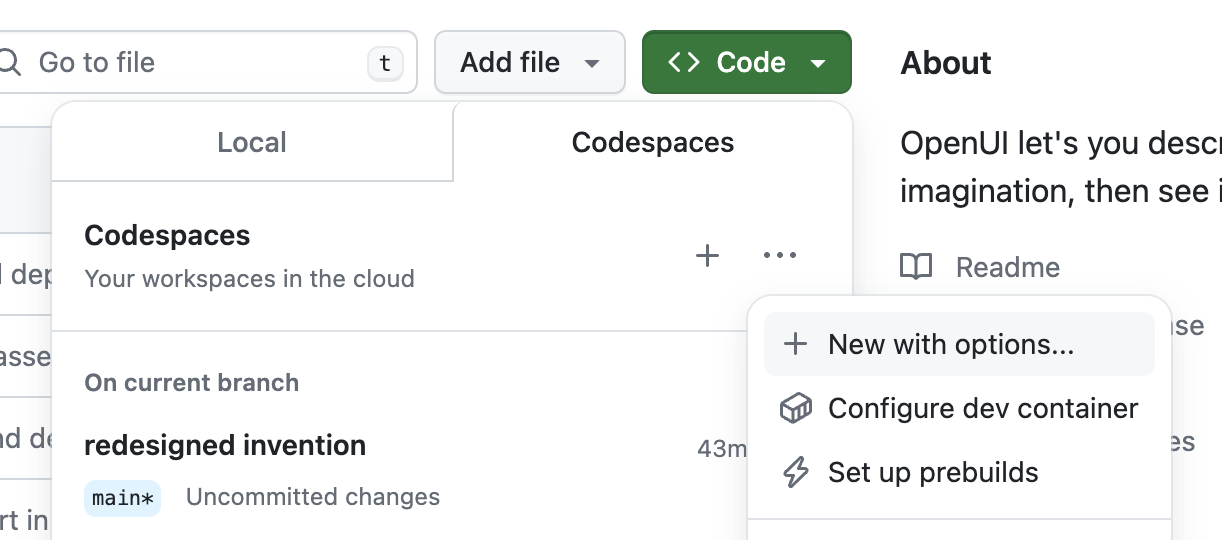
Choose more options when creating a Codespace, then select New with options.... Select the US West region if you want a really fast boot time. You'll also want to configure your OPENAI_API_KEY secret or just set it to xxx if you want to try Ollama (you'll want at least 16GB of Ram).
Once inside the code space you can run the server in one terminal: python -m openui --dev. Then in a new terminal:
cd /workspaces/openui/frontend
npm run dev
This should open another service on port 5173, that's the service you'll want to visit. All changes to both the frontend and backend will automatically be reloaded and reflected in your browser.
Ollama
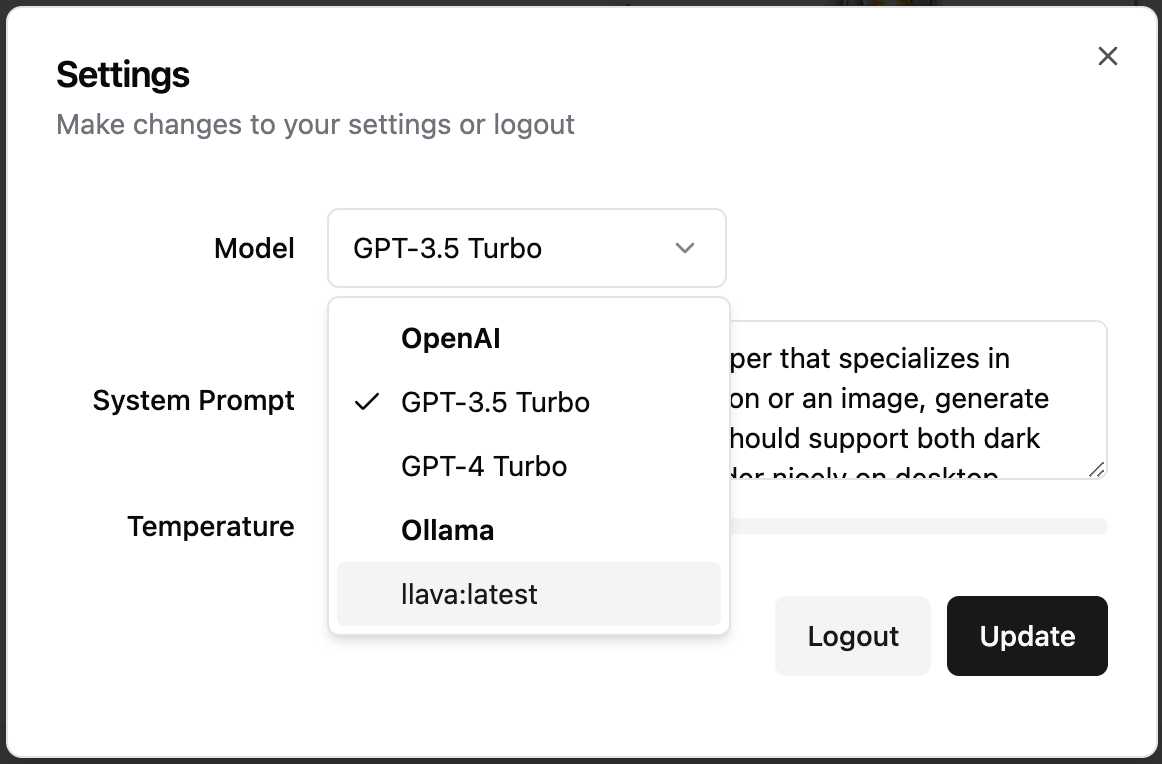
The codespace installs ollama automaticaly and downloads the llava model. You can verify Ollama is running with ollama list if that fails, open a new terminal and run ollama serve. In Codespaces we pull llava on boot so you should see it in the list. You can select Ollama models from the settings gear icon in the upper left corner of the application. Any models you pull i.e. ollama pull llama will show up in the settings modal.
Gitpod
You can easily use Open UI via Gitpod, preconfigured with Open AI.

On launch Open UI is automatically installed and launched.
Before you can use Gitpod:
- Make sure you have a Gitpod account.
- To use Open AI models set up the
OPENAI_API_KEY environment variable in your Gitpod User Account. Set the scope to wandb/openui (or your repo if you forked it).
NOTE: Other (local) models might also be used with a bigger Gitpod instance type. Required models are not preconfigured in Gitpod but can easily be added as documented above.
Resources
See the readmes in the frontend and backend directories.

 OpenUI 是 W&B 开源的一个工具,能把文字描述变成实时渲染的界面:描述一个组件,看着它渲染出来,让它改,最后还能把结果转换成 React、Svelte、Web Components 等多种格式。