What is this?
 fq is a command-line tool, language and collection of decoders for working with binary formats - often described as jq for binary data. You can dump a file's structure, run jq-style queries against it and explore results in an interactive REPL.
fq is a command-line tool, language and collection of decoders for working with binary formats - often described as jq for binary data. You can dump a file's structure, run jq-style queries against it and explore results in an interactive REPL.So is it a GUI app, a code library, or something I run in the terminal?It is a standalone CLI tool written in Go, plus an interactive REPL with auto-completion. You install one executable and run queries against files straight from the terminal.
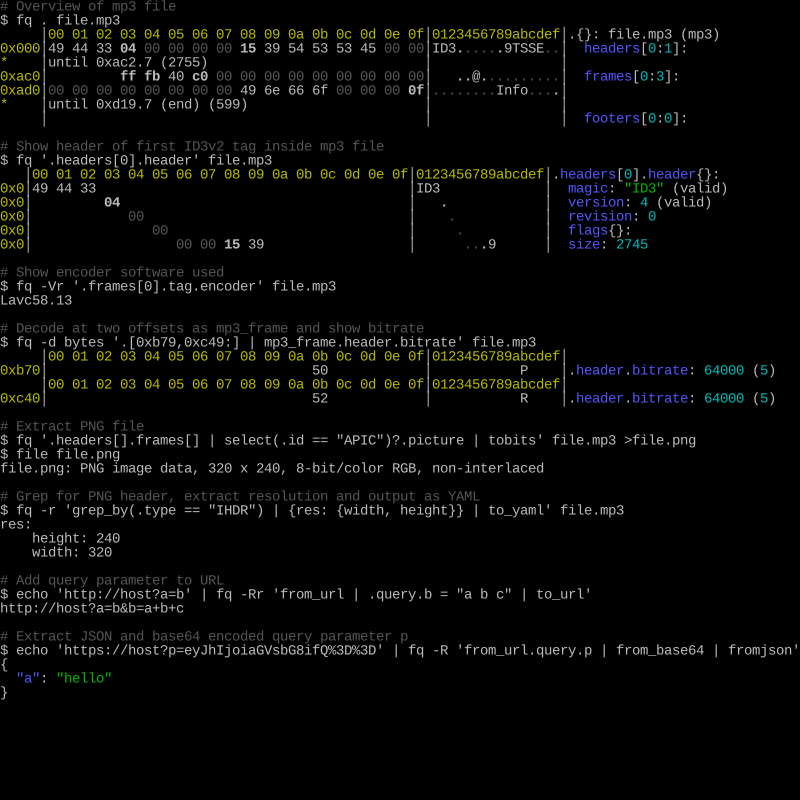
It is a standalone CLI tool written in Go, plus an interactive REPL with auto-completion. You install one executable and run queries against files straight from the terminal.How do I install it and take a first look at a file?Install via Homebrew on macOS, scoop on Windows, pacman or AUR on Arch, packages on Gentoo, Guix, Nix, FreeBSD and Alpine, or grab a pre-built release binary for macOS, Linux or Windows. Then run fq . file to dump a file's structure or fq 'some query' file to filter.
Install via Homebrew on macOS, scoop on Windows, pacman or AUR on Arch, packages on Gentoo, Guix, Nix, FreeBSD and Alpine, or grab a pre-built release binary for macOS, Linux or Windows. Then run fq . file to dump a file's structure or fq 'some query' file to filter.Do I need to know jq to get anything out of it?It helps: fq uses the same expression language as jq, and the README recommends learning jq to get the most out of the tool. Building from source also requires Go 1.22 or later; the pre-built binaries have no such requirement.
It helps: fq uses the same expression language as jq, and the README recommends learning jq to get the most out of the tool. Building from source also requires Go 1.22 or later; the pre-built binaries have no such requirement.Are there any install gotchas?On macOS, a manually downloaded binary may be blocked on first run - you need to allow it in Security preferences (the README shows the exact commands). Beyond that, installation is straightforward across macOS, Linux and Windows.
On macOS, a manually downloaded binary may be blocked on first run - you need to allow it in Security preferences (the README shows the exact commands). Beyond that, installation is straightforward across macOS, Linux and Windows.What kinds of files can it decode?Its decoder list covers media (mp4, mp3, flac, jpeg, png, gif, webp, wav), executables (elf, macho), archives (zip, tar), network captures and protocols (pcap, pcapng, DNS, TLS, IPv4/IPv6), serialization formats (protobuf, bson, cbor, msgpack) and more. It also works with text like URLs, hex, base64 and PEM, and can convert XML and YAML to and from jq values.
Its decoder list covers media (mp4, mp3, flac, jpeg, png, gif, webp, wav), executables (elf, macho), archives (zip, tar), network captures and protocols (pcap, pcapng, DNS, TLS, IPv4/IPv6), serialization formats (protobuf, bson, cbor, msgpack) and more. It also works with text like URLs, hex, base64 and PEM, and can convert XML and YAML to and from jq values.What can it do with a file once it is open?It shows a structural hex viewer, decodes nested formats, supports slicing and concatenating binary data and bit-level decoding, and offers an interactive REPL with auto-completion for exploring the results.
It shows a structural hex viewer, decodes nested formats, supports slicing and concatenating binary data and bit-level decoding, and offers an interactive REPL with auto-completion for exploring the results.Why did the author build it?The stated goals are to make binaries more accessible, queryable and sliceable, with nested formats and bit-oriented decoding in a quick, comfortable CLI tool. The project builds on itchyny's gojq implementation and took inspiration from HexFiend and the jq language.
The stated goals are to make binaries more accessible, queryable and sliceable, with nested formats and bit-oriented decoding in a quick, comfortable CLI tool. The project builds on itchyny's gojq implementation and took inspiration from HexFiend and the jq language.How does it compare to Wireshark, ImHex or HexFiend?The README lists them as related works with different focus: HexFiend is a macOS hex editor with format template support, ImHex a hex editor for reverse engineers, Wireshark decodes network traffic, and kaitai does declarative binary format parsing. fq aims to combine a jq-like query language, a REPL and a broad decoder set in one CLI tool.
The README lists them as related works with different focus: HexFiend is a macOS hex editor with format template support, ImHex a hex editor for reverse engineers, Wireshark decodes network traffic, and kaitai does declarative binary format parsing. fq aims to combine a jq-like query language, a REPL and a broad decoder set in one CLI tool.Which topics is it in?packet-capture, repl, codec, xml, media, parsing, binary-analysis, parser, protocol, tls, reverse-engineering, json
packet-capture, repl, codec, xml, media, parsing, binary-analysis, parser, protocol, tls, reverse-engineering, json