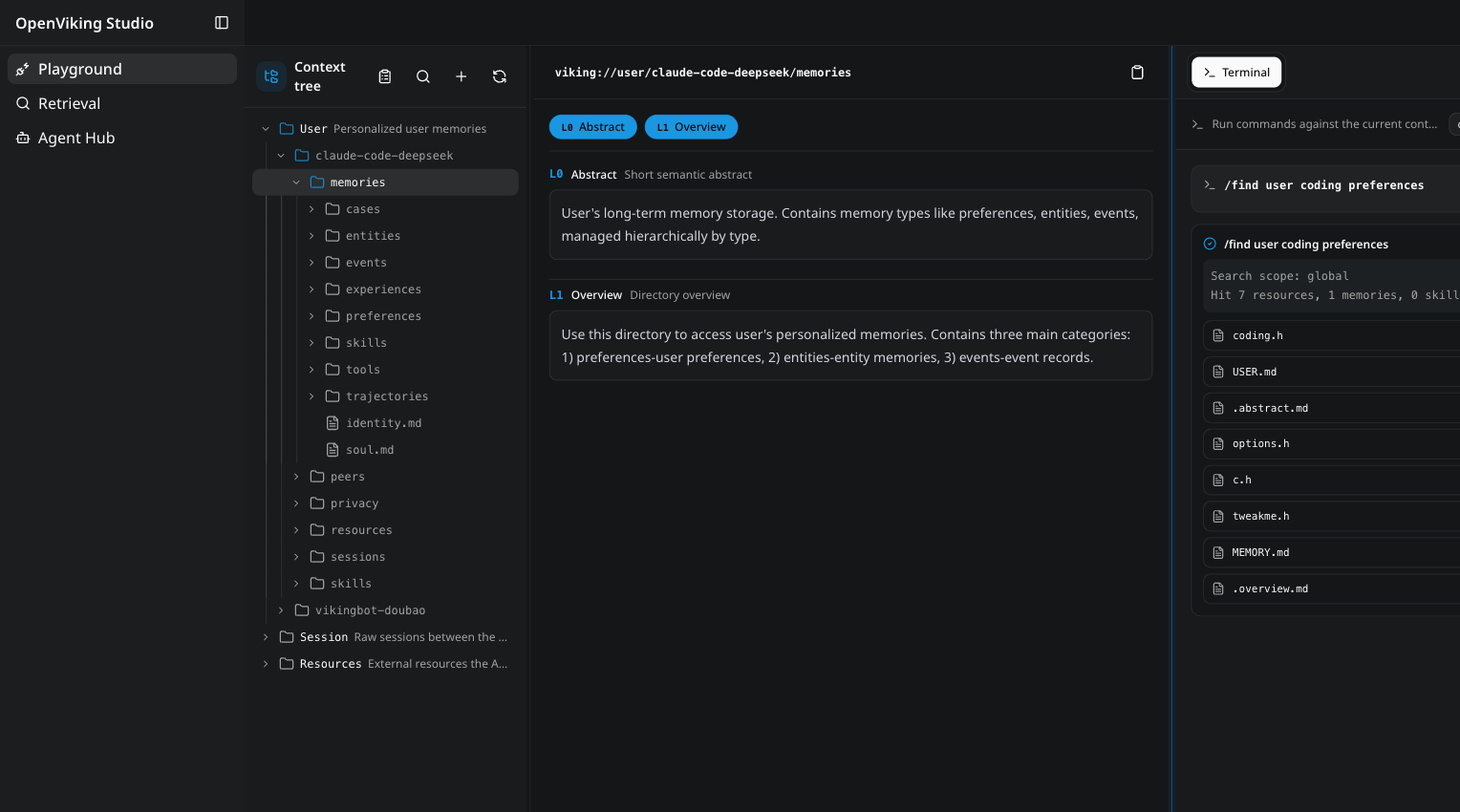
OpenViking is an open-source context database for AI agents. It stores memories, resources, and skills as one virtual filesystem under the viking:// protocol, so an agent browses its own context with ls, tree, and find instead of querying a black-box vector store. Content is processed into three tiers — L0 abstract, L1 overview, L2 details — and loaded on demand. Every retrieval leaves a trajectory you can watch and debug. Full introduction: Getting started.
The OpenViking Studio playground — a live demo you can open in the browser, no installation required.
Why OpenViking
One filesystem for all context. Memories, resources, and skills each get a viking:// URI. Agents locate and manipulate context deterministically, like a developer working with files. → Viking URI · Context types
Tiered loading cuts token spend. Every entry is processed into L0 (abstract), L1 (overview), and L2 (details) on write, then loaded only as deep as the task requires. → Context layers
Directory recursive retrieval. Vector search first locates the highest-scoring directory, then drills down layer by layer, so results arrive with their surrounding context intact. → Retrieval
Observable retrieval. Each query preserves its directory-browsing trajectory. When a result looks wrong, you can see exactly which path produced it. → Retrieval
Sessions become memory. After a session commits, OpenViking asynchronously extracts user preferences and agent experience into long-term memory. → Session
OpenViking 0.3.22 has been evaluated on long-conversation user memory (LoCoMo) and multi-turn agent tasks (tau2-bench). Full results and setup details, including knowledge-base QA, are in the benchmark report; reproduction scripts live in ./benchmark.
User memory (LoCoMo): with OpenViking, all three agent integrations land at 80–83% accuracy — up from 24–57% on their native memory — while input tokens drop by 34.3–91.0% and query latency by 58.45–66.10%.
Agent experience (tau2-bench): experience memory lifts task success by +6.87pp (retail) and +11.87pp (airline) over the same LLM without memory.
Quick start
💡 Want to see it in action first? Try OpenViking Studio — a live hosted instance with a context playground, semantic search, and a multi-agent hub. No installation required.
init walks you through provider setup and writes ~/.openviking/ov.conf. It supports Volcengine, OpenAI, Codex OAuth, Kimi, GLM, and local Ollama — for Ollama it can detect and install the runtime and pull models suited to your hardware. doctor checks the config file, Python version, provider connectivity, and disk space without a running server. Manual ov.conf templates, per-provider examples, environment variables, and Windows setup: Configuration guide · Quick start docs.
The install already includes the ov client CLI. With the server running:
ov status
ov add-resource https://github.com/volcengine/OpenViking
# Replace TASK_ID with the returned task_id; continue after status is completed
ov task status TASK_ID
ov ls viking://resources/
ov tree viking://resources/volcengine -L 2
ov find "what is openviking"
ov grep "openviking" --uri viking://resources/volcengine/OpenViking/docs/en
Next steps:
Client configuration (ov config), standalone CLI installs (npm / cargo), and advanced usage such as index rebuilding: CLI setup
OpenViking Helper is a desktop console, currently in beta for macOS and Windows x64:
Visual local agent setup: detects OpenViking CLI, Claude Code, Codex, Cursor, Trae, and OpenCode, then configures supported plugin, MCP, Hook, and CLI integrations.
Session trace inspection: parses Claude Code, Codex, and Trae sessions to show OpenViking recall, prompt injection, MCP calls, capture, and commit events.
Local memory and skill management: views local memory / rule files and SKILL.md skills, then syncs them to OpenViking.
The open-source edition is not crippled. OpenViking in this repo is fully open source under AGPLv3: no feature gates, no account required, no activation key. Follow Deploy in production above and run it in production yourself — and that will stay true.
The two editions below answer "who operates it and where it runs", not "can I use it".
☁️ Managed SaaS
Officially hosted on Volcano Engine. Nothing to set up, nothing to operate.
Personal — for individual developers. Free trial for up to 50 files, and scales far beyond local hardware with VikingDB.
Enterprise — multi-user context management, team collaboration and permissions, enterprise SLA and support.
Existing open-source users can move over with the migration tool.
Just want to run the open-source edition? Go ahead — you don't need to contact anyone. Head to Quick start.
Research
OpenViking open-sources a subset of the core capabilities described in the VikingMem paper:
VikingMem: A Memory Base Management System for Stateful LLM-based Applications
Jiajie Fu, Junwen Chen, Mengzhao Wang, Aoxiang He, Maojia Sheng, Xiangyu Ke, Yifan Zhu, and Yunjun Gao.
arXiv:2605.29640, 2026. Accepted by VLDB 2026.
📄 Read the paper on arXiv
Partner Projects
OpenViking welcomes collaboration with other open-source projects to build the context data ecosystem. Our confirmed partners include:










 一个面向 AI 智能体的开源上下文数据库:记忆、资源和技能都以 viking:// 协议存放在同一个虚拟文件系统里,智能体可以用 ls、tree、find 来浏览自己的上下文,而不是查询一个黑盒向量库。