






Ventoy README

The project's README from github.com/ventoy/Ventoy. As one markdown file: README.md.

Ventoy

Ventoy is an open source tool to create bootable USB drive for ISO/WIM/IMG/VHD(x)/EFI files.
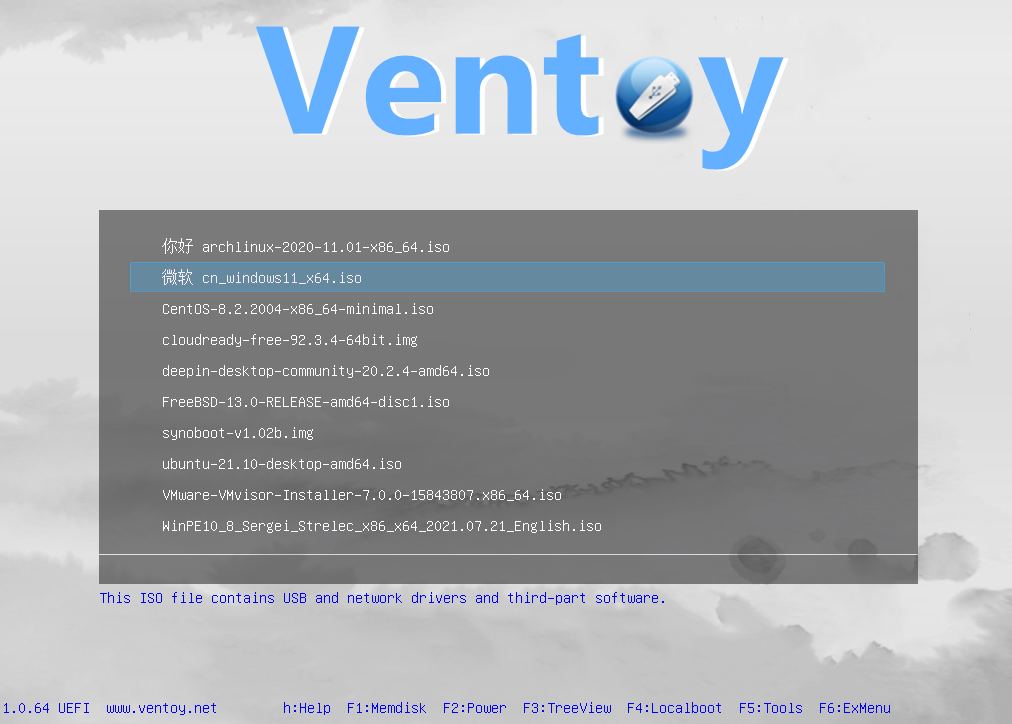
With Ventoy, you don't need to format the disk over and over, just copy the image files to the USB drive and boot them. You can copy many image files at a time and Ventoy will give you a boot menu to select them.
You can also browse ISO/WIM/IMG/VHD(x)/EFI files in local disk and boot them.
x86 Legacy BIOS, IA32 UEFI, x86_64 UEFI, ARM64 UEFI and MIPS64EL UEFI are supported in the same way.
Both MBR and GPT partition style are supported in the same way.
Most type of OS supported(Windows/WinPE/Linux/Unix/ChromeOS/Vmware/Xen...)
1300+ ISO files are tested (List). 90%+ distros in distrowatch.com supported (Details).

Official Website: https://www.ventoy.net

Tested OS

Windows
Windows 7, Windows 8, Windows 8.1, Windows 10, Windows 11, Windows Server 2012, Windows Server 2012 R2, Windows Server 2016, Windows Server 2019, Windows Server 2022, Windows Server 2025, WinPE

Linux
Debian, Ubuntu, CentOS(6/7/8/9/10), RHEL(6/7/8/9/10), Deepin, Fedora, Rocky Linux, AlmaLinux, EuroLinux(6/7/8/9), openEuler, OpenAnolis, SLES, openSUSE, MX Linux, Manjaro, Linux Mint, Endless OS, Elementary OS, Solus, Linx, Zorin, antiX, PClinuxOS, Arch, ArcoLinux, ArchLabs, BlackArch, Obarun, Artix Linux, Puppy Linux, Tails, Slax, Kali, Mageia, Slackware, Q4OS, Archman, Gentoo, Pentoo, NixOS, Kylin, openKylin, Ubuntu Kylin, KylinSec, Lubuntu, Xubuntu, Kubuntu, Ubuntu MATE, Ubuntu Budgie, Ubuntu Studio, Bluestar, OpenMandriva, ExTiX, Netrunner, ALT Linux, Nitrux, Peppermint, KDE neon, Linux Lite, Parrot OS, Qubes, Pop OS, ROSA, Void Linux, Star Linux, EndeavourOS, MakuluLinux, Voyager, Feren, ArchBang, LXLE, Knoppix, Calculate Linux, Clear Linux, Pure OS, Oracle Linux, Trident, Septor, Porteus, Devuan, GoboLinux, 4MLinux, Simplicity Linux, Zeroshell, Android-x86, netboot.xyz, Slitaz, SuperGrub2Disk, Proxmox VE, Kaspersky Rescue, SystemRescueCD, MemTest86, MemTest86+, MiniTool Partition Wizard, Parted Magic, veket, Sabayon, Scientific, alpine, ClearOS, CloneZilla, Berry Linux, Trisquel, Ataraxia Linux, Minimal Linux Live, BackBox Linux, Emmabuntüs, ESET SysRescue Live,Nova Linux, AV Linux, RoboLinux, NuTyX, IPFire, SELKS, ZStack, Enso Linux, Security Onion, Network Security Toolkit, Absolute Linux, TinyCore, Springdale Linux, Frost Linux, Shark Linux, LinuxFX, Snail Linux, Astra Linux, Namib Linux, Resilient Linux, Virage Linux, Blackweb Security OS, R-DriveImage, O-O.DiskImage, Macrium, ToOpPy LINUX, GNU Guix, YunoHost, foxclone, siduction, Adelie Linux, Elive, Pardus, CDlinux, AcademiX, Austrumi, Zenwalk, Anarchy, DuZeru, BigLinux, OpenMediaVault, Ubuntu DP, Exe GNU/Linux, 3CX Phone System, KANOTIX, Grml, Karoshi, PrimTux, ArchStrike, CAELinux, Cucumber, Fatdog, ForLEx, Hanthana, Kwort, MiniNo, Redcore, Runtu, Asianux, Clu Linux Live, Uruk, OB2D, BlueOnyx, Finnix, HamoniKR, Parabola, LinHES, LinuxConsole, BEE free, Untangle, Pearl, Thinstation, TurnKey, tuxtrans, Neptune, HefftorLinux, GeckoLinux, Mabox Linux, Zentyal, Maui, Reborn OS, SereneLinux , SkyWave Linux, Kaisen Linux, Regata OS, TROM-Jaro, DRBL Linux, Chalet OS, Chapeau, Desa OS, BlankOn, OpenMamba, Frugalware, Kibojoe Linux, Revenge OS, Tsurugi Linux, Drauger OS, Hash Linux, gNewSense, Ikki Boot, SteamOS, Hyperbola, VyOS, EasyNAS, SuperGamer, Live Raizo, Swift Linux, RebeccaBlackOS, Daphile, CRUX, Univention, Ufficio Zero, Rescuezilla, Phoenix OS, Garuda Linux, Mll, NethServer, OSGeoLive, Easy OS, Volumio, FreedomBox, paldo, UBOS, Recalbox, batocera, Lakka, LibreELEC, Pardus Topluluk, Pinguy, KolibriOS, Elastix, Arya, Omoikane, Omarine, Endian Firewall, Hamara, Rocks Cluster, MorpheusArch, Redo, Slackel, SME Server, APODIO, Smoothwall, Dragora, Linspire, Secure-K OS, Peach OSI, Photon, Plamo, SuperX, Bicom, Ploplinux, HP SPP, LliureX, Freespire, DietPi, BOSS, Webconverger, Lunar, TENS, Source Mage, RancherOS, T2, Vine, Pisi, blackPanther, mAid, Acronis, Active.Boot, AOMEI, Boot.Repair, CAINE, DaRT, EasyUEFI, R-Drive, PrimeOS, Avira Rescue System, bitdefender, Checkra1n Linux, Lenovo Diagnostics, Clover, Bliss-OS, Lenovo BIOS Update, Arcabit Rescue Disk, MiyoLinux, TeLOS, Kerio Control, RED OS, OpenWrt, MocaccinoOS, EasyStartup, Pyabr, Refracta, Eset SysRescue, Linpack Xtreme, Archcraft, NHVBOOT, pearOS, SeaTools, Easy Recovery Essentional, iKuai, StorageCraft SCRE, ZFSBootMenu, TROMjaro, BunsenLabs, Todo en Uno, ChallengerOS, Nobara, Holo, CachyOS, Peux OS, Vanilla OS, ShredOS, paladin, Palen1x, dban, ReviOS, HelenOS, XeroLinux, Tiny 11, chimera linux, CuteFish, DragonOs, Rhino Linux, vanilladpup, crystal, IGELOS, MiniOS, gnoppix, PikaOS, UwUntu, Noble, PocketHandyBox, DiskGenius, Commodore, Talos, Shebang Linux, hrmpf, Bazzite, ManualLinux, nyarchlinux, ultramarine, TempleOS, bluefin, Damn Small Linux, Kicksecure, SerentiyOS, AerynOS, ......

Unix
DragonFly, FreeBSD, pfSense, OPNsense, GhostBSD, FreeNAS, TrueNAS, XigmaNAS, FuryBSD, HardenedBSD, MidnightBSD, ClonOS, EmergencyBootKit, helloSystem

ChromeOS
FydeOS, CloudReady, ChromeOS Flex, ThoriumOS

Other
VMware ESXi, Citrix XenServer, Xen XCP-ng

Tested Image Report

【How to report a successfully tested image file】

Ventoy Browser

With Ventoy, you can also browse ISO/WIM/IMG/VHD(x)/EFI files in local disk and boot them. Notes

VentoyPlugson

A GUI Ventoy plugin configurator. VentoyPlugson

Features

avatar

Installation Instructions

See https://www.ventoy.net/en/doc_start.html for detailed instructions.

Compile Instructions

Please refer to BuildVentoyFromSource.txt

Document

Title Link
Install & Update https://www.ventoy.net/en/doc_start.html
Browse/Boot Files In Local Disk https://www.ventoy.net/en/doc_browser.html
Secure Boot https://www.ventoy.net/en/doc_secure.html
Customize Theme https://www.ventoy.net/en/plugin_theme.html
Global Control https://www.ventoy.net/en/plugin_control.html
Image List https://www.ventoy.net/en/plugin_imagelist.html
Auto Installation https://www.ventoy.net/en/plugin_autoinstall.html
Injection Plugin https://www.ventoy.net/en/plugin_injection.html
Persistence Support https://www.ventoy.net/en/plugin_persistence.html
Boot WIM file https://www.ventoy.net/en/plugin_wimboot.html
Windows VHD Boot https://www.ventoy.net/en/plugin_vhdboot.html
Linux vDisk Boot https://www.ventoy.net/en/plugin_vtoyboot.html
DUD Plugin https://www.ventoy.net/en/plugin_dud.html
Password Plugin https://www.ventoy.net/en/plugin_password.html
Conf Replace Plugin https://www.ventoy.net/en/plugin_bootconf_replace.html
Menu Class https://www.ventoy.net/en/plugin_menuclass.html
Menu Alias https://www.ventoy.net/en/plugin_menualias.html
Menu Extension https://www.ventoy.net/en/plugin_grubmenu.html
Memdisk Mode https://www.ventoy.net/en/doc_memdisk.html
TreeView Mode https://www.ventoy.net/en/doc_treeview.html
Disk Layout MBR https://www.ventoy.net/en/doc_disk_layout.html
Disk Layout GPT https://www.ventoy.net/en/doc_disk_layout_gpt.html
Search Configuration https://www.ventoy.net/en/doc_search_path.html

FAQ

See https://www.ventoy.net/en/faq.html for detail

Forum

https://forums.ventoy.net

Donation

It would be much appreciated if you want to make a small donation to support my work!
Alipay, WeChat Pay, PayPal and Bitcoin are available for donation. You can choose any of them.

Alipay WeChat Pay

PayPal
You can transfer to my paypal account [email protected] or just click https://www.paypal.me/ventoy

Bitcoin
Bitcoin Address 19mZDWzZgzkHCi9YX9H3fYCUuCHq3W6wfT

Ventoy (ventoy/Ventoy)

c
Searching Database…

80.1K ·GitHub
What is this?Ventoy is an open source tool that creates a bootable USB drive which can boot directly from ISO/WIM/IMG/VHD(x)/EFI files without extracting or reformatting them.
Is this a one-time formatting tool or something I run every time I add an OS?You install Ventoy on the USB drive once, then just copy image files onto it afterward; no reformatting or reinstalling Ventoy is needed for new ISOs.
How do I get it running?Download the Ventoy release, install it onto your USB/local disk/SSD/SD card, then simply copy your ISO/WIM/IMG/VHD(x)/EFI files onto the drive and boot from it.
Do I need any extra software to make multiple images bootable at once?No, Ventoy itself handles everything; you just drop image files on the drive and it shows a boot menu to pick one, with an optional GUI plugin configurator (VentoyPlugson) for advanced tweaks.
Does every ISO actually boot and install correctly?Most OSes work, with 1300+ ISOs tested, but it's not guaranteed for every single distro and some features (like persistence or auto-install) only apply to certain OS types.
Does it support both old BIOS machines and modern UEFI/Secure Boot systems?Yes, it works across x86 Legacy BIOS, IA32 UEFI, x86_64 UEFI, ARM64 and MIPS64EL UEFI, with both MBR and GPT partition styles, and supports Secure Boot.
Can I still use the USB drive for normal file storage?Yes, Ventoy preserves normal USB usage; the drive still works as regular storage alongside the bootable images.
Can I keep changes when booting a Linux live system?Yes, Ventoy supports Linux persistence so you can save changes across reboots on supported distros.
Can Ventoy also automate OS installation instead of just booting the ISO?Yes, it supports auto-installation scripts with variable expansion for both Windows and Linux images, not just booting into the live/installer menu.
Will upgrading Ventoy wipe my existing ISOs and data on the USB drive?No, data is preserved across version upgrades, and you typically don't need to update Ventoy when a new Linux distro is released.
Which topics is it in?iso, persistence, uefi, legacy, x86-64, usb, x86, arm64, unix, sysadmin, bsd, c
Creator
ventoy
Size
221.7 MB
Stars
80.1K
Age
6y
Commits · 90 Days