








Что это такое?
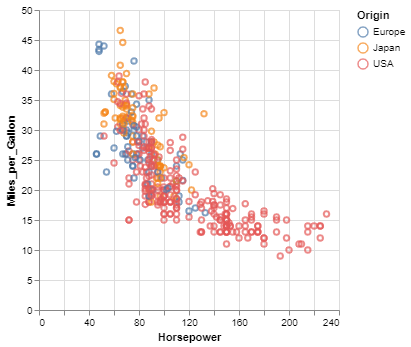
 Vega-Altair — это библиотека для Python, предназначенная для статистической визуализации данных. Она позволяет строить графики, описывая связи между данными и их визуальным отображением, а не отдавая команды на рисование.
Vega-Altair — это библиотека для Python, предназначенная для статистической визуализации данных. Она позволяет строить графики, описывая связи между данными и их визуальным отображением, а не отдавая команды на рисование.Это библиотека для построения графиков или полноценное приложение?Это библиотека на Python, которая оборачивает спецификацию Vega-Lite в формате JSON в API на Python с проверкой типов. Графики выводятся прямо в документе, а не в отдельном самостоятельном приложении.
Это библиотека на Python, которая оборачивает спецификацию Vega-Lite в формате JSON в API на Python с проверкой типов. Графики выводятся прямо в документе, а не в отдельном самостоятельном приложении.Как установить библиотеку и построить первый график?Установите библиотеку через pip или conda, затем импортируйте altair, передайте DataFrame в объект Chart и задайте сопоставления через encode, чтобы вывести график в Jupyter или VS Code.
Установите библиотеку через pip или conda, затем импортируйте altair, передайте DataFrame в объект Chart и задайте сопоставления через encode, чтобы вывести график в Jupyter или VS Code.Обязательно ли мне нужен Jupyter?Строго говоря, нет, но библиотека рассчитана на то, чтобы показывать графики прямо в JupyterLab, Jupyter Notebook и VS Code. Также она может экспортировать графики в отдельные HTML-файлы или статичные изображения.
Строго говоря, нет, но библиотека рассчитана на то, чтобы показывать графики прямо в JupyterLab, Jupyter Notebook и VS Code. Также она может экспортировать графики в отдельные HTML-файлы или статичные изображения.Сама библиотека рисует графики или передаёт отрисовку другому движку?Отрисовку выполняет движок Vega-Lite JS, поэтому сам график рисуется через базовую спецификацию, а не напрямую кодом Altair на Python.
Отрисовку выполняет движок Vega-Lite JS, поэтому сам график рисуется через базовую спецификацию, а не напрямую кодом Altair на Python.Можно ли экспортировать графики в другие форматы?Да, визуализации можно экспортировать в изображения PNG и SVG, в отдельные HTML-страницы, в Online Vega-Lite Editor или сохранять как JSON-файлы.
Да, визуализации можно экспортировать в изображения PNG и SVG, в отдельные HTML-страницы, в Online Vega-Lite Editor или сохранять как JSON-файлы.Поддерживаются ли интерактивные графики, например связанные выборки?Да, Altair наследует декларативную грамматику взаимодействий Vega-Lite, поэтому можно построить, например, гистограмму, которая фильтруется по выделению на точечной диаграмме, внеся лишь небольшие изменения в статичный график.
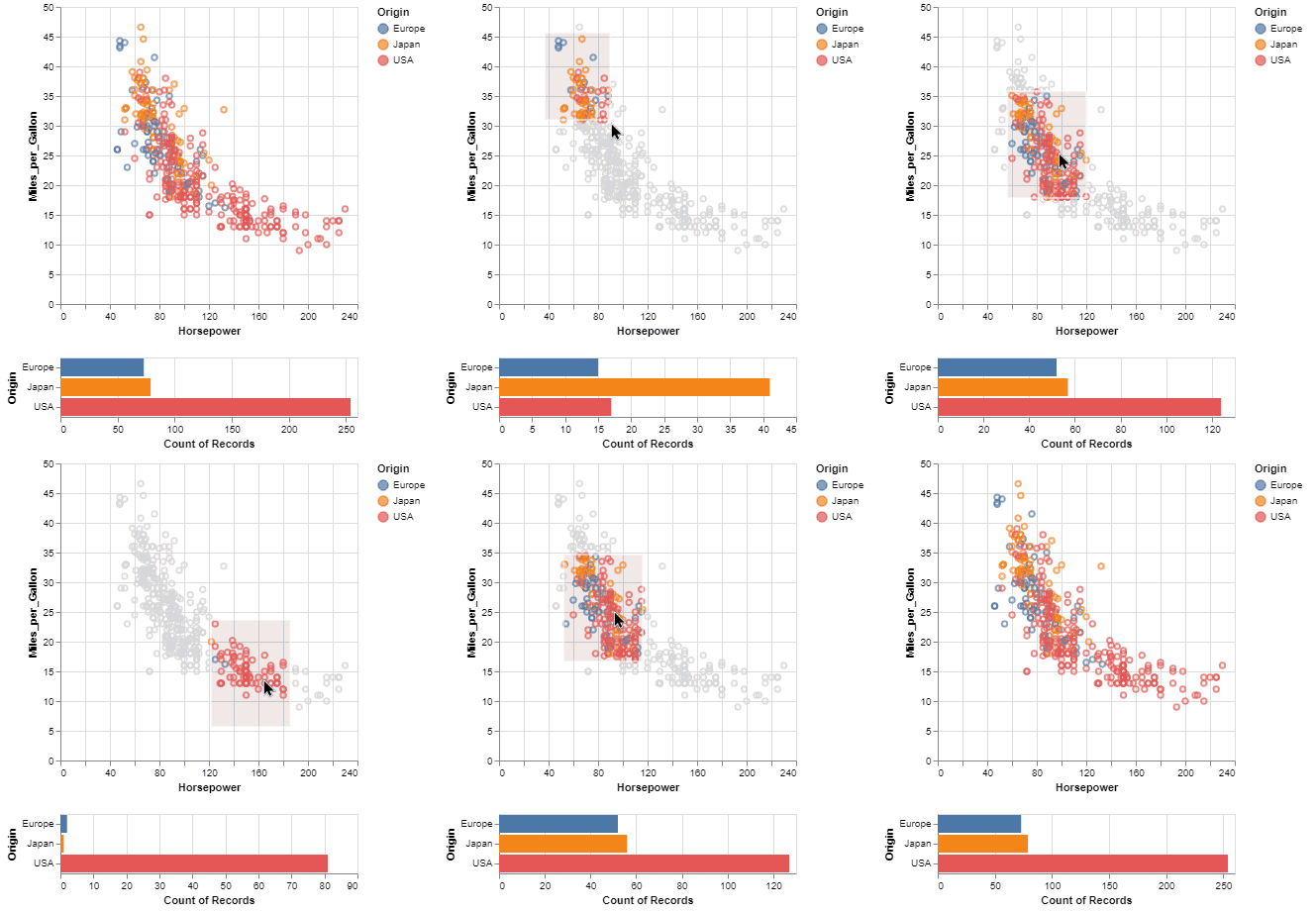
Да, Altair наследует декларативную грамматику взаимодействий Vega-Lite, поэтому можно построить, например, гистограмму, которая фильтруется по выделению на точечной диаграмме, внеся лишь небольшие изменения в статичный график.What are similar projects?matplotlib, plotly.py, bokeh, fg-data-profiling, DeepAnalyze, notebook, prettymaps, pygwalker
matplotlib, plotly.py, bokeh, fg-data-profiling, DeepAnalyze, notebook, prettymaps, pygwalkerWhich topics is it in?charting-library, data, jupyter, jupyter-notebook, data-analysis, academic, visualization, data-visualization, data-science, json, bsd, dashboard
charting-library, data, jupyter, jupyter-notebook, data-analysis, academic, visualization, data-visualization, data-science, json, bsd, dashboard