Do not spend any money on a bankrbot SWARM token.
SwarmForge
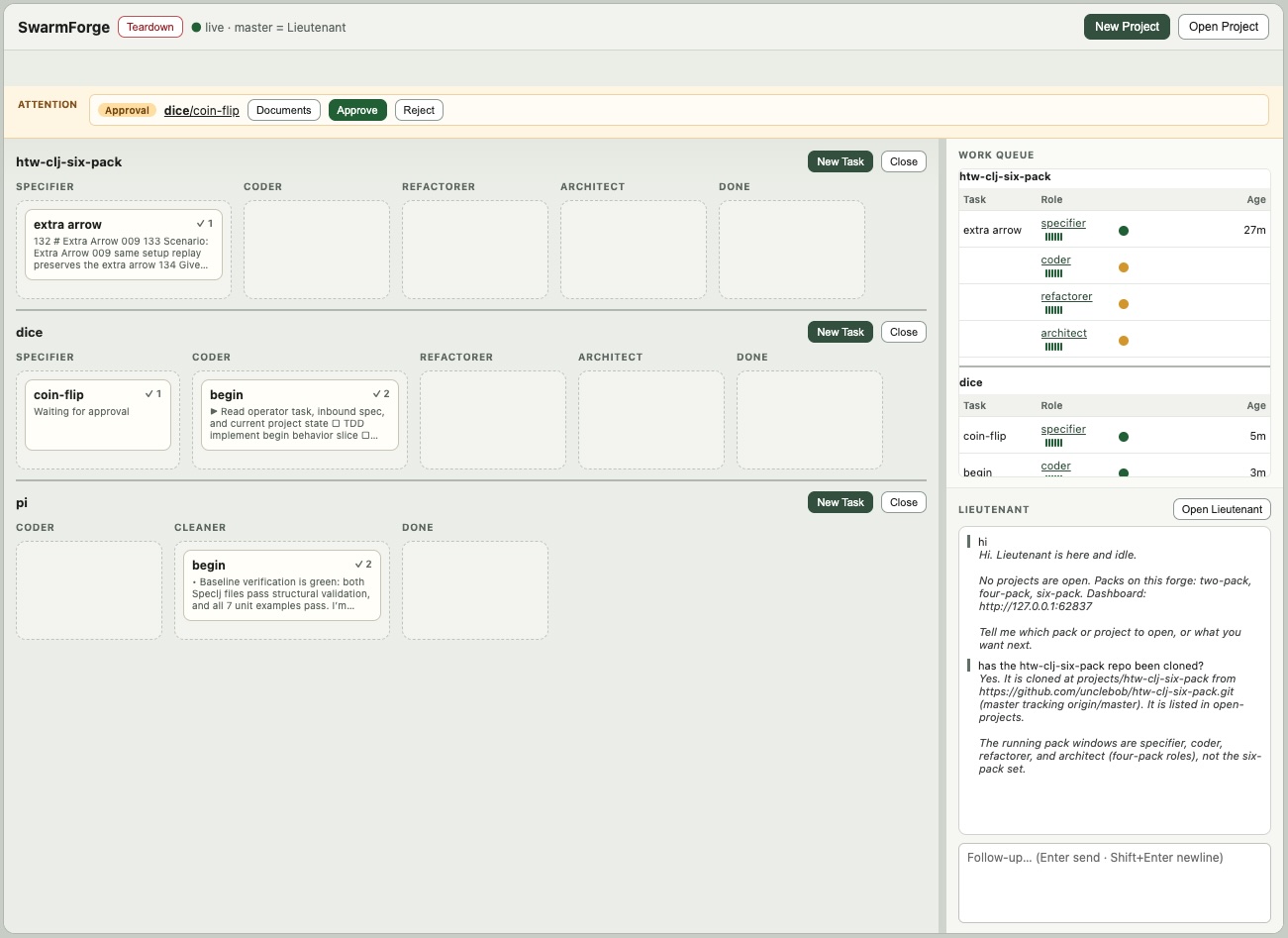
SwarmForge coordinates AI agents in isolated git worktrees and tmux sessions.
Agents exchange committed work through durable handoffs, while the operator
uses a local dashboard to start work, inspect agents, handle approval gates,
answer clarifications, and stop the swarm.
This repository's master branch is named main. It is the landing page,
installer source, shared runtime, and shared engineering law. It is not itself
a runnable SwarmForge product.
Products
| Command |
Branch |
Shape |
get-swarm-forge two-pack |
two-pack |
Pack installed into the current project: coder → cleaner. |
get-swarm-forge four-pack |
four-pack |
Pack installed into the current project: specifier → coder → refactorer → architect. |
get-swarm-forge six-pack |
six-pack |
Pack installed into the current project: six separate specification, implementation, cleanup, architecture, hardening, and QA roles. |
get-swarm-forge project-manager |
project-manager |
Multi-project forge with selectable two-, four-, and six-pack templates and a host lieutenant. |
get-swarm-forge lieutenant |
lieutenant |
Multi-project forge with one configurable project template and a planning lieutenant. |
A pack is composed into an existing project. Running ./swarm starts that
project's configured roles.
A forge is installed into an empty host directory. Running ./swarm starts
the forge dashboard and host lieutenant; project swarms start when the operator
creates or opens projects beneath projects/.
The squad, sprint-module-squad, and adversaries branches are separate
experimental workflows. They are not get-swarm-forge products.
Prerequisites
zshgittmux- Babashka (
bb)
- At least one configured agent backend:
grok, codex, claude, or
copilot
Install the helper
Put get-swarm-forge somewhere on PATH:
mkdir -p ~/cmds
curl -L -o ~/cmds/get-swarm-forge \
  https://raw.githubusercontent.com/unclebob/swarm-forge/main/get-swarm-forge
chmod +x ~/cmds/get-swarm-forge
Add ~/cmds to PATH, then recopy the helper when it changes. The helper is
the supported entry point because it composes files from more than one branch.
Composition
For a pack install, the helper downloads two branches:
main
  swarmforge/scripts/                    shared runtime and dashboard
  swarmforge/constitution/articles/      shared engineering, workflow, handoffs

<pack branch>
  swarm                                  launcher
  swarmforge/swarmforge.conf             roles, agents, and worktrees
  swarmforge/constitution.prompt         constitution entry point
  swarmforge/constitution/articles/      pack-local additions
  swarmforge/roles/                       role ownership
The result is written into the current project. Shared article names
engineering.prompt, workflow.prompt, and handoffs.prompt always come from
main; a pack specializes them with project.prompt and local-*.prompt
files.
For a forge install, the named forge branch supplies the host runtime,
lieutenant, and dashboard. project-manager also downloads the three pack
branches into packs/; lieutenant carries its one template under
.swarmforge/project-pack/.
Configuration contract
Every running project has a swarmforge/swarmforge.conf. For the fixed packs,
each non-comment line has this shape:
window[-invisible] <role> <backend> <worktree> [task|batch] [forward-only|back-one|back-all] [backend arguments...]
- File order is the default forward pipeline. Exactly one role must use the
master worktree; that sentinel means the project's main checkout on its
current branch. Other names become .worktrees/<name> checkouts.
window opens a terminal surface; window-invisible runs only in tmux and
is opened from the dashboard when needed.- Receive mode defaults to
task. batch lets a role accept a compatible
group of queued handoffs together.
- Propagation defaults to
forward-only. back-one and back-all arrange
merge-only copies for earlier roles after downstream work.
- Supported backends are
codex, grok, claude, and copilot; remaining
tokens are passed to that backend.
Forge hosts instead use Lieutenant <backend> [backend arguments...].
Branches may extend the grammar for their own control plane—for example,
lieutenant adds typed card routes and the squad branches add
swarmforge/squad.conf. The selected branch README and its parser are the
authority for those extensions.
Constitution and role prompts
The installer composes instructions as data; it does not bake every product's
rules into the launcher. A normal pack agent is started with instructions to
read swarmforge/constitution.prompt, recursively read what it names, and then
read swarmforge/roles/<role>.prompt.
The three article names owned by main are:
| Article |
Shared responsibility |
engineering.prompt |
Language defaults, testability, acceptance-pipeline tooling, verification, and quality-tool guardrails. |
workflow.prompt |
Worktree discipline, commit attribution, temporary files, and failure conditions. |
handoffs.prompt |
The structured send, receive, merge, retry, and completion protocol. |
A product branch contributes its constitution entry point and any differently
named local articles, such as project.prompt, local-engineering.prompt, or
local-workflow.prompt. The composer reserves the three shared names above for
main, so a pack cannot silently replace common law. The product's README
describes what its local articles add without repeating these shared rules.
Role prompts divide ownership inside that law: what a role may change, what it
must verify, what it must leave to another role, and where its next handoff
goes. There must be a matching prompt for every configured role. A forge
lieutenant is the exception: the shared
lieutenant.prompt explicitly keeps it
outside the project engineering constitution.
Use a product
Install a pack in an existing software repository:
get-swarm-forge six-pack
./swarm
Or install a forge in an empty directory:
get-swarm-forge lieutenant
./swarm
The selected product's README describes its routes, roles, worktrees, project
lifecycle, and dashboard behavior. The branch configuration—not this README—is
the authority for current backend assignments and topology.
What main owns
get-swarm-forge                         product composer
swarmforge/scripts/                    launcher, dashboard, board, handoffs
swarmforge/constitution/articles/      shared agent rules
swarmforge/handoff-protocol.md         durable handoff protocol
test/                                  shared runtime tests
Changes to shared launch, dashboard, terminal, worktree, board, or handoff
behavior belong on main first. Pack branches own only their configuration,
local constitution additions, role prompts, and launcher. Forge branches carry
the common files needed for standalone installation and should be refreshed
from main when those files change.
Do not pin prompt prose with automated tests. Test observable runtime behavior
instead.
Runtime components and generated state
The shared runtime is divided by responsibility:
| Component |
Responsibility |
swarmforge.sh / swarmforge.bb |
Parse configuration, create worktrees and tmux sessions, synchronize managed files, and launch agents. |
swarm_handoff.*, ready_for_next.*, done_with_current.* |
Create, accept, merge, audit, and complete durable work items. |
handoffd.* |
Deliver queued handoffs and notify receiving sessions. |
pack_board.*, pack_web.*, pack/dashboard.html |
Persist and present cards, approvals, clarifications, agent panes, and controls. |
forge.* |
Create, open, refresh, and stop projects inside a forge product. |
| Terminal adapters, watchdog, and cleanup scripts |
Expose panes, monitor sessions, and shut the swarm down cleanly. |
At startup the composed runtime validates the configuration, initializes git
when necessary, creates role worktrees, mirrors the managed SwarmForge files
into them, creates isolated tmux sessions, starts the handoff daemon and local
dashboard, and launches each configured agent backend.
master in a role configuration means the project's main checkout on its
current branch; it is a worktree sentinel, not a required git branch name.
Generated transport and process state lives under .swarmforge/; generated
role checkouts live under .worktrees/. .swarmforge/ contains such runtime
records as role/session maps, the tmux socket, handoff inboxes and outboxes,
board data, approvals, clarifications, daemon state, and dashboard state. It is
not product source and agents must not edit it as a substitute for the helper
commands.
Agents send committed work with swarm_handoff.sh, accept it with
ready_for_next.sh, and finish the current item with done_with_current.sh.
See the handoff protocol for message format,
auditing, delivery, retry, merge, and lifecycle details.
The simple-windows tag marks the last main snapshot before the dashboard
cockpit. It is historical and is not a get-swarm-forge product.

 SwarmForge 协调多个 AI 编程代理,它们在隔离的 git worktree 和 tmux 会话中工作,通过持久的“交接”(handoff)交换已完成的工作,操作者则通过本地仪表盘来批准、澄清和停止集群。