

cleanyourtv-app README

README проекта с github.com/udhaykumarbala/cleanyourtv-app. Одним файлом markdown: README.md.

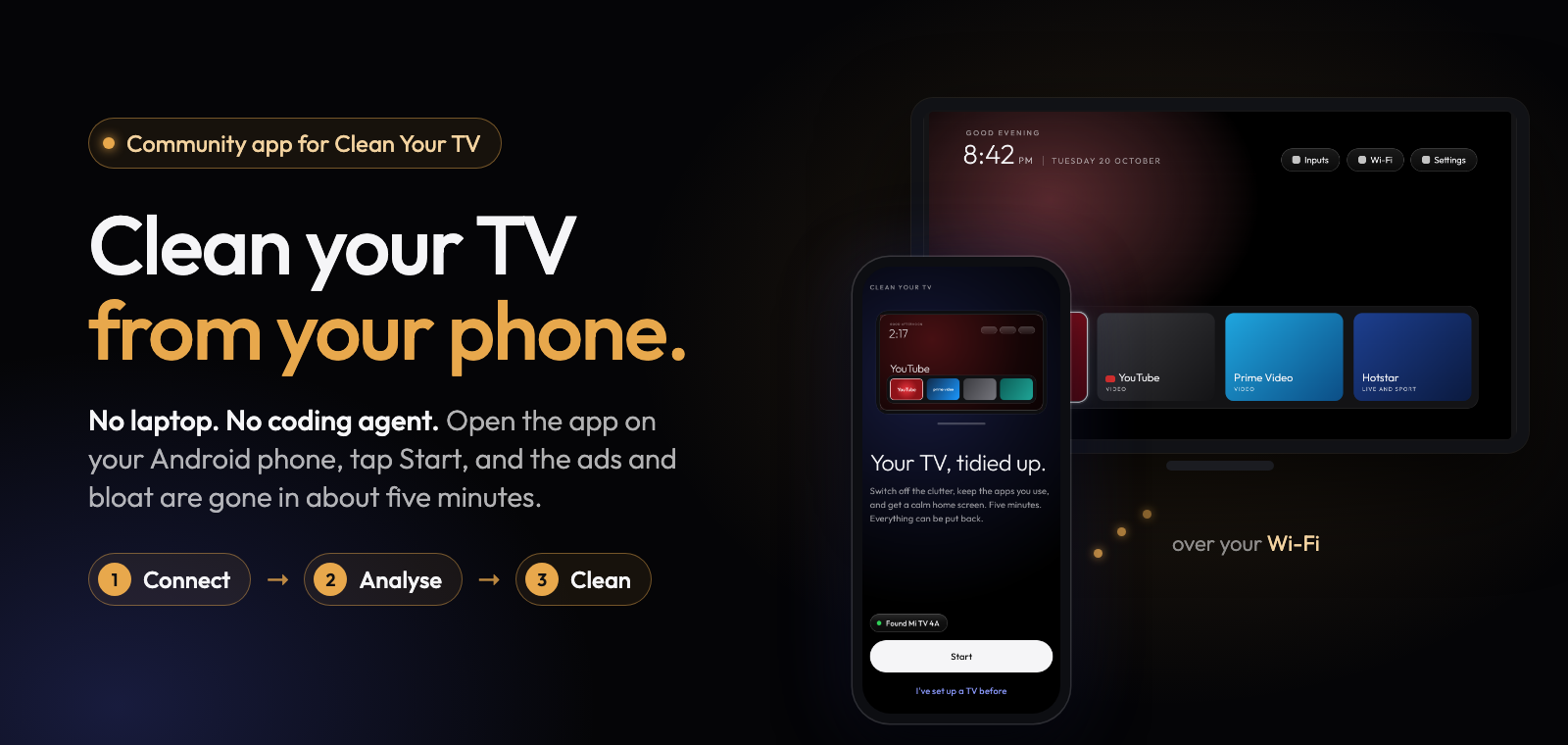
Community app for Clean Your TV. Clean your TV from your phone. No laptop. No coding agent. Open the app on your Android phone, tap Start, and the ads and bloat are gone in about five minutes. Three steps: connect, analyse, clean.

Download the latest APK 173 TV lists from 47 brands Android 9 or newer MIT licence

A community-built phone app for Clean Your TV.
Anyone can clean up their TV: no laptop, no coding agent, no cables.

Download · Get it with Obtainium · How it works · Is it safe? · Supported TVs
Obtainium follows this app's GitHub releases and updates it by itself.

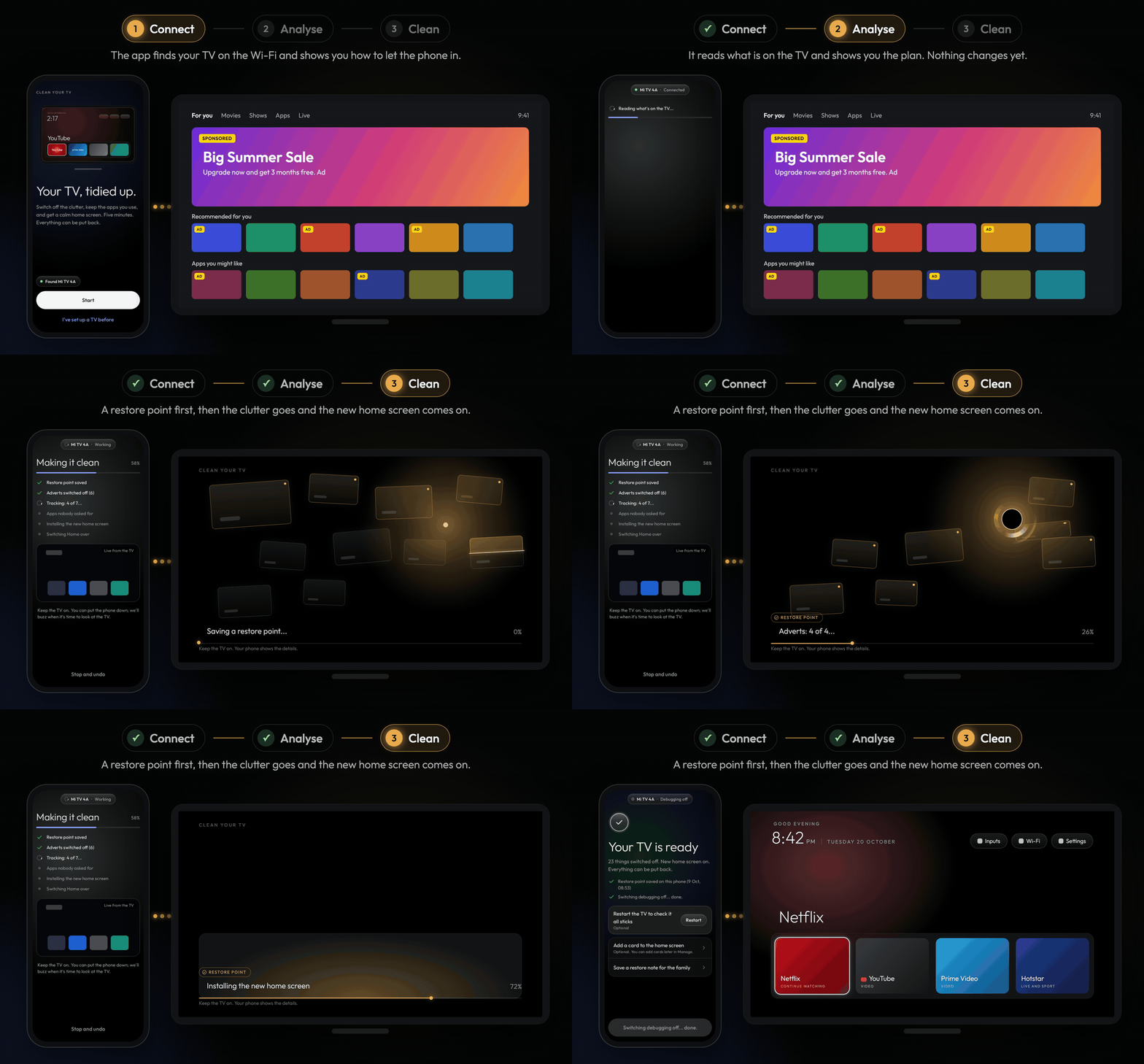
Three steps, phone and TV side by side. 1 Connect: the app finds the TV and the TV asks to allow the phone. 2 Analyse: the phone reads the TV and shows 22 things to switch off while the TV is untouched. 3 Clean: the phone shows Making it clean while the TV shows a lantern scanning the old cards and drawing them into a soft black hole, and the TV ends on its new home screen.

How it works

1. Connect 2. Analyse 3. Clean
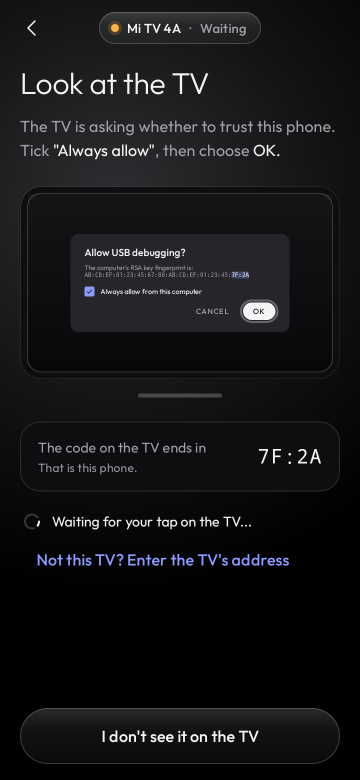
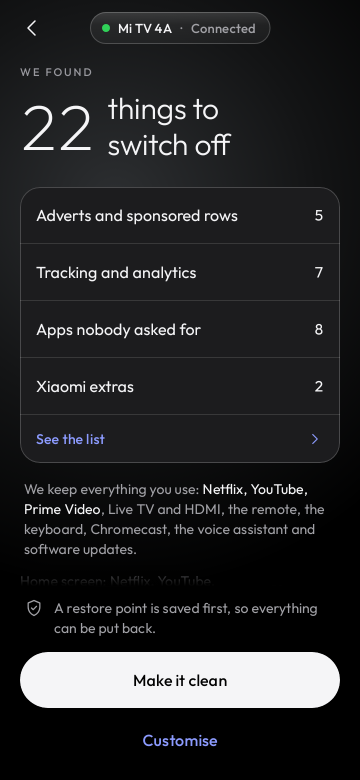
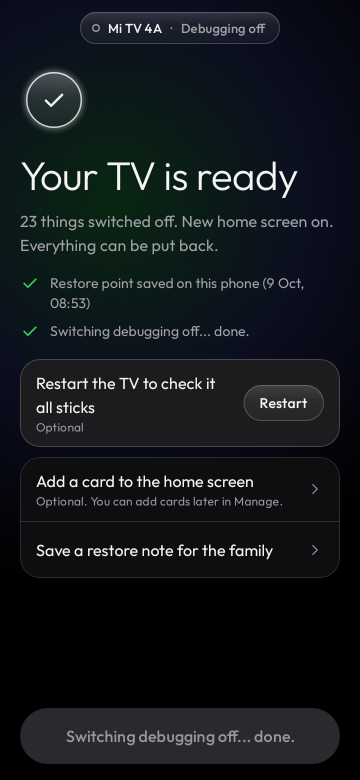
Look at the TV: the TV asks whether to trust this phone; tick Always allow, then choose OK We found 22 things to switch off, grouped into adverts, tracking, apps nobody asked for and brand extras, with everything it keeps listed below Your TV is ready: 23 things switched off, new home screen on, everything can be put back
The app finds your TV on the Wi-Fi and shows you how to let the phone in with the remote. It reads what is on the TV and shows the plan: what goes off and what stays. Nothing changes yet. Tap "Make it clean". A restore point first, then the clutter goes and the new home screen comes on.

You need an Android phone (Android 9 or newer, with a screen lock) on the same Wi-Fi as the TV. Download the APK and open it to install. Connecting takes about a minute (you switch on network debugging with the remote; the app shows you how), and the whole clean-up about five minutes.

Come back any time to put an app back, check for leftovers after a TV update, change the dock or the look, or undo everything.

What your TV gets

Not every TV gets the new home screen yet. The app says which of these your TV gets before it changes anything, on the "What we found" screen, and why.

Which TVs What the app does
New home screen and clean-up TVs where testers confirmed the switch holds after a restart: most Xiaomi and Redmi sets on Android 9 to 11 and the Xiaomi MiTV-MZTU1 and MiTV-MOEU1 on Android 14; OnePlus on Android 11, Sony on Android 8, Hisense on Android 9, Homatics, MECOOL and the Strong LEAP-S1 on Android 14, the Toshiba Smart TV (hamamatsucho) on Android 11, the MI MiProjM05 projector on Android 9 (with Google's Android TV home); and the TCL, Sony, Hisense, Philips and other models whose list says so Switches off the clutter and puts the Clean Your TV home screen in charge, with a restore point first
Clean-up only, for now Most Google TV sets (their setup wizard holds the Wi-Fi, or the TV has no list yet), TVs the app has not met before, and Google's own Chromecast and TV Streamer (the switch would cost casting) Switches off adverts, tracking and background apps. The TV keeps its own home screen, so it looks the same; the adverts drawn by that home screen stay with it
Not possible Fire TV, TCL's China builds, Android 7 and older Clean-up only, and the app says so up front

The TV list says what each model gets today, which ones are in the test build, and which are coming soon. A TV with no list of its own moves up when its owners send its report from the app ("Help add this TV").

Two ways to clean your TV

Clean Your TV gives any Android TV a calm, ad-free home screen and switches off the bloat, using lists tested by its community. On its own it needs a computer: you run its scripts, or hand its prompt to a coding agent. This app does the whole job from your phone.

Clean Your TV repo Clean Your TV app (this repo)
You need A computer with ADB, or a coding agent such as Claude Code Just an Android phone on the same Wi-Fi as the TV
You do Run the scripts, or give the prompt to the agent Tap Start, check the plan, tap "Make it clean"
Made for Tinkerers, themes and new TV lists Everyone: you, your parents, your friends

Both give you the same Clean Your TV home screen and the same community TV lists, switch apps off without uninstalling them, and keep a way back for every change.

Safe by design

Supported TVs

173 TV lists from 47 brands, from the Clean Your TV community lists: TCL, Sony, Xiaomi, Hisense, Philips, Amazon Fire TV, Panasonic, XGIMI, BenQ, NVIDIA Shield, onn, Google and many more, on Android TV, Google TV and Fire OS. A model nobody has listed yet still gets a careful clean-up based on its brand.

The details
  • Profiles: TCL (26 lists), Sony (22), Xiaomi (29), Hisense, Philips, Amazon Fire TV, Panasonic, XGIMI, BenQ, NVIDIA Shield, Skyworth, Haier, CHiQ, onn, Google, Vestel-made sets (JVC, Toshiba, Cecotec), the Freebox Player and more, on Android TV, Google TV, Fire OS and TCL's China builds. Each profile names who tested it.
  • Brand fallback: for Amazon, Hisense, Panasonic, Philips, Sony, TCL, XGIMI and Xiaomi models without a profile, the app switches off only what every profile of that brand agrees on, and says it is being careful. More can be switched off by hand under Customise.
  • Other Android TVs get the clean-up the app is sure about, and keep their own home screen until a list for them says the switch holds (see "What your TV gets" above and the TV list).
  • Clean-up only (the TV keeps its own home screen, and the app says why): Fire TV, TCL's China builds, Android 7, vendor home screens the app does not know, Chromecast with Google TV and the Google TV Streamer (the switch would cost casting), the Kalley and PRISM+ sets whose setup wizard returns at every boot, and TVs whose setup wizard has to stay on.
  • Network debugging: the TV needs ADB over the network (port 5555). On TVs that only offer Wireless debugging with a pairing code, pair once from a computer; the app shows the three commands.

Your TV is not listed? TV lists live in Clean Your TV, so they help everyone, with or without the app. Add yours there by following its contributing guide, and the app picks it up in its next release. See also CONTRIBUTING.md.

Built on Clean Your TV

Privacy in detail
  • No accounts, no analytics, no advertising, no crash reporting service.
  • On your home network the app talks only to the TV you pick (ADB on port 5555) and listens for TVs announcing themselves (mDNS).
  • On the internet it talks only to GitHub, and only when you ask: "Check for updates" makes one request for the latest release, and an optional add-on downloads from its GitHub release. The launcher and the TV progress screen are inside the APK, so a normal setup makes no internet request at all.
  • The key the TV trusts lives in the phone's Android Keystore and never leaves the phone. Restore points stay on the phone unless you save a copy yourself.
  • "Report a problem" and "Help add this TV" show the whole report first, remove addresses, serial numbers, keys and codes, and send nothing themselves: you share it or post it on GitHub.
  • Permissions: internet, network state, Wi-Fi multicast (to find the TV), a foreground service while it works on the TV, notifications and the screen lock prompt. No location, storage, camera or contacts.
  • The full policy: PRIVACY.md, published at cleanyour.tv/app/android/privacy.
Check the download

Every release is signed by the same key, whose certificate SHA-256 is (also in docs/release-signer.sha256):

eaf7af3867bb29ff4bb038854842c93f42ffe4198a087e611cb18f925201cd65
sha256sum cleanyourtv-0.2.0.apk                 # compare with the release notes
apksigner verify --print-certs cleanyourtv-0.2.0.apk

Android refuses an update signed by any other key, so after the first install every update is checked for you. The build is reproducible: for every release tag CI builds the unsigned APK from the public source, and scripts/verify-release.sh checks that the published APK is exactly that build plus a signature.

For developers

git clone --recurse-submodules https://github.com/udhaykumarbala/cleanyourtv-app.git
cd cleanyourtv-app
./gradlew check assembleDebug        # JDK 21 and the Android SDK

A Kotlin and Jetpack Compose app that speaks ADB to the TV itself, with no computer in between. CONTRIBUTING.md covers tests, screenshot goldens, the module rules and how releases are built and signed. How the app was designed and reviewed is in docs/history, and what changed in each version in CHANGELOG.md.

The app is developed with AI coding agents under human review: the maintainer set the design and reviewed and tested the app, and every change went through automated tests and review.

Credits

Full list: THIRD-PARTY-NOTICES. Licence: MIT, like Clean Your TV.

If the app saved you an evening, you can buy me a coffee.

cleanyourtv-app (udhaykumarbala/cleanyourtv-app)

Ищем в базе…

Что это такое?Clean Your TV — это приложение для Android, созданное сообществом, которое очищает Android TV, Google TV или Fire TV прямо с телефона, без ноутбука и без ИИ-агента для программирования.
Это приложение ставится на телевизор или на телефон?Оно устанавливается на Android-телефон в виде APK; затем подключается к телевизору по Wi-Fi через ADB и удалённо отключает лишние приложения и ставит чистый лаунчер на телевизор.
Как его запустить?Скачайте APK и откройте его для установки, подключите телефон к телевизору через одну и ту же сеть Wi-Fi, включите сетевую отладку на телевизоре с пульта (приложение подскажет, как это сделать), затем дайте приложению выполнить анализ и нажмите «Make it clean».
Что нужно у меня, чтобы им пользоваться?Android-телефон с Android 9 или новее, с включённой блокировкой экрана, в той же сети Wi-Fi, что и телевизор.
Приложение меняет главный экран на каждом устройстве?Нет — на таких телевизорах, как Fire TV, Chromecast с Google TV, Google TV Streamer, китайские версии TCL и устройства на Android 7, приложение только чистит систему и оставляет родной главный экран телевизора, потому что его замена сломала бы трансляцию или работает ненадёжно.
Какие бренды телевизоров и платформы поддерживаются?131 модель телевизоров от 46 брендов, включая TCL, Sony, Xiaomi, Hisense, Philips, Amazon Fire TV, NVIDIA Shield и другие, на Android TV, Google TV или Fire OS; для моделей, которых нет в списке, всё равно выполняется аккуратная очистка по бренду.
Приложение куда-нибудь отправляет мои данные?Нет: ни аккаунтов, ни аналитики, ни рекламы, ни отчётов о сбоях. В домашней сети оно общается только с выбранным вами телевизором, а в интернет обращается только к GitHub и только тогда, когда вы сами просите проверить обновления.
Чем это отличается от исходных скриптов Clean Your TV?В исходном репозитории Clean Your TV для запуска скриптов нужен компьютер с ADB (или ИИ-агент для программирования), а это приложение делает всю работу с телефона, только нажатиями: нажмите «Start», проверьте план и нажмите «Make it clean».
Можно ли отменить изменения, если они мне не понравятся?Да: можно вернуть одно приложение или всё сразу из точки восстановления, а опция «Save a copy» экспортирует простые скрипты восстановления, которые работают с любого компьютера с adb, даже без приложения.
Что будет, если соединение оборвётся во время очистки?Сторожевой таймер на телевизоре автоматически вернёт его родной главный экран, если телефон не подтвердит новый главный экран в течение 150 секунд.
Как приложение не даёт сломать телевизор?Оно показывает полный план до того, как что-либо запустится, защищает основные системные приложения (Wi-Fi, Play Store, пульт, входы) от изменений, а на телевизорах, известных проблемами с заменой главного экрана, ограничивается только очисткой.
Какие есть похожие проекты?cleanyourtv, dumbtv, cleanmytv, tellyscope, hilight-studio, free-my-tv, TelemetryCleaner, Shizuku-Next
Автор
udhaykumarbala
Размер
370.8 MB
Звёзды
2.3K
Возраст
28 д
Коммиты · 90 дней
