
We're launching a product around self-configuring agents soon. Sign up here.
We're hiring engineers. If this work interests you, reach out to [email protected] with your Github link.
AutoAgent
Like autoresearch but for agent engineering. Give an AI agent a task, let it build and iterate on an agent harness autonomously overnight. It modifies the system prompt, tools, agent configuration, and orchestration, runs the benchmark, checks the score, keeps or discards the change, and repeats.
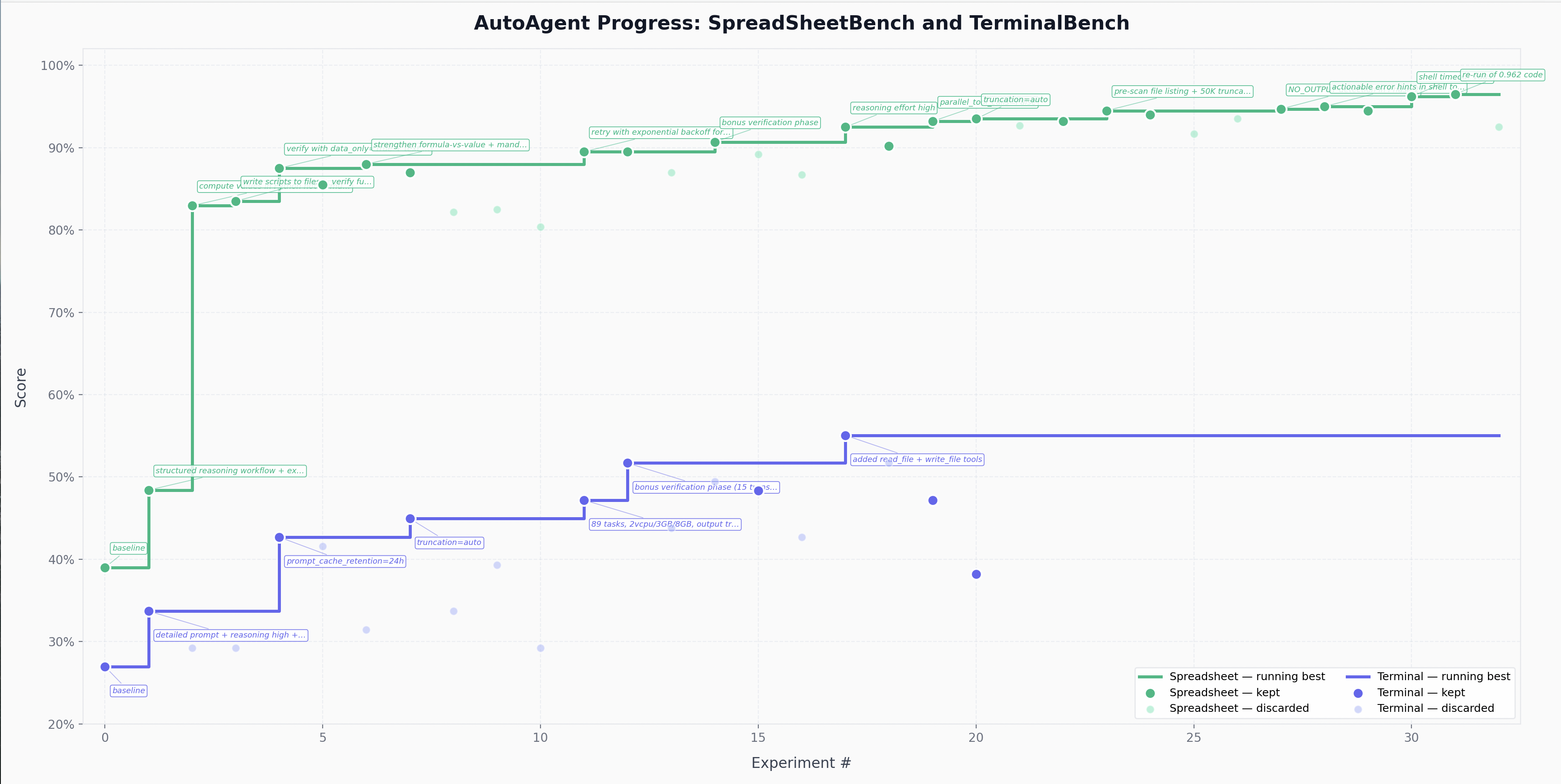
The core idea is the same: you're not touching the harness Python files like you normally would as an engineer. Instead, you program program.md, the Markdown file that provides context to the meta-agent and defines the agent-engineering loop.
How it works
The repo has a few files and directories that matter:
agent.py -- the entire harness under test in a single file. It contains
config, tool definitions, agent registry, routing/orchestration, and the
Harbor adapter boundary. The adapter section is explicitly marked as fixed;
the rest is the primary edit surface for the meta-agent.program.md -- instructions for the meta-agent + the directive (what
kind of agent to build). This file is edited by the human.tasks/ -- evaluation tasks in
harbor format. In a clean
baseline branch, benchmark payloads may be omitted and added in
benchmark-specific branches..agent/ -- optional workspace artifacts for reusable instructions,
notes, prompts, or skills.
The metric is total score produced by the benchmark's task test suites. The
meta-agent hill-climbs on this score.
Quick start
Requirements: Docker, Python 3.10+, uv, and
whatever model-provider credentials your current agent.py harness requires.
# 1. Install uv (if you don't have it)
curl -LsSf https://astral.sh/uv/install.sh | sh

# 2. Install dependencies
uv sync

# 3. Set up the environment variables required by your current agent/runtime
# Example:
cat > .env << 'EOF'
OPENAI_API_KEY=...
EOF

# 4. Build base image
docker build -f Dockerfile.base -t autoagent-base .

# 5. Add tasks to tasks/ (see Task format section below)

# 6. Run a single benchmark task
rm -rf jobs; mkdir -p jobs && uv run harbor run -p tasks/ --task-name "<task-name>" -l 1 -n 1 --agent-import-path agent:AutoAgent -o jobs --job-name latest > run.log 2>&1

# 7. Run all tasks in parallel (-n = concurrency, default 4)
rm -rf jobs; mkdir -p jobs && uv run harbor run -p tasks/ -n 100 --agent-import-path agent:AutoAgent -o jobs --job-name latest > run.log 2>&1
Point your coding agent at the repo and prompt:
Read program.md and let's kick off a new experiment!
The meta-agent will read the directive, inspect the current harness, run the
benchmark, diagnose failures, modify agent.py, and iterate.
Project structure
agent.py                       -- single-file harness under test
  editable harness section     -- prompt, registries, tools, routing
  fixed adapter section        -- Harbor integration + trajectory serialization
program.md                     -- meta-agent instructions + directive
Dockerfile.base                -- base image
.agent/                        -- optional agent workspace artifacts
tasks/                         -- benchmark tasks, typically added in benchmark-specific branches
jobs/                          -- Harbor job outputs
results.tsv                    -- experiment log (created by meta-agent, gitignored)
run.log                        -- latest run output
The repo ships without tasks. Add your own to tasks/ following Harbor's task format:
tasks/my-task/
  task.toml           -- config (timeouts, metadata)
  instruction.md      -- prompt sent to the agent
  tests/
    test.sh           -- entry point, writes /logs/reward.txt
    test.py           -- verification (deterministic or LLM-as-judge)
  environment/
    Dockerfile        -- task container (FROM autoagent-base)
  files/              -- reference files mounted into container
Tests write a score (0.0-1.0) to the verifier logs. The meta-agent hill-climbs
on this. See the Harbor docs for full details on writing and porting tasks.
Design choices
- Program the meta-agent, not the harness directly. The human steers the
loop through
program.md, while the meta-agent edits agent.py.
- Single-file, registry-driven harness. The implementation lives in one
file for simplicity, but agent and tool registration stay structured so the
harness can still evolve cleanly.
- Docker isolation. The agent runs in a container. It can't damage the host.
- Score-driven. Every experiment produces a numeric score. Keep if better,
discard if not. Same loop as autoresearch.
- Harbor-compatible tasks. Tasks use the same format as harbor benchmarks,
so the same harness can be evaluated on different datasets.
Cleanup
Docker images and containers accumulate across runs. Clean up regularly:
# Harbor's cached task images + task cache
uv run harbor cache clean -f

# Full Docker nuke (all unused images, build cache, etc.)
docker system prune -a -f

# Lighter: just dead containers
docker container prune -f
If Docker becomes unresponsive (for example after many concurrent runs), restart
Docker Desktop:
killall Docker && open -a Docker
You can equip the agent with Agent Skills for Context Engineering and context7 skills to improve performance.
License
MIT

 AutoAgent 让 AI 智能体在一夜之间自主构建并迭代一个智能体框架(agent.py):它会调整系统提示词、工具、配置和编排,用基准测试给每次改动打分,只保留有提升的改动。