
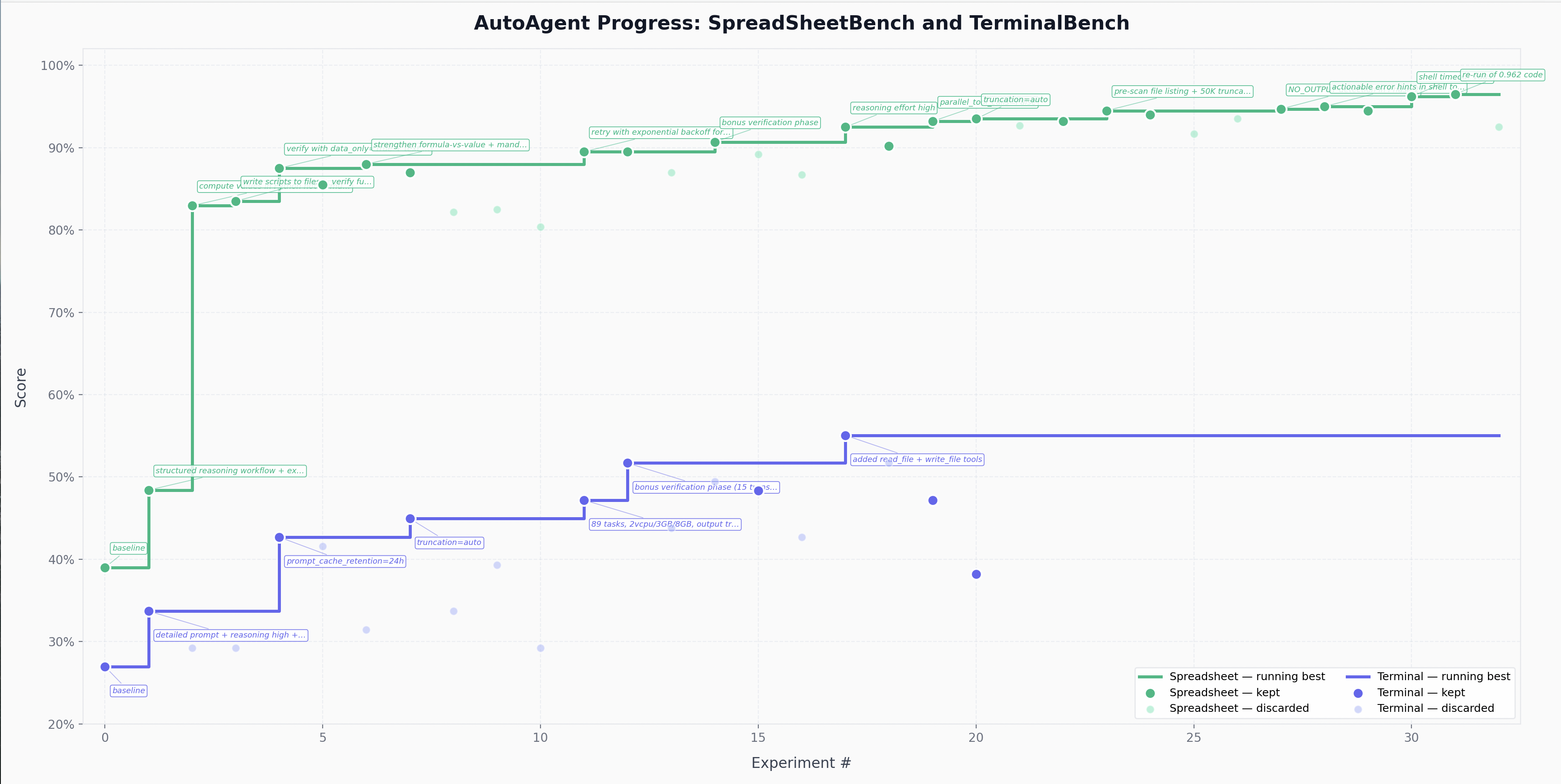
Что это?
 AutoAgent позволяет ИИ-агенту автономно, за ночь, строить и итерировать агентский харнесс (agent.py): он подстраивает системный промпт, инструменты, конфиг и оркестрацию, оценивает каждое изменение по бенчмарку и оставляет только улучшения.
AutoAgent позволяет ИИ-агенту автономно, за ночь, строить и итерировать агентский харнесс (agent.py): он подстраивает системный промпт, инструменты, конфиг и оркестрацию, оценивает каждое изменение по бенчмарку и оставляет только улучшения.Я редактирую харнесс напрямую или что-то другое?Сам agent.py вы не трогаете. Вместо этого вы пишете program.md — Markdown-файл, задающий мета-агенту контекст и директиву, — а мета-агент сам редактирует однофайловый харнесс (agent.py).
Сам agent.py вы не трогаете. Вместо этого вы пишете program.md — Markdown-файл, задающий мета-агенту контекст и директиву, — а мета-агент сам редактирует однофайловый харнесс (agent.py).Как на самом деле запустить цикл мета-агента?Направьте своего кодинг-агента на репозиторий и дайте ему задание; дальше мета-агент читает директиву в program.md, изучает текущий харнесс, запускает бенчмарк, диагностирует сбои, изменяет agent.py и повторяет цикл.
Направьте своего кодинг-агента на репозиторий и дайте ему задание; дальше мета-агент читает директиву в program.md, изучает текущий харнесс, запускает бенчмарк, диагностирует сбои, изменяет agent.py и повторяет цикл.Что нужно установить перед попыткой?Нужны Docker, Python 3.10+, uv и те учётные данные API провайдера модели, которые требует ваш текущий харнесс agent.py.
Нужны Docker, Python 3.10+, uv и те учётные данные API провайдера модели, которые требует ваш текущий харнесс agent.py.Есть ли готовые бенчмарки, работающие из коробки?Нет, репозиторий поставляется без задач для оценки. Нужно добавить свои задачи в tasks/ в формате задач Harbor, прежде чем у мета-агента появится оценка для оптимизации.
Нет, репозиторий поставляется без задач для оценки. Нужно добавить свои задачи в tasks/ в формате задач Harbor, прежде чем у мета-агента появится оценка для оптимизации.Зачем здесь изоляция через Docker?Эксперименты мета-агента с харнессом выполняются внутри контейнера, чтобы неудачное изменение или вышедший из-под контроля процесс не могли повредить хост-машину, пока он итерирует всю ночь.
Эксперименты мета-агента с харнессом выполняются внутри контейнера, чтобы неудачное изменение или вышедший из-под контроля процесс не могли повредить хост-машину, пока он итерирует всю ночь.Как мета-агент решает, что оставить?Каждый эксперимент выдаёт числовую оценку (0.0-1.0), которую тест-сьюты бенчмарка пишут в логи верификатора; мета-агент оставляет изменение, если оценка улучшилась, и отбрасывает его в противном случае.
Каждый эксперимент выдаёт числовую оценку (0.0-1.0), которую тест-сьюты бенчмарка пишут в логи верификатора; мета-агент оставляет изменение, если оценка улучшилась, и отбрасывает его в противном случае.Почему agent.py — один файл?Авторы выбрали однофайловый дизайн на основе реестра ради простоты, сохранив при этом достаточно структурированную регистрацию агентов и инструментов, чтобы харнесс мог аккуратно развиваться.
Авторы выбрали однофайловый дизайн на основе реестра ради простоты, сохранив при этом достаточно структурированную регистрацию агентов и инструментов, чтобы харнесс мог аккуратно развиваться.Можно ли поднять собственную результативность мета-агента?Да, его можно оснастить Agent Skills for Context Engineering и навыками context7, чтобы улучшить качество его итераций.
Да, его можно оснастить Agent Skills for Context Engineering и навыками context7, чтобы улучшить качество его итераций.What are similar projects?rrsi, Proteus, Raven, PocketFlow, awesome-harness-engineering, JIT, hive, imp
rrsi, Proteus, Raven, PocketFlow, awesome-harness-engineering, JIT, hive, impWhich topics is it in?harness-framework, self-evolving, harness-engineering, llm-agents, agentic, context-engineering, harness, agent-framework, autonomous-agents, evaluation, orchestration, agents
harness-framework, self-evolving, harness-engineering, llm-agents, agentic, context-engineering, harness, agent-framework, autonomous-agents, evaluation, orchestration, agents