
What is this?
 AutoAgent lets an AI agent build and iterate on an agent harness (agent.py) autonomously overnight: it tweaks the system prompt, tools, config, and orchestration, scores each change against a benchmark, and keeps only the improvements.
AutoAgent lets an AI agent build and iterate on an agent harness (agent.py) autonomously overnight: it tweaks the system prompt, tools, config, and orchestration, scores each change against a benchmark, and keeps only the improvements.Am I editing the harness directly, or something else?You do not touch agent.py yourself. Instead you write program.md, a Markdown file that gives the meta-agent context and a directive, and the meta-agent edits the single-file harness (agent.py) on its own.
You do not touch agent.py yourself. Instead you write program.md, a Markdown file that gives the meta-agent context and a directive, and the meta-agent edits the single-file harness (agent.py) on its own.How do I actually run the meta-agent loop?Point your coding agent at the repo and prompt it; the meta-agent then reads the directive in program.md, inspects the current harness, runs the benchmark, diagnoses failures, modifies agent.py, and repeats.
Point your coding agent at the repo and prompt it; the meta-agent then reads the directive in program.md, inspects the current harness, runs the benchmark, diagnoses failures, modifies agent.py, and repeats.What do I need installed before trying this?You need Docker, Python 3.10+, uv, and whatever model-provider API credentials your current agent.py harness requires.
You need Docker, Python 3.10+, uv, and whatever model-provider API credentials your current agent.py harness requires.Does it come with benchmarks ready to run out of the box?No, the repo ships without any evaluation tasks. You need to add your own tasks to tasks/ following Harbor's task format before the meta-agent has a score to optimize.
No, the repo ships without any evaluation tasks. You need to add your own tasks to tasks/ following Harbor's task format before the meta-agent has a score to optimize.What is the point of Docker isolation here?The meta-agent's harness experiments run inside a container so a bad change or runaway process can't damage the host machine while it iterates overnight.
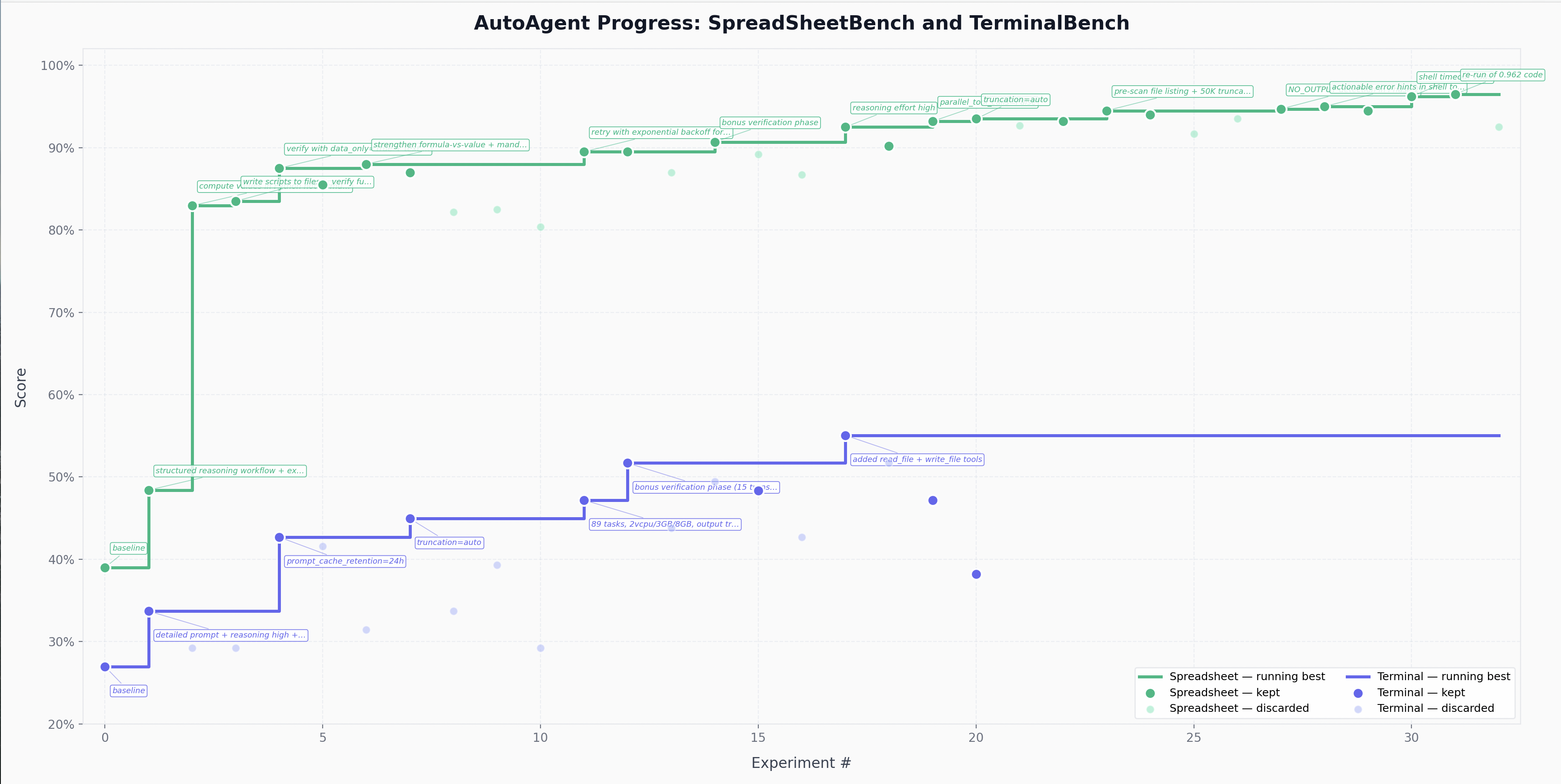
The meta-agent's harness experiments run inside a container so a bad change or runaway process can't damage the host machine while it iterates overnight.How does the meta-agent decide what to keep?Every experiment produces a numeric score (0.0-1.0) written by the benchmark's test suites to verifier logs; the meta-agent keeps the change if the score improves and discards it otherwise.
Every experiment produces a numeric score (0.0-1.0) written by the benchmark's test suites to verifier logs; the meta-agent keeps the change if the score improves and discards it otherwise.Why is agent.py a single file?The authors chose a single-file, registry-driven design for simplicity, while still keeping agent and tool registration structured enough for the harness to evolve cleanly.
The authors chose a single-file, registry-driven design for simplicity, while still keeping agent and tool registration structured enough for the harness to evolve cleanly.Can I boost the meta-agent's own performance?Yes, you can equip it with Agent Skills for Context Engineering and context7 skills to improve how well it iterates.
Yes, you can equip it with Agent Skills for Context Engineering and context7 skills to improve how well it iterates.What are similar projects?rrsi, Proteus, Raven, PocketFlow, awesome-harness-engineering, JIT, hive, imp
rrsi, Proteus, Raven, PocketFlow, awesome-harness-engineering, JIT, hive, impWhich topics is it in?harness-framework, self-evolving, harness-engineering, llm-agents, agentic, context-engineering, harness, agent-framework, autonomous-agents, evaluation, orchestration, agents
harness-framework, self-evolving, harness-engineering, llm-agents, agentic, context-engineering, harness, agent-framework, autonomous-agents, evaluation, orchestration, agents