All files and checksums: Releases.
Builds aren't code-signed yet: on macOS use System Settings → Privacy & Security → Open Anyway;
on Windows More info → Run anyway.
Self-host it
Serve Rembrandt from the computer that holds your photos and edit them in any browser:
It asks which photo folder to use, starts at login, and prints a private link. Edits are saved next
to each photo as XMP; the photos themselves are never changed. Add --lan to reach it from other
devices on your network. Linux and macOS; one small dependency-free binary (server/).
To update, press Update in the browser (Settings › About); it installs the latest release,
checks it against the published SHA-256 sums, and restarts the server.
Features
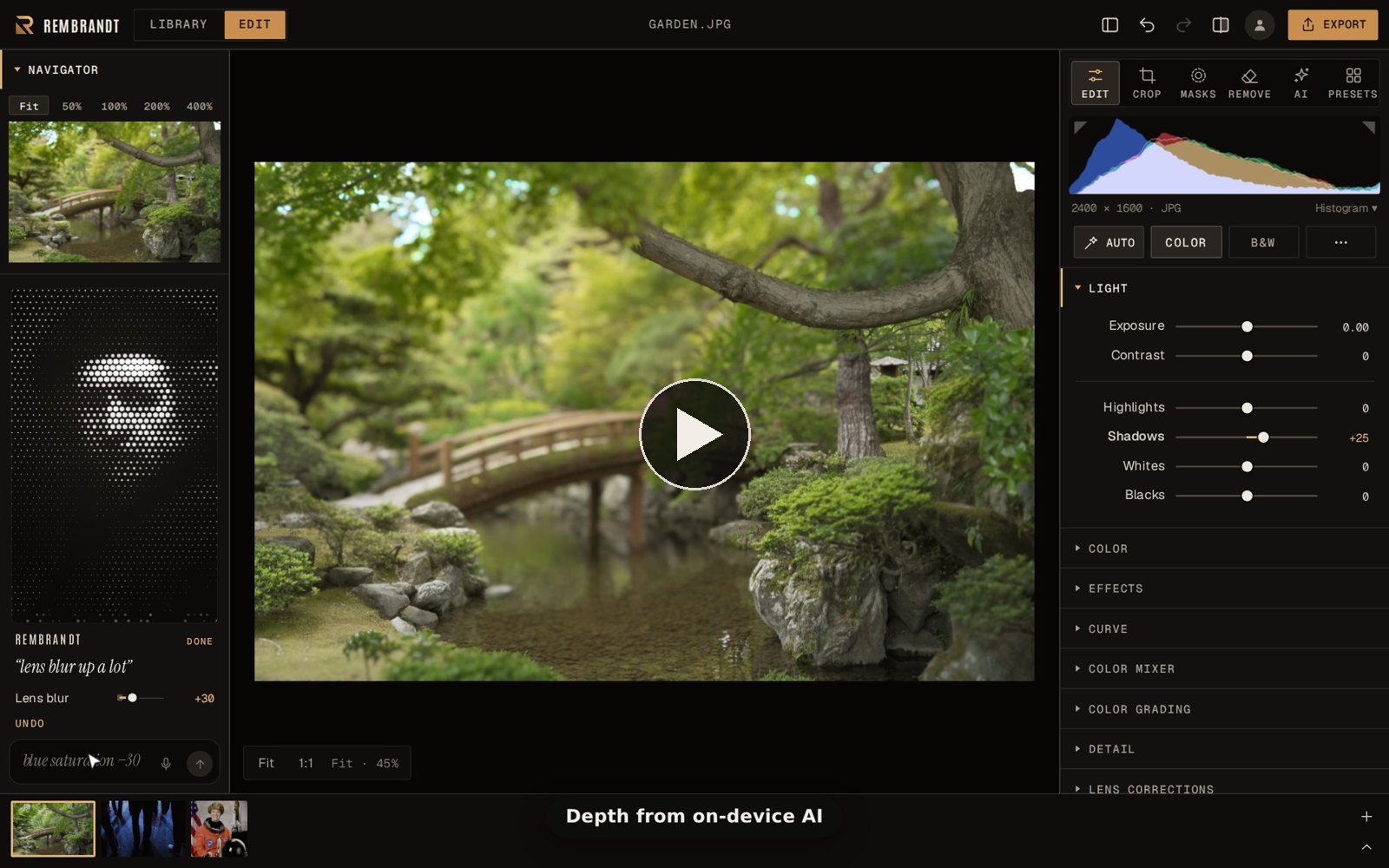
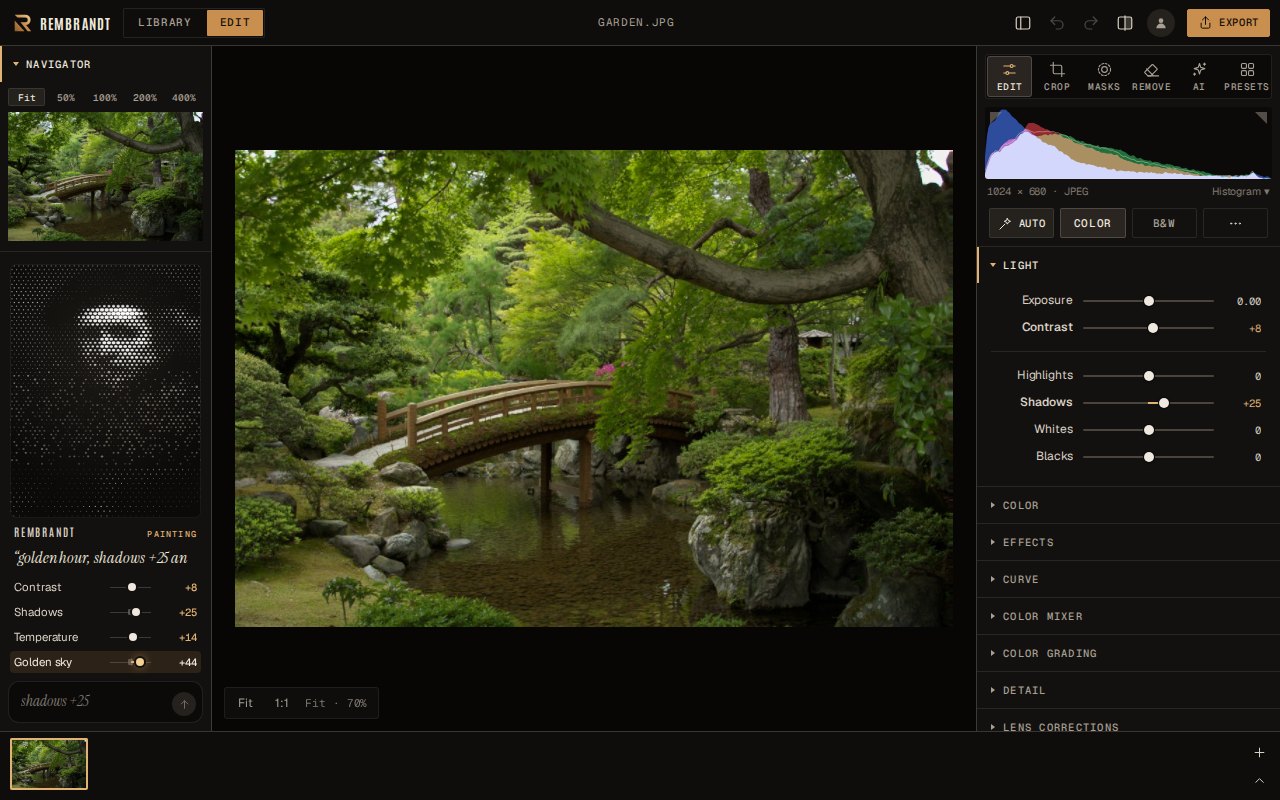
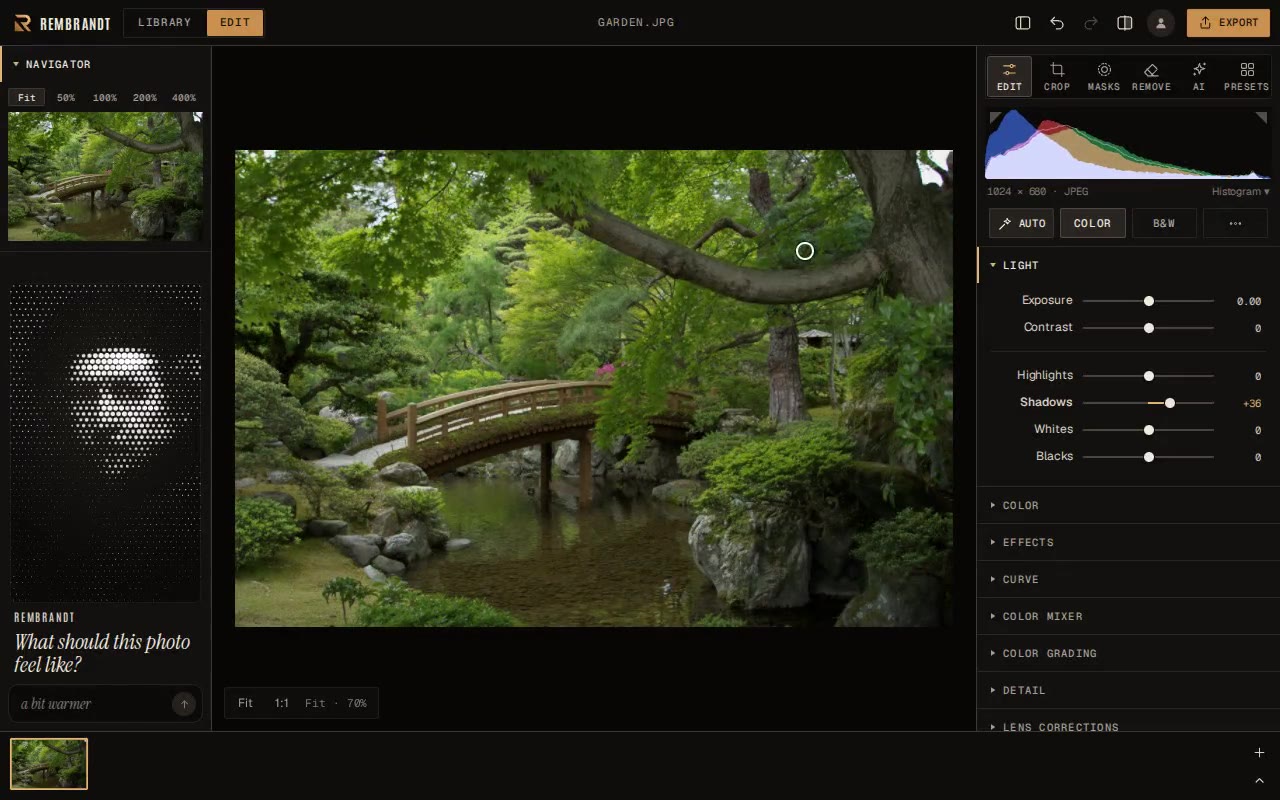
Ask in words: type “warmer and a bit brighter”, “down exposure by ten points”, “shadows +25”
or “paste the edits from the previous photo” (Ctrl/⌘ K), or say it: press the microphone in the
side panel and say “bring lens blur down”. A small Rembrandt in dots thinks it over,
then makes each change while you watch the sliders move. It runs on your device: a vocabulary, not
a language model.
Edit the photo itself: drag up or down on any part of the picture to lighten or darken that
tone, left or right to change that colour; the sliders follow.
AI looks: Enhance, Relight, Sky, Atmosphere, Sunrays, Skin, Motion and Lens Blur with
aperture shapes, from on-device depth and subject maps.
Refocus: brings back detail in out-of-focus photos, even heavy defocus (regularised
deconvolution on the GPU), on the subject or the whole picture.
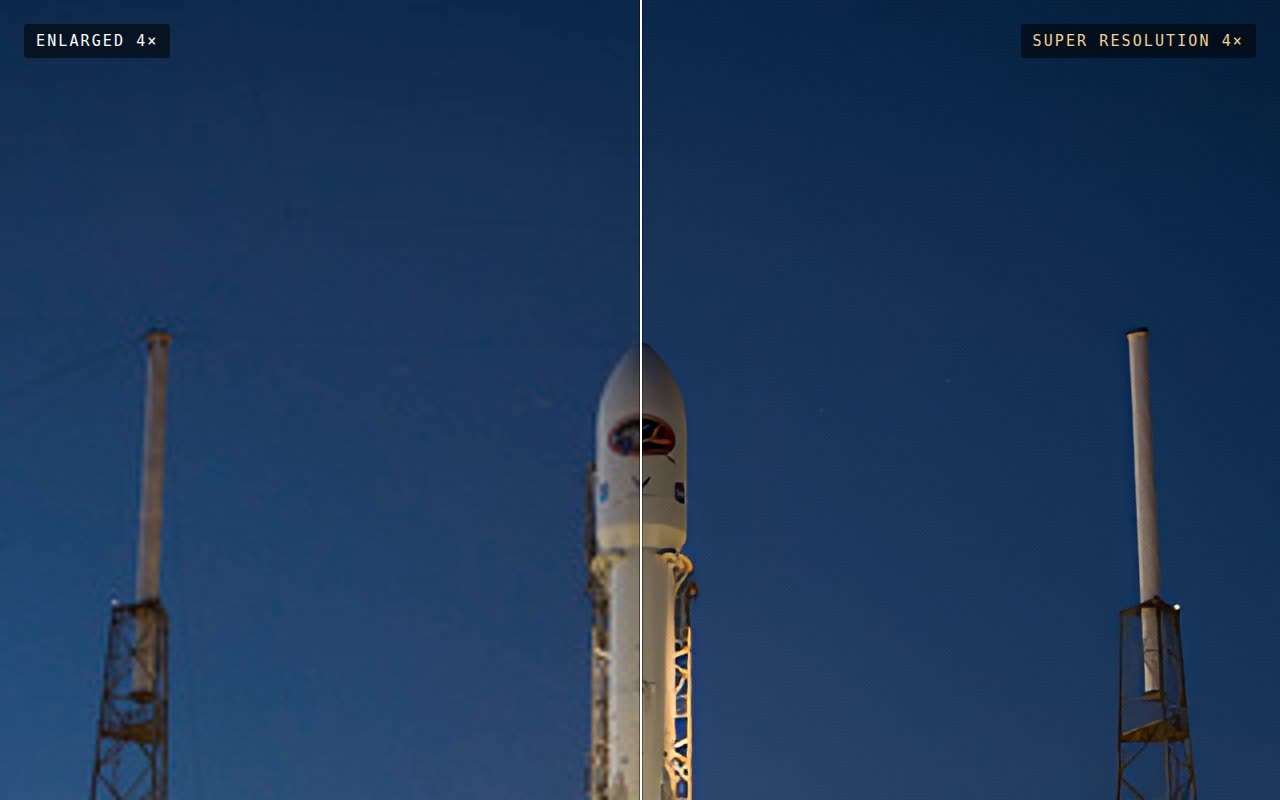
Super Resolution: 2× and 4× with real detail, or Restore at the same size for soft photos;
runs on the GPU (Metal on Apple silicon).
AI Denoise: clean high-ISO shots into a new DNG with the same edits, on the GPU.
Background work that stays out of the way: AI Denoise, Super Resolution and merges run in small
GPU slices that pause while you edit, or when you're away, or overnight in a night window you set
(Settings › Performance). The queue survives restarts.
Merge: HDR from brackets, panoramas and focus stacks, each to a RAW-like DNG.
RAW from 1,000+ cameras, developed on the GPU: tone, colour, curves, grading, dehaze, detail.
Masks: brush, gradients, colour and tone ranges, AI subject, background, object and depth, and
People: face skin, body skin, hair, eyebrows, eye whites, irises, lips, teeth and clothes.
Remove: heal and clone spots and strokes; Rembrandt picks a matching source for you. Remove
blemishes finds and heals them on portraits in one click and keeps moles and beauty marks.
Pick the best: select a shoot and Rembrandt groups the bursts, picks the sharpest frame with
open eyes in each and rejects the blurry and eyes-closed ones. Your own flags are kept; one Undo.
Compare (C) shows 2–4 frames side by side with zoom and pan linked.
Lens corrections: the camera's built-in profile from Fujifilm and Sony RAWs, or one of 1,500
lens profiles from Lensfun (distortion, vignetting, chromatic
aberration), plus manual distortion and vignetting for any photo. Auto straighten levels horizons;
Transform's Vertical and Horizontal fix converging lines, and Auto makes a building's verticals parallel.
On-device AI: Refocus, background replacement. Nothing is uploaded.
Batch: copy and paste edits to hundreds of photos, batch export, and presets that fit each
photo's exposure. Imports Lightroom presets (.xmp, .lrtemplate and zip packs). Watch a folder to
apply a preset and album to new photos as they arrive.
Share how: a before/after page with a slider, a replay video of the edit, or the recipe inside
the exported file so anyone can see (and reuse) how it was edited.
Bring your photos: folders, Lightroom Classic (edits, keywords, labels, virtual copies,
collections, with a report of anything that can't come over) and Lightroom, Google Photos, Google Drive,
Dropbox, OneDrive (setup). Export back to them too.
Open formats: edits are standard XMP, readable by Lightroom and others. Export to JPEG, PNG, WebP
or TIFF, with an optional watermark; exports keep the camera details and date taken, add your name
and copyright, and embed an sRGB profile; location is never written.
Cloud sync (optional, paid): turn it on in Settings to sync edits, albums and photos between
your computers, the web and your phone. It's the only thing that needs an account, and the only
thing that costs money; everything else stays free.
Quick facts
What it is
A RAW developer and photo library, in the same family as Lightroom Classic: develop, adjust, mask, retouch, organise and export your own photos. Every edit is non-destructive.
What it isn't
A layer-based pixel editor like Photoshop or GIMP (no layers, text or painting), or a generative AI tool: it doesn't make images from a prompt or invent new objects. Its AI effects (fog, sun rays, lens blur, background replacement with a picture you choose) are built from each photo's own depth and subject.
The AI
Selects people, faces, subjects, objects and depth for masks, removes blemishes, denoises, refocuses, upscales and picks your best shots. It all runs on your computer.
Typing or talking
You can ask for edits in words ("warmer", "lens blur down") or by voice. It understands editing terms, not general requests.
Your photos
Stay on your computer. Originals are never changed; edits are saved as standard XMP that Lightroom and darktable read.
Cost
Free, no account. Only the optional Cloud sync between devices is paid.
Runs on
macOS, Windows and Linux, or self-hosted and used in any browser.
Coming from Lightroom
Imports your catalog (edits, keywords, collections) and your presets (.xmp and .lrtemplate).
Not here yet
Print, Book, Slideshow and Map modules, tethered capture, plugins.
Licence
GPL-3.0-or-later. Free to use, study, change and share.
Found a bug?
Open an issue with your version (Settings › About) and how to make it happen. Please don't send photos to be edited.
How it compares
Lightroom: the everyday editing and library work is here: RAW development, masks (including AI
subject, depth and object), healing, presets, lens corrections, HDR and panorama merges,
denoise, batch editing, and catalog import. Not here yet: Print, Book, Slideshow, Web and Map
modules, face recognition, Adobe's camera profiles, tethered capture (a watched folder covers most
tethering apps), and a plugin ecosystem.
darktable: Rembrandt borrows darktable's central idea, a scene-referred pipeline (edits work
on linear light before a tone curve maps it to the screen), which is why highlights recover cleanly.
darktable has far more modules and control; Rembrandt aims to be usable in five minutes, with fewer,
broader controls and on-device AI. The engine is an independent implementation (see Credits).
LightCraft: a newer open-source Lightroom reimplementation in Rust, from the ArtCraft team, with
more of Lightroom's library and export surface (stacks, Survey view, all of Upright's modes, AVIF and HDR export)
and an MCP server for AI agents. By its own status table,
its AI masks and denoise are still classical heuristics or in progress and Super Resolution isn't
started; some CR3, Olympus and Nikon HE RAWs don't decode yet. Rembrandt's on-device AI (People and
subject masks, AI Denoise, Super Resolution, Refocus, blemish removal, culling by focus and eyes)
and LibRaw's 1,000+ cameras are where it differs most.
RawTherapee / ART: similar ground to darktable; Rembrandt trades depth of control for speed of use.
GIMP / Photoshop: different kind of tool. Those are pixel editors for compositing and painting;
Rembrandt is a non-destructive RAW developer and library, like Lightroom.
Your photos aren't locked in
Rembrandt never moves or rewrites your originals. Edits are saved as standard XMP sidecars next to
your photos, which Lightroom, darktable and others can read, and Settings › Data & privacy exports a backup of all your edits.
If Rembrandt disappeared tomorrow, your library and your edits would still be yours, in open formats.
How it's built
JavaScript with WebGL2 and WebGPU shaders for the editing engine and on-device AI, in a small Rust
(Tauri) desktop app. RAW files are decoded by LibRaw
(C++, compiled to WebAssembly). Every release is built by GitHub Actions from this repository, with
checksums and signed build provenance (SECURITY.md).
Credits
darktable: the scene-referred workflow Rembrandt's engine is modelled on.
An early prototype ported darktable's algorithms; it was replaced by an independent implementation of
the published methods (listed in NOTICE.md) before the code was released.
Free software under the GNU General Public License v3.0 or later, the same licence as
darktable. Use it, study it, change it and share it; if you distribute a modified version, share its
source under the same terms. It may also be distributed through app stores (an additional permission
under the GPL; see NOTICE.md, which also lists the third-party parts).
Screenshot photos from the scikit-image sample data: espresso by Rachel Michetti and cat by
Stefan van der Walt (CC0), rocket launch by SpaceX and Hubble eXtreme Deep Field by NASA (public
domain).
rembrandt (thesnarkitecht/rembrandt)
Choose a tag and it will appear here. With no tags selected, all catalog projects are shown.
Searching Database…
Choose a tag and it will appear here. With no tags selected, all catalog projects are shown.
What is this?Rembrandt is a free, non-destructive RAW photo editor and library for macOS, Windows and Linux, built in the same family as Lightroom Classic, with on-device AI tools and no account, subscription or tracking required.
Is this a RAW editor like Lightroom, or a pixel editor like Photoshop?It's a non-destructive RAW developer and photo library in the same family as Lightroom Classic, not a layer-based pixel editor like Photoshop or GIMP, and not a generative AI tool that invents new content.
Do I need a powerful GPU for the AI features?Super Resolution, AI Denoise, Refocus and background replacement run on your GPU (Metal on Apple silicon), processing in small slices in the background or overnight so editing isn't blocked.
What's still missing compared to Lightroom?Print, Book, Slideshow and Map modules, tethered capture and a plugin ecosystem aren't implemented yet; a watched folder covers most tethering needs in the meantime.
Where do my photos and edits actually live?Originals are never changed; edits are saved as standard XMP sidecar files next to each photo, readable by Lightroom and darktable, and everything stays on your computer unless you enable the optional paid Cloud sync.
Does the GPL license let it be sold on app stores?Yes — Rembrandt is GPL-3.0-or-later (the same license as darktable) with an added permission allowing distribution through app stores; if you distribute a modified version you must share its source under the same terms.
How does the 'ask in words' editing feature work?You type or speak natural commands like 'golden hour, shadows +25' and Rembrandt moves the matching sliders; it understands editing terms through a built-in vocabulary, not a general-purpose language model, and runs entirely on-device.
Can I self-host it and edit from a browser?Yes, a small dependency-free Linux/macOS binary serves your chosen photo folder, starts at login and prints a private link you open in any browser; add --lan to reach it from other devices on your network.
How does it differ from darktable and the Rust-based LightCraft?Rembrandt borrows darktable's scene-referred pipeline but aims to be usable in five minutes with fewer, broader controls. Compared to LightCraft, it ships working on-device AI masks, AI Denoise, Super Resolution and Refocus, plus LibRaw support for 1,000+ cameras.
Am I locked into Rembrandt once I start editing?No — edits are stored as open XMP sidecars that Lightroom and darktable can read, and originals are never modified, so your library stays usable even if Rembrandt disappeared.

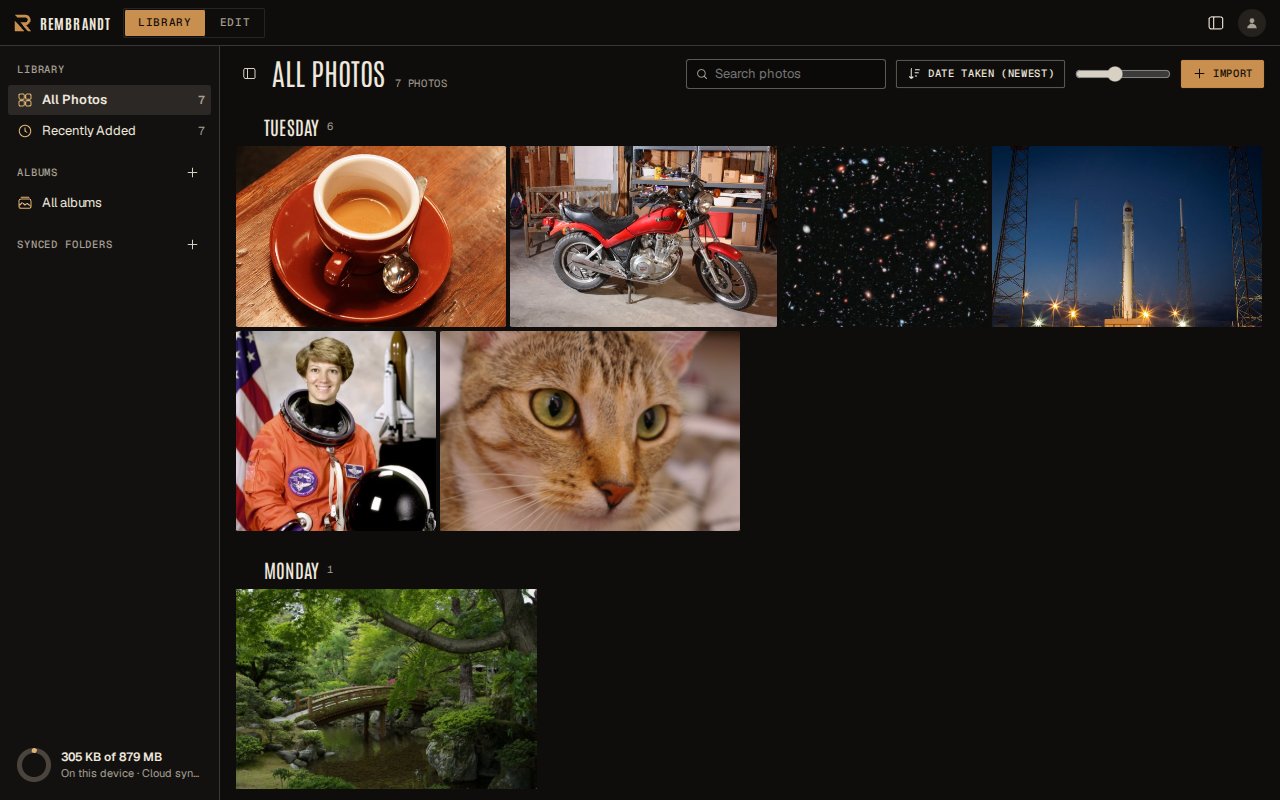
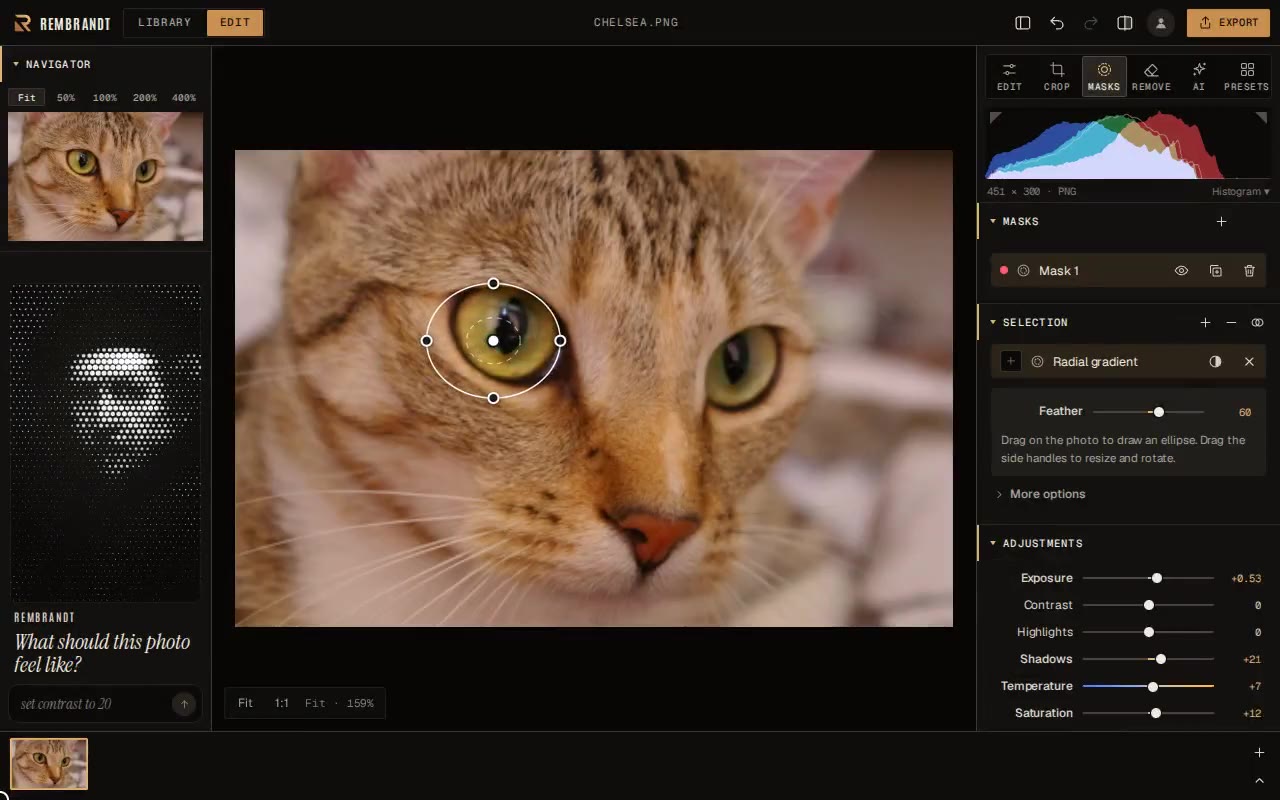
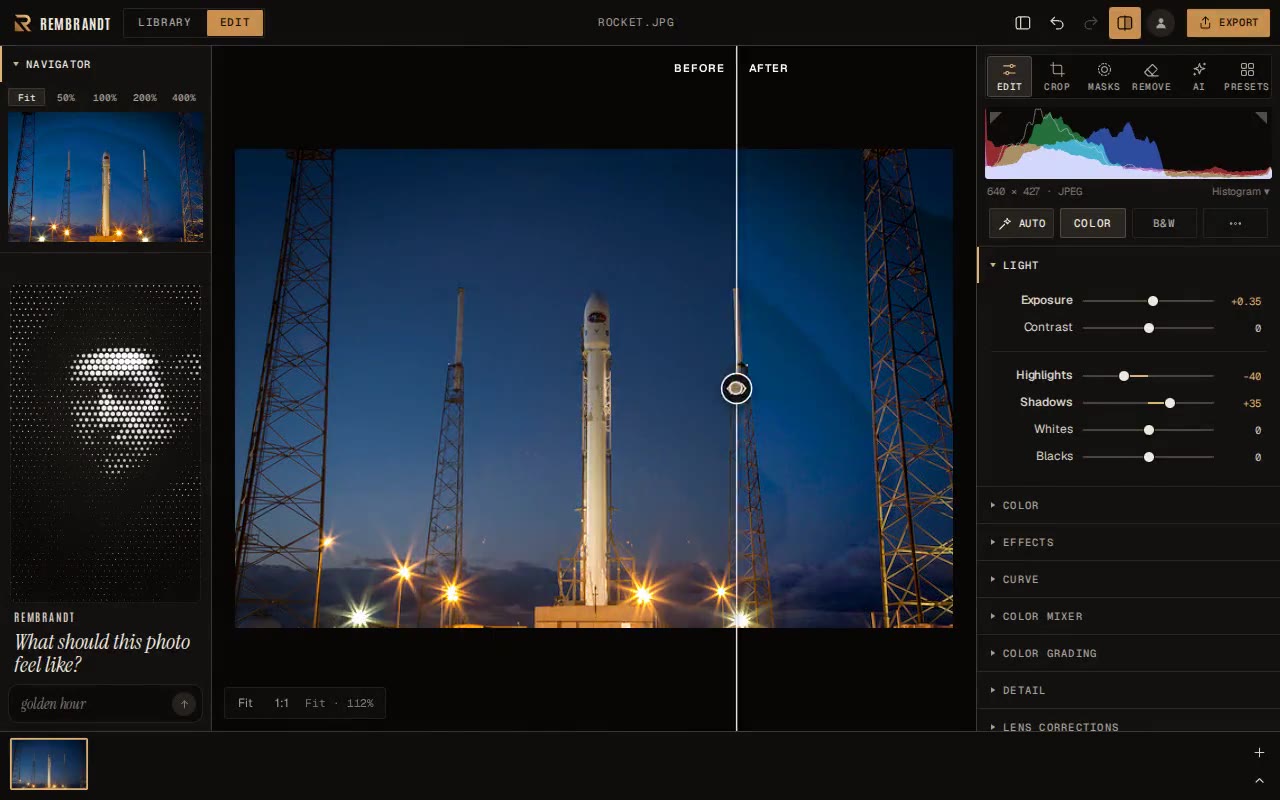

 Rembrandt is a free, non-destructive RAW photo editor and library for macOS, Windows and Linux, built in the same family as Lightroom Classic, with on-device AI tools and no account, subscription or tracking required.