Video editing, color and sound; an open-source, clean-room reimplementation of Adobe Premiere Pro, rebuilt in pure Rust.
An open-source, clean-room take on the Adobe Premiere Pro workflow: native on macOS, Windows and Linux, and in the browser via WebAssembly.
By the ArtCraft team.
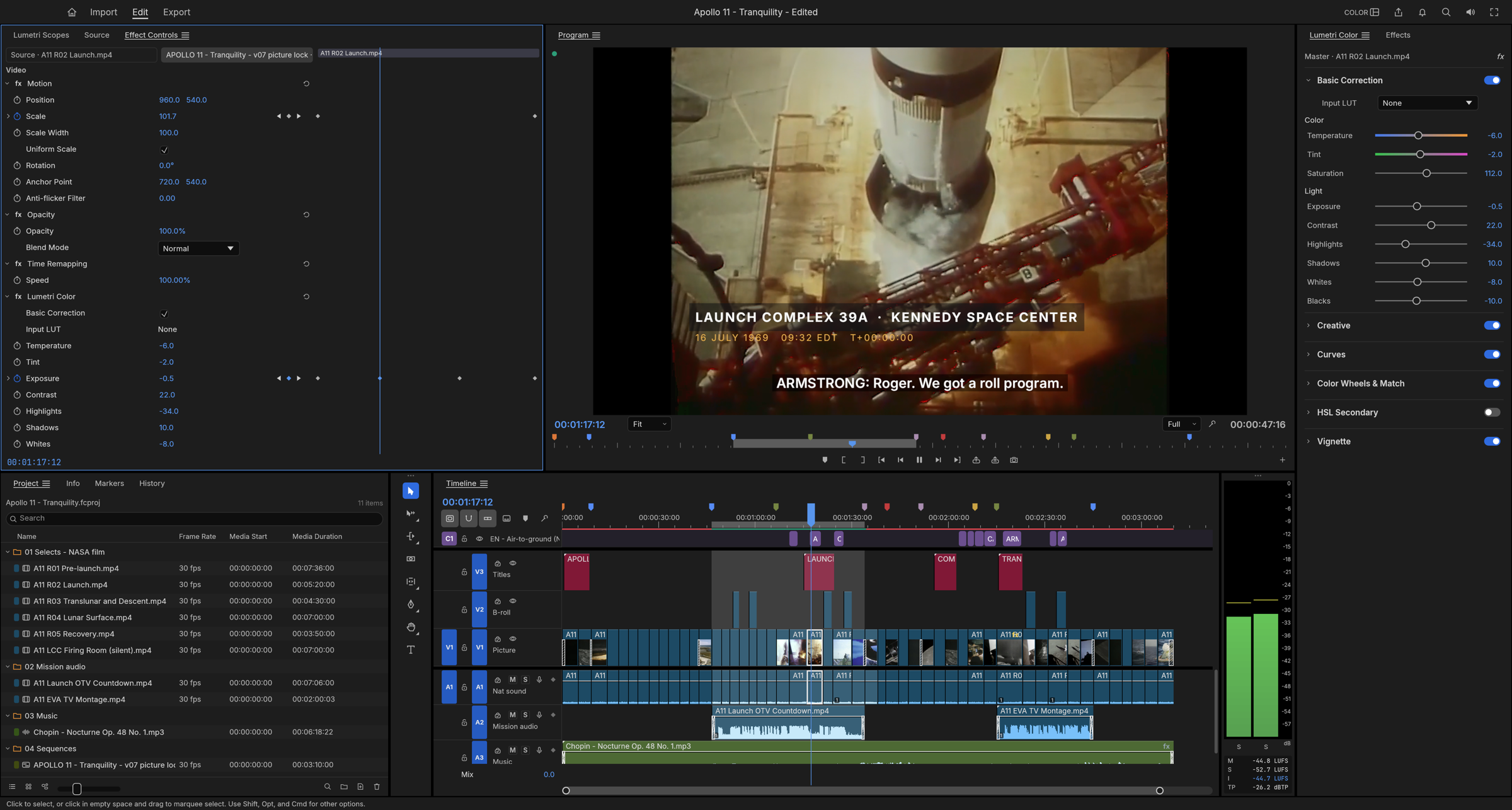
Apollo 11 - Tranquility: a three-minute documentary edit of NASA's 1969 launch, landing and moonwalk film, with subtitles from the mission transcript. Every frame in these screenshots comes from public-domain footage, decoded, composited and graded by FilmCraft's own code.
[!NOTE]
ArtCraft is a community of artists from all walks of life. Digital, generative, music,
games — if you make things, you're one of us. Come say hi on Discord.
FilmCraft is a non-linear editor for people who know Premiere: the same panels, workspaces, tools and shortcuts, so your hands already know where everything is. Underneath, it is new from the bitstream up. The H.264, HEVC, ProRes and AAC codecs are our own, written in Rust from the public specifications. A GPU compositor works in linear light. Frame math runs on exact integer time, so edits never drift. And every action in the app is a command that an AI agent can drive as precisely as you can.
Edit
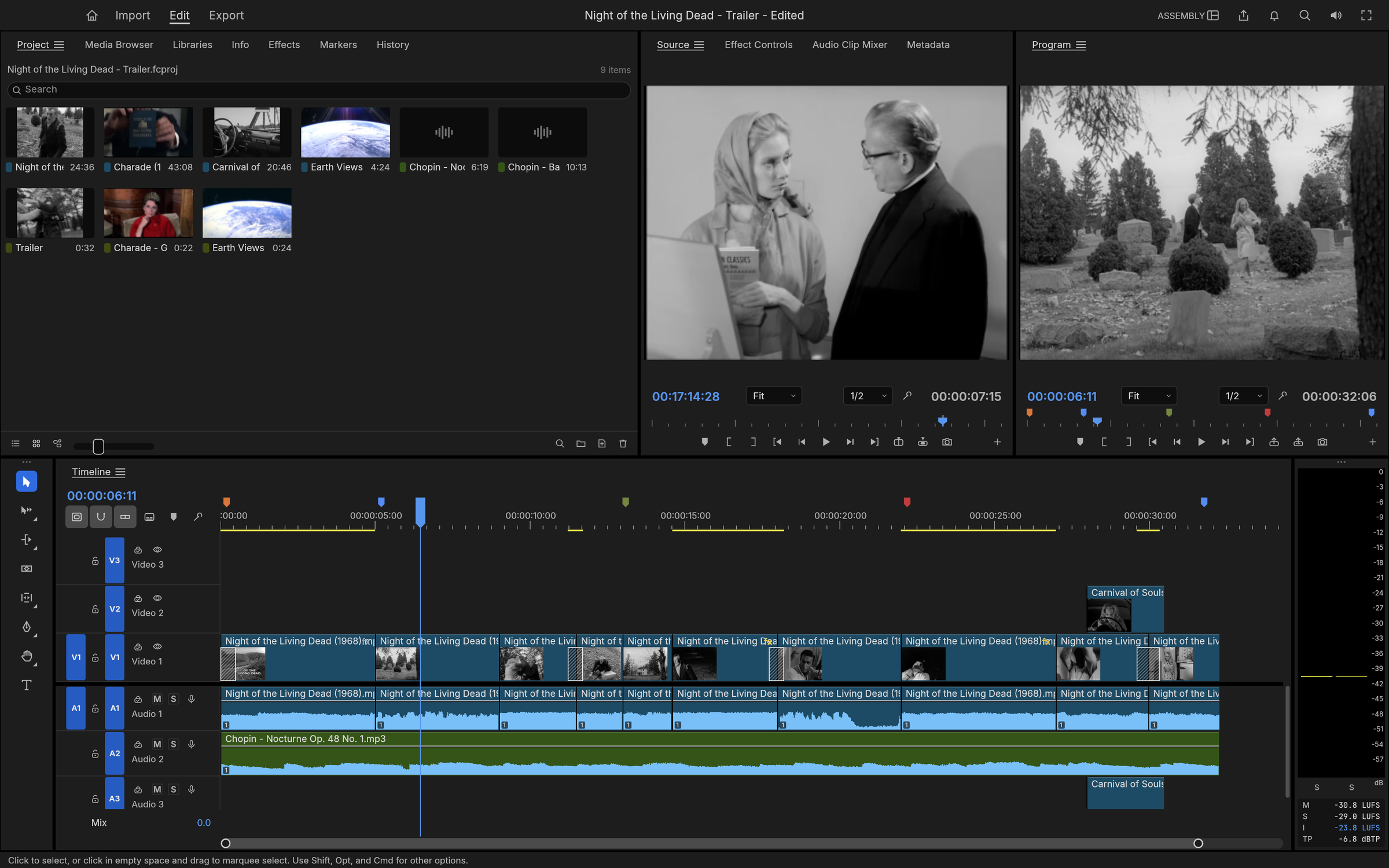
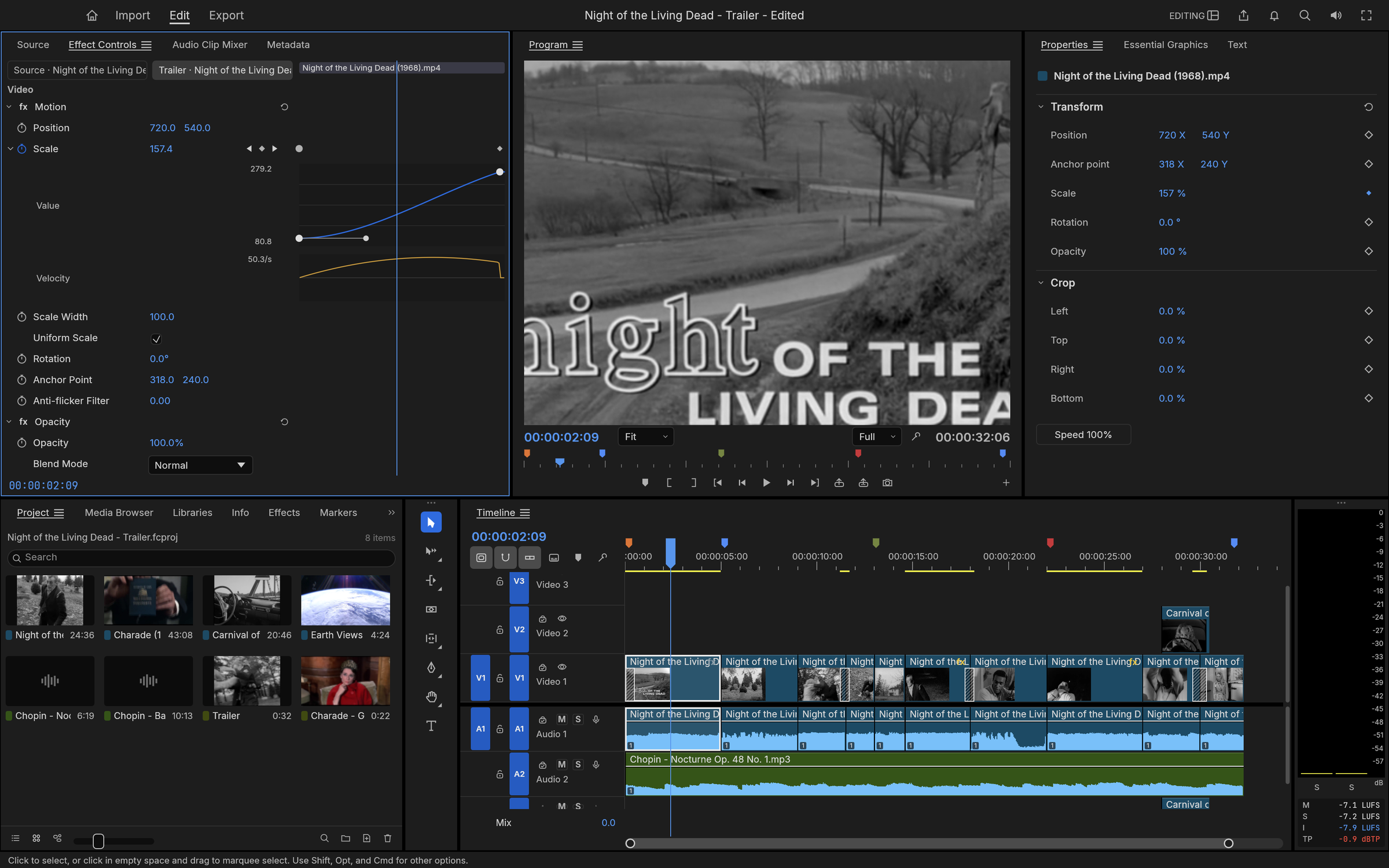
The Assembly workspace, cutting a trailer for Night of the Living Dead (1968) with an insert from Carnival of Souls (1962).
A timeline you already know. Source and Program monitors, bins with thumbnails, a multi-track timeline with patch and target buttons, sync locks and linked selection. The Editing, Assembly, Color, Effects and Audio workspaces are all there, and every panel docks wherever you want it.
Three-point editing. Mark In and Out in the Source monitor, then insert (,) or overwrite (.) onto the patched tracks. Lift (;) and extract (') take ranges back out.
Every trim. Ripple, roll, slip, slide, rate stretch and razor tools. Trim mode selects edit points as ripple, roll or trim, nudges them a frame at a time (⌥←⌥→, ×5 with ⇧), toggles the trim type with ⌃T and extends them to the playhead with E. Q and W ripple-trim to the playhead. The Trim Monitor shows both sides of the edit, and dynamic trimming trims live while it plays: L forward, J back, K to stop and commit as one undo step.
Exact time. Every edit is computed on integer ticks: 254,016,000,000 per second, which divides evenly by every common frame rate and sample rate. 23.976, 29.97 drop-frame and 59.94 are exact, not approximate.
The details pros rely on. Markers with colours, names and durations; export sequence review notes with Markers ▸ Export Markers as CSV…; add edit (⌘K) on one or all tracks; nesting; copy, paste and paste insert; ripple delete and close gap; snapping; unlimited undo with a History panel.
Your keys. A Keyboard Shortcuts editor (⌥⌘K) with a drawn keyboard, panel-specific shortcuts, conflict warnings and presets for FilmCraft, Premiere Pro, Final Cut Pro and Avid key layouts.
Never lose work. Saves are atomic, auto-save keeps a rolling set of versions, and a crash-recovery journal written about a second after each edit brings back unsaved changes after a crash or power cut.
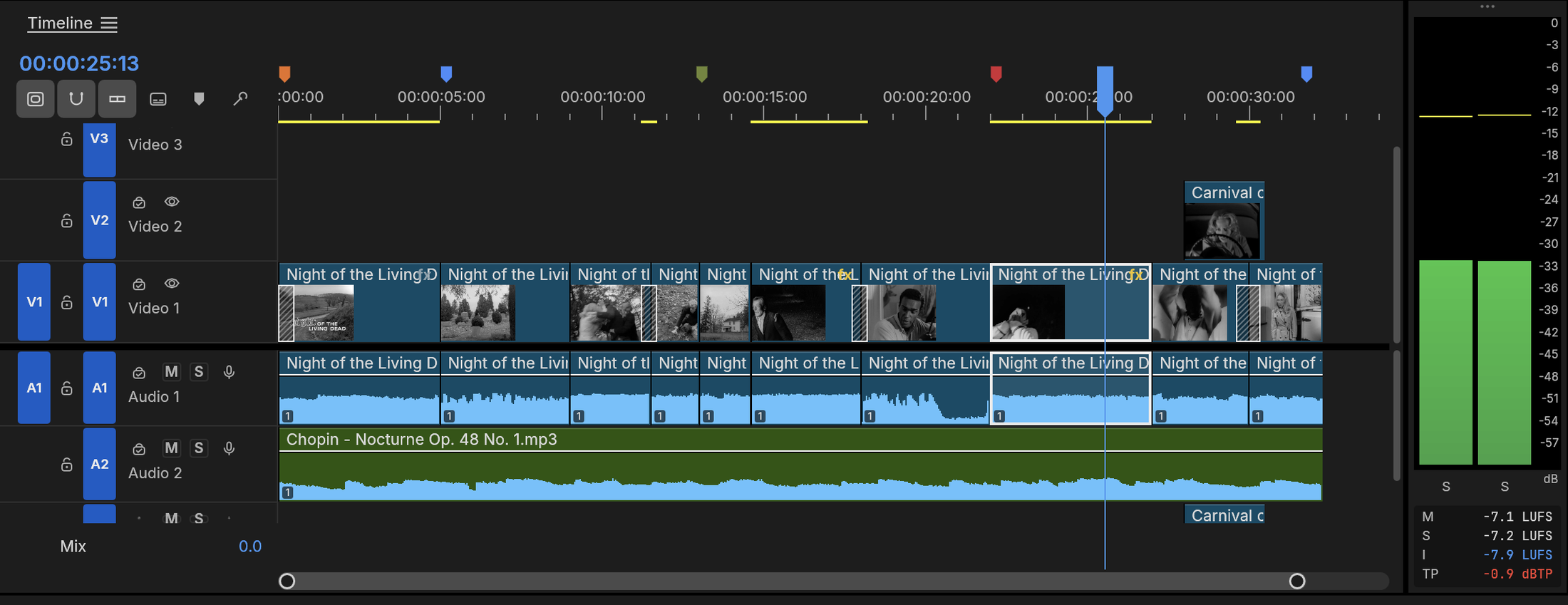
Up close: dissolves, an insert on V2, the score on A2, coloured markers, and the loudness meters on the right.
Color
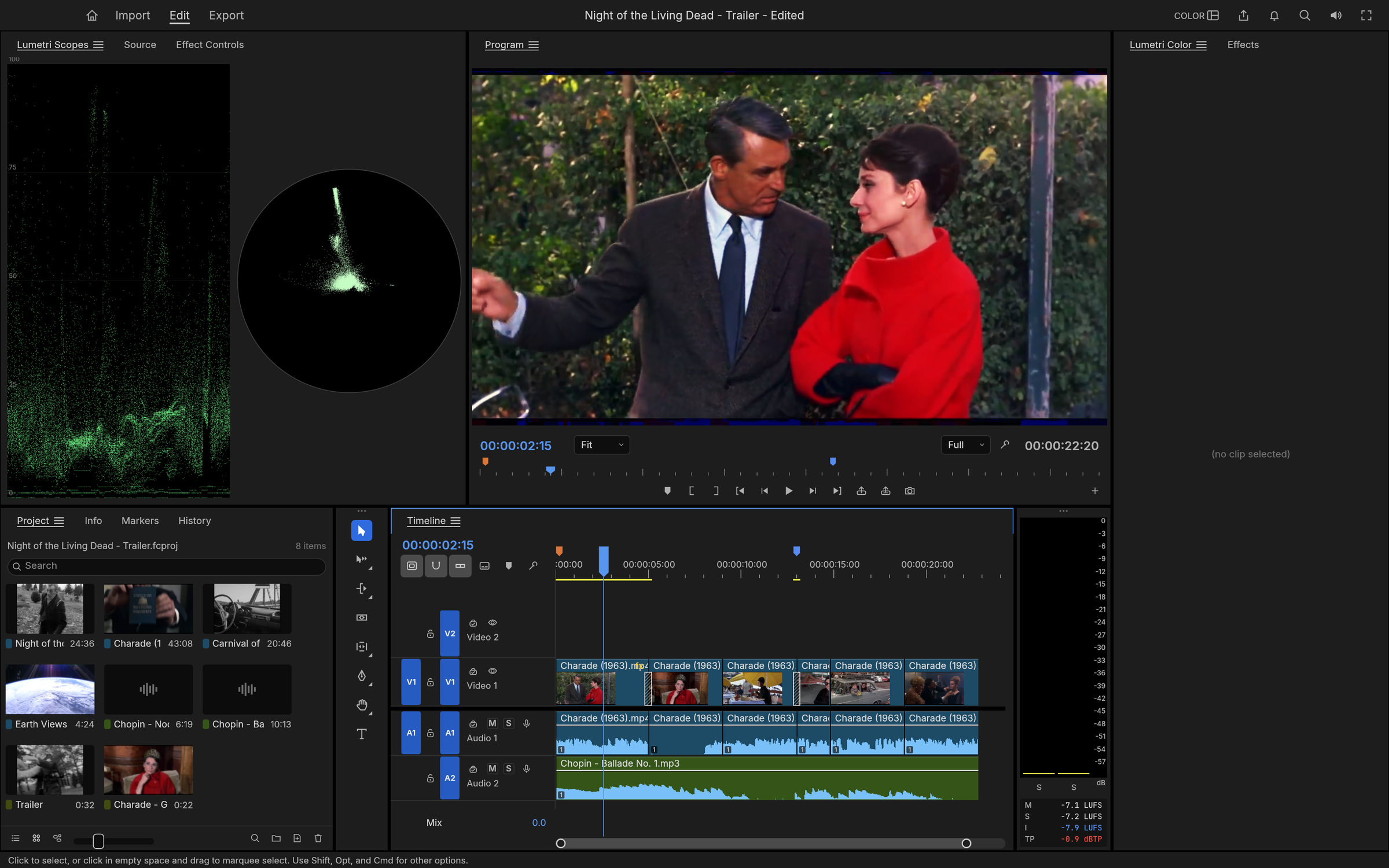
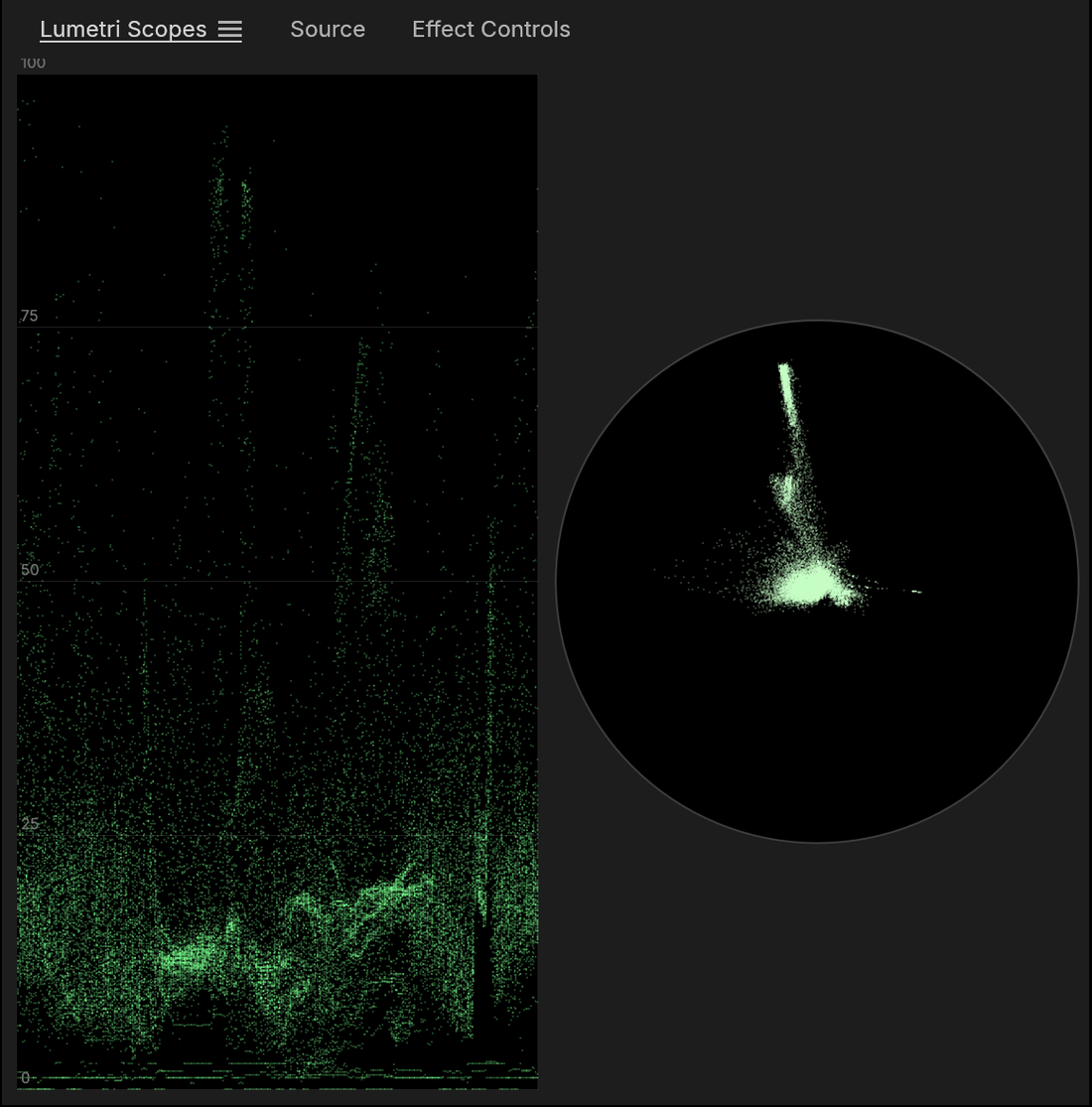
The Color workspace on Charade (1963), with live scopes beside the Program monitor.
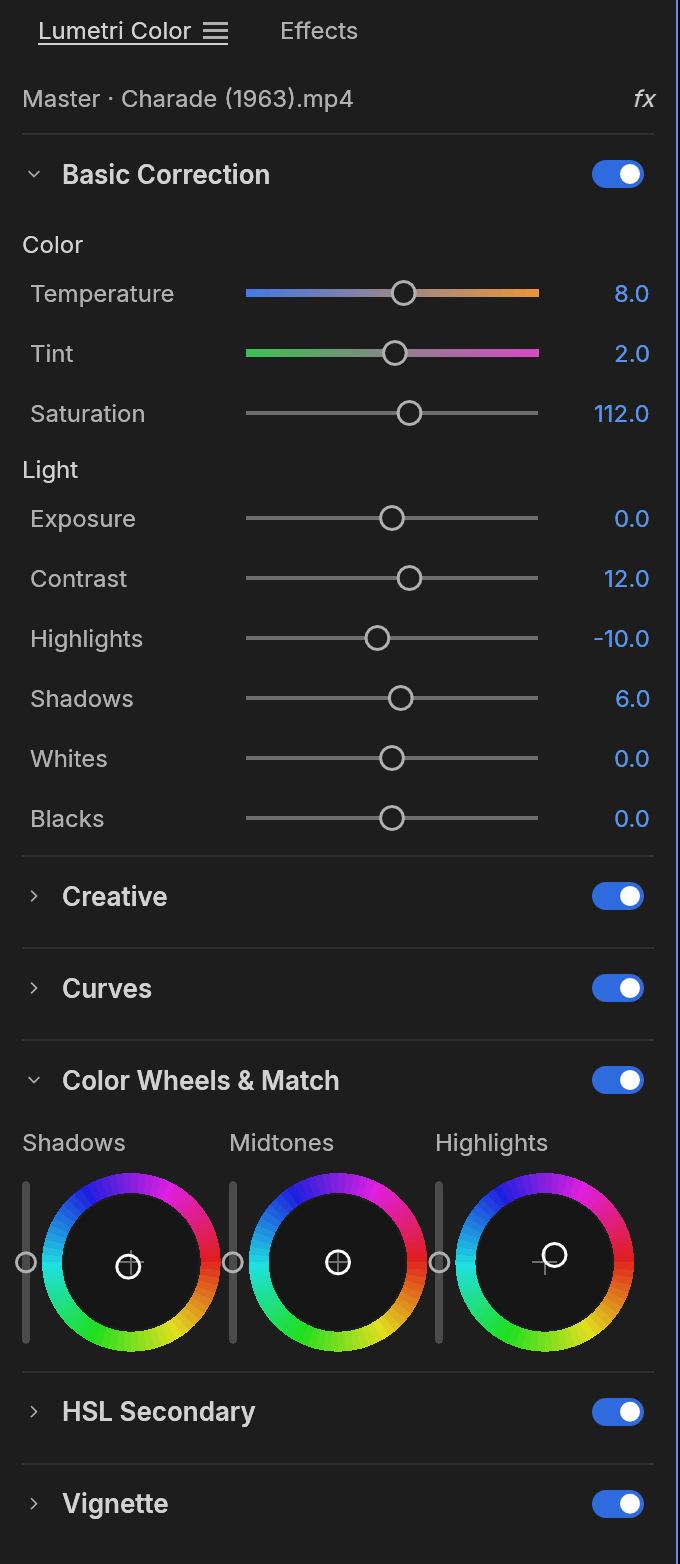
A complete Lumetri-style grading panel, in the order a colourist works:
Basic Correction: temperature and tint, exposure, contrast, highlights, shadows, whites, blacks, saturation.
Creative: eight built-in looks with an intensity control, plus faded film, sharpen and vibrance. The looks are colour transforms written in code, not LUT files.
Curves: an RGB curve editor with monotone-cubic interpolation (no overshoot), and hue vs saturation, hue vs hue, hue vs luma, luma vs saturation and saturation vs saturation.
Color Wheels: shadow, midtone and highlight wheels, each with its own lightness control.
HSL Secondary: key a colour by hue, saturation and luma, view the key as a matte, and correct only what you selected.
Vignette: amount, midpoint, roundness and feather.
The Lumetri Color panel. Basic Correction, Color Wheels and every other section, each with its own on/off switch.
Scopes that tell the truth. The waveform and vectorscope are computed from the graded frame. All grading happens in linear light, in 32-bit float.
Effects and motion
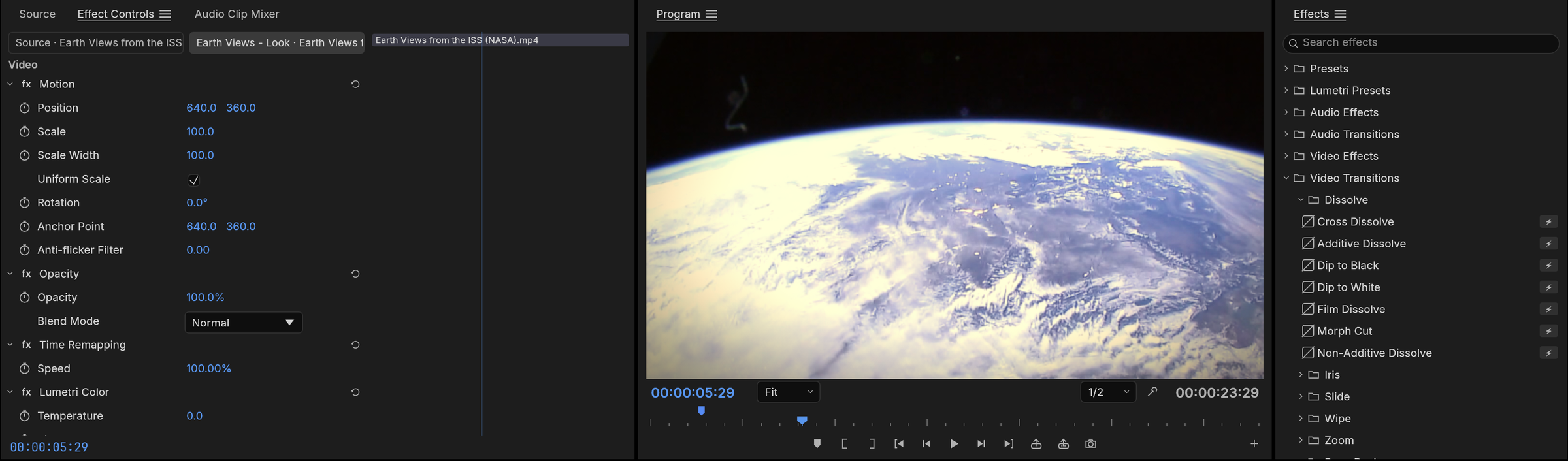
NASA's Earth Views from the ISS with a look applied, and the Effects browser open on the dissolves.
Premiere 26's full Video Effects bin (93 effects in 16 folders), the Legacy bin and the obsolete effects old projects use, plus around 30 transitions. Blurs (Bokeh, Focus, Compound), keys (Ultra Key, Track Matte), distortions (Corner Pin, Turbulent Displace, Warp Stabilizer), Lights & Glows, Immersive Video (VR) effects on equirectangular footage, Posterize Time, Echo and more. Cross dissolve, dip to black or white, film dissolve, wipes, irises, pushes, slides, zooms, page peel, cube spin and more.
Motion and opacity on every clip: position, scale, rotation, anchor point and anti-flicker, plus 26 blend modes.
Keyframes like Premiere's: linear, Bezier, auto and continuous Bezier, hold, ease in and ease out. Effect Controls shows a keyframe lane for every parameter under a time ruler with the playhead's handle, and each animated parameter opens into value and velocity graphs with draggable influence handles. Effect Controls and the Properties panel share the keyframe navigator (◀ ◆ ▶): add or remove the keyframe at the playhead, step to the previous or next one.
A GPU compositor built on wgpu (Metal, Vulkan, DirectX 12, WebGPU). It samples YUV straight from the decoder with footprint supersampling and blends in linear light. A CPU path renders the same frames, and the two are tested against each other.
An eased push-in on the title card: the value graph, the velocity graph and the Bezier influence handle.
Audio
Loudness meters to broadcast standards. Momentary, short-term and integrated loudness and true peak to ITU-R BS.1770 and EBU R128, alongside the peak meters. Our integrated reading matches ffmpeg's ebur128 filter to the tenth of a LU.
Clip effects on our own DSP library: parametric EQ, high-pass, low-pass and band-pass filters, dynamics, a true-peak limiter, delay, reverb, DeNoise, DeHummer, invert and pitch shift. Parameters can be keyframed. Effects stay continuous across scrubbing, playback and export, with latency compensated.
Audio Track Mixer and Audio Clip Mixer: faders, pan, mute, solo, five insert slots per track (pre- or post-fader), sends, submixes and a Mix track, all sample-accurate and latency-compensated. 24 tracks with three effects each mix about six times faster than real time on one core.
Automation like a console: Read, Latch, Touch and Write modes recorded live from the mixer during playback, shown and edited as track keyframes on the timeline. Plus the Audio Gain dialog (set, adjust, normalize) and constant-power crossfades.
Audio-clock playback. The sound card is the master clock, so picture follows sound and never the other way round.
Titles and captions
A real text engine: OpenType shaping with kerning and ligatures, bidirectional text, line breaking, tracking and leading, drawn in linear light and sharp at any scale or rotation.
Type, Shape and Pen tools on the Program monitor: click to type, edit with a caret and selection, drag out rectangles, ellipses and paths. Graphic clips hold text and shape layers with fill, strokes, background and shadow, all keyframable, and edited in the Properties panel.
Captions: caption tracks in Subtitle, CEA-608, CEA-708 and Teletext formats; import and export SRT, WebVTT and SCC with frame-exact timing; edit captions in the Text panel and burn them into exports.
Formats and codecs
No FFmpeg inside. The video codecs, AAC, Opus and the containers are our own Rust code, implemented from the public ITU-T, ISO and IETF specifications and tested frame by frame against ffmpeg as an external oracle.
Decode
Encode
Notes
H.264 / AVC
✓
✓
Decoder bit-exact on 37+ streams, 500–600 fps at 1080p. Encoder: High, Main and Baseline profiles, CABAC, B-frames, CRF/CBR/VBR/2-pass
HEVC / H.265
✓
Main and Main 10, bit-exact on 41 streams (tiles, WPP, PCM, long-term references), about 225 fps at 1080p
Apple ProRes
✓
✓
Decodes 422 Proxy to 4444 XQ; export writes 422 HQ
AAC-LC
✓
✓
VP9
✓
Profiles 0–3, 8/10/12-bit, 4:2:0 to 4:4:4, tiles and superframes; bit-exact on 50+ streams; in WebM/Matroska and MP4
Opus
✓
SILK, CELT, hybrid and multistream surround; range-exact on every RFC 8251 conformance vector; in WebM/Matroska and MP4
AV1
✓
Main profile, 8/10-bit 4:2:0 and monochrome, every coding tool incl. film grain, superres and spatial layers; bit-exact with libdav1d on the libaom vectors tested; in MP4 and WebM/Matroska
Avid DNxHD / DNxHR
✓
✓
All SMPTE ST 2019-1 CIDs (LB to 444, 8/10/12-bit); export writes DNxHR in MOV
MJPEG, PCM
✓
✓
MP3, FLAC, ALAC, Vorbis
✓
Via the symphonia crate (MPL-2.0) for now, to be replaced by our own
Import PNG, JPEG, GIF, WebP, TIFF and BMP; export PNG sequences and animated GIF
Also imported: MPEG-2 / MPEG-1 video, AC-3, MP2, MXF (OP1a / OP-Atom), MPEG transport and program streams (AVCHD, broadcast, DVD), Ogg and image sequences. Not yet: AV1 export, camera RAW, E-AC-3. Hardware decoding works on macOS (VideoToolbox), Windows (Media Foundation) and, for H.264 and HEVC, Linux (VA-API); H.264 export can use NVIDIA's encoder on Windows and Linux (opt-in), and H.265 (HEVC Main, 8-bit) export works through it (NVENC on Windows, VideoToolbox on macOS) (#30).
Export
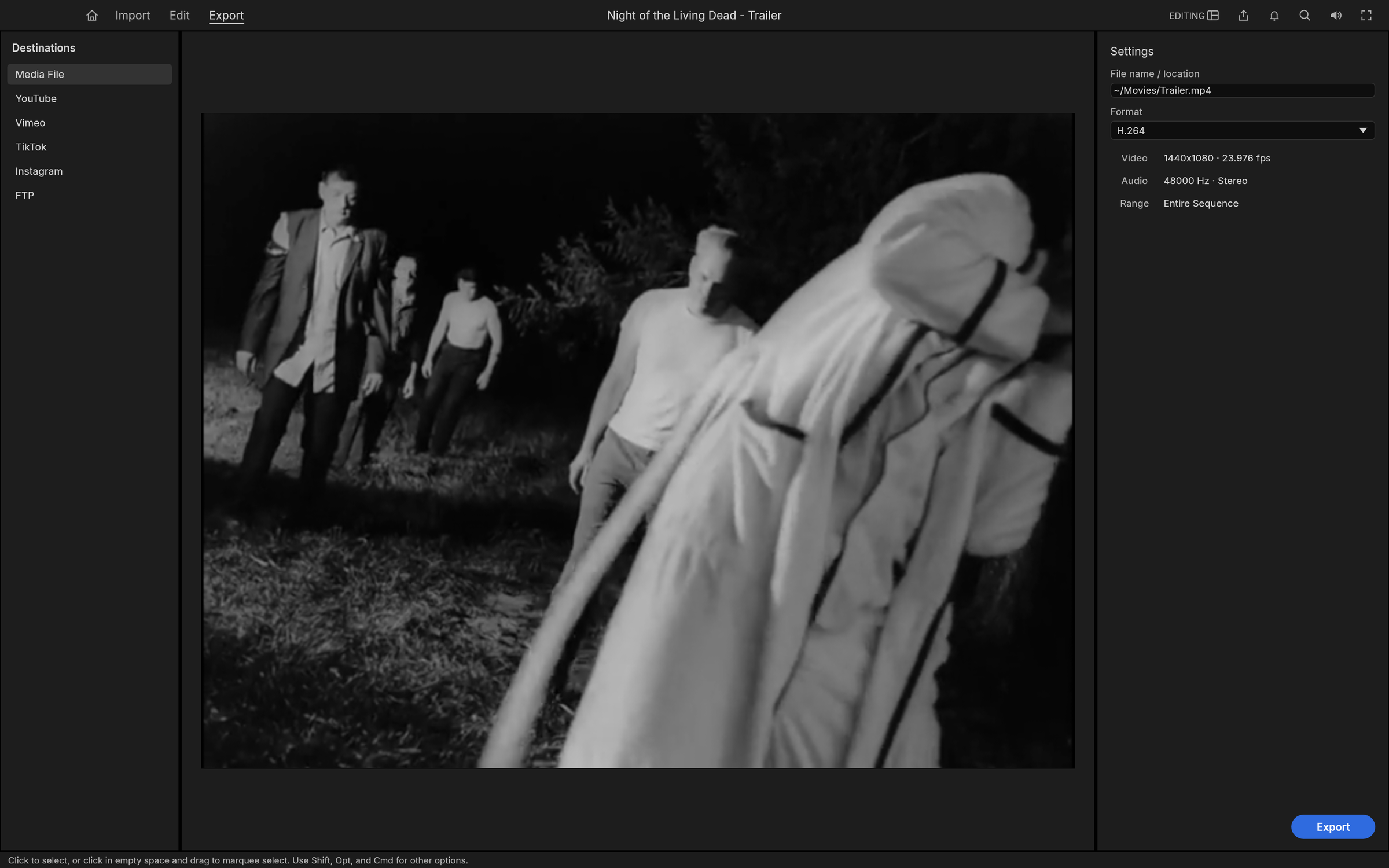
Export mode, set to write the trailer as H.264 MP4.
H.264 MP4 with AAC, using our own encoders. A 6-second 960×540 render takes 1.3 seconds and decodes in ffmpeg without a single warning, with strict error detection on.
Also: Apple ProRes 422 HQ and Motion JPEG in QuickTime, MXF OP1a and Avid-style OP-Atom (DNxHR, ProRes or H.264 with PCM and start timecode), PNG sequences, animated GIF and WAV.
Background jobs with progress and cancel, so you keep editing while it renders.
Render previews: the render bar marks segments green, yellow or red; rendered previews are cached by content, so an edit only invalidates what it touches and undo brings the green back.
Interchange
Move timelines between FilmCraft and every other editor:
Final Cut Pro 7 XML (xmeml): the format Premiere and DaVinci Resolve exchange. It carries nested sequences, transitions, generators, Motion, Opacity, Time Remap and audio levels, with keyframes.
FCPXML 1.9–1.11: the spine, connected clips as lanes, transitions, retiming and compound clips.
OpenTimelineIO: the open interchange format of the film industry, round-tripping every FilmCraft detail through metadata.filmcraft.
CMX 3600 EDL: the oldest format still in use, with drop-frame timecode, dissolves, wipes, speed changes (M2) and one EDL per track.
AAF (Edit Protocol): for Avid Media Composer and Pro Tools. Video and audio tracks, dissolves and dips, clip volume with keyframes, markers and source timecode; audio embedded or as separate WAV / AIFF files, trimmed with handles, with clip effects rendered in and broken out to mono, plus an optional video mixdown. Import reads AAF back, extracting embedded audio.
OMF 2.0: the audio-post handoff: the audio tracks with crossfades and gain, sample-accurate, with the audio encapsulated or alongside.
Import merges the document's bins, media and sequences into your project as one undoable step, and links each media file it finds on disk.
Built for agents
Every menu item, button, slider and drag in FilmCraft is a command with an id, typed parameters and an enabled state. There are more than 650 engine commands (filmcraft-cli commands lists them), with the rest of Premiere's catalogue on the way. The UI, the CLI, a JSON control channel and an MCP server all dispatch the same commands, so Claude or any agent can cut, trim, grade, mix and export exactly the way a person does. The UI can also be driven at the level of mouse and keyboard: every widget has an automation id, and agents can click, drag, type and take screenshots.
// over the control channel (JSON lines on TCP) or as MCP tool calls
{"method": "engine.execute", "params": {"command": "timeline.place",
  "params": {"item": 1, "track": "V1", "seconds": 0, "sourceIn": 284298240000000, "duration": 1270080000000}}}
{"method": "engine.execute", "params": {"command": "effects.setParam",
  "params": {"clip": 87, "effect": "lumetri", "param": "curve_luma", "value": [[0,0],[0.25,0.21],[0.75,0.82],[1,1]]}}}
{"method": "ui.screenshot", "params": {"path": "frame.png"}}
The trailer and the grades in these screenshots were built exactly this way, by an agent driving the running app.
Everywhere
Native on macOS, Windows and Linux, with a native macOS menu bar.
The web: the same engine and UI run in the browser via WebAssembly (apps/filmcraft-web, see docs/web.md); every release ships it as filmcraft-web-<version>.zip.
Swappable UI. The interface is one crate (ui-egui) over the engine, so a different front end can replace it without touching editing logic.
Get started
cargo run --release -p filmcraft                           # the desktop app, with a demo project
cargo run --release -p filmcraft -- --control 9876         # plus the JSON-lines control server
cargo run --release -p filmcraft-cli -- commands           # list every engine command
cargo run --release -p filmcraft-cli -- mcp                # MCP server (headless)
Japanese text in the interface and in titles comes from craft-fonts, an optional build input (release builds always include it; without it FilmCraft uses its own and the system's fonts):
git clone https://github.com/storytold/craft-fonts ../craft-fonts
CRAFT_FONTS_DIR="$PWD/../craft-fonts" cargo run --release -p filmcraft
FilmCraft is young and moving fast. Editing, trimming, multicam, colour, keyframes, effects, titles, captions, mixing, codecs and export work today.
FilmCraft is in alpha. We track two numbers (docs/target-app-parity.md, re-measured 2026-10-10 against Premiere Pro 26.5.2):
Feature breadth: ~86%. Premiere Pro's menu items, effects, transitions, panels and formats that exist in FilmCraft (menus 92% and effects 100% measured).
Ready for real work: ~56%. Our honest estimate of how close FilmCraft is to replacing Premiere on real projects.
The biggest gaps today:
Speed on big footage. Hardware decoding works on macOS and Windows, and for H.264 and HEVC on Linux (VA-API, or NVDEC with NVIDIA's driver; VP9 and AV1 decode in software there). Blend modes and the most common effects run on the GPU, but Lumetri, keys and export rendering still run on the CPU; H.264 encoding can use the hardware encoder on macOS and on Windows and Linux with an NVIDIA GPU (opt-in, Export ▸ Hardware encoding), and H.265 export is hardware-only on both (HDR sequences export Main 10 PQ / HLG with NVENC; VideoToolbox writes 8-bit SDR) (#30).
Premiere projects..prproj files can't be opened yet; bring sequences over as FCP7 XML, AAF or OTIO.
No plugins. No VST3 / Audio Units or OpenFX hosting.
Delivery codecs. H.264 is our only software delivery-codec export; H.265 exports only through a hardware encoder (NVIDIA on Windows: Main 8-bit SDR and Main 10 HDR PQ / HLG; VideoToolbox on macOS: 8-bit Main, SDR); no AV1 export yet.
Real-world media and platforms. Our decoders are bit-exact on conformance streams, but camera and phone files in the wild are less tested. Windows and Linux get far less testing than macOS.
AI features. Few so far; speech to text is optional and off by default.
Bug reports with real footage are the most useful thing you can send us: open an issue or tell us in Discord.
testkit (ffmpeg oracles, fixtures), golden (golden-image tests)
Nothing below the front ends depends on a UI toolkit or OS API. cargo xtask ci checks formatting, lints, tests, the layering rules, asset attribution and the wasm build.
Want a specific build or format? On GitHub, the latest release has every build listed below, and all releases has earlier versions and their notes. <ver> in the file names is the version number, and SHA256SUMS.txt lists a checksum for every file.
Windows
Build
Installer
Portable
x64 (64-bit Intel/AMD)
filmcraft-<ver>-windows-x64.msi
filmcraft-<ver>-windows-x64-portable.zip
arm64 (Snapdragon and other ARM PCs)
filmcraft-<ver>-windows-arm64.msi
filmcraft-<ver>-windows-arm64-portable.zip
x86 (32-bit)
filmcraft-<ver>-windows-x86.msi
filmcraft-<ver>-windows-x86-portable.zip
Installers and executables are code-signed.
If the app doesn't open on Windows: the desktop app initializes only Vulkan and DirectX 12 by
default, not OpenGL. Letting wgpu also create an OpenGL instance can crash some graphics drivers (AMD's
atio6axx.dll) before the window appears, so the app would flash in Task Manager and quit.
WGPU_BACKEND overrides the default for troubleshooting (for example dx12 or vulkan). In
PowerShell, from the folder containing the executable:
$env:WGPU_BACKEND = "vulkan"
& .\filmcraft.exe
Remove-Item Env:WGPU_BACKEND                     # restore the default for later launches
An explicit gl override can bring the driver crash back on affected systems. The macOS, Linux
and web backend defaults are unchanged.
macOS
Build
File
Notes
App, universal (Apple silicon + Intel)
filmcraft-<ver>-macos-universal.dmg
Signed and notarized
Command-line tool, universal
filmcraft-cli-<ver>-macos-universal.zip
Signed and notarized
Linux
Format
x86_64
aarch64 (ARM64)
Notes
AppImage
filmcraft-<ver>-linux-x86_64.AppImage
filmcraft-<ver>-linux-aarch64.AppImage
Runs anywhere; updates itself with AppImageUpdate (.zsync files)
Flatpak
filmcraft-<ver>-linux-x86_64.flatpak
filmcraft-<ver>-linux-aarch64.flatpak
Sandboxed; flatpak install --user <file>
Debian/Ubuntu
filmcraft-<ver>-linux-x86_64.deb
filmcraft-<ver>-linux-aarch64.deb
Fedora/RHEL/openSUSE
filmcraft-<ver>-linux-x86_64.rpm
filmcraft-<ver>-linux-aarch64.rpm
Tarball
filmcraft-<ver>-linux-x86_64.tar.gz
filmcraft-<ver>-linux-aarch64.tar.gz
Unpack and run ./install.sh
RISC-V (riscv64): filmcraft-<ver>-linux-riscv64.tar.gz (tarball only; needs glibc 2.39+, e.g. Ubuntu 24.04
or Debian 13).
The tarball installer places FilmCraft, its command-line tool and desktop integration in
~/.local, without administrator permissions. For all users, run
sudo ./install.sh --prefix /usr/local instead. Running the installer again updates the installation.
Gentoo (community-maintained): the ::snakebyte overlay
packages the Linux release as media-video/filmcraft-bin. It is maintained by the community, not by the
FilmCraft team, so report packaging problems to the overlay:
Runs in a modern browser; host it on any static server
The Crafting Apps
FilmCraft is one of the Crafting Apps: free, open-source creative tools from the
ArtCraft team, each written from scratch in Rust and each able to
stand on its own.
App
What it's for
Code
Learn more
PhotoCraft
Image editing: layers, masks, type and real PSD files
And ArtCraft itself, our AI image and video studio for artists who want real control.
Come make things with us
Our Discord is where artists of every kind hang out: people who paint, shoot, draw, cut film,
set type, and people still figuring out what they like to make. Share what you're working on,
ask for help, tell us what's broken, or tell us what you wish these tools could do.
Whatever your medium and however long you've been at it, you're welcome here.
FilmCraft is dual-licensed under MIT or Apache-2.0, at your option.
Copyright (c) 2026 ArtCraft Team and the FilmCraft contributors. Required notices are in NOTICE.
Bundled fonts, icons, images and other assets keep their own open licenses; each one is listed
with its author, source and license in ATTRIBUTION.md. Builds made with
craft-fonts (all official releases) also embed its fonts
(OFL-1.1), listed in its ATTRIBUTION.md.
Footage and music in the screenshots: NASA's Apollo 11 film and television footage from images.nasa.gov (launch, Launch Control Center, lunar surface and recovery) and the Apollo 11 air-to-ground voice transcript, all US Government works in the public domain (NASA does not endorse this project); Night of the Living Dead (1968), Carnival of Souls (1962) and Charade (1963), all in the US public domain; Earth Views from the ISS by NASA; Chopin's Nocturne Op. 48 No. 1 and Ballade No. 1, performed for Musopen and released under CC0. The media itself is not in this repository. Sources and details for every asset are in ATTRIBUTION.md.
FilmCraft is an independent implementation. It contains no Adobe code, icons, images, presets or LUTs, and no GPL or LGPL code; every icon is drawn in code and every asset is openly licensed and attributed (AGENTS.md), apart from the ArtCraft name and logos, which are trademarks of the ArtCraft Team used under docs/brand/LICENSE-brand.txt. ffmpeg is used only as an external test oracle.
The ArtCraft name, wordmark and logos in docs/brand/ are trademarks of the
ArtCraft Team and are not covered by this license. They may be used only unmodified, and only as
part of this repository and FilmCraft, under docs/brand/LICENSE-brand.txt.
Forks and modified versions must remove them.
Adobe, Photoshop, Illustrator, Premiere Pro, Lightroom, Acrobat, After Effects and InDesign are trademarks or registered trademarks of Adobe Inc. in the United States and/or other countries. FilmCraft is an independent, open-source project and is not affiliated with, sponsored by or endorsed by Adobe Inc.; these names are used only to describe the workflows it is compatible with.
What is this?FilmCraft is an open-source, clean-room reimplementation of Adobe Premiere Pro, rebuilt from scratch in pure Rust with its own codecs, a GPU compositor and a typed command system.
Is this built on Adobe's actual code, or a from-scratch clone?It is a completely independent, clean-room build: the team wrote the H.264, HEVC, ProRes and AAC codecs, plus the compositor, from public specifications instead of reusing Adobe's or FFmpeg's code, while mirroring Premiere's panels and shortcuts.
How do I get FilmCraft running?FilmCraft runs natively as a desktop app on macOS, Windows and Linux, or compiles to WebAssembly to run in a browser; the README links a 'Get started' guide with the full build and launch steps.
Do I need FFmpeg or other codec libraries installed?No - the video and audio codecs are FilmCraft's own Rust implementations rather than wrappers around FFmpeg; only a few legacy audio formats (MP3, FLAC, ALAC, Vorbis) still go through the third-party symphonia crate until native decoders replace it.
Can it encode every format it can decode?Not yet - HEVC, VP9, AV1 and Opus are currently decode-only, and MXF export plus hardware-accelerated decode are still on the roadmap.
Does it run in a browser, or only as a native desktop app?Both - it ships as a native app for macOS, Windows and Linux and also compiles to WebAssembly so it runs directly in a web browser.
What powers the GPU compositor?A compositor built on wgpu that targets Metal, Vulkan, DirectX 12 and WebGPU, sampling YUV straight from the decoder and blending everything in linear light.
What does 'Built for agents' actually mean?Every menu item, button and slider in FilmCraft is a typed command, and the UI, CLI, a JSON control channel and an MCP server all dispatch the same roughly 135 commands, so an AI agent like Claude can cut, trim, grade and export exactly as a human editor would.
Can I bring in projects from Premiere, Final Cut or Avid?Yes - FilmCraft reads and writes Final Cut Pro 7 XML, FCPXML, OpenTimelineIO, CMX 3600 EDL, AAF and OMF 2.0, so timelines move between it and Premiere, DaVinci Resolve, Final Cut Pro or Avid Media Composer.
How accurate are FilmCraft's own codecs compared to FFmpeg?They are tested frame by frame against ffmpeg as an external oracle; the H.264 decoder is bit-exact on 37+ conformance streams and runs around 500-600 fps at 1080p.
Who makes FilmCraft?It's built by the ArtCraft team, a community of digital, generative, music and game artists who hang out on Discord.










 FilmCraft is an open-source, clean-room reimplementation of Adobe Premiere Pro, rebuilt from scratch in pure Rust with its own codecs, a GPU compositor and a typed command system.