



What is this?

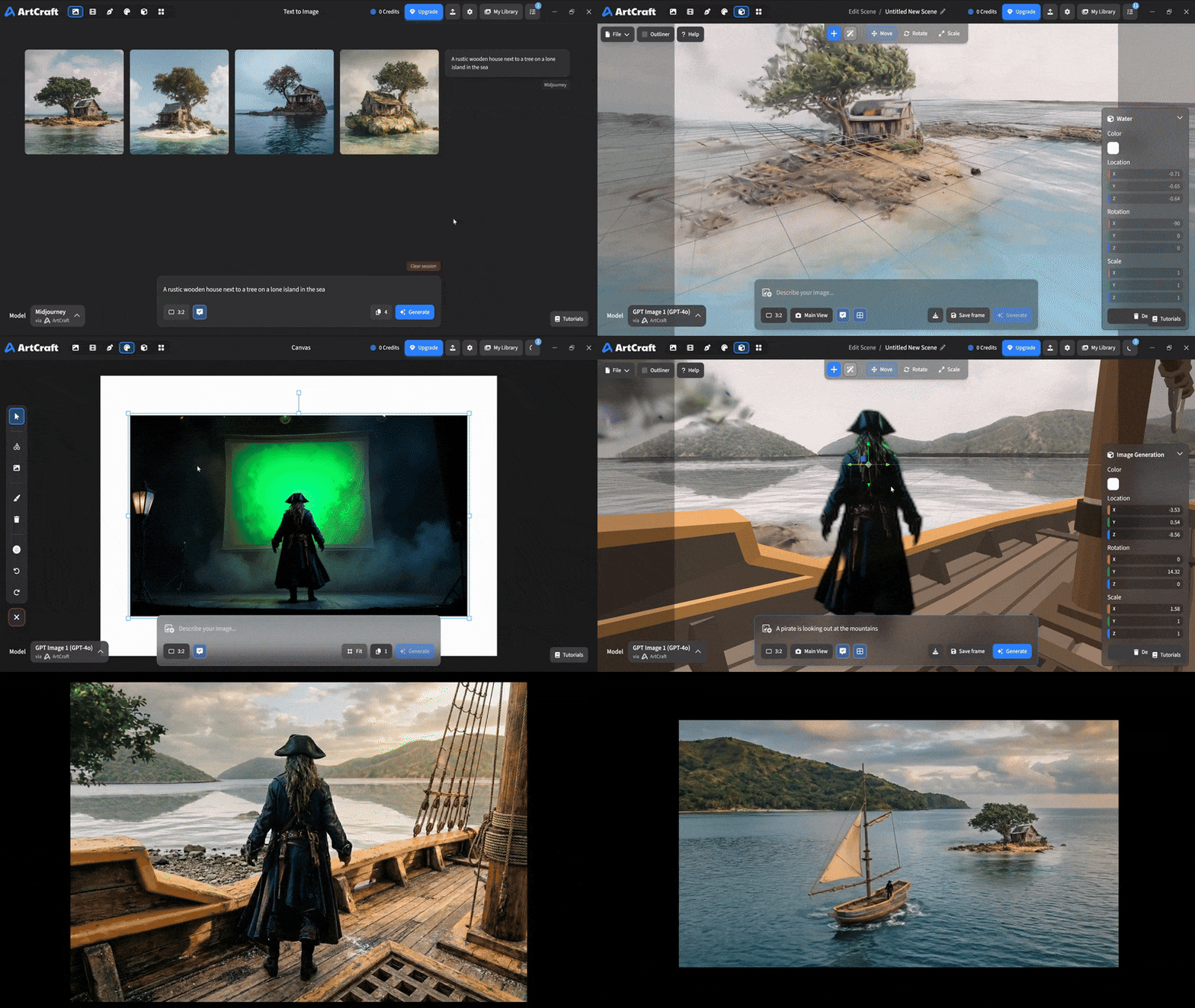
 ArtCraft is a desktop IDE for interactive AI image and video creation, where you compose scenes in 2D, stage them in 3D, and then pick from dozens of AI models to generate the final result.
ArtCraft is a desktop IDE for interactive AI image and video creation, where you compose scenes in 2D, stage them in 3D, and then pick from dozens of AI models to generate the final result.Is this just a prompt box, or does it give more control than that?It gives much more control: visual tools for scene blocking, character posing, 3D compositing, kitbashing, and canvas editing let you build the shot before generating, instead of relying on a single text prompt.
It gives much more control: visual tools for scene blocking, character posing, 3D compositing, kitbashing, and canvas editing let you build the shot before generating, instead of relying on a single text prompt.How do I get it running?Download a stable release for Windows or macOS, grab the latest build from GitHub, or build it from source yourself (required if you're on Linux).
Download a stable release for Windows or macOS, grab the latest build from GitHub, or build it from source yourself (required if you're on Linux).Can I actually use every model listed in the catalog?No, several of the 62 cataloged models are marked as currently disabled or restricted and not yet available in the desktop app, such as some Kling and MiniMax tiers.
No, several of the 62 cataloged models are marked as currently disabled or restricted and not yet available in the desktop app, such as some Kling and MiniMax tiers.Who is ArtCraft built for?It's aimed at artists, designers, and filmmakers who want repeatable, precise creative control over AI-generated images, video, 3D meshes, and worlds, not just quick one-off prompts.
It's aimed at artists, designers, and filmmakers who want repeatable, precise creative control over AI-generated images, video, 3D meshes, and worlds, not just quick one-off prompts.How many AI models can I use inside ArtCraft?The catalog lists 62 models across images, video, music and sound, 3D meshes, and worlds, from providers like ArtCraft's own models, Grok, Midjourney, Sora, and World Labs.
The catalog lists 62 models across images, video, music and sound, 3D meshes, and worlds, from providers like ArtCraft's own models, Grok, Midjourney, Sora, and World Labs.Can I turn a single image into a 3D object?Yes, the Image to 3D Mesh feature converts an image into a 3D object you can position, rotate, and frame precisely in a scene.
Yes, the Image to 3D Mesh feature converts an image into a 3D object you can position, rotate, and frame precisely in a scene.Does it support masking and inpainting for precise edits?Yes, Canvas Image Editing provides drawing, masks, and inpainting tools so you can control exactly where an image changes.
Yes, Canvas Image Editing provides drawing, masks, and inpainting tools so you can control exactly where an image changes.Are more model providers coming?Yes, integrations for Kling, Google, Runway, and Luma are planned, along with possible support for aggregators like OpenArt and Freepik.
Yes, integrations for Kling, Google, Runway, and Luma are planned, along with possible support for aggregators like OpenArt and Freepik.What are similar projects?Open-Generative-AI, ComfyUI-ALLinONE-MinimaxH3, storycast, 3dicon, ViMax, Pixelle-Video, dramaclaw, ooosplat
Open-Generative-AI, ComfyUI-ALLinONE-MinimaxH3, storycast, 3dicon, ViMax, Pixelle-Video, dramaclaw, ooosplatWhich topics is it in?midjourney, background-removal, gpt-image, gaussian-splatting, image-to-3d, ai-art, 3d-graphics, 3d-modeling, inpainting, 3d-reconstruction, creative-tools, ai-video
midjourney, background-removal, gpt-image, gaussian-splatting, image-to-3d, ai-art, 3d-graphics, 3d-modeling, inpainting, 3d-reconstruction, creative-tools, ai-video