SQLite.swift





A type-safe, Swift-language layer over SQLite3.
SQLite.swift provides compile-time confidence in SQL statement
syntax and intent.
Features
- A pure-Swift interface
- A type-safe, optional-aware SQL expression builder
- A flexible, chainable, lazy-executing query layer
- Automatically-typed data access
- A lightweight, uncomplicated query and parameter binding interface
- Developer-friendly error handling and debugging
- Full-text search support
- Well-documented
- Extensively tested
- SQLCipher support via Swift Package Manager
- Schema query/migration
- First-class WAL mode and journaling configuration via
Connection(_, journalMode: .wal) and the enableWAL() / walCheckpoint(...)
APIs
- Works on Linux (with some limitations)
- Active support at
StackOverflow,
and Gitter Chat Room
(experimental)
Usage
import SQLite

// Wrap everything in a do...catch to handle errors
do {
    let db = try Connection("path/to/db.sqlite3")

    let users = Table("users")
    let id = SQLite.Expression<Int64>("id")
    let name = SQLite.Expression<String?>("name")
    let email = SQLite.Expression<String>("email")

    try db.run(users.create { t in
        t.column(id, primaryKey: true)
        t.column(name)
        t.column(email, unique: true)
    })
    // CREATE TABLE "users" (
    //     "id" INTEGER PRIMARY KEY NOT NULL,
    //     "name" TEXT,
    //     "email" TEXT NOT NULL UNIQUE
    // )

    let insert = users.insert(name <- "Alice", email <- "[email protected]")
    let rowid = try db.run(insert)
    // INSERT INTO "users" ("name", "email") VALUES ('Alice', '[email protected]')

    for user in try db.prepare(users) {
        print("id: \(user[id]), name: \(user[name]), email: \(user[email])")
        // id: 1, name: Optional("Alice"), email: [email protected]
    }
    // SELECT * FROM "users"

    let alice = users.filter(id == rowid)

    try db.run(alice.update(email <- email.replace("mac.com", with: "me.com")))
    // UPDATE "users" SET "email" = replace("email", 'mac.com', 'me.com')
    // WHERE ("id" = 1)

    try db.run(alice.delete())
    // DELETE FROM "users" WHERE ("id" = 1)

    try db.scalar(users.count) // 0
    // SELECT count(*) FROM "users"
} catch {
    print (error)
}
Note that Expression should be written as SQLite.Expression to avoid
conflicts with the SwiftUI.Expression if you are using SwiftUI too.
SQLite.swift also works as a lightweight, Swift-friendly wrapper over the C
API.
// Wrap everything in a do...catch to handle errors
do {
    // ...

    let stmt = try db.prepare("INSERT INTO users (email) VALUES (?)")
    for email in ["[email protected]", "[email protected]"] {
        try stmt.run(email)
    }

    db.totalChanges    // 3
    db.changes         // 1
    db.lastInsertRowid // 3

    for row in try db.prepare("SELECT id, email FROM users") {
        print("id: \(row[0]), email: \(row[1])")
        // id: Optional(2), email: Optional("[email protected]")
        // id: Optional(3), email: Optional("[email protected]")
    }

    try db.scalar("SELECT count(*) FROM users") // 2
} catch {
    print (error)
}
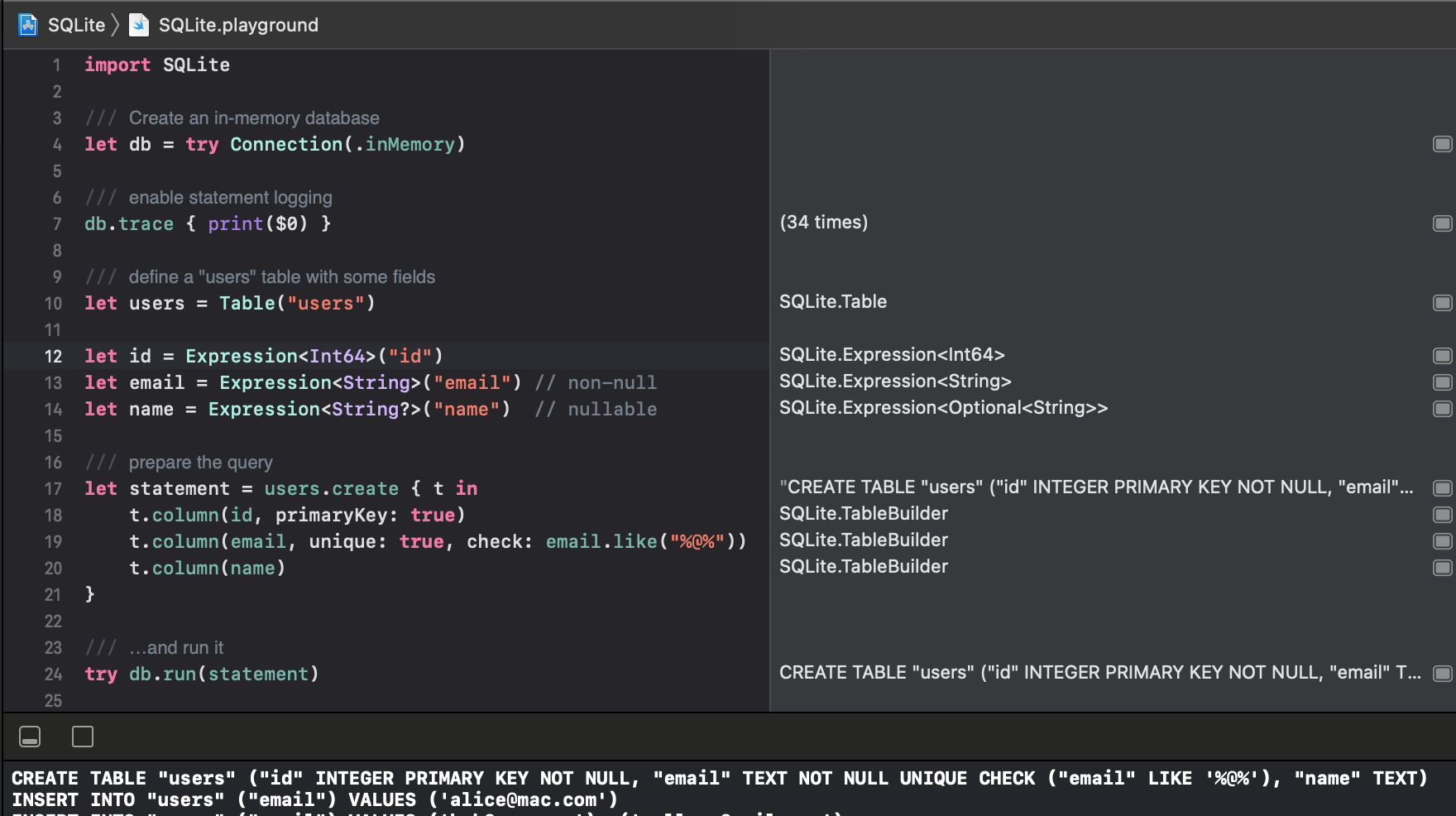
Read the documentation or explore more,
interactively, from the Xcode project’s playground.
Installation
Swift Package Manager
The Swift Package Manager is a tool for managing the distribution of
Swift code.
- Add the following to your
Package.swift file:
dependencies: [
    .package(url: "https://github.com/stephencelis/SQLite.swift.git", from: "0.16.0")
]
- Build your project:
$ swift build
See the Tests/SPM folder for a small demo project which uses SPM.
Carthage
Carthage is a simple, decentralized dependency manager for Cocoa. To
install SQLite.swift with Carthage:
Make sure Carthage is installed.
Update your Cartfile to include the following:
github "stephencelis/SQLite.swift" ~> 0.16.0
Run carthage update and
add the appropriate framework.
CocoaPods
CocoaPods is a dependency manager for Cocoa projects. To install
SQLite.swift with CocoaPods:
Make sure CocoaPods is installed.
# Using the default Ruby install will require you to use sudo when
# installing and updating gems.
[sudo] gem install cocoapods
Update your Podfile to include the following:
use_frameworks!

target 'YourAppTargetName' do
    pod 'SQLite.swift', '~> 0.15.0'
end
Run pod install --repo-update.
Manual
To install SQLite.swift as an Xcode sub-project:
Drag the SQLite.xcodeproj file into your own project.
(Submodule, clone, or download the project first.)
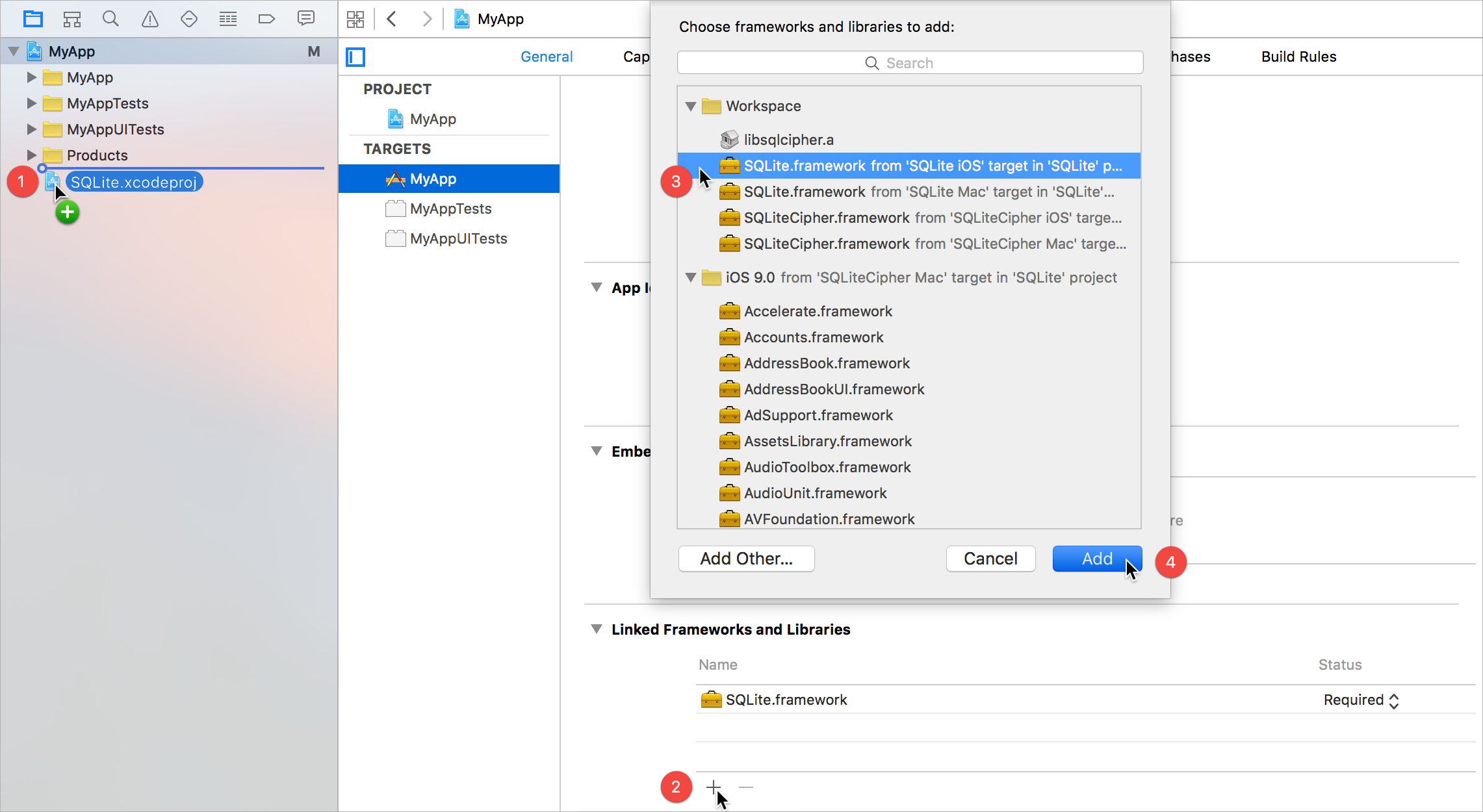
In your target’s General tab, click the + button under Linked
Frameworks and Libraries.
Select the appropriate SQLite.framework for your platform.
Add.
Some additional steps are required to install the application on an actual
device:
In the General tab, click the + button under Embedded
Binaries.
Select the appropriate SQLite.framework for your platform.
Add.
Communication
Read the contributing guidelines. The TL;DR (but please; R):
Original author
License
SQLite.swift is available under the MIT license. See the LICENSE
file for more information.
These projects enhance or use SQLite.swift:
Alternatives
Looking for something else? Try another Swift wrapper (or FMDB):

 SQLite.swift 是一个类型安全的 Swift 语言封装层,基于 SQLite3,让你可以编写并运行 SQL 查询,并在编译时进行检查,而不必直接使用原始的 SQL 字符串。