
summarize README

The project's README from github.com/steipete/summarize. As one markdown file: README.md.

Summarize 📝 — Link in, signal out.

CI npm Node License

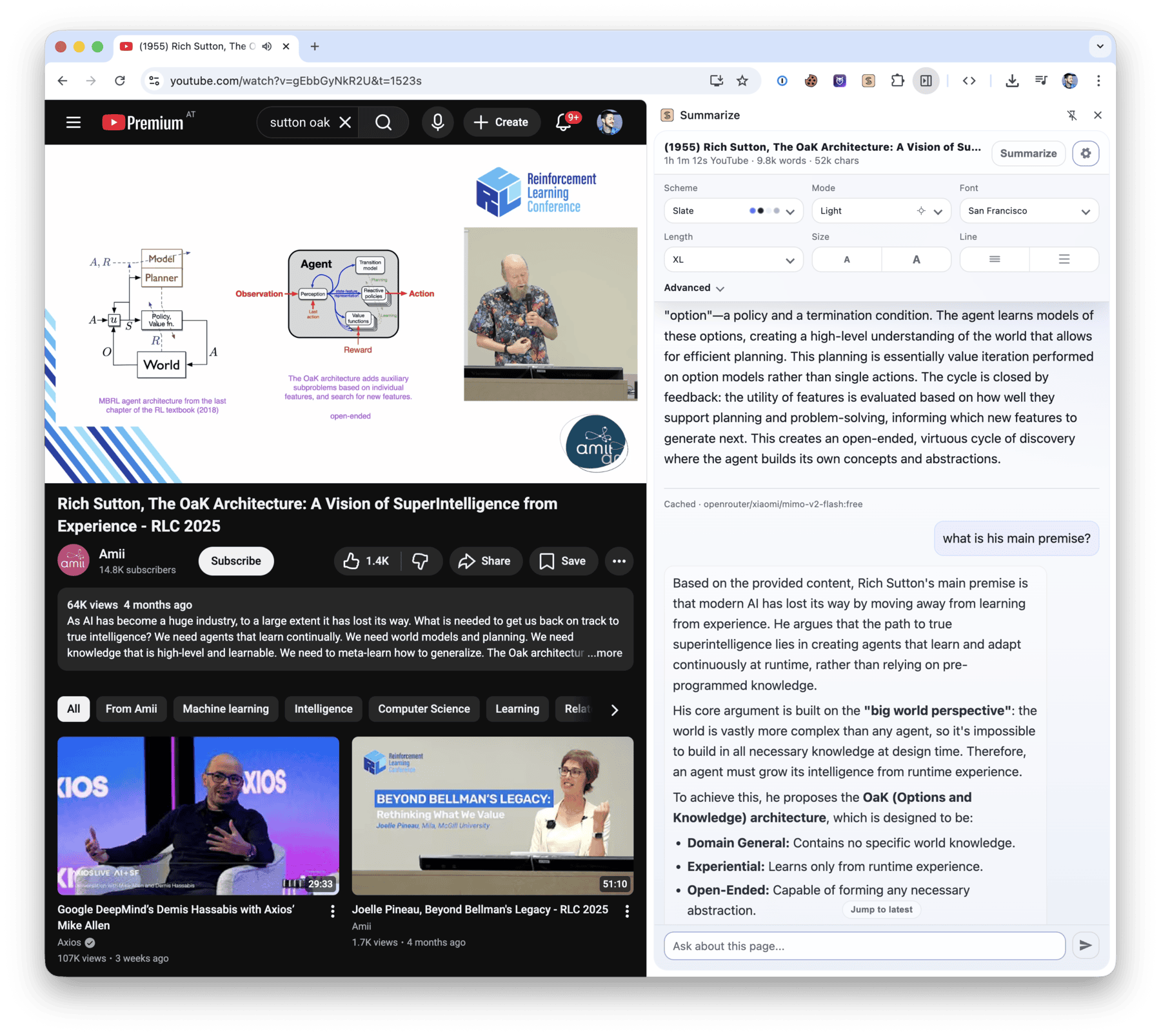
Summarize extracts clean text and produces summaries from web pages, files, YouTube videos, podcasts, and other audio or video. Use it from the Node.js CLI or from the Chrome Side Panel and Firefox Sidebar.

Summarize extension screenshot

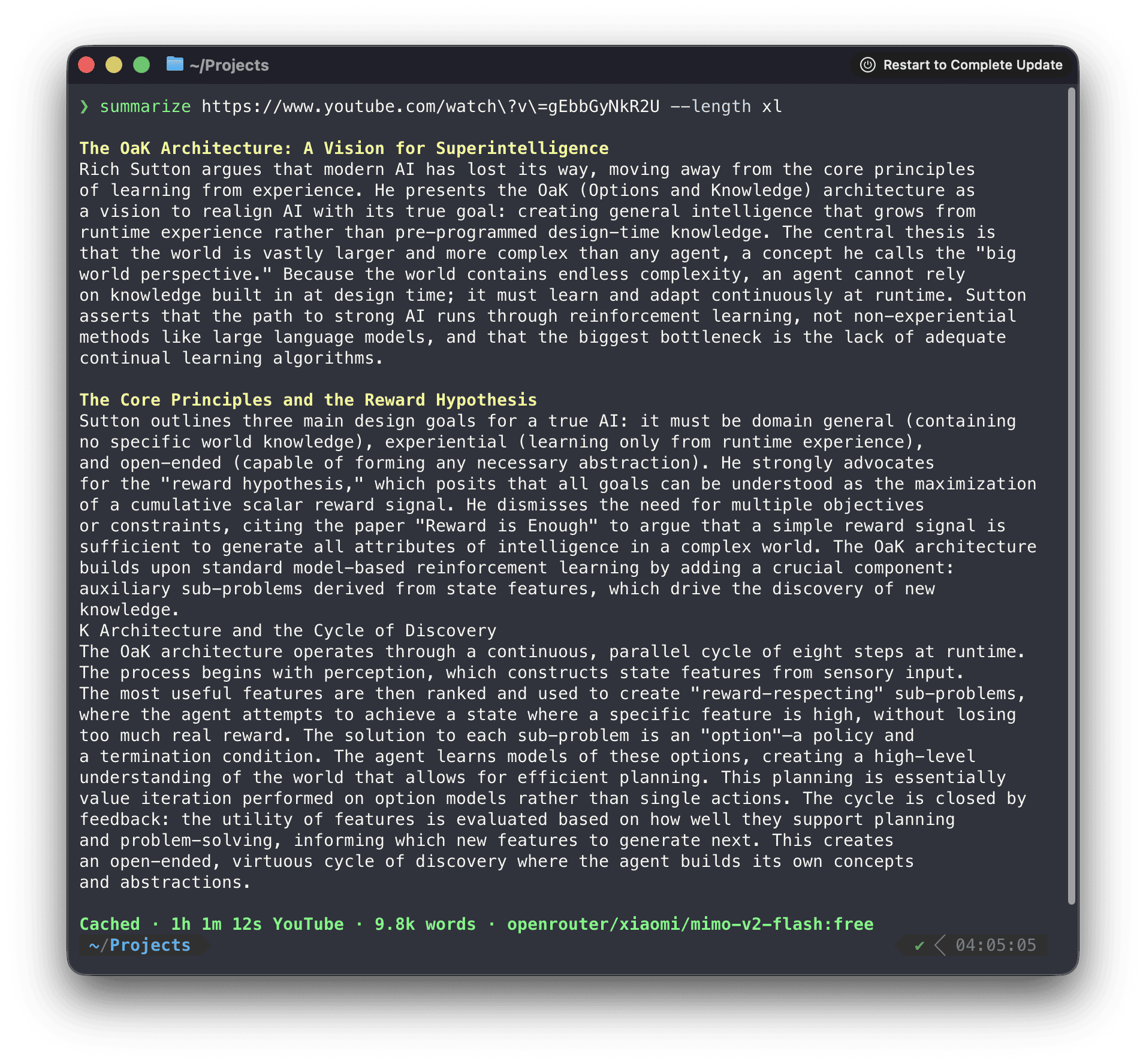
$ summarize "https://example.com" --extract --plain
This domain is for use in documentation examples without needing permission. Avoid use in operations.
[Learn more](https://iana.org/domains/example)

Install

Run it once without installing:

npx -y @steipete/summarize --version

Or install the CLI with npm or Homebrew:

npm install --global @steipete/summarize
brew install summarize

The npm package requires Node.js 24 or newer. Homebrew/core and the macOS archives on GitHub Releases provide standalone builds. See the installation guide for optional media tools and platform notes.

Quick start

Extract readable content without an API key:

summarize "https://example.com" --extract --plain

For a model-generated summary, configure a supported provider or use an authenticated coding CLI:

summarize "https://example.com" --cli codex

The default auto model chooses among configured providers. The five-minute quickstart covers API keys, local models, files, YouTube, podcasts, and JSON output.

What it handles

Input Processing path
Web pages Readability extraction, with optional Markdown and Firecrawl fallbacks
PDFs, images, and text files File-aware extraction and model attachments where supported
YouTube and podcasts Published transcripts first, then configured transcription fallbacks
Audio and video Local or cloud transcription, with optional speaker labels
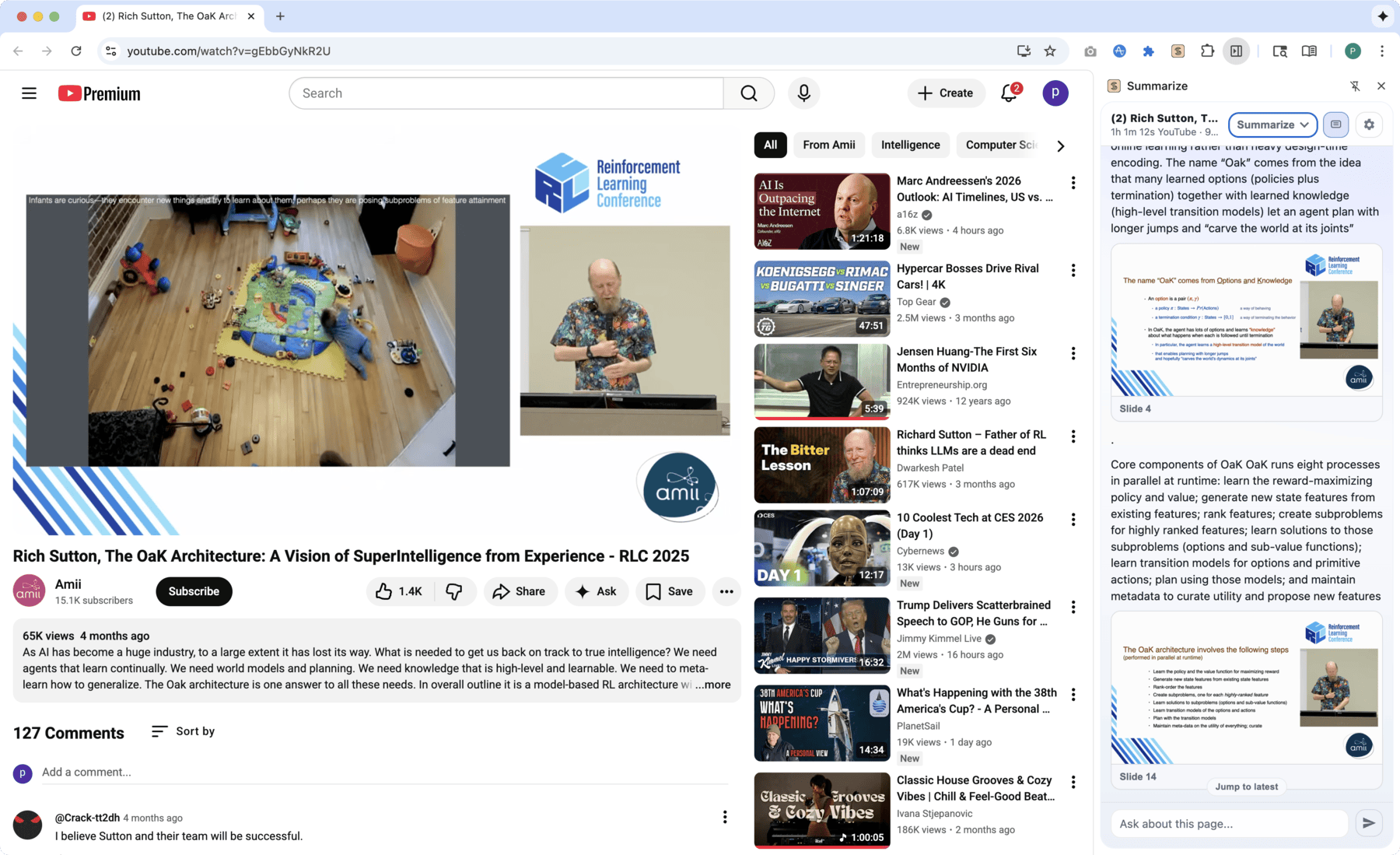
Video slides Scene-based frames, optional OCR, and timestamped output

Use --extract when you only need clean content, --json for a stable automation envelope, and --slides for video frames. The command reference documents every flag.

Summarize CLI screenshot

Browser extension

Install Summarize Side Panel from the Chrome Web Store to summarize the active tab, chat with its content, and work with video transcripts and slides.

Direct mode runs without a companion service. Browser media uses Chrome capabilities for local transcription and slide extraction; the optional daemon adds CLI model backends, native media tools, OCR, shared caches, and Firefox media support.

To pair the installed CLI, copy the token shown by the extension and run:

summarize daemon install --token <TOKEN>

See the extension setup and architecture and troubleshooting guide.

Media and slides

Summarize prefers existing captions and podcast transcripts before it transcribes media. Native ffmpeg, yt-dlp, and tesseract extend codec, YouTube slide, and OCR support; a bundled WebAssembly FFmpeg path covers common media without a native install.

YouTube slide screenshots

The focused guides describe YouTube extraction, media routing, slides, and local ONNX transcription.

Models and configuration

Model IDs use provider/model names. Summarize works with configured API providers, OpenAI-compatible endpoints, Ollama, OpenRouter free models, and authenticated coding CLIs such as Codex, Claude, Gemini, OpenClaw, and GitHub Copilot.

Configuration lives at ~/.summarize/config.json; command-line flags take precedence. Inspect the effective setup without exposing keys:

summarize status

Read the model guide, automatic selection rules, CLI provider guide, and configuration reference for the full setup.

Library

For programmatic extraction without the CLI dependency surface, install @steipete/summarize-core:

npm install @steipete/summarize-core

The package exports focused content and prompt entry points. See the core package README for usage.

Documentation

Start with the documentation index, then follow the guide for your task:

Development

Requires Node.js 24 and pnpm 11.25.0.

pnpm install --frozen-lockfile
pnpm build
pnpm check

See CONTRIBUTING.md for repository layout and extension workflows.

License

MIT. See LICENSE.

summarize (steipete/summarize)

Searching Database…

这是什么?Summarize 是一款命令行工具和浏览器扩展,可以从网页、文件、YouTube 视频、播客以及其他音频或视频中提取干净的文本,并生成摘要。
这是命令行工具、浏览器扩展,还是两者都是?两者都是:既有 Node.js 命令行工具,也有 Chrome 侧边栏扩展,同时还支持 Firefox 侧边栏。
我该如何安装并开始使用?可以不安装,直接通过 npx 运行一次;也可以用 npm 或 Homebrew 安装命令行工具。GitHub Releases 上还提供独立的 macOS 压缩包。
运行之前需要准备什么?npm 包需要 Node.js 24 或更高版本。仅提取普通内容时不需要 API 密钥;但基于模型的摘要需要配置服务提供方(API 密钥、Ollama、OpenRouter,或已完成认证的编程命令行工具,如 Codex、Claude 或 Gemini)。
要完整运行,是否还需要额外的媒体工具?内置的 WebAssembly FFmpeg 方案无需安装任何东西即可处理常见媒体格式;但若要扩展编解码器、YouTube 幻灯片和 OCR 支持,则需要安装本地的 ffmpeg、yt-dlp 和 tesseract。
这款扩展能在 Chrome 之外使用吗?Chrome 应用商店中的扩展可直接在浏览器内处理本地转录和幻灯片;可选的配套守护进程则额外提供命令行模型后端、本地媒体工具、OCR、共享缓存以及 Firefox 媒体支持。
我的配置和密钥保存在哪里?配置(包括服务提供方设置)保存在本地的 ~/.summarize/config.json 中;命令行参数的优先级更高。
对于 YouTube 和播客,它如何决定使用哪份转录稿或字幕?它会优先使用已发布的现有转录稿和播客字幕;只有在没有可用内容时,才会回退到已配置的转录功能。
我能在自己的代码中使用它,而不是通过命令行吗?可以。@steipete/summarize-core 包提供了内容和提示词提取逻辑,可用于编程调用,且无需引入命令行的全部依赖。
它能总结视频幻灯片,而不仅仅是转录稿吗?可以。--slides 参数会按场景生成视频帧,并可选择开启 OCR,输出带时间戳的结果。
如何将浏览器扩展与命令行工具关联起来?复制扩展中显示的配对令牌,然后运行对应的命令行命令,将已安装的命令行工具连接到配套守护进程。
Creator
steipete
Size
57.1 MB
Stars
6.7K
Age
10mo
Commits · 90 Days