







 Windows
 macOS
macOS Linux
Linux Docker
Что это такое?
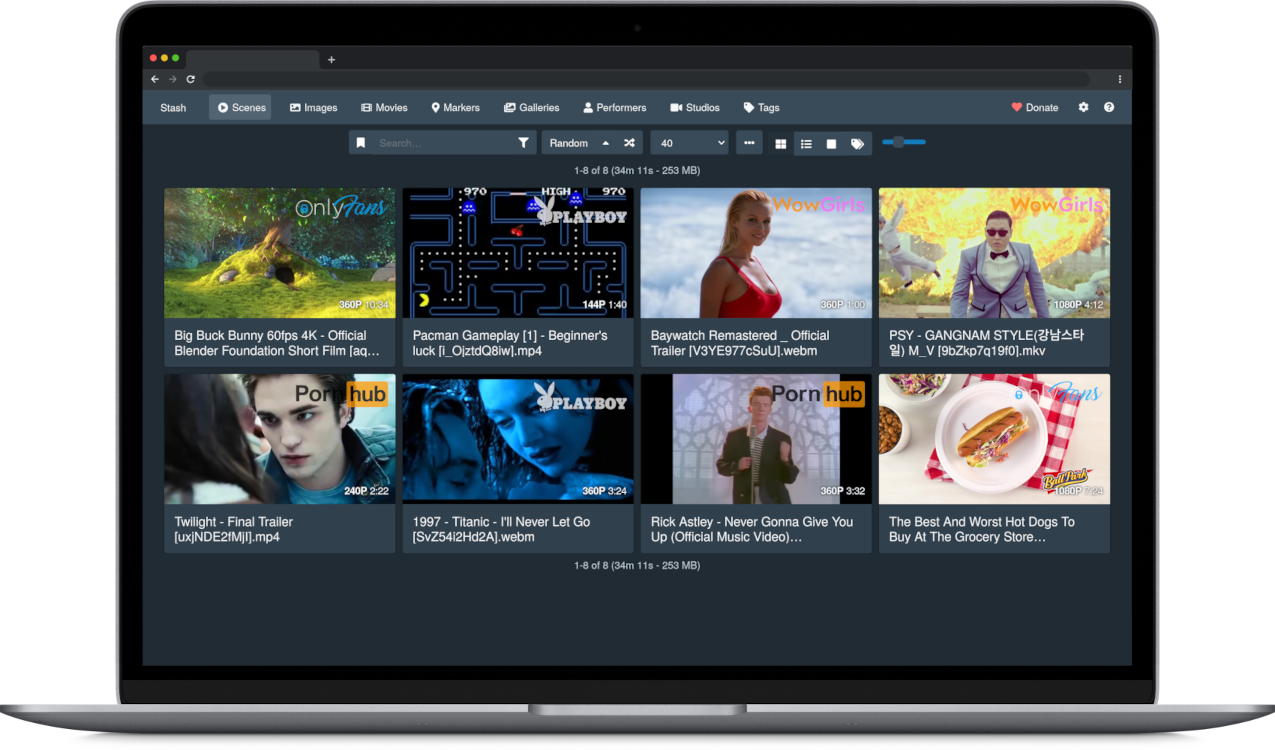
 Stash — это веб-приложение на Go, которое вы разворачиваете у себя. Оно упорядочивает вашу личную коллекцию видео и изображений (SFW или NSFW) и показывает её, подтягивая метаданные — исполнителей, теги и студии — из онлайн-скраперов.
Stash — это веб-приложение на Go, которое вы разворачиваете у себя. Оно упорядочивает вашу личную коллекцию видео и изображений (SFW или NSFW) и показывает её, подтягивая метаданные — исполнителей, теги и студии — из онлайн-скраперов.Это настольная программа или сервер, который я запускаю и открываю в браузере?Это локальный сервер, который вы запускаете (как готовый бинарный файл или через Docker). Работаете вы с ним через веб-браузер, а не через отдельное окно настольной программы.
Это локальный сервер, который вы запускаете (как готовый бинарный файл или через Docker). Работаете вы с ним через веб-браузер, а не через отдельное окно настольной программы.Как запустить Stash?Скачайте готовый бинарный файл для Windows, macOS или Linux со страницы Releases или разверните программу с помощью готового docker-compose.yml. После запуска откройте веб-интерфейс и укажите папки с медиафайлами, чтобы программа их просканировала.
Скачайте готовый бинарный файл для Windows, macOS или Linux со страницы Releases или разверните программу с помощью готового docker-compose.yml. После запуска откройте веб-интерфейс и укажите папки с медиафайлами, чтобы программа их просканировала.Нужно ли мне самому устанавливать FFmpeg?Stash требует FFmpeg. Если его нет, Stash при настройке предложит скачать копию. Пользователям Linux рекомендуется установить FFmpeg через менеджер пакетов своего дистрибутива.
Stash требует FFmpeg. Если его нет, Stash при настройке предложит скачать копию. Пользователям Linux рекомендуется установить FFmpeg через менеджер пакетов своего дистрибутива.Нужно ли знать о требованиях к версии ОС перед установкой?Да: начиная с v0.27.0 Stash перестал поддерживать Windows 7/8/Server 2008/2012 (требуются Windows 10 или Server 2016+), а начиная с v0.32.0 требуется macOS 12 Monterey или новее.
Да: начиная с v0.27.0 Stash перестал поддерживать Windows 7/8/Server 2008/2012 (требуются Windows 10 или Server 2016+), а начиная с v0.32.0 требуется macOS 12 Monterey или новее.Как Stash определяет исполнителей, теги и студии для моих файлов?Он использует скраперы, которые получают метаданные с сайтов и баз данных. Основным эталонным источником служит StashDB — база, которую пополняет сообщество и которая работает на открытом ПО stash-box. Для нишевого контента также используются несколько других баз на stash-box, которыми управляет сообщество.
Он использует скраперы, которые получают метаданные с сайтов и баз данных. Основным эталонным источником служит StashDB — база, которую пополняет сообщество и которая работает на открытом ПО stash-box. Для нишевого контента также используются несколько других баз на stash-box, которыми управляет сообщество.Могу ли я добавить больше скраперов или расширить Stash сверх встроенных возможностей?Да: скраперы, плагины и темы, которые поддерживает сообщество, можно скачать и установить прямо из меню «Settings» в Stash или найти в репозитории CommunityScrapers.
Да: скраперы, плагины и темы, которые поддерживает сообщество, можно скачать и установить прямо из меню «Settings» в Stash или найти в репозитории CommunityScrapers.Какие типы файлов Stash на самом деле умеет упорядочивать?Stash поддерживает широкий набор видео- и графических форматов. Он позволяет добавлять теги к контенту и просматривать статистику по исполнителям, тегам и студиям.
Stash поддерживает широкий набор видео- и графических форматов. Он позволяет добавлять теги к контенту и просматривать статистику по исполнителям, тегам и студиям.Есть ли встроенная справка, если я застряну?Да: нажатие Shift+? внутри приложения открывает встроенное руководство. Также есть официальный сайт с документацией, FAQ и вики сообщества.
Да: нажатие Shift+? внутри приложения открывает встроенное руководство. Также есть официальный сайт с документацией, FAQ и вики сообщества.What are similar projects?livego, amane, mediamtx, go2rtc, livekit, ConvertX, ffmpeg-libav-tutorial, moviepy
livego, amane, mediamtx, go2rtc, livekit, ConvertX, ffmpeg-libav-tutorial, moviepyWhich topics is it in?media-server, metadata, media, graphql, video-processing, ffmpeg, image-processing, json, golang, video, hacktoberfest, plugin
media-server, metadata, media, graphql, video-processing, ffmpeg, image-processing, json, golang, video, hacktoberfest, plugin