



1.1K ·GitHub
Что это?
 Bolt Slides превращает один промпт в презентацию, где каждый слайд — настоящее адаптивное веб-приложение на React, а не статичное слайдшоу — а собирает её любой AI-агент-кодер.
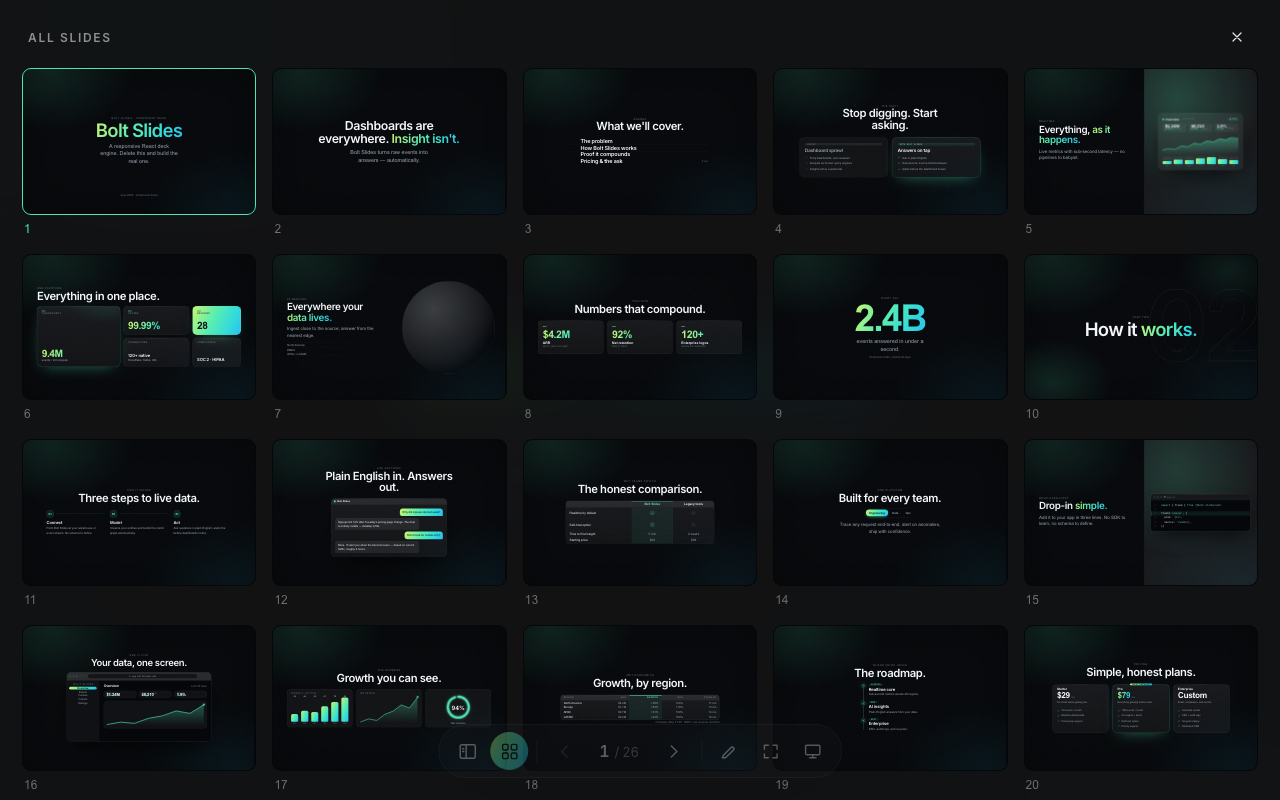
Bolt Slides превращает один промпт в презентацию, где каждый слайд — настоящее адаптивное веб-приложение на React, а не статичное слайдшоу — а собирает её любой AI-агент-кодер.Это приложение для слайдшоу или кодовый фреймворк?Это презентационный фреймворк/шаблон на React: под капотом — классическая презентация с постраничной навигацией (сайдбар с миниатюрами, обзор сеткой, click-builds, режим докладчика), где каждый слайд буквально обычный React-компонент.
Это презентационный фреймворк/шаблон на React: под капотом — классическая презентация с постраничной навигацией (сайдбар с миниатюрами, обзор сеткой, click-builds, режим докладчика), где каждый слайд буквально обычный React-компонент.Как собрать презентацию с его помощью?Откройте репозиторий в Bolt и дайте агенту промпт, например «Сделай мне презентацию, представляющую твой проект твоей аудитории», — встроенный скилл научит её темировать, компоновать и писать презентацию за один заход. Или сделайте вручную: запустите dev-сервер, посмотрите демо из 26 слайдов, затем удалите демо-слайды в 'src/App.tsx' и напишите свои.
Откройте репозиторий в Bolt и дайте агенту промпт, например «Сделай мне презентацию, представляющую твой проект твоей аудитории», — встроенный скилл научит её темировать, компоновать и писать презентацию за один заход. Или сделайте вручную: запустите dev-сервер, посмотрите демо из 26 слайдов, затем удалите демо-слайды в 'src/App.tsx' и напишите свои.Какие агенты-кодеры могут собрать презентацию за меня?Подойдёт любой агент, умеющий читать встроенный файл скилла и писать React/JSX — в README отдельно названы Claude Code, Codex, Cursor и Bolt.
Подойдёт любой агент, умеющий читать встроенный файл скилла и писать React/JSX — в README отдельно названы Claude Code, Codex, Cursor и Bolt.А если я не хочу пользоваться агентом?Слайды можно писать и руками, но визуального редактора нет — слайды это обычные React-компоненты, так что нужно спокойно владеть JSX, получением данных или монтированием штук вроде 3D-сцен прямо в коде.
Слайды можно писать и руками, но визуального редактора нет — слайды это обычные React-компоненты, так что нужно спокойно владеть JSX, получением данных или монтированием штук вроде 3D-сцен прямо в коде.Какие компоненты входят в библиотеку?Туда входят структурные блоки (Cover, Agenda, Section, Split, Bento, Slide), компоненты данных (Charts, Table, StatGrid, BigNumber, CountUp, VisualDashboard), сюжетные компоненты (Quote, Contrast, Timeline, Steps, Chat), продуктовые (CodeWindow, BrowserFrame, Pricing, Team) и украшения вроде Globe, TiltCard, Marquee и Accordion — всё показано в стартовой презентации.
Туда входят структурные блоки (Cover, Agenda, Section, Split, Bento, Slide), компоненты данных (Charts, Table, StatGrid, BigNumber, CountUp, VisualDashboard), сюжетные компоненты (Quote, Contrast, Timeline, Steps, Chat), продуктовые (CodeWindow, BrowserFrame, Pricing, Team) и украшения вроде Globe, TiltCard, Marquee и Accordion — всё показано в стартовой презентации.Как изменить внешний вид презентации?Каждый цвет, шрифт, радиус и тень живут в блоке :root файла src/styles/tokens.css, поэтому смена переменной вроде --primary перекрашивает всю презентацию, включая обрамление. Девять готовых тематических направлений — от журнальной роскоши до тёмного техно — описаны в скилле.
Каждый цвет, шрифт, радиус и тень живут в блоке :root файла src/styles/tokens.css, поэтому смена переменной вроде --primary перекрашивает всю презентацию, включая обрамление. Девять готовых тематических направлений — от журнальной роскоши до тёмного техно — описаны в скилле.Что умеет режим докладчика?Режим докладчика открывается во второй вкладке браузера, синхронизируемой с вкладкой для аудитории через BroadcastChannel; он показывает таймер, превью следующего слайда и редактируемые заметки, которые сохраняются локально, пока вы докладываете.
Режим докладчика открывается во второй вкладке браузера, синхронизируемой с вкладкой для аудитории через BroadcastChannel; он показывает таймер, превью следующего слайда и редактируемые заметки, которые сохраняются локально, пока вы докладываете.Можно дать прямую ссылку на один слайд?Да — хеш URL отслеживает текущий слайд (например, '/#7'), так что можно поделиться глубокой ссылкой, открывающей сразу этот слайд.
Да — хеш URL отслеживает текущий слайд (например, '/#7'), так что можно поделиться глубокой ссылкой, открывающей сразу этот слайд.What are similar projects?Libraries.dev, luobo-ppt, hairline, visual-explainer, framefields, Infographic, evondevKit, open-slide
Libraries.dev, luobo-ppt, hairline, visual-explainer, framefields, Infographic, evondevKit, open-slideWhich topics is it in?slides, jsx, presentation, agentic, charts, ai-tools, theme, component-library, data-visualization, skill, cursor, ui-components
slides, jsx, presentation, agentic, charts, ai-tools, theme, component-library, data-visualization, skill, cursor, ui-components