





SU_IMD README

The project's README from github.com/soul-99/SU_IMD. As one markdown file: README.md.

IMD - It's My Device

Supercharged fork of Geto

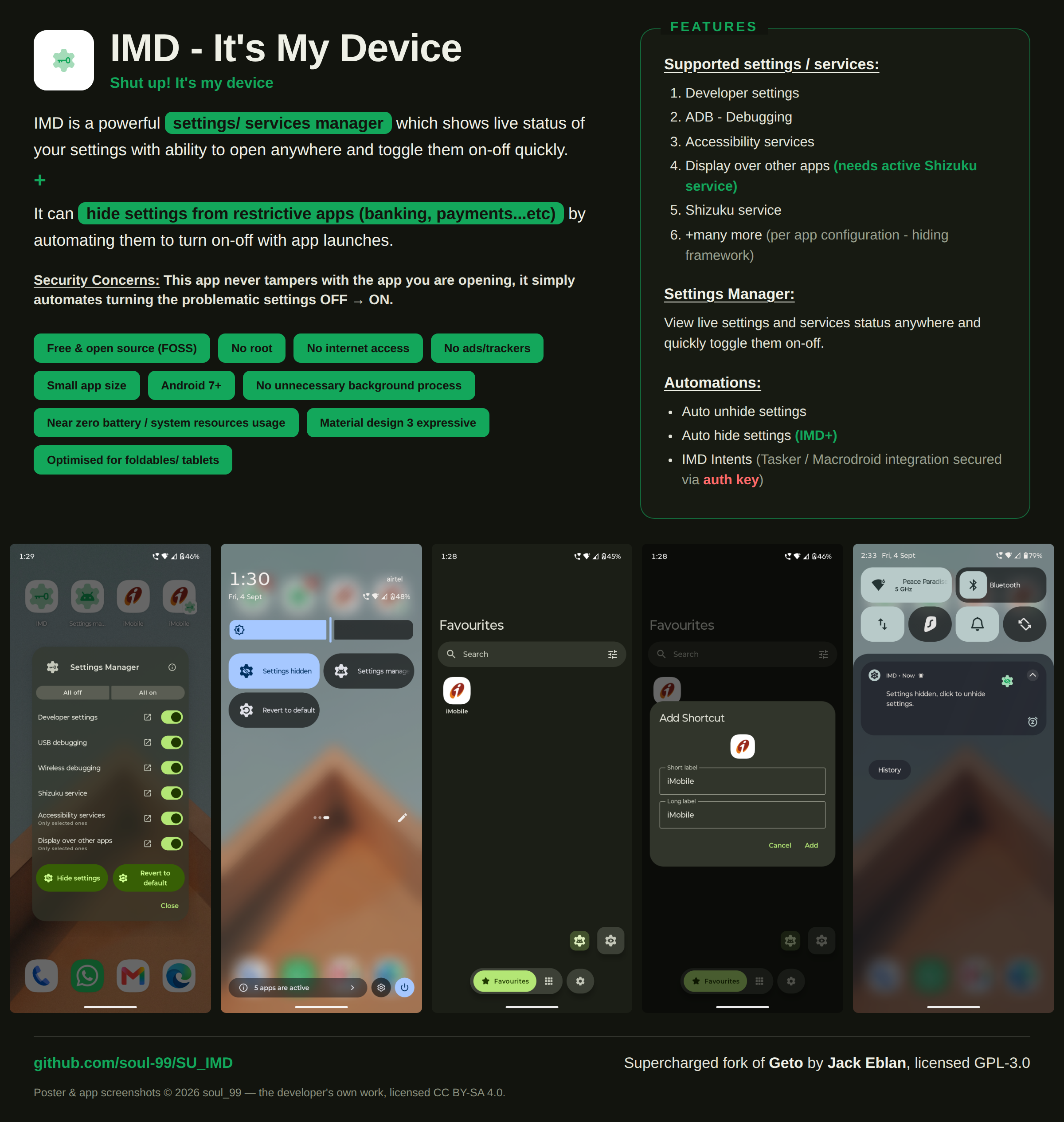
Poster: IMD - It's My Device. A settings/services manager that shows the live status of your settings, and a hider that turns them off and back on around a restrictive app. Lists the supported settings, the three automations, and five screenshots of the app

Get it on Obtainium Get it on GitHub Get it on F-Droid

Latest release GitHub downloads

IMD (It's My Device) is a  powerful settings/ services manager  and  settings/ services hider  (automated disable-enable settings) for restrictive apps (banking, payments...etc). It supports the following settings / services :

  1. Developer settings
  2. ADB / Debugging
  3. Accessibility services
  4. Display over other apps (needs active Shizuku service)
  5. Shizuku service
  6. and many more (per app configuration - hiding framework, hint: use Settings observer for help)

How this works

flowchart TD
    A["User opens app from IMD / IMD generated app shortcut"]
    B["IMD actually disables these settings<br/><b><mark>no app's security policy is broken</mark></b>"]
    C["Use your app normally"]
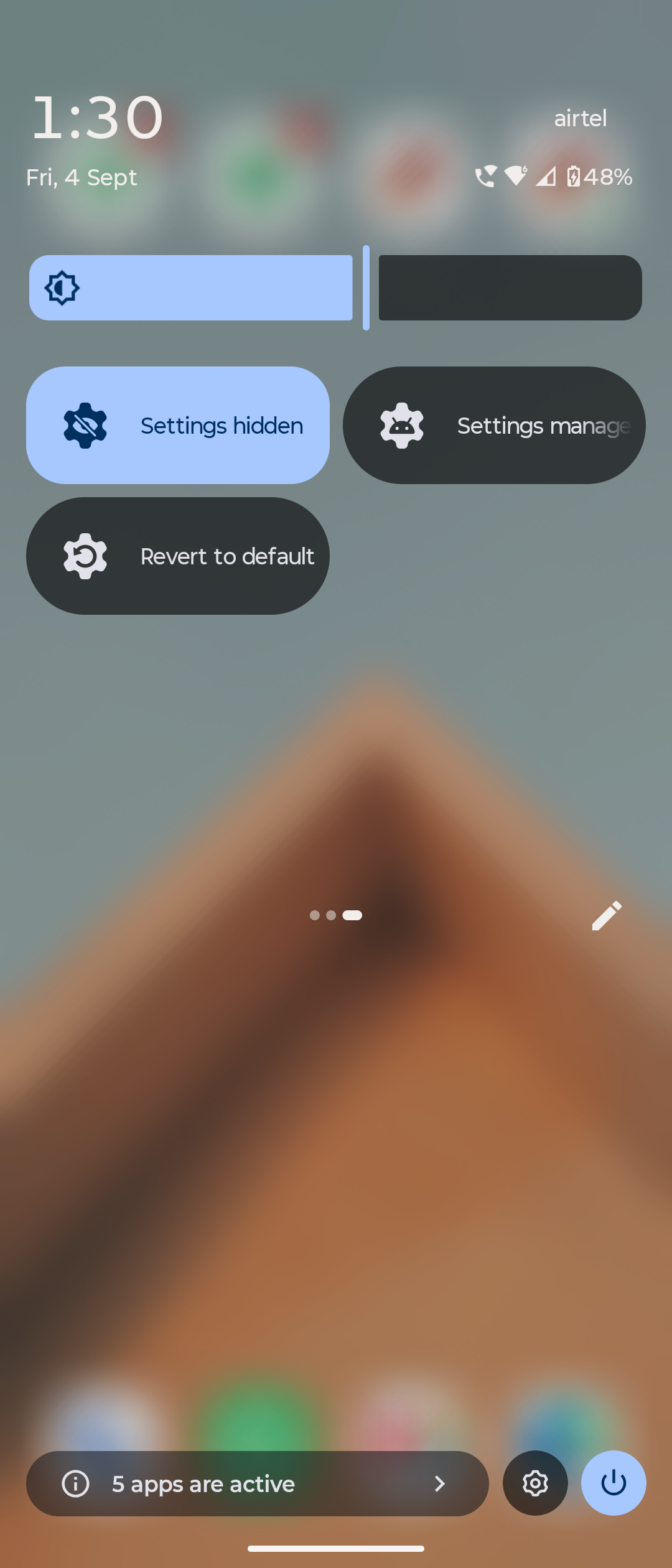
    D["Use Revert function<br/><i>(accessible via: notification / quick toggle / Quick settings tile / homescreen shortcut / IMD settings manager)</i>"]
    E["IMD enables the disabled settings"]
    A --> B
    B --> C
    C --> D
    D --> E

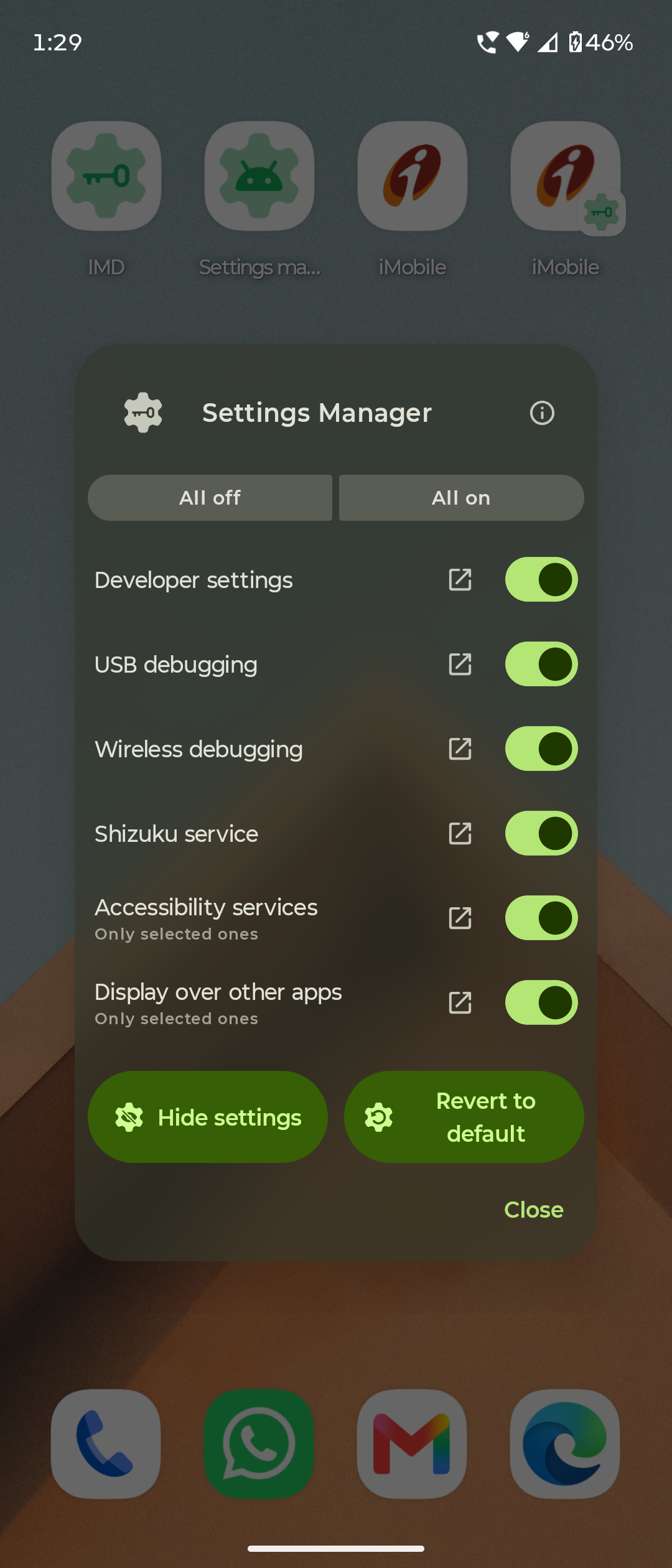
Settings manager

The Settings Manager window over a homescreen: All off / All on, then Developer settings, USB debugging, Wireless debugging, Shizuku service, Accessibility services and Display over other apps, each with a switch and a link out to Android's own page, and Hide settings / Revert to default at the bottom The Quick Settings shade with three IMD tiles: Settings hidden, Settings manager and Revert to default

IMD's settings manager allows you to:

  1. View the live status of your settings/ services
  2. Quickly toggle them on-off

Automations

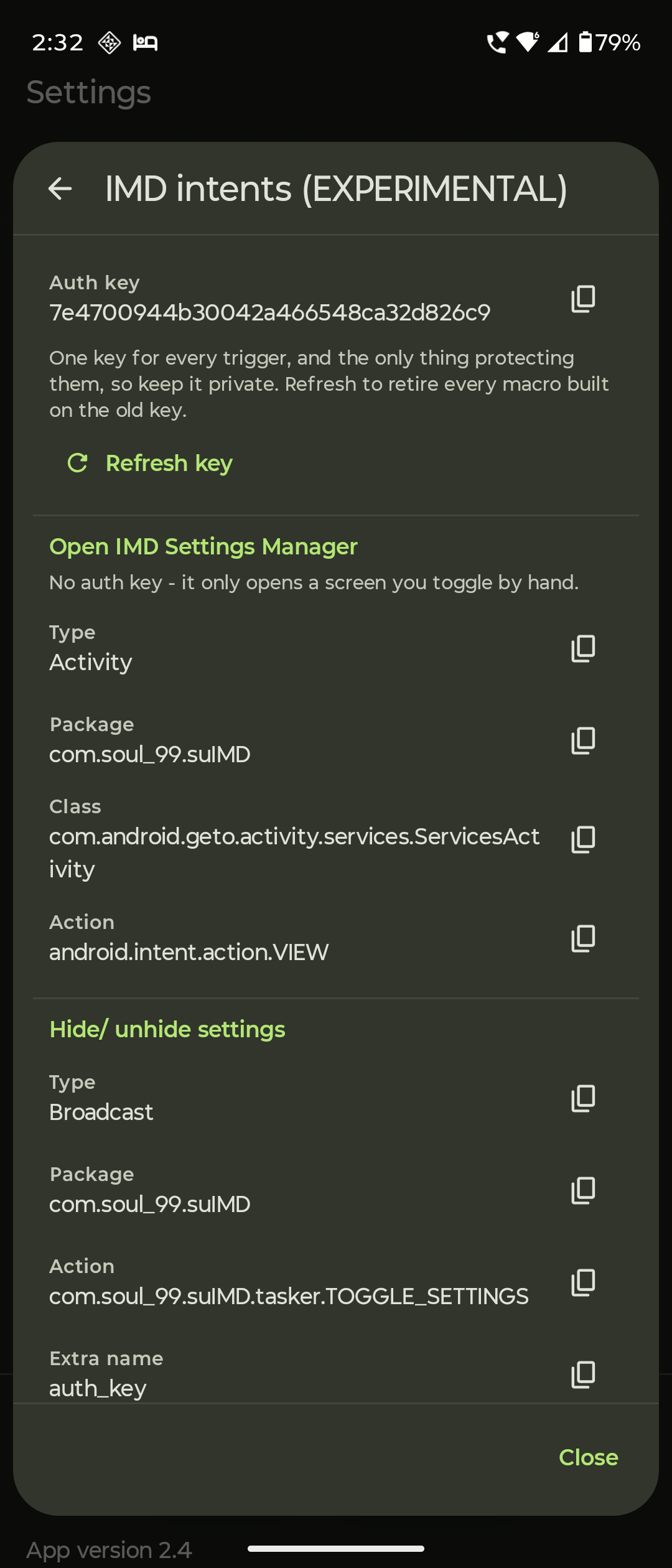
The 'How auto unhide works' page: seven numbered steps from IMD hiding your settings to the notification going away once everything is back The 'How IMD+ works' page: nine numbered steps from opening a watched app to IMD's own accessibility service coming back and IMD+ being armed again The IMD intents screen, showing the per-install auth key with a refresh, and the type, package, class and action of each intent with a copy button on every value

  1. Auto unhide settings
  2. Auto hide settings (IMD+ : needs background service)
  3. IMD Intents (Tasker / MacroDroid integration, secured with auth keys)

About Permissions

Security Concerns

Changelog

Every release and what changed in it: CHANGELOG.md

Support the project 🫶 (for free)

I created this app in my busy schedule of full-time medical residency.

Initially it was born out of my personal needs, but after positive community feedback, I decided to share it with the FOSS community.

I want it to be taken over by more capable developers in future, as my profession does not allow me to maintain it all year round.

You can do these for free, if you want to support this project and keep it alive.

  1. Share this project/app to community. This is most helpful and will help to keep the project alive. (I don't need any credit or mentions) Share the repo »

    https://github.com/soul-99/SU_IMD
    
  2. ⭐ Star the GitHub repo to increase its visibility.

  3. Report bugs in the main repo.

  4. Join discussions.

  5. Contribute to the code or docs, if you are a developer.

- soul_99
(Dr. Utkarsh Rajput)

Development & Contributions

Before you change anything, read SUIMD.md first. It documents how the app works, how each of its logics runs, and what was changed from the original Geto and why - including the bugs found in it and the reasoning behind each fix. Almost everything that looks odd in this code is answered there.

Then read CONTRIBUTING.md before you open a pull request.

About this project

I'm a full time radiology resident doctor, software is just a part time hobby.

This app exists because I wanted it to exist for myself, I have made multiple revisions after testing every build, fixing bugs and adding features, making the app what it is now - on par with my expectations.

Please know that due to my profession, it might take me some time for me to reply to queries, fix bugs and add new features in future builds, so please be patient.

But I do plan to maintain this app for the near future, until someone else makes a better app for the same purpose.


Namaste 🙏 & Thanks !


Long live free and open source software!

SU_IMD (soul-99/SU_IMD)

Searching Database…

476 ·GitHub
这是什么?Geto 的一个功能增强分支:一个用来管理和隐藏手机设置/服务的安卓应用,可以自动停用或重新启用这些设置,让有限制的应用(银行、支付类)保持正常运行。
这是我装在手机上的应用,还是在电脑上运行的脚本?它是一个普通的安卓应用(包名为 com.soul99.suIMD),不是在电脑上运行的东西。它甚至可以和原版 Geto 同时安装——两者能在同一台设备上共存。
我该怎么在手机上把它配置好?安装 APK,然后通过 adb shell 或 Shizuku 一次性授予 WRITESECURESETTINGS 权限。这个权限是必需的——正是它允许应用修改设置状态。
它需要 Shizuku 在运行才能工作吗?不一定——Shizuku 是可选的,只用来隐藏“显示在其他应用上层”权限时才需要。其他所有功能都通过配置时一次性授予的 WRITESECURESETTINGS 标准权限来完成。
它能像普通应用那样自动更新吗?不能——它完全没有网络权限,所以无法检查自身更新;想知道有没有新版本,就得靠 Obtainium。另外 IMD+ 自动隐藏功能也需要一个后台服务在运行。
它能在我的手机上用吗?仅支持安卓——任何运行 Android 7.0(API 24)或更新版本的设备都可以,无需 root。没有 iOS 或桌面版。
它工作时需要联网吗?完全不需要——它可以完全离线运行,而且不会运行任何不必要的常驻后台服务,所以电池和系统资源消耗几乎为零。
它会监视我或收集数据吗?不会。它没有任何广告、统计分析、追踪器或账号,也不会动你的其他应用,而且修改设置的那些功能无法被其他应用触发——只能由你自己操作。
它是免费开源的吗?是的——采用 GPL-3.0 协议,和原版 Geto 相同,没有任何广告或账号。
它能隐藏哪些设置和服务?开发者选项、ADB/调试、无障碍服务、显示在其他应用上层(需要 Shizuku 服务处于运行状态)、Shizuku 服务本身等等——每一项都可以按应用单独配置。应用内还有一个设置观察器,帮你找到需要隐藏的内容。
它能自动切换设置吗,比如我打开银行应用的时候?可以——它支持设置的自动取消隐藏和自动隐藏(IMD+ 自动隐藏以后台服务形式运行),还提供 IMD Intents,让 Tasker 或 MacroDroid 这类自动化应用通过带鉴权密钥的方式触发它。
它和原版 Geto 应用有什么不同?它是 JackEblan 的 Geto 的一个功能增强分支,有自己独立的包名(com.soul99.suIMD),所以两个应用可以并排安装。SUIMD.md 文档详细列出了相对原版的所有改动,包括在其中发现的 bug 以及每个修复背后的原因。
它是谁开发的,更新速度快吗?作者是 Soul99(Dr. Utkarsh Rajput),一名全职放射科住院医师。他为自己开发了这款应用,并发布到 FOSS 社区。他也坦率地表示,工作原因会拖慢回复和修复的速度,并希望将来有更有能力的开发者接手这个项目。
Creator
soul-99
Size
19.5 MB
Stars
476
Age
1mo
Commits · 90 Days