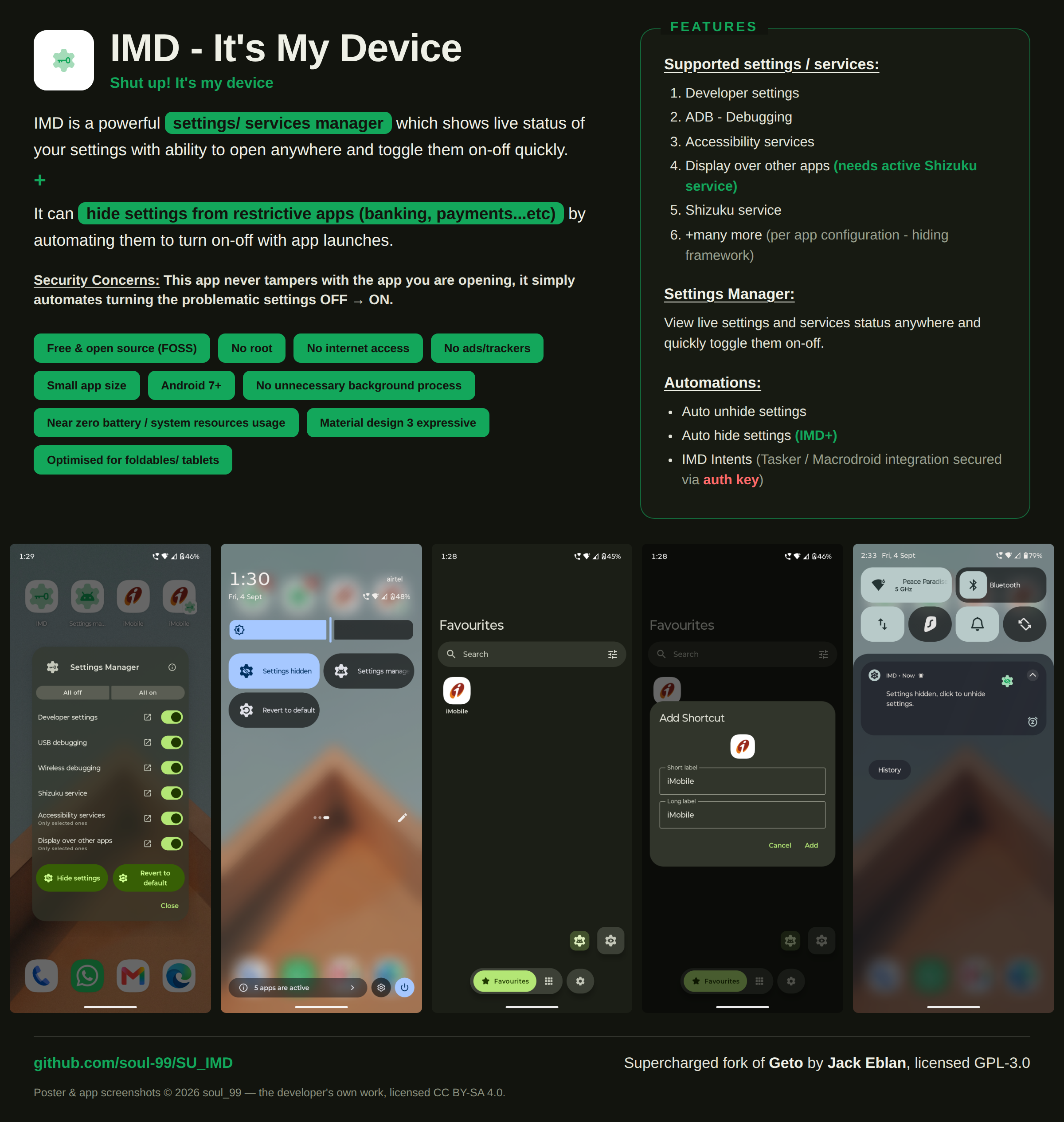







Что это такое?
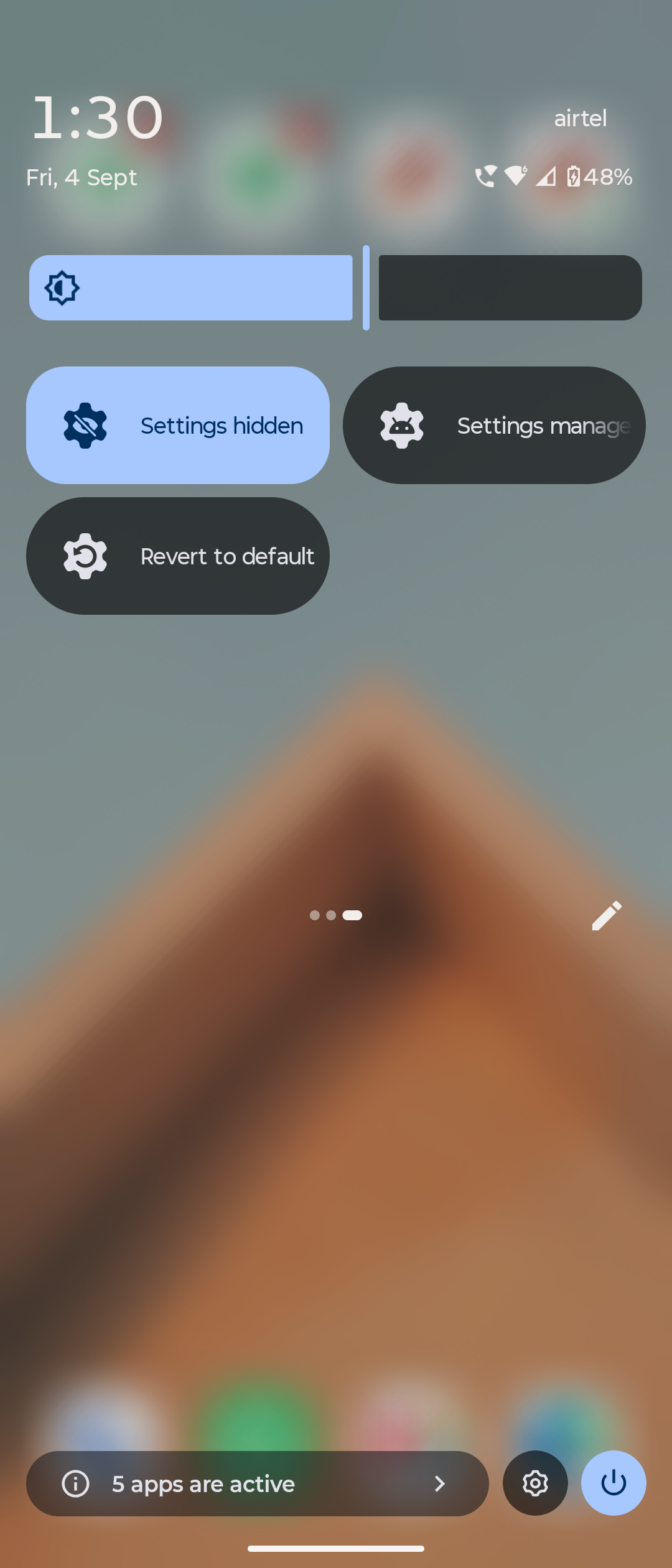
 Прокачанный форк Geto: приложение для Android, которое управляет и скрывает настройки и службы телефона, а также автоматически выключает или снова включает их, чтобы ограниченные приложения (банкинг, платежи) продолжали работать.
Прокачанный форк Geto: приложение для Android, которое управляет и скрывает настройки и службы телефона, а также автоматически выключает или снова включает их, чтобы ограниченные приложения (банкинг, платежи) продолжали работать.Это приложение, которое я ставлю на телефон, или скрипт, который я запускаю с компьютера?Это обычное приложение для Android (пакет com.soul99.suIMD), а не то, что запускается с ПК. Его можно установить рядом с оригинальным Geto — оба приложения спокойно живут на одном устройстве.
Это обычное приложение для Android (пакет com.soul99.suIMD), а не то, что запускается с ПК. Его можно установить рядом с оригинальным Geto — оба приложения спокойно живут на одном устройстве.Как настроить его на своём телефоне?Установите APK, затем один раз выдайте разрешение WRITESECURESETTINGS через adb shell или Shizuku. Это разрешение обязательно — именно оно позволяет приложению менять состояние настроек.
Установите APK, затем один раз выдайте разрешение WRITESECURESETTINGS через adb shell или Shizuku. Это разрешение обязательно — именно оно позволяет приложению менять состояние настроек.Для его работы Shizuku должен работать постоянно?Не обязательно — Shizuku нужен по желанию и только для того, чтобы скрыть разрешение «поверх других приложений». Всё остальное работает через стандартную разовую выдачу WRITESECURESETTINGS из этапа настройки.
Не обязательно — Shizuku нужен по желанию и только для того, чтобы скрыть разрешение «поверх других приложений». Всё остальное работает через стандартную разовую выдачу WRITESECURESETTINGS из этапа настройки.Приложение сможет обновляться само, как обычные приложения?Нет — у него вообще нет разрешения на доступ к сети, поэтому проверять собственные обновления оно не умеет; узнать о новом обновлении поможет Obtainium. Кроме того, функции авто-скрытия IMD+ нужна постоянно работающая фоновая служба.
Нет — у него вообще нет разрешения на доступ к сети, поэтому проверять собственные обновления оно не умеет; узнать о новом обновлении поможет Obtainium. Кроме того, функции авто-скрытия IMD+ нужна постоянно работающая фоновая служба.Будет ли оно работать на моём телефоне?Только на Android — любое устройство с Android 7.0 (API 24) или новее, рут не нужен. Версий для iOS или компьютера нет.
Только на Android — любое устройство с Android 7.0 (API 24) или новее, рут не нужен. Версий для iOS или компьютера нет.Ему нужен интернет, чтобы работать?Совсем нет — оно полностью работает офлайн и не держит лишних постоянных фоновых служб, так что расход батареи и ресурсов системы практически нулевой.
Совсем нет — оно полностью работает офлайн и не держит лишних постоянных фоновых служб, так что расход батареи и ресурсов системы практически нулевой.Оно следит за мной или собирает данные?Нет. Никакой рекламы, аналитики, трекеров или каких-либо аккаунтов, оно не вмешивается в другие ваши приложения, а его части, меняющие настройки, не может запустить другое приложение — только вы сами.
Нет. Никакой рекламы, аналитики, трекеров или каких-либо аккаунтов, оно не вмешивается в другие ваши приложения, а его части, меняющие настройки, не может запустить другое приложение — только вы сами.Оно бесплатное и с открытым кодом?Да — GPL-3.0, та же лицензия, что у оригинального Geto, без рекламы и без каких-либо аккаунтов.
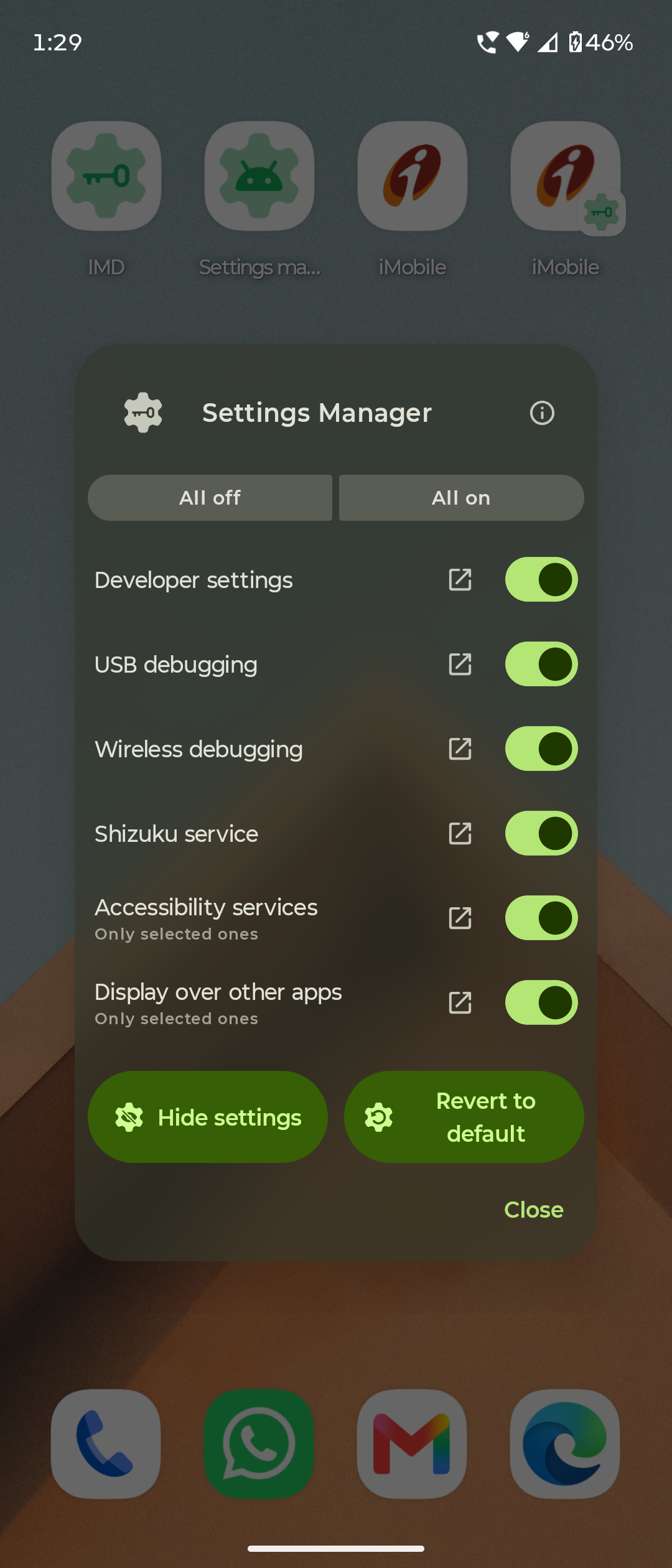
Да — GPL-3.0, та же лицензия, что у оригинального Geto, без рекламы и без каких-либо аккаунтов.Какие настройки и службы оно умеет скрывать?Настройки разработчика, ADB/отладку, службы специальных возможностей, разрешение «поверх других приложений» (нужна активная служба Shizuku), саму службу Shizuku и многое другое — каждое настраивается отдельно для каждого приложения. Внутри приложения есть наблюдатель настроек (Settings observer), который помогает найти то, что стоит скрыть.
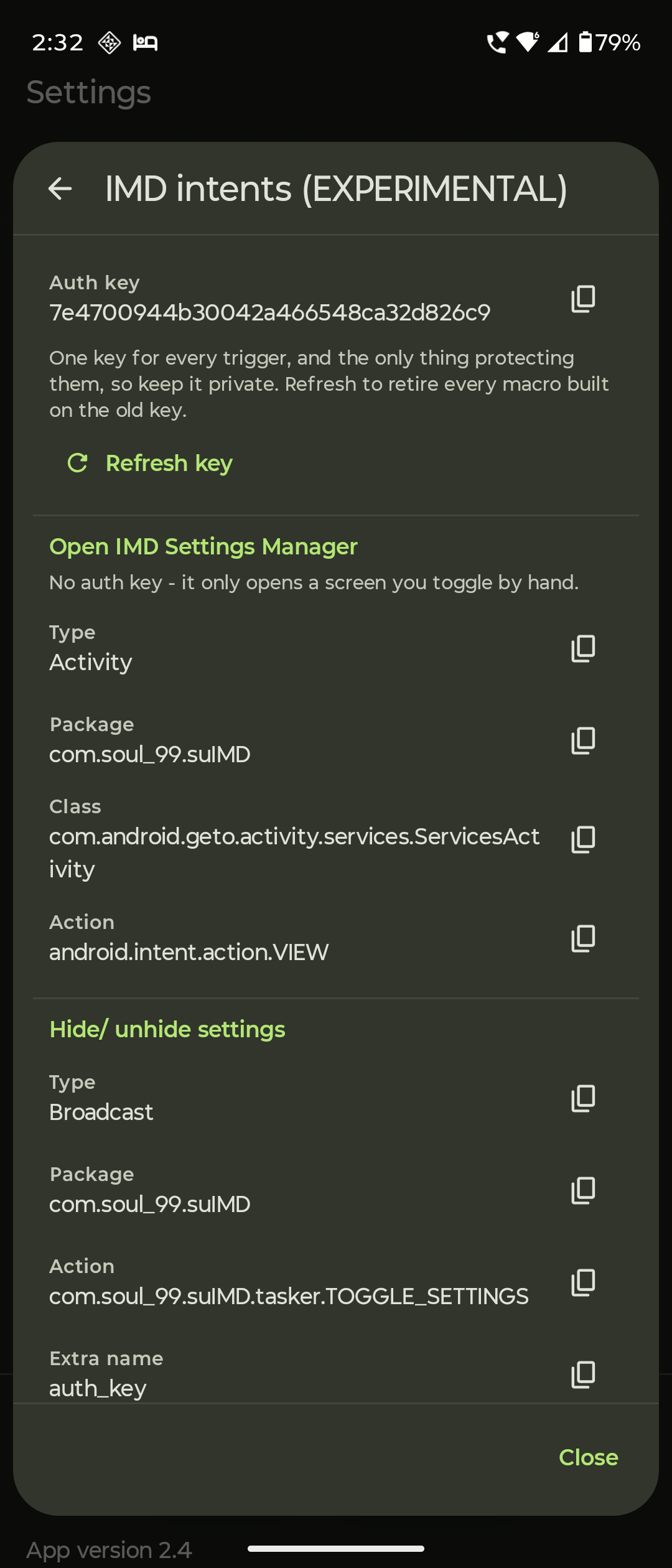
Настройки разработчика, ADB/отладку, службы специальных возможностей, разрешение «поверх других приложений» (нужна активная служба Shizuku), саму службу Shizuku и многое другое — каждое настраивается отдельно для каждого приложения. Внутри приложения есть наблюдатель настроек (Settings observer), который помогает найти то, что стоит скрыть.Оно может переключать настройки автоматически, например когда я открываю банковское приложение?Да — поддерживается авто-показ и авто-скрытие настроек (авто-скрытие IMD+ работает как фоновая служба), плюс IMD Intents, которые позволяют приложениям автоматизации вроде Tasker или MacroDroid запускать его; они защищены ключами авторизации.
Да — поддерживается авто-показ и авто-скрытие настроек (авто-скрытие IMD+ работает как фоновая служба), плюс IMD Intents, которые позволяют приложениям автоматизации вроде Tasker или MacroDroid запускать его; они защищены ключами авторизации.Чем оно отличается от оригинального приложения Geto?Это прокачанный форк Geto от JackEblan со своим собственным именем пакета (com.soul99.suIMD), поэтому оба приложения можно установить рядом. Документ SUIMD.md подробно описывает каждое изменение относительно оригинала, включая найденные в нём баги и логику каждого исправления.
Это прокачанный форк Geto от JackEblan со своим собственным именем пакета (com.soul99.suIMD), поэтому оба приложения можно установить рядом. Документ SUIMD.md подробно описывает каждое изменение относительно оригинала, включая найденные в нём баги и логику каждого исправления.Кто его делает и как быстро идёт разработка?Soul99 (Dr. Utkarsh Rajput), ординатор-радиолог на полной ставке, сделал его для себя и выложил в FOSS-сообщество. Он честно говорит, что работа замедляет ответы и исправления, и надеется, что со временем проект подхватят более свободные разработчики.
Soul99 (Dr. Utkarsh Rajput), ординатор-радиолог на полной ставке, сделал его для себя и выложил в FOSS-сообщество. Он честно говорит, что работа замедляет ответы и исправления, и надеется, что со временем проект подхватят более свободные разработчики.What are similar projects?hilight-studio, Obtainium, Shizuku-Next, deepseek-harness-android-app, LocationSpoofer, universal-android-debloater, Signal-iOS, thunderbird-android
hilight-studio, Obtainium, Shizuku-Next, deepseek-harness-android-app, LocationSpoofer, universal-android-debloater, Signal-iOS, thunderbird-androidWhich topics is it in?shizuku, privacy-tools, foss, privacy-first, android-app, mobile-app, utility, java, mobile, gplv3, android, privacy
shizuku, privacy-tools, foss, privacy-first, android-app, mobile-app, utility, java, mobile, gplv3, android, privacy