
18.1K ·GitHub
Что это такое?
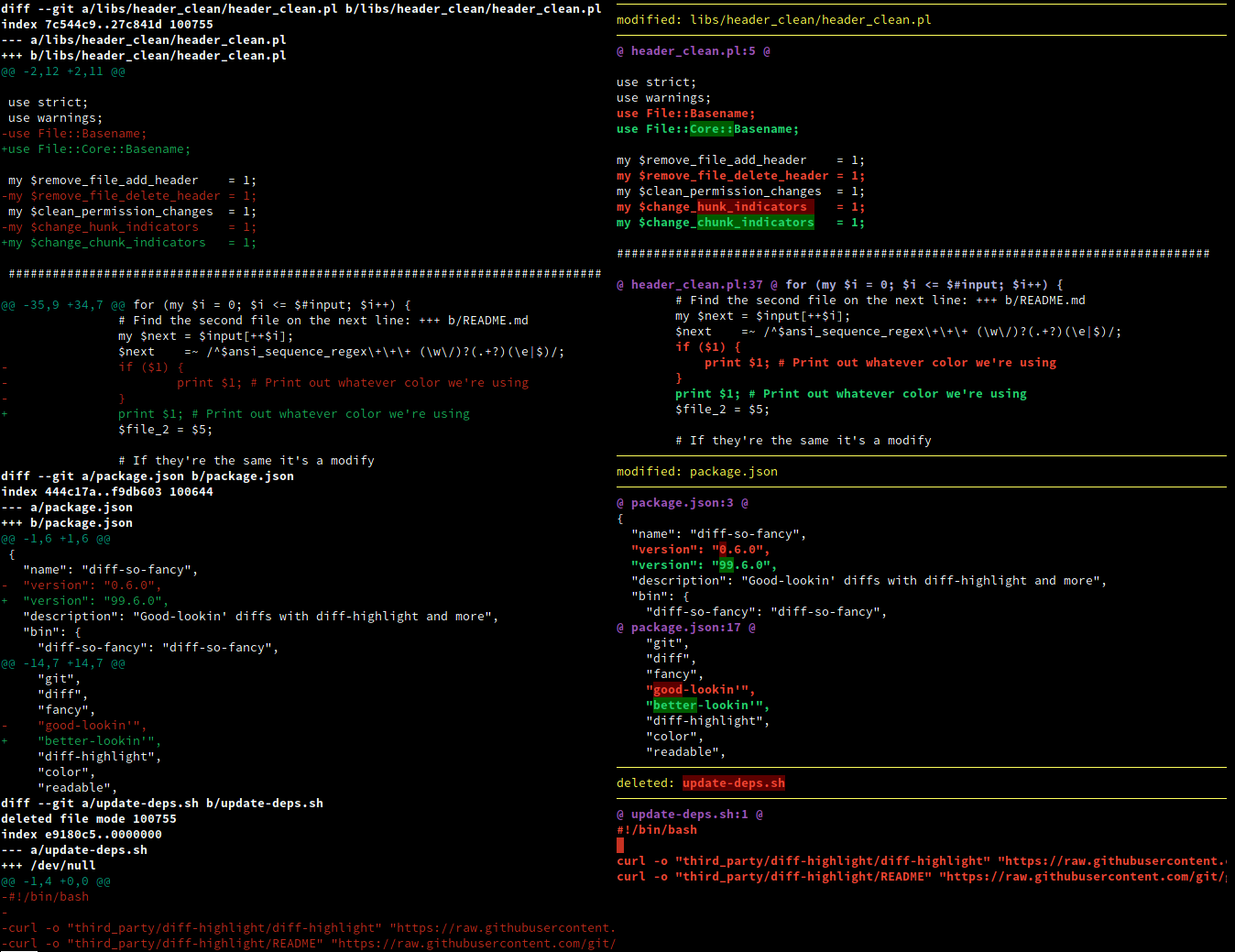
 Утилита для командной строки, которая превращает машиночитаемый вывод diff из git в понятный человеку текст — так вы быстрее смотрите изменения и замечаете дефекты.
Утилита для командной строки, которая превращает машиночитаемый вывод diff из git в понятный человеку текст — так вы быстрее смотрите изменения и замечаете дефекты.Это библиотека, которую я добавляю в свой проект, или утилита, которую я устанавливаю?Отдельная утилита. Вы устанавливаете один скрипт, а затем либо настраиваете git запускать его при каждом выводе diff, либо подаёте на него вывод diff прямо из терминала.
Отдельная утилита. Вы устанавливаете один скрипт, а затем либо настраиваете git запускать его при каждом выводе diff, либо подаёте на него вывод diff прямо из терминала.Как его установить и подключить к git?Скопируйте скрипт diff-so-fancy из последнего релиза на GitHub в свою $PATH или возьмите готовый пакет: он есть на npm, в Homebrew, Fedora, в репозитории extra у Arch и в виде ppa:aos для Debian/Ubuntu. Затем настройте git использовать его для всего вывода diff.
Скопируйте скрипт diff-so-fancy из последнего релиза на GitHub в свою $PATH или возьмите готовый пакет: он есть на npm, в Homebrew, Fedora, в репозитории extra у Arch и в виде ppa:aos для Debian/Ubuntu. Затем настройте git использовать его для всего вывода diff.Нужно ли что-то ещё, кроме git, чтобы он работал?Он написан на Perl, поэтому на машине нужен интерпретатор Perl, плюс git для обычной работы с diff.
Он написан на Perl, поэтому на машине нужен интерпретатор Perl, плюс git для обычной работы с diff.Есть ли подводные камни при установке?Если вы клонируете репозиторий для разработки, а не берёте релиз, каталог lib/ должен лежать рядом с главным скриптом. Проблемы с пакетами npm или из дистрибутивов нужно сообщать в багтрекеры самих этих пакетов, а не в этот репозиторий.
Если вы клонируете репозиторий для разработки, а не берёте релиз, каталог lib/ должен лежать рядом с главным скриптом. Проблемы с пакетами npm или из дистрибутивов нужно сообщать в багтрекеры самих этих пакетов, а не в этот репозиторий.Он будет работать на Windows или это только для Mac и Linux?Это переносимый скрипт, который работает везде, где есть Perl и git: в README упомянуты brew для macOS, Fedora, Arch и PPA для Debian/Ubuntu, а пакет npm работает кроссплатформенно, включая Windows.
Это переносимый скрипт, который работает везде, где есть Perl и git: в README упомянуты brew для macOS, Fedora, Arch и PPA для Debian/Ubuntu, а пакет npm работает кроссплатформенно, включая Windows.Что конкретно меняется в том, как выглядит diff?Заголовки блоков git становятся упрощёнными и понятными человеку, первый блок пустых строк подсвечивается цветом, а символы + и - в начале строк можно убрать. Заголовки могут сжиматься до одной строки только с именем файла и номером строки, и утилита рисует линейку из Unicode-символов, подогнанную под ширину экрана. Всё это — опции: markEmptyLines, changeHunkIndicators, stripLeadingSymbols, useUnicodeRuler, rulerWidth, shortHeaders, semIntegration — у каждой есть разумные значения по умолчанию.
Заголовки блоков git становятся упрощёнными и понятными человеку, первый блок пустых строк подсвечивается цветом, а символы + и - в начале строк можно убрать. Заголовки могут сжиматься до одной строки только с именем файла и номером строки, и утилита рисует линейку из Unicode-символов, подогнанную под ширину экрана. Всё это — опции: markEmptyLines, changeHunkIndicators, stripLeadingSymbols, useUnicodeRuler, rulerWidth, shortHeaders, semIntegration — у каждой есть разумные значения по умолчанию.А можно пользоваться им без git, с обычным выводом diff?Да — запустите diff с флагом -u для unified-вывода и передайте результат в diff-so-fancy. Поддерживается и рекурсивный режим: через -r или --recursive.
Да — запустите diff с флагом -u для unified-вывода и передайте результат в diff-so-fancy. Поддерживается и рекурсивный режим: через -r или --recursive.Чем он отличается от Delta или difftastic?В README в качестве альтернатив названы Delta, difftastic и Lazygit. Lazygit даже поставляется со встроенной поддержкой diff-so-fancy, так что вы можете получить такой же читаемый вывод внутри этого терминального интерфейса, не выбирая между ними.
В README в качестве альтернатив названы Delta, difftastic и Lazygit. Lazygit даже поставляется со встроенной поддержкой diff-so-fancy, так что вы можете получить такой же читаемый вывод внутри этого терминального интерфейса, не выбирая между ними.What are similar projects?difftastic, vim-fugitive, git-filter-repo, cz-cli, cloc, gitui, delta, tatr
difftastic, vim-fugitive, git-filter-repo, cz-cli, cloc, gitui, delta, tatrWhich topics is it in?perl, diff, script, syntax-highlighting, version-control, code-quality, code-review, cli-tool, git, command-line, utility, developers
perl, diff, script, syntax-highlighting, version-control, code-quality, code-review, cli-tool, git, command-line, utility, developers