
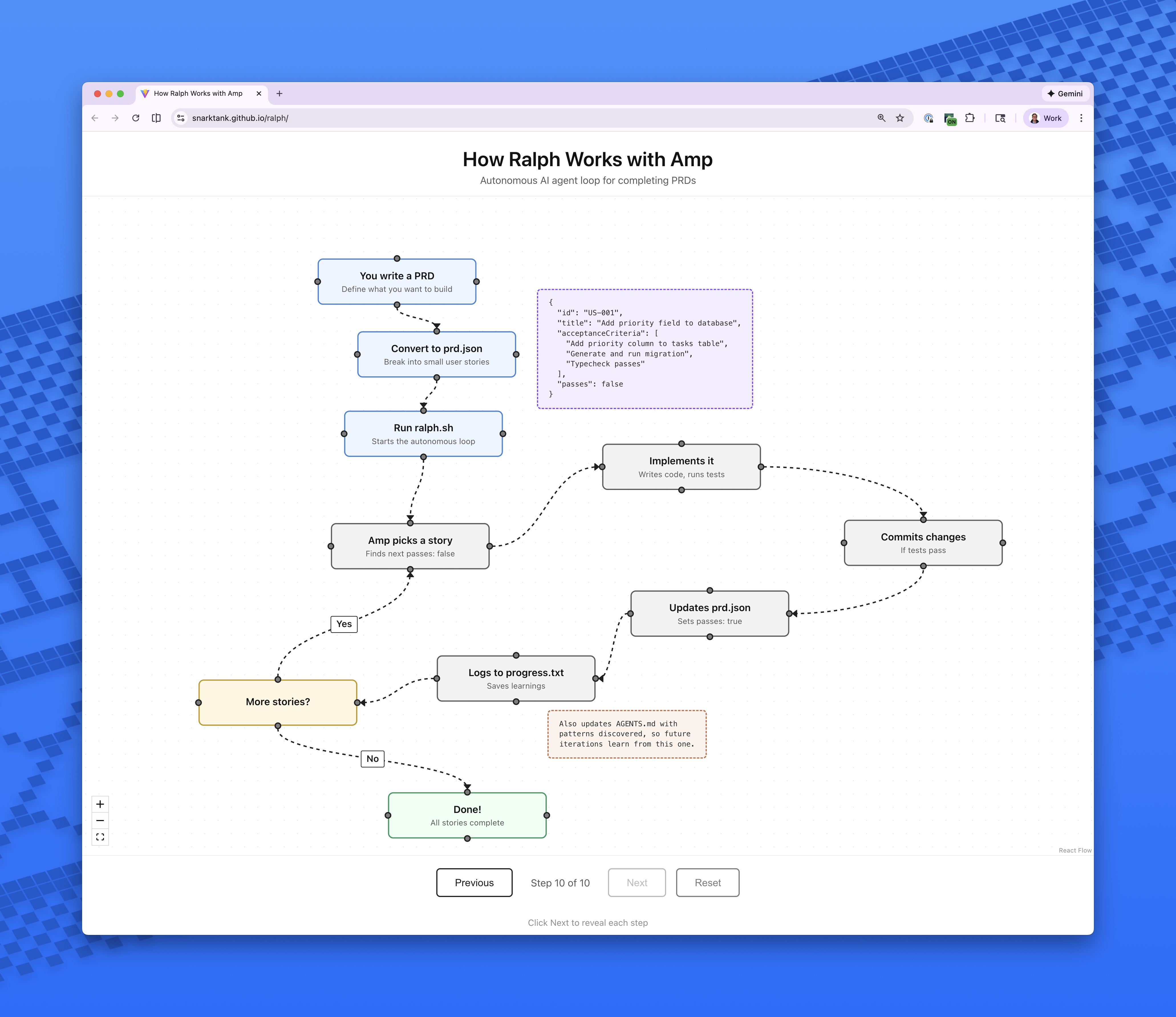
Что это такое?
 Ralph — это автономный цикл ИИ-агента, который снова и снова запускает инструменты для программирования с ИИ (Amp или Claude Code), пока не будут выполнены все пункты вашего PRD. Каждая итерация начинает с чистого листа — с новым экземпляром и пустым контекстом.
Ralph — это автономный цикл ИИ-агента, который снова и снова запускает инструменты для программирования с ИИ (Amp или Claude Code), пока не будут выполнены все пункты вашего PRD. Каждая итерация начинает с чистого листа — с новым экземпляром и пустым контекстом.Это приложение, которое я устанавливаю, или оно живёт внутри моего проекта?Ни то, ни другое — это просто набор файлов: bash-цикл (ralph.sh), шаблоны промптов и скиллы, которые вы копируете в свой проект, устанавливаете глобально или добавляете через маркетплейс Claude Code.
Ни то, ни другое — это просто набор файлов: bash-цикл (ralph.sh), шаблоны промптов и скиллы, которые вы копируете в свой проект, устанавливаете глобально или добавляете через маркетплейс Claude Code.Как мне применить его к новой фиче?Сгенерируйте PRD с помощью скилла /prd, преобразуйте его в prd.json с помощью скилла /ralph, затем запустите Ralph — по умолчанию 10 итераций, а бэкенд выбирается флагом --tool amp или --tool claude.
Сгенерируйте PRD с помощью скилла /prd, преобразуйте его в prd.json с помощью скилла /ralph, затем запустите Ralph — по умолчанию 10 итераций, а бэкенд выбирается флагом --tool amp или --tool claude.Что должно быть установлено, чтобы я мог его запустить?Аутентифицированный Amp CLI (по умолчанию) или Claude Code, установленный jq (brew install jq на macOS) и git-репозиторий для вашего проекта. Вот и весь список.
Аутентифицированный Amp CLI (по умолчанию) или Claude Code, установленный jq (brew install jq на macOS) и git-репозиторий для вашего проекта. Вот и весь список.Могу ли я просто скормить ему большую фичу целиком?Нет — каждый пункт PRD должен быть достаточно маленьким, чтобы уложиться в одно контекстное окно; эпики вроде «добавить аутентификацию» или «сделать весь дашборд» слишком велики, и их нужно разбивать на части.
Нет — каждый пункт PRD должен быть достаточно маленьким, чтобы уложиться в одно контекстное окно; эпики вроде «добавить аутентификацию» или «сделать весь дашборд» слишком велики, и их нужно разбивать на части.Как он справляется с задачами по фронтенду?В критериях приёмки фронтенд-задач обязательно должно быть указано «Verify in browser using dev-browser skill». Тогда Ralph использует скилл dev-browser, чтобы открыть страницу, поработать с интерфейсом и убедиться, что изменение действительно работает.
В критериях приёмки фронтенд-задач обязательно должно быть указано «Verify in browser using dev-browser skill». Тогда Ralph использует скилл dev-browser, чтобы открыть страницу, поработать с интерфейсом и убедиться, что изменение действительно работает.Зачем нужна настройка автоматической передачи (auto-handoff) в Amp?Добавление настройки в ~/.config/amp/settings.json включает автоматическую передачу управления при заполнении контекста, так что Ralph может продолжать работу над большими задачами, которые не помещаются в одно контекстное окно.
Добавление настройки в ~/.config/amp/settings.json включает автоматическую передачу управления при заполнении контекста, так что Ralph может продолжать работу над большими задачами, которые не помещаются в одно контекстное окно.Что произойдёт с моим предыдущим запуском, когда я начну новую фичу?Ralph автоматически архивирует предыдущие запуски, когда вы начинаете фичу с другим branchName, сохраняя их в archive/YYYY-MM-DD-feature-name/.
Ralph автоматически архивирует предыдущие запуски, когда вы начинаете фичу с другим branchName, сохраняя их в archive/YYYY-MM-DD-feature-name/.Откуда взялся этот подход?Он основан на паттерне Ralph от Geoffrey Huntley, а автор репозитория написал подробную статью о том, как он сам использует Ralph в своей работе.
Он основан на паттерне Ralph от Geoffrey Huntley, а автор репозитория написал подробную статью о том, как он сам использует Ralph в своей работе.What are similar projects?planning-with-files, operator-memory, hyperfide, autoresearch, orca, pstack-claude, ordewell, deer-flow
planning-with-files, operator-memory, hyperfide, autoresearch, orca, pstack-claude, ordewell, deer-flowWhich topics is it in?context-management, agentic-workflow, agentic-coding, bash, autonomous-agents, coding-agents, claude-skills, agent-memory, workflow-automation, prompt-engineering, git, shell
context-management, agentic-workflow, agentic-coding, bash, autonomous-agents, coding-agents, claude-skills, agent-memory, workflow-automation, prompt-engineering, git, shell