
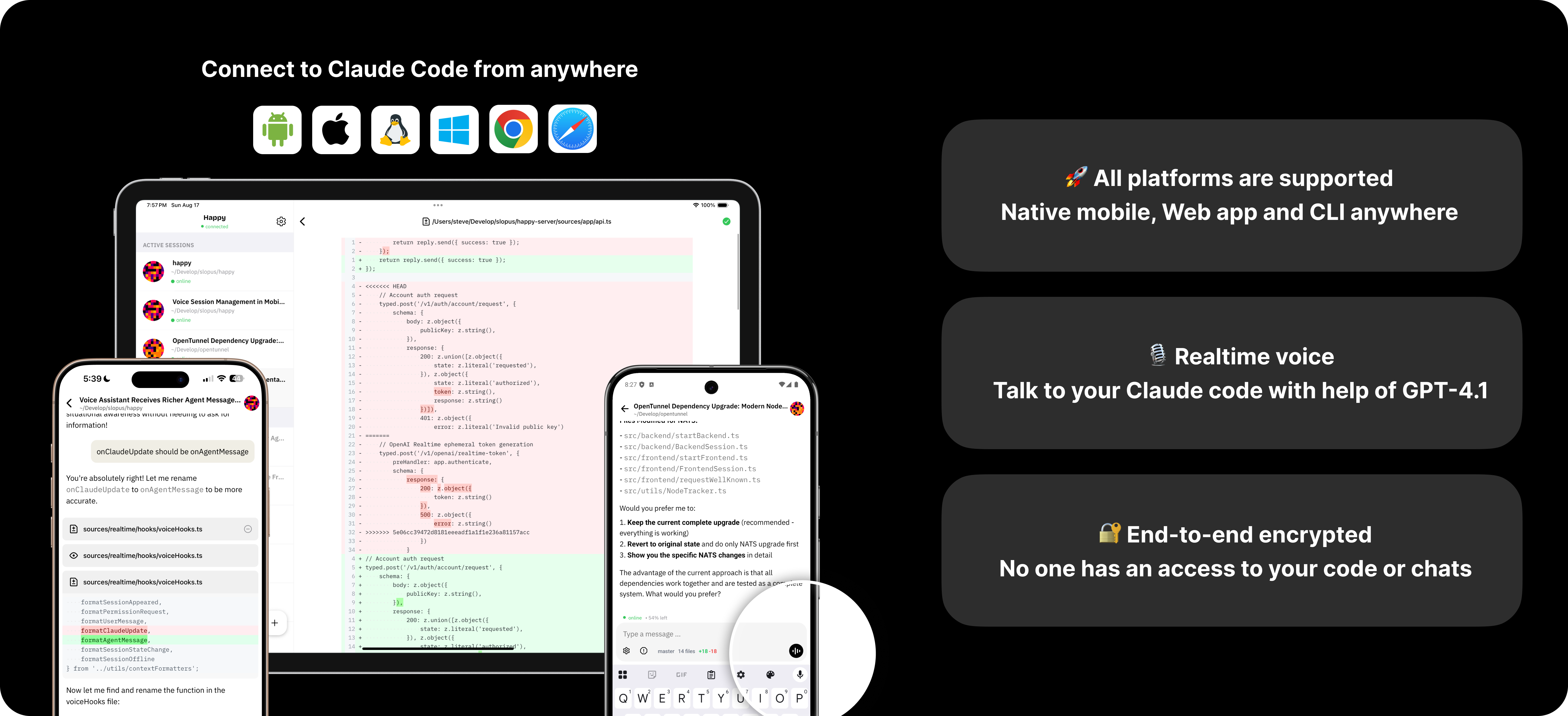

这是干什么的?
 一个开源的 AI 编程代理客户端:在你的电脑上运行 Claude Code 或 Codex,并通过手机、网页或桌面端控制会话,全程端到端加密。仓库描述中还提到了 Grok。
一个开源的 AI 编程代理客户端:在你的电脑上运行 Claude Code 或 Codex,并通过手机、网页或桌面端控制会话,全程端到端加密。仓库描述中还提到了 Grok。Happy 是一个独立的 AI,还是配合我已有的代理使用的工具?它本身不是模型——它只是包装你已有的命令行工具:用 'happy' 代替 'claude' 启动,或用 'happy codex' 代替 'codex',继续使用你已付费的订阅。
它本身不是模型——它只是包装你已有的命令行工具:用 'happy' 代替 'claude' 启动,或用 'happy codex' 代替 'codex',继续使用你已付费的订阅。我怎么在手机和电脑上都用起来?下载应用(iOS、Android、网页版或 macOS 桌面版),在你的电脑上安装 Happy CLI,然后用 'happy' 代替 'claude' 运行即可。该 CLI 是从 npm 包 'happy-coder' 迁移而来的。
下载应用(iOS、Android、网页版或 macOS 桌面版),在你的电脑上安装 Happy CLI,然后用 'happy' 代替 'claude' 运行即可。该 CLI 是从 npm 包 'happy-coder' 迁移而来的。需要我自己有 Claude Code 或 Codex 的订阅吗?需要——Happy 是通过包装器驱动你已安装的 Claude Code 和 Codex,所以你需要这两个代理以及你已付费的订阅;Happy 本身不提供任何新套餐。
需要——Happy 是通过包装器驱动你已安装的 Claude Code 和 Codex,所以你需要这两个代理以及你已付费的订阅;Happy 本身不提供任何新套餐。桌面应用在 Windows 上也能用吗?不能——原生桌面应用只有 macOS 版;在其他系统上可以使用网页版或终端。另外,从手机接管会话会让它以远程模式重启。
不能——原生桌面应用只有 macOS 版;在其他系统上可以使用网页版或终端。另外,从手机接管会话会让它以远程模式重启。我可以用哪些设备来控制我的代理?原生 macOS 桌面应用、iOS 和 Android 移动应用、网页应用,还有终端里的 CLI——你可以在电脑上开始任务,然后按一下键就切换到其他设备。
原生 macOS 桌面应用、iOS 和 Android 移动应用、网页应用,还有终端里的 CLI——你可以在电脑上开始任务,然后按一下键就切换到其他设备。我的代码很敏感——它会以未加密的形式经过你们的服务器吗?会话通过 Happy Server 同步,但流量是端到端加密的,所以代码绝不会以未加密的形式离开你的设备。没有任何遥测或追踪,而且代码是开源的,可以审计。
会话通过 Happy Server 同步,但流量是端到端加密的,所以代码绝不会以未加密的形式离开你的设备。没有任何遥测或追踪,而且代码是开源的,可以审计。Happy 是一个应用,还是由多个组件组成的?五个:Happy Desktop(原生 macOS 应用)、Happy App(网页界面加 Expo 移动客户端)、Happy CLI(包装 Claude Code 和 Codex)、Happy Agent(用于创建、发送和监控会话的远程控制 CLI)和 Happy Server(负责加密同步的后端)。
五个:Happy Desktop(原生 macOS 应用)、Happy App(网页界面加 Expo 移动客户端)、Happy CLI(包装 Claude Code 和 Codex)、Happy Agent(用于创建、发送和监控会话的远程控制 CLI)和 Happy Server(负责加密同步的后端)。当我从手机接管会话时会发生什么?会话会以远程模式重启,你的手机变成控制端;要回到电脑上,只需在键盘上按任意键即可。
会话会以远程模式重启,你的手机变成控制端;要回到电脑上,只需在键盘上按任意键即可。作者为什么要做这个?他们是一群总在咖啡馆或午休时查看自己 AI 编程代理的工程师;不在电脑前就没法瞄一眼自己的副业项目,这种困扰正是 Happy 诞生的原因。
他们是一群总在咖啡馆或午休时查看自己 AI 编程代理的工程师;不在电脑前就没法瞄一眼自己的副业项目,这种困扰正是 Happy 诞生的原因。除了看聊天记录,我还能管理代理会话吗?可以——Happy Agent 是一个独立的远程控制 CLI,可以创建、发送和监控会话,是在手机、网页和桌面视图之外的补充。
可以——Happy Agent 是一个独立的远程控制 CLI,可以创建、发送和监控会话,是在手机、网页和桌面视图之外的补充。Which topics is it in?claude-desktop, push-notifications, end-to-end-encryption, expo, remote-control, sync, codex-cli, grok, coding-agents, app, orchestration, agent-orchestration
claude-desktop, push-notifications, end-to-end-encryption, expo, remote-control, sync, codex-cli, grok, coding-agents, app, orchestration, agent-orchestration