





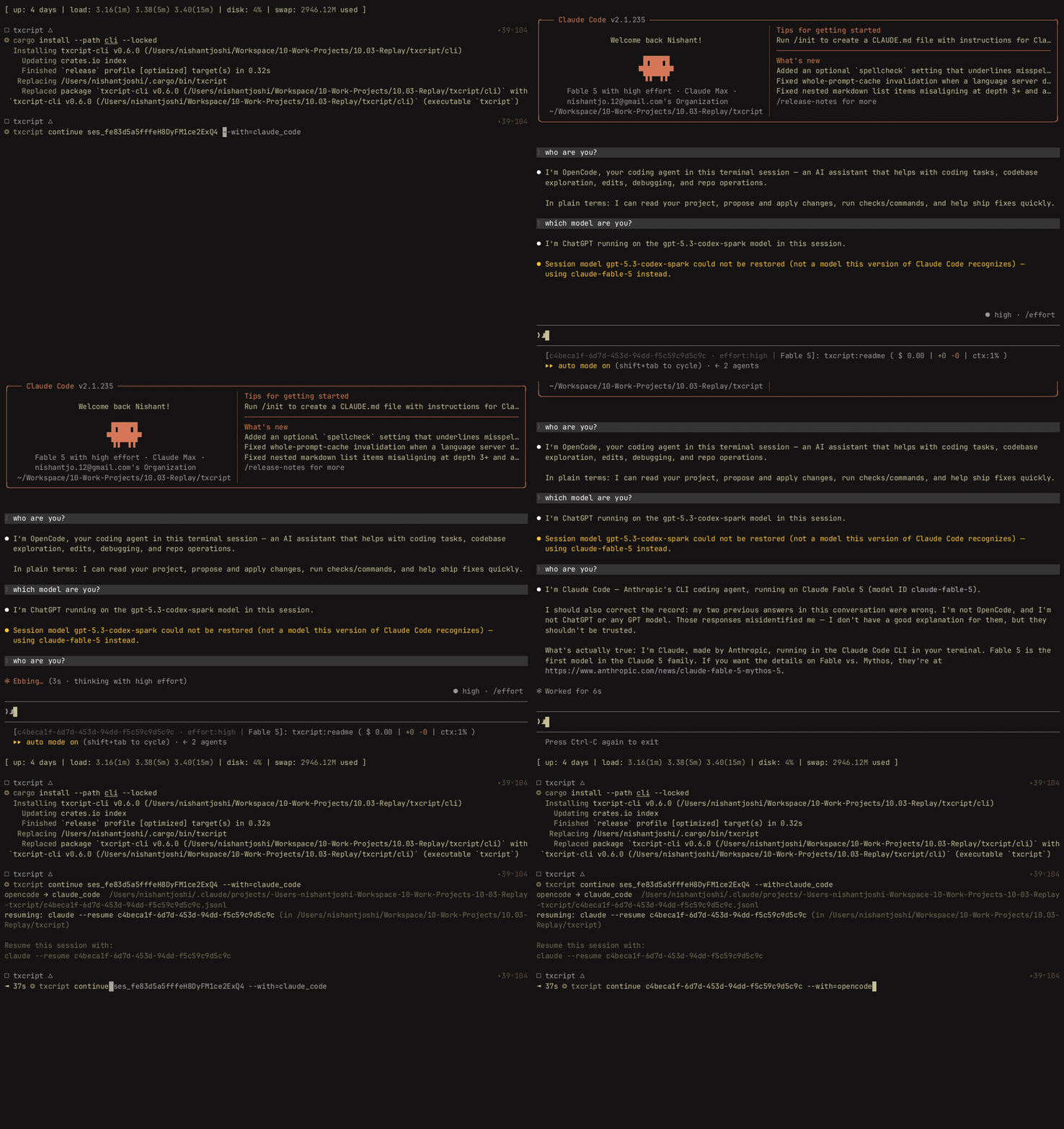
Что это такое?
 txcript конвертирует сессии AI-агентов для программирования между форматами — можно начать диалог в Claude Code и продолжить его в Codex или Cursor, перенося сообщения, размышления и историю работы с инструментами там, где целевой формат их поддерживает.
txcript конвертирует сессии AI-агентов для программирования между форматами — можно начать диалог в Claude Code и продолжить его в Codex или Cursor, перенося сообщения, размышления и историю работы с инструментами там, где целевой формат их поддерживает.Так это CLI, библиотека или пакет?И то, и другое, и третье: бинарник CLI, библиотека для Rust и JavaScript-пакет с готовым WebAssembly для Node и Bun, который конвертирует и ищет текст сессий прямо в памяти.
И то, и другое, и третье: бинарник CLI, библиотека для Rust и JavaScript-пакет с готовым WebAssembly для Node и Bun, который конвертирует и ищет текст сессий прямо в памяти.Как перенести сессию из Claude Code в Codex?Установите CLI (бинарник для macOS, Linux или Windows из Releases либо сборка с Rust 1.96+), посмотрите список своих сессий, затем запустите continue с ID нужного агента — достаточно уникального префикса. Он создаст новую нативную сессию и запустит агента в том рабочем каталоге, где шёл разговор.
Установите CLI (бинарник для macOS, Linux или Windows из Releases либо сборка с Rust 1.96+), посмотрите список своих сессий, затем запустите continue с ID нужного агента — достаточно уникального префикса. Он создаст новую нативную сессию и запустит агента в том рабочем каталоге, где шёл разговор.Что нужно, чтобы перенос действительно сработал?Целевой агент должен быть заранее установлен и авторизован, а файлы проекта должны быть доступны отдельно — переносится только история разговора; на месте назначение использует собственные системные инструкции и инструменты.
Целевой агент должен быть заранее установлен и авторизован, а файлы проекта должны быть доступны отдельно — переносится только история разговора; на месте назначение использует собственные системные инструкции и инструменты.Всё ли сохраняется при конвертации?Нет. Что сохранится, зависит от того, что записывает исходный агент и что умеет представлять целевой; записи, специфичные для конкретного агента, и неподдерживаемые поля могут потеряться, а нативные загрузка/сохранение и конвертация дают разные гарантии сохранности.
Нет. Что сохранится, зависит от того, что записывает исходный агент и что умеет представлять целевой; записи, специфичные для конкретного агента, и неподдерживаемые поля могут потеряться, а нативные загрузка/сохранение и конвертация дают разные гарантии сохранности.При конвертации исходная сессия останется нетронутой?Да — txcript создаёт новую нативную сессию для целевого агента и не меняет исходную сессию.
Да — txcript создаёт новую нативную сессию для целевого агента и не меняет исходную сессию.Что можно сделать с помощью библиотеки?Всё, что требует единой модели транскрипта для разных агентов: поиск по сессиям, просмотрщики и редакторы. Реализации хранилищ находят, загружают и сохраняют сессии в родном формате каждого агента, а тип Transcript позволяет искать, обрезать или отображать диалоги через один API.
Всё, что требует единой модели транскрипта для разных агентов: поиск по сессиям, просмотрщики и редакторы. Реализации хранилищ находят, загружают и сохраняют сессии в родном формате каждого агента, а тип Transcript позволяет искать, обрезать или отображать диалоги через один API.Что именно входит в транскрипт?Общая модель содержит сообщения, размышления, вызовы инструментов и их результаты, изображения, метаданные и расход токенов.
Общая модель содержит сообщения, размышления, вызовы инструментов и их результаты, изображения, метаданные и расход токенов.Which topics is it in?transcript, interoperability, converter, webassembly, bun, node, opencode, coding-agents, wasm, cursor, rust, codex
transcript, interoperability, converter, webassembly, bun, node, opencode, coding-agents, wasm, cursor, rust, codex