
WebToApp
Build Android APKs from web projects, directly on your phone.
An on-device APK workshop that goes far beyond URL wrapping — it can fork and exec full server runtimes, ship a hardened anti-censorship network stack, sign bundles for Google Play, and run MV3 browser extensions, all without a PC or a remote build server.
English · 简体中文





Sponsored by Swiftproxy — Swiftproxy · Reliable Residential Proxies for Web Automation
What's different ·
What you can build ·
Capability overview ·
Feature map ·
Module market ·
Documentation ·
Architecture ·
Build
What makes WebToApp different
Most "website to app" tools stop at wrapping a URL in a WebView. WebToApp is closer to a pocket-sized APK workshop, and the hard parts are exactly where it diverges:
- It runs real server runtimes on-device. Node.js, PHP, Python, Go, and WordPress are fork+exec'd as native binaries straight from app storage — like Termux, packaged into an installable APK. URL-wrapper tools cannot do this at all.
- It ships a hardened, anti-censorship network stack. DNS-over-HTTPS, TLS fingerprint spoofing (Chrome / Firefox / Safari JA3 templates) with a local MITM bridge, Encrypted Client Hello (ECH) on both engines to encrypt the SNI, per-app proxies, and CORS bypass for locked-down SPAs.
- The whole build is self-contained. Binary AXML/ARSC patching, permission pruning, V1/V2/V3 signing, and Google Play-ready AAB export all happen inside the app via
apksig — no remote build queue, no PC.
- It stays extensible after shipping. Add JS/CSS modules, Tampermonkey-style userscripts, or MV3 Chrome extensions (live-searched and installed from the Chrome Web Store) without rebuilding the host.
- The host UI speaks 10 languages out of the box. Chinese, English, Arabic (RTL), Portuguese, Spanish, French, German, Russian, Japanese, and Korean — switch anytime in Settings; new in-app copy is maintained for all ten.
Capability overview
A quick scan of what's in the box. Each links to the detailed feature map below.
| Area |
Highlights |
| Build targets |
Web · HTML · Frontend · WordPress · Node.js · PHP · Python · Go · Image · Video · Gallery · Multi-Web |
| Browser engines |
System WebView by default; optional GeckoView (Firefox) runtime |
| Network & anti-censorship |
DoH (7 providers), TLS fingerprint spoofing + MITM bridge, ECH, static/PAC/SOCKS5 proxies, CORS bypass |
| Privacy & hardening |
50+ vector browser fingerprint disguise, resource encryption (AES-256-GCM), anti-debug, activation gating |
| Local runtimes |
Native Node.js 18.20, PHP 8.4 + Composer 2.10, Python 3.14, official Go 1.26, WordPress 7.x over SQLite |
| Extensions |
Built-in modules, userscripts with GM_*, MV3 Chrome extensions, live Chrome Web Store search |
| APK/AAB output |
On-device V1/V2/V3 signing, Google Play AAB export with targetSdk rewrite, keystore management |
| Agent |
Full-app automation via up to 57 tools: generate, build, export, manage ports/engines/runtimes, clone apps, ad-block rules, config templates, and more; auto-retry on 429/5xx |
| Host languages |
10 UI languages — 中文 · English · العربية · Português · Español · Français · Deutsch · Русский · 日本語 · 한국어 (Arabic RTL) |
What you can build
| Input |
Output |
Good for |
| Website URL |
WebView-based APK |
Landing pages, tools, dashboards, docs, internal systems |
| HTML / static front-end |
Localhost-backed APK |
React, Vue, Vite, static builds, offline web apps |
| Node.js / PHP / Python / Go |
APK with an on-device local server |
Small server apps, admin tools, demos, prototypes |
| WordPress |
APK running WordPress over local PHP + SQLite |
Portable sites, theme/plugin demos, content packages |
| Images / video / galleries |
Media-focused APK |
Albums, course materials, portfolios, offline viewers |
| Multiple sites |
Tab/card/feed/drawer multi-web APK |
Link hubs, portals, app collections |
| Installed APK |
Rebranded clone or shortcut disguise |
Icon/name/package experiments, repackaging research |
Full feature map
WebToApp has a large number of switches. The sections below group them by use case, kept collapsible so the top of the page stays scannable.
🌐 Browser engine & networking
- Dual engine — System WebView by default, or an optional GeckoView (Firefox) runtime downloaded on first use.
- Kernel flavor disguise — present as Chrome, Edge, Samsung Internet, Firefox, or Safari-style while keeping the real engine.
- Desktop mode, custom User-Agent, and JS/CSS injection at document-start / end / idle.
- Popup handling — same window, external browser, popup window, or block.
- Proxies — static HTTP/HTTPS/SOCKS5, PAC, authentication, bypass rules, and a local HTTP-to-SOCKS bridge.
- DNS-over-HTTPS — Cloudflare, Google, AdGuard, NextDNS, CleanBrowsing, Quad9, Mullvad, plus custom endpoints; strict or automatic modes.
- Encrypted Client Hello (ECH) — encrypt the SNI in the TLS handshake on both engines: GeckoView via TRR + its ECH prefs, the system WebView via the MITM bridge's Chromium upstream (auto-downloaded on first use, embedded in exported APKs). Auto-wires DoH when toggled; a SOCKS upstream proxy takes precedence.
- TLS fingerprint spoofing — impersonate Chrome 131 / Firefox 133 / Safari 18 JA3 profiles (or custom ciphers), served through a local TLS-MITM bridge so the outgoing ClientHello matches a real browser.
- CORS bypass — on by default for static SPAs that call external APIs blocked by CORS; same-origin traffic is left alone, and CORS-only apps can use a lightweight
PrivateNetworkNativeBridgeAdapter without the full Native Bridge surface.
- Failover — automatic fallback to mirror URLs when the primary target is unreachable.
- PWA offline cache strategies, custom error pages, per-app host overrides, and payment-scheme handlers.
- Compatibility toggles — blob download interception, scroll memory, image repair, clipboard / orientation / notification polyfills, private-network bridging, and Native Bridge capability gates.
- Download location — system Downloads, app-private storage, or a user-picked SAF folder, wired through the full packaging passthrough chain.
🛡️ Privacy, fingerprint defense & hardening
- Browser fingerprint disguise across 50+ vectors — User-Agent, WebGL, Canvas, AudioContext, ClientRects, timezone, language, memory, media devices, WebRTC, fonts, battery, permissions, performance, storage, notifications, CSS media, iframe propagation, and error-stack cleanup.
- Hosts-rule ad blocker with cosmetic MutationObserver filtering, 20 built-in community filter lists (EasyList, uBlock Origin, AdGuard, AdAway, plus 8 language-specific lists), per-source enable/disable/delete, named custom filter imports managed as cards and selectable per app, and custom subscription rules bundled into the APK.
- Resource encryption (PBKDF2 + AES-256-GCM) for packaged config, HTML, media, and BGM; optional custom encryption password stronger than package/certificate-derived keys.
- Runtime hardening when encryption is on — anti-debug, anti-Frida, DEX-tamper checks; threat response of log-only, silent exit, or randomized crash.
- WebView/content isolation for storage, WebRTC, Canvas, Audio, WebGL, fonts, headers, and IP surfaces.
- Activation-code gating — local verification, or your own HTTPS endpoint signed with EC P-256. See the remote activation docs.
📦 Local server runtimes (fork + exec on-device)
- Node.js (18.20.x) runs in a dedicated
:nodejs OS process via a native node_launcher wrapper loading libnode.so; supports custom native .node extensions.
- PHP 8.4 from
pmmp/PHP-Binaries, downloaded once on first use, with Composer 2.10.x and custom native extensions (zend_extension, .so).
- Python 3.14 — Flask, Django, FastAPI via uvicorn, Tornado, the built-in HTTP server; pip dependencies resolved into
.pypackages, custom native extensions supported; binary names are versioned so future bumps do not hard-code paths.
- Go 1.26 — official Linux arm64 toolchain (
.tar.gz from dl.google.com, USTC mirror for CN), on-device go build / go mod / go run, vendor/ offline builds, static serving, and the native go_exec_loader wrapper; DNS and CA trust go through the same local JVM bridge used by PHP.
- WordPress 7.x over local PHP + SQLite (
sqlite-database-integration), with theme and plugin import.
- Linux Environment screen manages toolchains and dependencies for Node, PHP, and Python.
- Port Manager coordinates runtime ports across generated apps via broadcast receivers.
- A local DNS bridge proxy (HTTP CONNECT in the Android JVM) gives runtimes working DNS resolution and outbound HTTP where the musl/packed binary can't reach the system resolver.
🧩 Extensions & automation
- Built-in modules — video download (YouTube / Bilibili / Douyin / Xiaohongshu extractors), video enhancer with YouTube cleanup (ad skip, max quality, background play, SponsorBlock), web analyzer, find-in-page, dark mode, privacy tools, content enhancer, element blocker, and YouTube launcher.
- Userscripts — Greasemonkey/Tampermonkey-style
.user.js with a GM_* bridge (storage, requests, styles, menu commands) and promise-based GM.* APIs gated by script grants.
- MV3 Chrome extension runtime for manifest content scripts in isolated or main worlds, with
chrome.* polyfills for runtime, storage, tabs, scripting, and declarative network-request parsing.
- In-app Chrome Web Store search — browse and install browser extensions by keyword (or paste a store URL / extension ID), with offline fallback to manual import.
- Export codes (
WTA1: gzip + Base64) and QR sharing via ZXing.
- Agent — a tool-calling assistant with up to 57 built-in tools covering the entire app surface: create/edit/build/export apps, manage ports and browser engines, install/clear runtimes, ad-block hosts rules, common-config templates, usage stats, app cloning, batch import, Play policy checks, and module development. Plan mode waits for user approval; automatic retry/backoff on 429/5xx.
📱 App experience
- Splash screens — image or video, with skip behavior, trim ranges, and fixed orientation.
- Background music — playlists with synced LRC lyrics, lyric animations, custom font/color/stroke/shadow, and online music search.
- Toolbar, status bar (light & dark), navigation, floating-window mode, and long-press menu styles. The browser toolbar is a master toggle (off by default) with per-item buttons for title/URL/back/forward/refresh plus a native find-in-page bottom bar and a console panel for on-device debugging. Status bar color can follow theme, a custom color, full transparency, or PAGE_TOP (sample the page’s top pixels so the chrome matches the content).
- Download location mode — system Downloads, app-private directory, or a custom SAF folder picked by the user.
- Announcement templates for launch, interval, and no-network moments.
- Host app language — switch the entire builder UI among 10 languages (中文 / English / العربية / Português / Español / Français / Deutsch / Русский / 日本語 / 한국어); Arabic is full RTL.
- Translation overlay — 20 target languages via Google, MyMemory, LibreTranslate, or Lingva engines, with automatic failover across them (in-page translate for the content of generated apps, separate from host UI language).
- Print bridge — intercept
window.print() and blob/data-URL PDFs to the Android print framework / PDF export (with an onPageStarted re-inject fallback so late navigations stay hooked).
- Media Session bridge — surface web media on the system media notification and lock-screen controls, with Bluetooth and Android Auto support.
- Notifications — Web Notification polyfill, scheduled and persistent notifications with progress, URL-polling foreground service, deep links, boot auto-start, scheduled launch, and background-run service.
- Per-app usage stats with Vico charts and URL health monitoring.
🔧 APK / AAB export & signing
- Custom package name,
versionName, versionCode, icon, label, architecture target, and export format.
- Build-time permission injection with unused permissions pruned from the template manifest.
- One-tap AAB export — auto-builds the APK on demand, converts it to a Play-ready signed AAB with
targetSdk rewritten to the Play-required level (currently 36) and protobuf metadata generated locally; cancellable mid-build.
- Keystore management — create, import, export, delete, and certificate-fingerprint viewing; PKCS12/PFX/JKS/BKS import including Android Studio upload-key cases where store and key passwords differ.
- Signature schemes — V1, V2, V3 independently controlled, with auto-fallback for legacy certificates; custom V1 signer filename for
META-INF/<name>.SF / .RSA.
- Performance options — image compression, WebP conversion, code minification, lazy loading, DNS prefetch, and preload hints.
- Full project and app-data backup/restore.
🗂 File manager & project tooling
- File manager — a single screen to view, share, install, open, and clear build outputs (APK builds, AAB exports, app clones, build logs) and a user-files directory, with a read-only build-log viewer.
- Website scraper for offline packs — HTML, CSS, JS, images, fonts,
url(), srcset, @import, path rewriting, same-domain limits, depth limits, and size limits; parallel streaming worker pool with main-thread progress callbacks.
- Multi-Web layouts — tabs, cards, feeds, drawers, per-site icons/theme colors/extraction selectors/refresh intervals, and shared JS/CSS.
- Gallery apps — categorized media, grid/list/timeline views, shuffle/single-loop, sorting, thumbnail bar, overlays, auto-next, and playback memory.
- App Modifier — shortcut disguise or real binary clone with manifest/resource patching and re-signing.
🔬 Specialized tools & research features
- Device disguise is included for technical demonstration and must only be used with informed user consent.
Agent
WebToApp ships a built-in AI agent (open from ⋮ → Agent) that can operate the entire app through natural-language conversation. Instead of tapping through menus, you describe what you want and the Agent executes it via a tool-calling loop backed by any LLM you configure in AI Settings — Chat Completions, Anthropic Messages, or OpenAI Responses endpoints, plus Google Gemini and Ollama / LM Studio / VLLM locals.
How it works:
- You send a message (or attach an image for visual context).
- The LLM reasons and emits
tool_calls.
- The Agent executes each tool on-device — read-only tools run immediately; write tools pop a permission dialog first.
- Results flow back to the LLM, which continues until the task is done or it asks you a clarifying question.
Up to 57 built-in tools, grouped by domain (the 3 imagery tools load only with an image-capable model):
| Domain |
Examples |
| Files |
Read, Write, Edit, Delete, List, Glob, Grep project files |
| Apps |
List, Get, Create, Update app configurations |
| App lifecycle |
Build APK/AAB, Export, Share, Create shortcut, Duplicate, Delete, Move to category |
| Ports & engines |
Scan/kill ports, check/select/delete browser engines (WebView, GeckoView) |
| Runtimes |
Status, install, and cache-clear for Node.js, PHP, Python, Go, WordPress, Linux env |
| Ad-block |
Rule counts, import/remove/enable/disable hosts subscriptions |
| Stats & health |
Usage statistics, URL health checks |
| App modifier |
List installed apps, clone/rebrand, batch import, export templates |
| Build env & compliance |
Initialize Linux build env, install components, Google Play policy checks |
| Modules |
List, create, update extension modules |
| Interaction |
Ask user questions (multi-select), plan mode (propose → approve → execute), todo tracking |
Module market
WebToApp has a GitHub-backed module market for community JS/CSS extension modules. The catalog is just files in this repository, so contributions use a normal pull-request flow.
modules/
├── registry.json        # app-facing catalog
├── submissions.json     # CI-generated PR / contributor metadata
├── README.md            # contributor guide
└── <module-folder>/     # each module
The app fetches both registry.json and submissions.json and only shows modules present in both, keeping the in-app catalog aligned with actually-merged PRs. The submissions file also records every contributor per module, so the catalog shows stacked avatars and a contributors leaderboard. Catalog files and module icons route through a global mirror first, with raw.githubusercontent.com and jsDelivr as automatic fallbacks, so the store loads fast everywhere (including mainland China).
- Users open Extension Modules and tap the storefront icon.
- Contributors add a folder under
modules/, update registry.json, and open a PR.
- The default client cache is one hour, so merged modules propagate without an app update.
The high-level architecture lives here; the canonical submission rules, field schemas, reviewer checklist, and CI validation deta
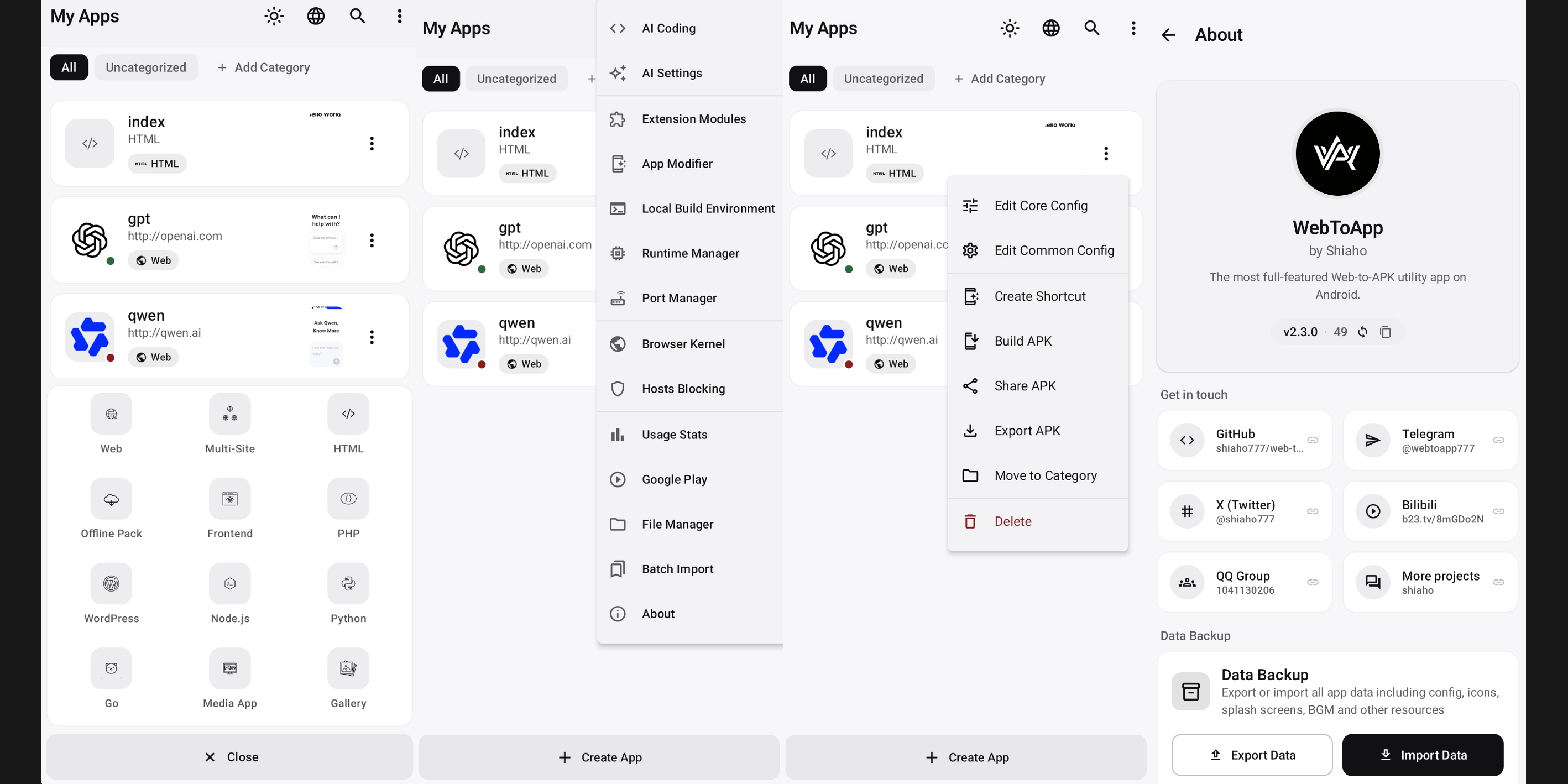

 WebToApp 是一款安卓应用,可以完全在手机上把网页项目打包成可安装的 APK——不需要电脑,也不需要远程构建服务器。它不只是给 URL 套个壳,还能运行真正的服务器运行时,内置抗审查网络栈,支持 Google Play 签名和浏览器扩展。