

这是什么?
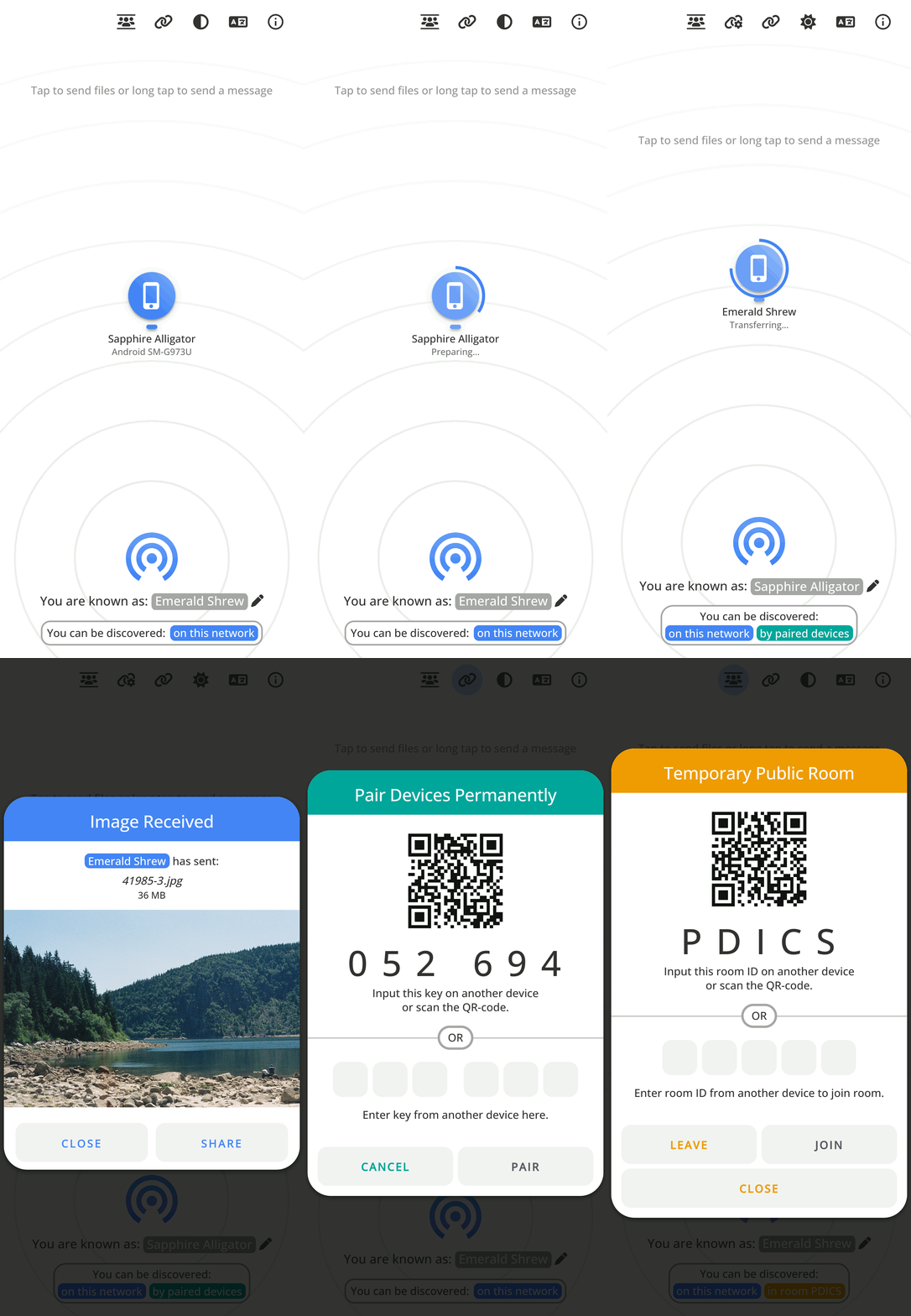
 PairDrop 是一款网页应用,用于在同一局域网内的设备之间传输文件和文字。它受 Apple AirDrop 启发,并基于 Snapdrop 分支开发。它还支持设备配对,以及加入临时公共房间,通过互联网进行传输。
PairDrop 是一款网页应用,用于在同一局域网内的设备之间传输文件和文字。它受 Apple AirDrop 启发,并基于 Snapdrop 分支开发。它还支持设备配对,以及加入临时公共房间,通过互联网进行传输。这是桌面应用,还是在浏览器中打开的应用?它是一款渐进式网页应用(PWA),可在任何现代浏览器中运行,前端采用原生 HTML5/JS/CSS,后端使用 Node.js 处理 WebSocket 信令。
它是一款渐进式网页应用(PWA),可在任何现代浏览器中运行,前端采用原生 HTML5/JS/CSS,后端使用 Node.js 处理 WebSocket 信令。我该如何开始用它共享文件?在同一网络的两台设备上用浏览器打开 PairDrop,它们会自动互相发现;如需运行自己的服务器,可使用 Docker 或 Node.js。
在同一网络的两台设备上用浏览器打开 PairDrop,它们会自动互相发现;如需运行自己的服务器,可使用 Docker 或 Node.js。自行部署服务器需要准备什么?需要 Node.js 运行环境(v15+),服务器依赖 express、ws、express-rate-limit、ua-parser-js 和 unique-names-generator;同时也提供 Docker 镜像。
需要 Node.js 运行环境(v15+),服务器依赖 express、ws、express-rate-limit、ua-parser-js 和 unique-names-generator;同时也提供 Docker 镜像。默认情况下,文件传输能否通过公共互联网进行?默认情况下,传输依赖本地网络发现;要连接局域网之外的设备,需要与其配对或加入公共房间。位于 NAT 之后的设备会通过 PairDrop 自有的 TURN 服务器自动连接。
默认情况下,传输依赖本地网络发现;要连接局域网之外的设备,需要与其配对或加入公共房间。位于 NAT 之后的设备会通过 PairDrop 自有的 TURN 服务器自动连接。PairDrop 适合哪些人使用?适合所有想在手机、笔记本电脑和台式机之间传输文件的人,无论它们使用什么操作系统,无需安装应用,也无需注册账号。例如,在 Android 和 iOS 之间分享照片,或在 Linux 设备之间传输文件。
适合所有想在手机、笔记本电脑和台式机之间传输文件的人,无论它们使用什么操作系统,无需安装应用,也无需注册账号。例如,在 Android 和 iOS 之间分享照片,或在 Linux 设备之间传输文件。我能自己运行 PairDrop 服务器吗,比如在树莓派上?可以,你可以在本地网络中自行部署 PairDrop,例如在树莓派上,并配置你自己的 STUN/TURN 服务器。
可以,你可以在本地网络中自行部署 PairDrop,例如在树莓派上,并配置你自己的 STUN/TURN 服务器。连接是点对点的,还是服务器能看到我的文件?文件通过 WebRTC 直接点对点传输;Node.js 服务器仅通过 WebSocket 处理信令和发现,不接触文件内容本身。
文件通过 WebRTC 直接点对点传输;Node.js 服务器仅通过 WebSocket 处理信令和发现,不接触文件内容本身。持久设备配对是如何工作的?你只需通过 6 位数字码或二维码将两台设备配对一次。配对后,即使重新打开应用,设备也会通过共享密钥在任意网络中自动找到彼此,并且可以编辑或删除配对。
你只需通过 6 位数字码或二维码将两台设备配对一次。配对后,即使重新打开应用,设备也会通过共享密钥在任意网络中自动找到彼此,并且可以编辑或删除配对。公共房间有什么用?公共房间允许未配对或不在同一局域网的设备,通过输入共享的 5 个字母代码或扫描二维码进行临时连接,适用于通过互联网进行的一次性传输,或公共 Wi-Fi 等复杂网络环境。
公共房间允许未配对或不在同一局域网的设备,通过输入共享的 5 个字母代码或扫描二维码进行临时连接,适用于通过互联网进行的一次性传输,或公共 Wi-Fi 等复杂网络环境。我能否无需先打开网页就发送文件?可以,PairDrop 与操作系统的分享/右键菜单集成:在 Windows 和 Ubuntu(Nautilus)上可直接从右键菜单发送文件,在 iOS/Android 上可通过分享菜单发送,也可以通过命令行界面发送。
可以,PairDrop 与操作系统的分享/右键菜单集成:在 Windows 和 Ubuntu(Nautilus)上可直接从右键菜单发送文件,在 iOS/Android 上可通过分享菜单发送,也可以通过命令行界面发送。PairDrop 与它所分支的原版 Snapdrop 有何不同?PairDrop 新增了持久配对设备、用于互联网传输的临时公共房间、多文件自动下载和 ZIP 打包、分享/右键菜单/命令行集成、显示名称自定义,以及纯 Node.js 后端,并在稳定性和界面方面做了其他改进。
PairDrop 新增了持久配对设备、用于互联网传输的临时公共房间、多文件自动下载和 ZIP 打包、分享/右键菜单/命令行集成、显示名称自定义,以及纯 Node.js 后端,并在稳定性和界面方面做了其他改进。What are similar projects?snapdrop, sharedrop, filepizza, openGym, YesPlayMusic, yjs, WebRTC-Experiment, netbird
snapdrop, sharedrop, filepizza, openGym, YesPlayMusic, yjs, WebRTC-Experiment, netbirdWhich topics is it in?progressive-web-app, indexeddb, websockets, file-sharing, webrtc, express, pwa, p2p, raspberry-pi, gplv3, ios, android
progressive-web-app, indexeddb, websockets, file-sharing, webrtc, express, pwa, p2p, raspberry-pi, gplv3, ios, android