
window-sweaters README

The project's README from github.com/saragordic/window-sweaters. As one markdown file: README.md.

Window Sweaters

A little Mac app I made to give my windows sweaters. 🧶 Knitted borders, colours inspired by your favourite apps, and a cosier desktop.

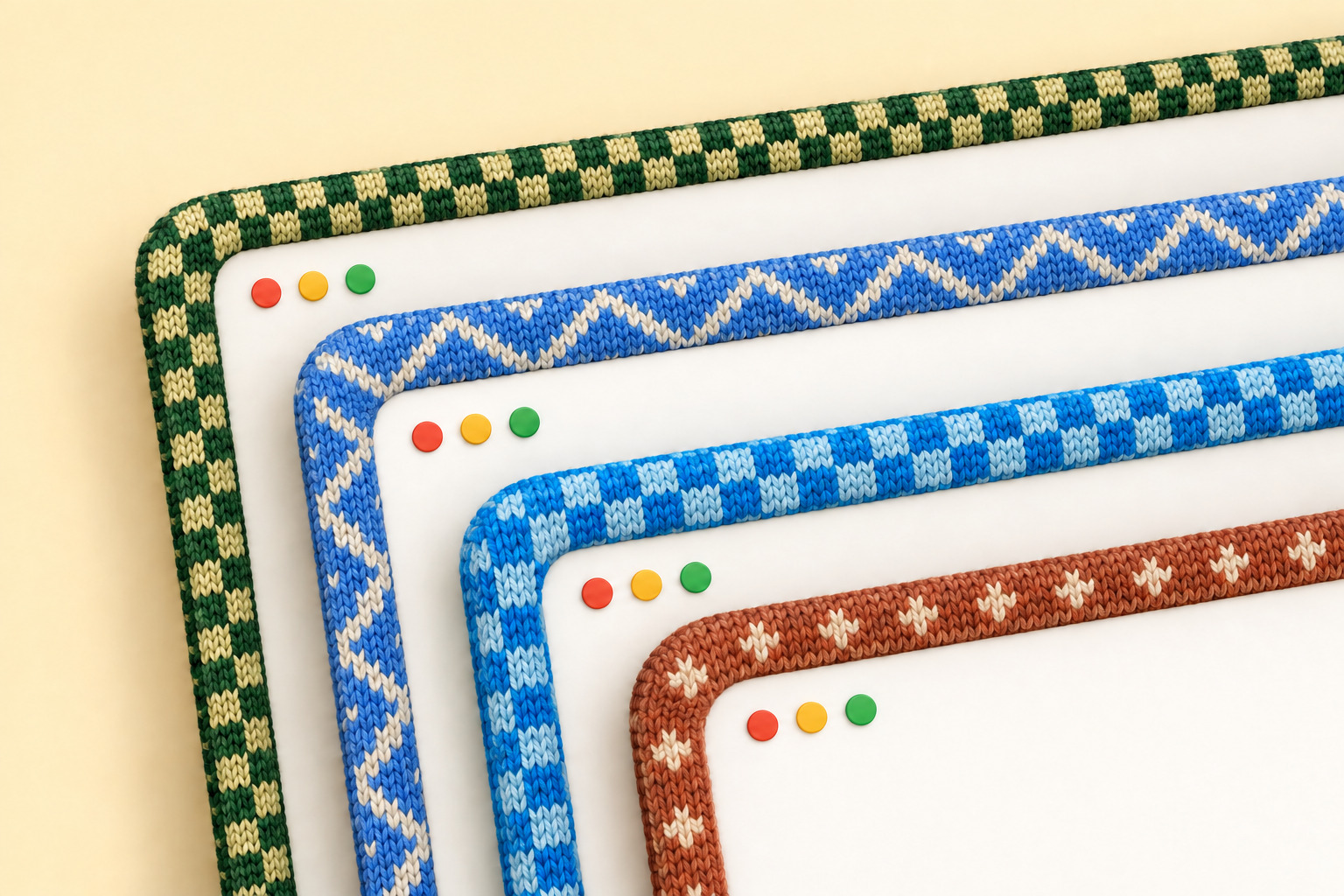
Four overlapping windows edged with knitted borders in green, blue and rust colourways

Get it

You can just send this repo to your coding agent and ask it to install Window Sweaters for you:

Install Window Sweaters on my Mac: https://github.com/saragordic/window-sweaters

Or install it yourself with Homebrew:

brew trust saragordic/tap
brew install --cask saragordic/tap/window-sweaters

Then open Window Sweaters from your Applications folder.

You can also grab the latest ZIP from Releases, unzip it, and drag Window Sweaters.app into Applications.

If macOS blocks it, open System Settings → Privacy & Security → Open Anyway after trying to launch it. The app isn't notarized by Apple yet. Apple's instructions explain this step.

Make yourself cosy

Click the yarn icon in your menu bar to change the style, pattern, border width, and stitch size. You can also pause the sweaters or quit from there.

To leave an app bare, open Apps and untick it. Its windows lose their sweater straight away, everything else stays as it is, and it stays off until you tick it again, even after a restart. Only want sweaters on a few apps? Choose Turn Off for All Apps, then tick the ones you like. Apps you open later start off too.

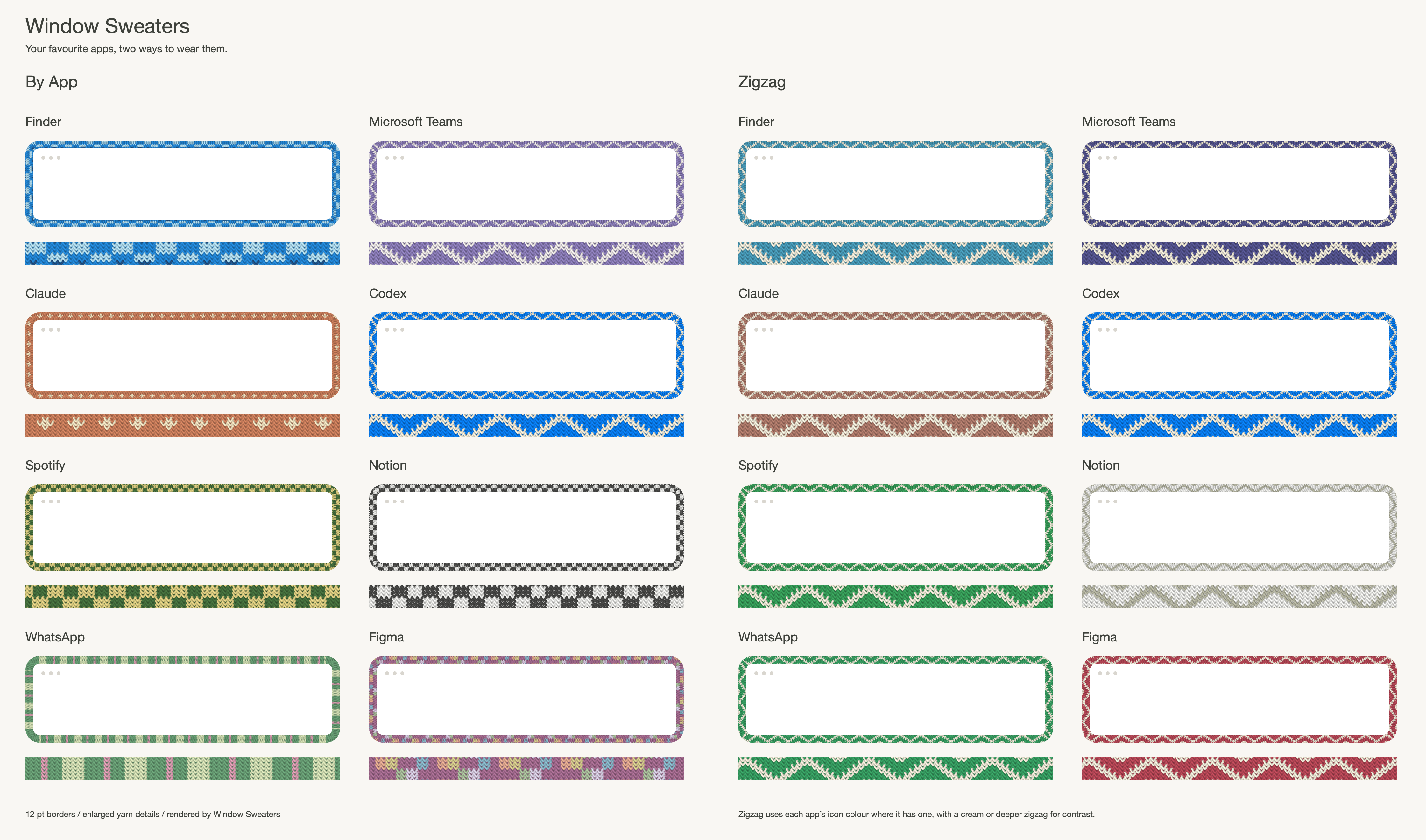
By App gives each app its own sweater. Zigzag gives them all a softer, matching cream zigzag in colours taken from their icons. Try both and see what you like.

If macOS asks for Accessibility access, enable Window Sweaters in System Settings → Privacy & Security → Accessibility so it can follow which window is focused.

The sweaters

Custom sweaters for 37 apps, and counting! Almost 40 little colourways, with colours picked by hand. These are just a few of my favourites:

Eight apps shown in By App and Zigzag styles, with enlarged yarn details

Shown above in By App and Zigzag. Here’s everyone we’ve knitted for so far:

See every sweater and its close-up stitches in the catalogue, or download the By App PDF.

The 37 custom sweaters keep their hand-picked colours and patterns. Other apps borrow colours from their own icons, softened into yarn, and get a two-colour zigzag, picnic or twinkle sweater in By App mode. The pattern stays the same for each app. If an icon has no usable colour, the app keeps a stable colour chosen from its name.

Icons are sampled locally in the background when needed. While the colour is being prepared, the border uses its usual fallback. Zigzag uses icon colours for every app, the 37 custom ones included, with a cream zigzag, or a deeper shade of the app’s colour on pale apps. Colours you set in apps.conf always win. Other shared patterns keep their own contrast yarns, with each app’s own base colour.

A little work in progress

I built this on my Mac and use it myself, but there are still rough edges. Borders hide while you resize a window and return when you're done.

The app is built for macOS 13 or later, on Apple Silicon and Intel. I've tested it on Apple Silicon with macOS 26; older macOS versions and Intel Macs haven't had the same hands-on testing. It uses private macOS window APIs, so system updates may affect how it works.

If something looks wrong, open an issue and tell me your macOS version, Mac model, and whether you're using another screen. Reproduction steps help a lot.

Build it yourself

You'll need Apple's Command Line Tools (xcode-select --install) and Python 3.

git clone https://github.com/saragordic/window-sweaters.git
cd window-sweaters
./scripts/build-app.sh
python3 scripts/install-local.py

This builds outputs/Window Sweaters.app, installs it in ~/Applications, and opens it. The installer backs up any previous local installation before replacing it.

Your own colourways

If you'd like to experiment, edit these files and restart the app:

~/Library/Application Support/Knit Borders/apps.conf
~/Library/Application Support/Knit Borders/charts/

The folder still uses the app's original name so existing settings keep working. For example, an app rule looks like this:

Claude = #D58561 atelier-claude

Names match app-name prefixes, ignoring capitalisation; the longest match wins. You can also put your own PNG charts in the charts folder to replace built-in patterns.

If you like setting things up from the command line, Window Sweaters also runs an optional shell script at startup, if you have one at ~/.config/window-sweaters/sweatersrc or ~/.sweatersrc.

Taking it off

Quit Window Sweaters from the yarn icon first. Then, if you installed it with Homebrew:

brew uninstall --zap --cask window-sweaters

--zap also removes your saved colourways. Leave it off to keep them for later.

If you installed it by hand, drag Window Sweaters.app to the Trash, then delete these if you want everything gone:

~/Library/Application Support/Knit Borders
~/Library/Preferences/local.knitborders.app.plist

macOS remembers the Accessibility permission separately, so remove Window Sweaters from System Settings → Privacy & Security → Accessibility too.

Contributing

make test       # run the tests
make catalogue  # render the sweater collection
make bench     # benchmark the renderer

See CONTRIBUTING.md for more details.

Credits and license

Built on JankyBorders by Felix Kratz, with thanks. Released under GPL-3.0. See NOTICE.md for attribution.

window-sweaters (saragordic/window-sweaters)

Searching Database…

这是什么东西?Window Sweaters 是一款好玩的 macOS 菜单栏应用,能用针织毛衣样式的边框把你的应用窗口“包”起来,配色灵感来自你喜爱的应用。
它是我正常安装的应用,还是会以某种方式改动 macOS?它是一个普通的菜单栏应用,所有设置都在一个毛线团图标里。它在底层借助 macOS 的私有窗口接口来给窗口画边框,并且基于 JankyBorders 构建,所以 macOS 更新偶尔可能会影响它的使用。
我怎么把它装到我的 Mac 上?可以让你的编程助手从这个仓库安装,也可以自己用 Homebrew 安装,或者从 Releases 下载最新的 ZIP 包,把 Window Sweaters.app 拖入“应用程序”文件夹。然后从“应用程序”文件夹里打开它就行。
macOS 会让我直接运行它吗?不一定:这款应用还没有通过 Apple 的公证,所以 macOS 可能会阻止它首次启动——需要在“系统设置”→“隐私与安全性”里点击“仍要打开”来放行。它还会请求辅助功能权限,以便跟踪当前聚焦的是哪个窗口。
它能在我的 Mac 上运行吗?它需要 macOS 13 或更高版本,Apple Silicon 和 Intel 芯片的 Mac 都能运行。目前只在 macOS 26 的 Apple Silicon 机器上实际测试过,所以 Intel 和较旧版本的 macOS 上表现没那么有把握。
它会把我的数据发送到别处吗?README 里没有任何涉及网络使用的迹象:应用图标是在本地后台采样的,用来挑选毛线配色,而且你在 apps.conf 里自己设置的颜色始终优先。
哪些应用自带现成的毛衣?目前支持 37 款应用:Apple 的 Finder、Safari、Mail、Messages、Notes、Calendar、Terminal 等等;Notion、Slack、Zoom、Teams 之类的办公工具;Cursor、VS Code、Claude、ChatGPT、Codex、Ghostty 等编程和 AI 应用;Figma、Photoshop、Illustrator 等设计工具;Office 系列;还有 Spotify、Chrome、Firefox、Telegram、WhatsApp 和 Discord。
我能自己设计配色方案吗?可以——编辑应用的配置文件就能给每个应用设置颜色(规则按应用名前缀匹配,最长匹配优先),还可以把自己的 PNG 针织图样放进 charts 文件夹来替换内置图案。另外还有一个可选的启动 shell 脚本,位于 ~/.config/window-sweaters/sweatersrc 或 ~/.sweatersrc。
它基于什么构建,采用什么许可证?它基于 Felix Kratz 的 JankyBorders 构建,以 GPL-3.0 许可证发布,署名信息在 NOTICE.md 里。作者是为了自己的 Mac 才做的这个工具,并作为一个小型开源项目分享出来。
What are similar projects?BetterDisplay, rooms, dimble, Sapphire, Ice, OpenYoink, Doll, boring.notch
Creator
saragordic
Size
40.8 MB
Stars
803
Age
1mo
Commits · 90 Days