Rooms
A little Mac app I made for switching between projects.
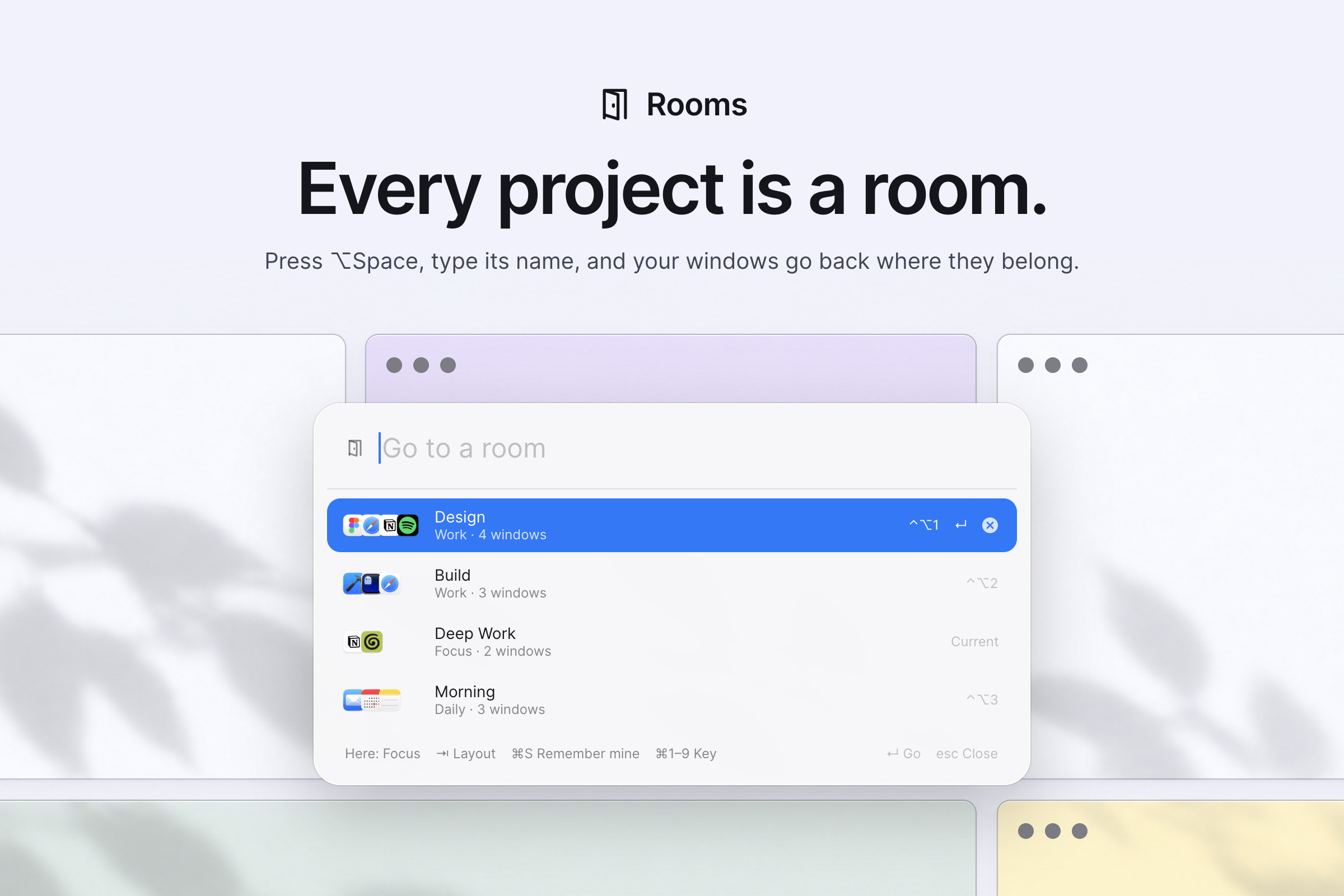
Every project is a room: a set of windows and a layout. Press ⌥Space, type the
room's name, and your windows come back, laid out neatly. Everything else hides, and
nothing is ever closed.
Get it
You can just send this repo to your coding agent and ask it to install Rooms for you:
Install Rooms on my Mac: https://github.com/saragordic/rooms
Or install it yourself with Homebrew:
brew trust saragordic/tap
brew install --cask saragordic/tap/rooms
Then open Rooms from your Applications folder. It lives in the menu bar.
You can also grab the latest ZIP from Releases, unzip it, and drag Rooms.app into Applications. The app isn't notarized by Apple yet, so macOS blocks the first launch of the ZIP version: open System Settings → Privacy & Security → Open Anyway after trying to launch it. Apple's instructions explain this step. (The Homebrew version opens straight away.)
Rooms needs Accessibility access to move windows. Turn it on in System Settings → Privacy & Security → Accessibility when it asks. After an update, macOS may ask again: remove Rooms from that list and add it back.
Make your first room
- Open the windows a project needs.
- Press ⌥Space, type a name for the room, and press Enter.
- Click the windows that belong in it. The number on a card is its place in the layout, and 1 is the main window. Then Create Room.
- Press Tab to change the layout. In ⌥Space, select the room and press Tab (⇧Tab goes back): the preview shows each layout that fits your screen, and the room remembers the one you pick.
The windows come to the screen you're on and lay themselves out. From then on, ⌥Space and the room's name (or ⌃⌥1–9) brings it back. Getting Started in the menu shows these steps again.
Around the rooms
- Layouts. In ⌥Space, press Tab to try the layouts that fit this screen: Focus (one big window beside the rest), Columns, Grid, My Layout (your own arrangement, snapped to a grid with even gaps), or Stack (cards with their title bars peeking out, only when nothing tidier fits). The preview glides as you go.
- Change which window goes where. Tab picks the layout; the order decides which window takes which spot, and 1 is the big main spot. To rearrange, right-click the room in ⌥Space and choose Edit Windows…: click a card to take it out, click it again to put it back at the end, until the numbers are in the order you want. Or arrange the windows by hand (the ⌃⌥ snapping keys help) and press ⌘S in ⌥Space to keep that arrangement.
- Auto fits the screen. It tries Focus, Columns and Grid, and stacks only when apps' minimum sizes leave no tidy option. When you save a room, Rooms measures how small each app lets its windows get, so layouts fit from the start. Your laptop and your monitor each remember their own layout, and plugging a monitor in re-lays out the room you're in.
- Rooms learn. Arrange the windows how you like and press ⌘S: Rooms recognises the layout and tidies it, or keeps your arrangement exactly.
- Edit, rename, delete. Right-click a room in ⌥Space (or use the menu for the room you're in) to choose its windows again and rename it. Delete a room with the ⓧ on its row, a right-click, or ⌘⌫ in ⌥Space, and ⌘Z brings it back. Deleting a room never touches its windows.
- Direct keys. ⌃⌥1–9 jump straight into a room; ⌘1–9 in ⌥Space gives the selected room its number.
- Window snapping for the window you're in, with the same gaps as rooms: halves ⌃⌥←→↑↓ (press ← or → again for ⅔, then ⅓), quarters ⌃⌥UIJK, thirds ⌃⌥DFG, two-thirds ⌃⌥ET, maximize ⌃⌥↩, center ⌃⌥C, restore ⌃⌥⌫, other display ⌃⌥⌘←→.
Nothing closes
Windows that aren't in the room are hidden, or parked just off-screen when they belong to one of the room's apps. Before a window moves, Rooms writes down where it belongs, and only forgets once the window is back. Show Everything in the menu, quitting Rooms, or opening it again after a crash brings parked windows back; one whose app isn't responding stays recorded and comes back on the next try.
Privacy
Rooms works entirely on your Mac. It makes no network connections of any kind: no accounts, no analytics, no updates checked, nothing sent anywhere.
Your rooms live in ~/Library/Application Support/Rooms/rooms.json, which you can read and edit (Edit Rooms… in the menu). Parked windows are recorded next to it in resting.json, and a log of what Rooms moved stays in ~/Library/Logs/Rooms/rooms.log. These include window titles, so please don't post them unedited in an issue.
A little work in progress
I built this on my Mac and use it all day, but there are still rough edges:
- Rooms holds browser windows, not tabs. Put a project's tabs in their own browser window (Chrome can name it: Window → Name Window…). If a room's window was closed, Rooms uses another window of that app, preferring one that isn't in another room.
- Some apps won't shrink below a minimum size. On a small screen with many windows, Stack may be the only layout that fits.
- Spaces and full-screen windows aren't managed; Rooms works with ordinary windows on the current Space.
- Stage Manager fights with any window manager. Rooms warns you when it's on.
- ⌥Space replaces the usual way of typing a non-breaking space. Pick another shortcut under Keyboard Shortcut in the menu if you need it.
It's built for macOS 14 or later, on Apple Silicon and Intel. I've tested it on Apple Silicon with macOS 26; older macOS versions and Intel Macs haven't had the same hands-on testing.
If something looks wrong, open an issue and tell me your macOS version, Mac model, and whether you're using another screen. Reproduction steps help a lot.
Build it yourself
You'll need Xcode 16 or later (or its Command Line Tools: xcode-select --install).
git clone https://github.com/saragordic/rooms.git
cd rooms
make run
This builds build/Rooms.app and opens it. To keep the Accessibility permission across rebuilds, create a certificate named Rooms Dev in Keychain Access (Certificate Assistant → Create a Certificate → type "Code Signing"); the Makefile uses it when it exists.
Taking it off
Choose Quit Rooms from the menu first: parked windows come back as it quits. Then, if you installed it with Homebrew:
brew uninstall --zap --cask rooms
--zap also removes your rooms and settings. Leave it off to keep them for later.
If you installed it by hand, drag Rooms.app to the Trash, then delete these if you want everything gone:
~/Library/Application Support/Rooms
~/Library/Logs/Rooms
~/Library/Preferences/com.saragordic.rooms.plist
macOS remembers the Accessibility permission separately, so remove Rooms from System Settings → Privacy & Security → Accessibility too.
Contributing
make test      # run the tests for the layout engine
make release   # build the universal Rooms.app and its ZIP
See CONTRIBUTING.md for more details.
License
MIT. See LICENSE.

 Rooms 是一款用于在项目之间切换的 macOS 应用:每个“房间”是一组带布局的已保存窗口,一个快捷键就能让它们整齐地全部回来,同时隐藏其他所有内容。