Что это?
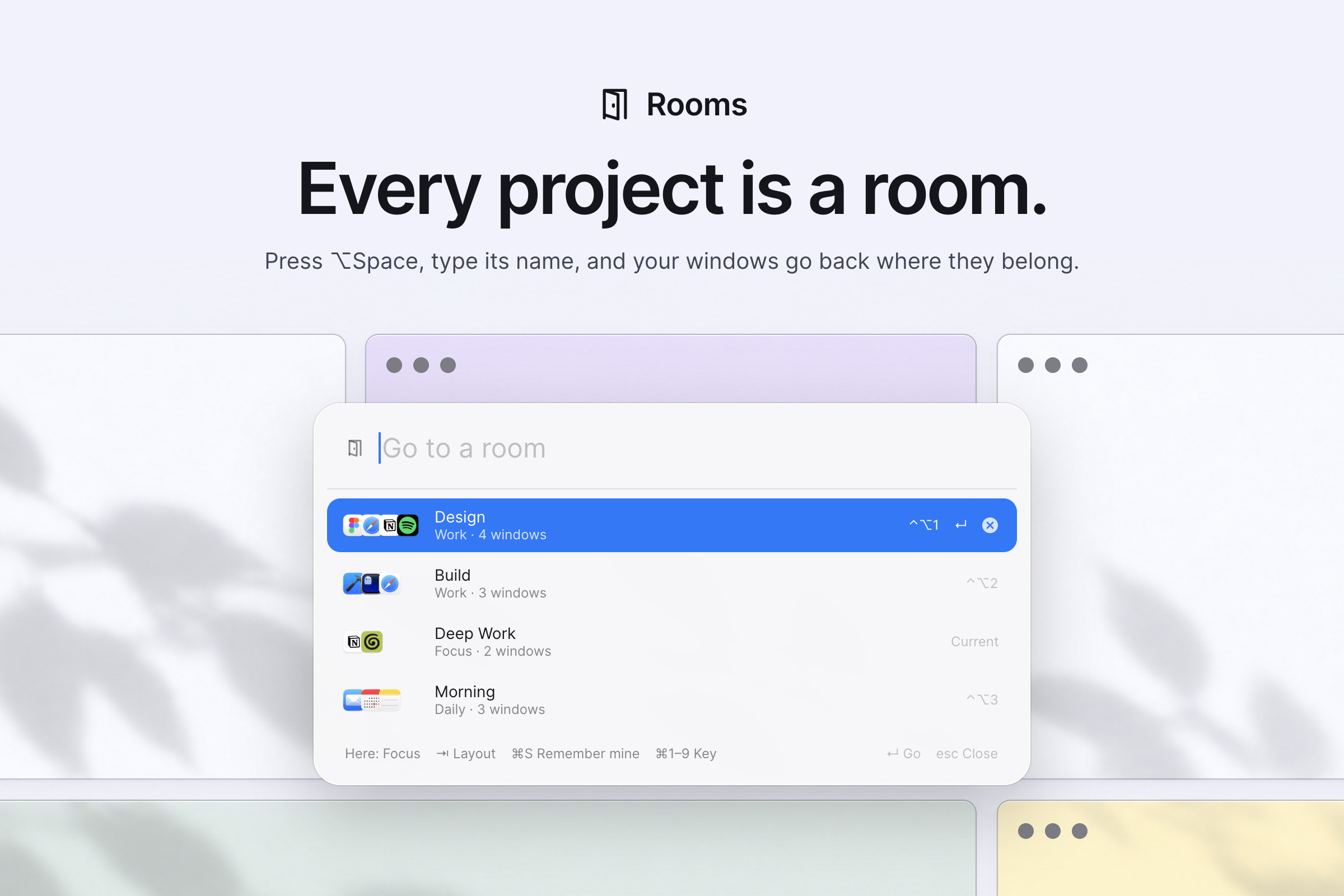
 Rooms — приложение macOS для переключения между проектами: каждая «комната» — сохранённый набор окон с раскладкой, и одно сочетание клавиш возвращает их все аккуратно разложенными, скрывая всё остальное.
Rooms — приложение macOS для переключения между проектами: каждая «комната» — сохранённый набор окон с раскладкой, и одно сочетание клавиш возвращает их все аккуратно разложенными, скрывая всё остальное.Это оконный менеджер или просто лаунчер?Это оконный менеджер, который также управляет раскладкой и переключением окон: он раскладывает окна по схемам вроде Focus, Columns, Grid или Stack, а окна вне активной комнаты паркует или прячет вместо закрытия.
Это оконный менеджер, который также управляет раскладкой и переключением окон: он раскладывает окна по схемам вроде Focus, Columns, Grid или Stack, а окна вне активной комнаты паркует или прячет вместо закрытия.Как установить и настроить Rooms?Установите через Homebrew, скачайте ZIP со страницы Releases и перетащите Rooms.app в Applications или попросите кодинг-агента установить его за вас. Затем откройте окна для проекта, нажмите ⌥Space, назовите комнату, выберите относящиеся к ней окна и нажмите Enter.
Установите через Homebrew, скачайте ZIP со страницы Releases и перетащите Rooms.app в Applications или попросите кодинг-агента установить его за вас. Затем откройте окна для проекта, нажмите ⌥Space, назовите комнату, выберите относящиеся к ней окна и нажмите Enter.Нужно ли что-то особое перед установкой, например Xcode?Для запуска нужны только macOS и Homebrew (или ручная установка из ZIP); Xcode 16 или его Command Line Tools нужны, только если хотите собрать его сами из исходников.
Для запуска нужны только macOS и Homebrew (или ручная установка из ZIP); Xcode 16 или его Command Line Tools нужны, только если хотите собрать его сами из исходников.Есть ли шероховатости, о которых стоит знать?Rooms управляет окнами браузера, а не отдельными вкладками; некоторые приложения не сжимаются ниже минимального размера, так что подойти может только раскладка Stack; Spaces и полноэкранные окна не управляются; а Stage Manager конфликтует с ним. Сборка ZIP к тому же не нотаризована, поэтому macOS блокирует первый запуск, пока вы не разрешите его вручную.
Rooms управляет окнами браузера, а не отдельными вкладками; некоторые приложения не сжимаются ниже минимального размера, так что подойти может только раскладка Stack; Spaces и полноэкранные окна не управляются; а Stage Manager конфликтует с ним. Сборка ZIP к тому же не нотаризована, поэтому macOS блокирует первый запуск, пока вы не разрешите его вручную.Работает ли это на Mac с Intel или только на Apple Silicon?Он поддерживает macOS 14+ и на Apple Silicon, и на Intel, но автор проводил практическое тестирование только на Apple Silicon с macOS 26, так что Intel и старые версии macOS проверены меньше.
Он поддерживает macOS 14+ и на Apple Silicon, и на Intel, но автор проводил практическое тестирование только на Apple Silicon с macOS 26, так что Intel и старые версии macOS проверены меньше.Отправляет ли Rooms мои данные куда-либо?Нет. Rooms работает целиком на вашем Mac и никогда не делает сетевых подключений; данные комнат и логи хранятся локально в простых JSON и файлах журналов, которые вы можете читать сами.
Нет. Rooms работает целиком на вашем Mac и никогда не делает сетевых подключений; данные комнат и логи хранятся локально в простых JSON и файлах журналов, которые вы можете читать сами.Как переключение комнат устроено в повседневной работе?Нажмите ⌥Space, введите или выберите имя комнаты (или используйте ⌃⌥1-9), и Rooms принесёт окна этой комнаты на текущий экран в сохранённой раскладке, пряча или паркуя всё остальное.
Нажмите ⌥Space, введите или выберите имя комнаты (или используйте ⌃⌥1-9), и Rooms принесёт окна этой комнаты на текущий экран в сохранённой раскладке, пряча или паркуя всё остальное.Можно ли менять раскладку окон в комнате?Да, нажмите Tab в ⌥Space, чтобы перебирать подходящие под ваш экран раскладки (Focus, Columns, Grid, My Layout, Stack), или разложите окна вручную и нажмите ⌘S, чтобы Rooms запомнил именно такое расположение.
Да, нажмите Tab в ⌥Space, чтобы перебирать подходящие под ваш экран раскладки (Focus, Columns, Grid, My Layout, Stack), или разложите окна вручную и нажмите ⌘S, чтобы Rooms запомнил именно такое расположение.Что происходит с окнами, не входящими в активную комнату?Они никогда не закрываются, только прячутся или паркуются чуть за краем экрана; «Show Everything» в меню, выход из Rooms или его повторный запуск после сбоя возвращает их все.
Они никогда не закрываются, только прячутся или паркуются чуть за краем экрана; «Show Everything» в меню, выход из Rooms или его повторный запуск после сбоя возвращает их все.Удаляет ли деинсталляция все мои комнаты и настройки?Если установлено через Homebrew, деинсталляция с --zap удалит и ваши комнаты, и настройки; без этого флага или при ручном перетаскивании Rooms.app в Корзину они сохранятся на будущее.
Если установлено через Homebrew, деинсталляция с --zap удалит и ваши комнаты, и настройки; без этого флага или при ручном перетаскивании Rooms.app в Корзину они сохранятся на будущее.What are similar projects?macos-sysdata, tendedero, DockDoor, vorssaint-utils, OpenYoink, dimble, BetterDisplay, boring.notch
macos-sysdata, tendedero, DockDoor, vorssaint-utils, OpenYoink, dimble, BetterDisplay, boring.notchWhich topics is it in?window-management, menubar-app, window-manager, menubar, menu-bar, xcode, homebrew, macos-app, apple-silicon, swift, offline, utility
window-management, menubar-app, window-manager, menubar, menu-bar, xcode, homebrew, macos-app, apple-silicon, swift, offline, utility