
NOOP
Your strap. Your data. Your machine. Offline, on-device, no cloud.
Now in the all-new Liquid Metal design: one living look across iPhone, Android and Mac.









⬇ Download ·
❓ FAQ ·
💬 Discord ·
👽 Reddit ·
Features ·
Protocol ·
Raw data capture ·
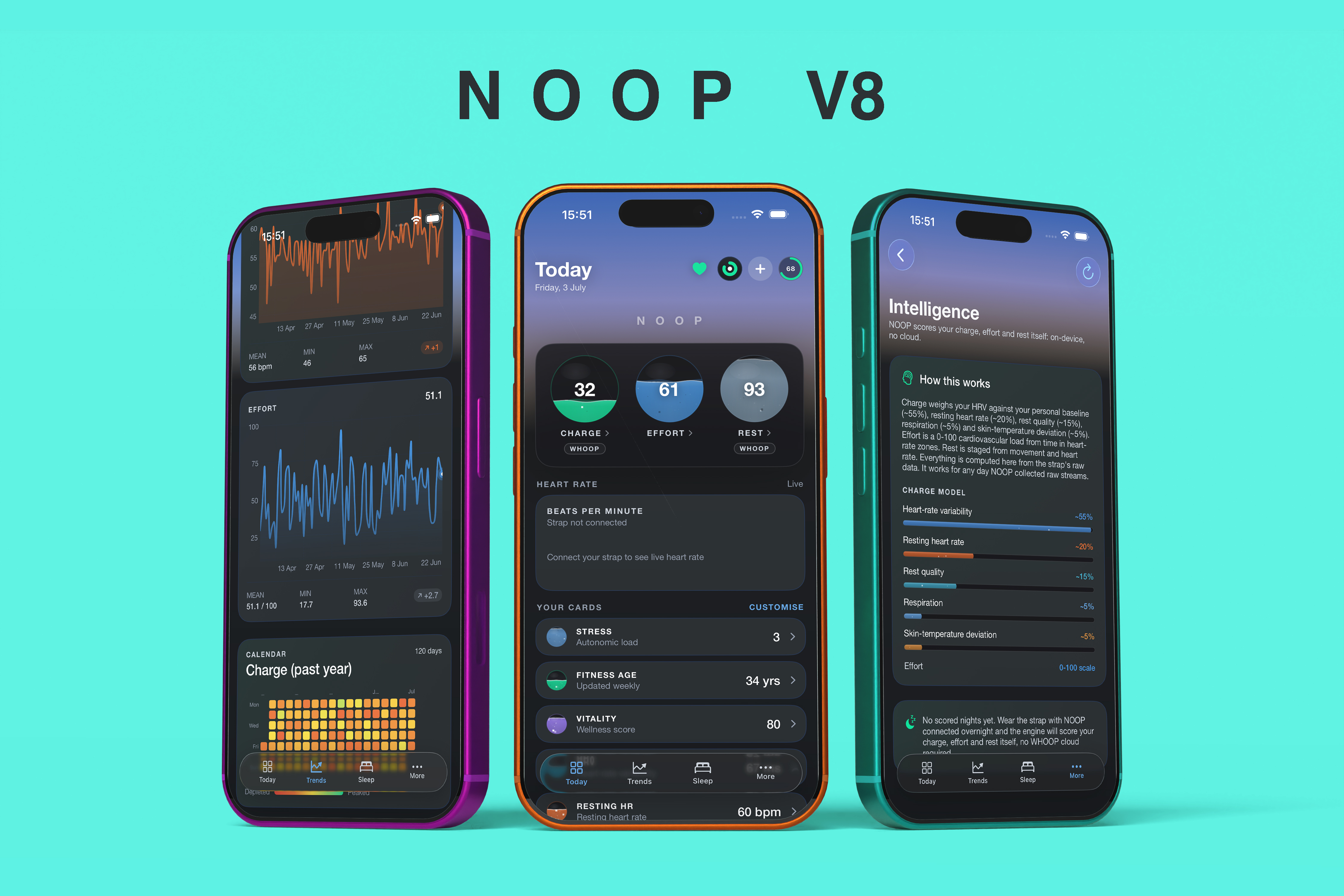
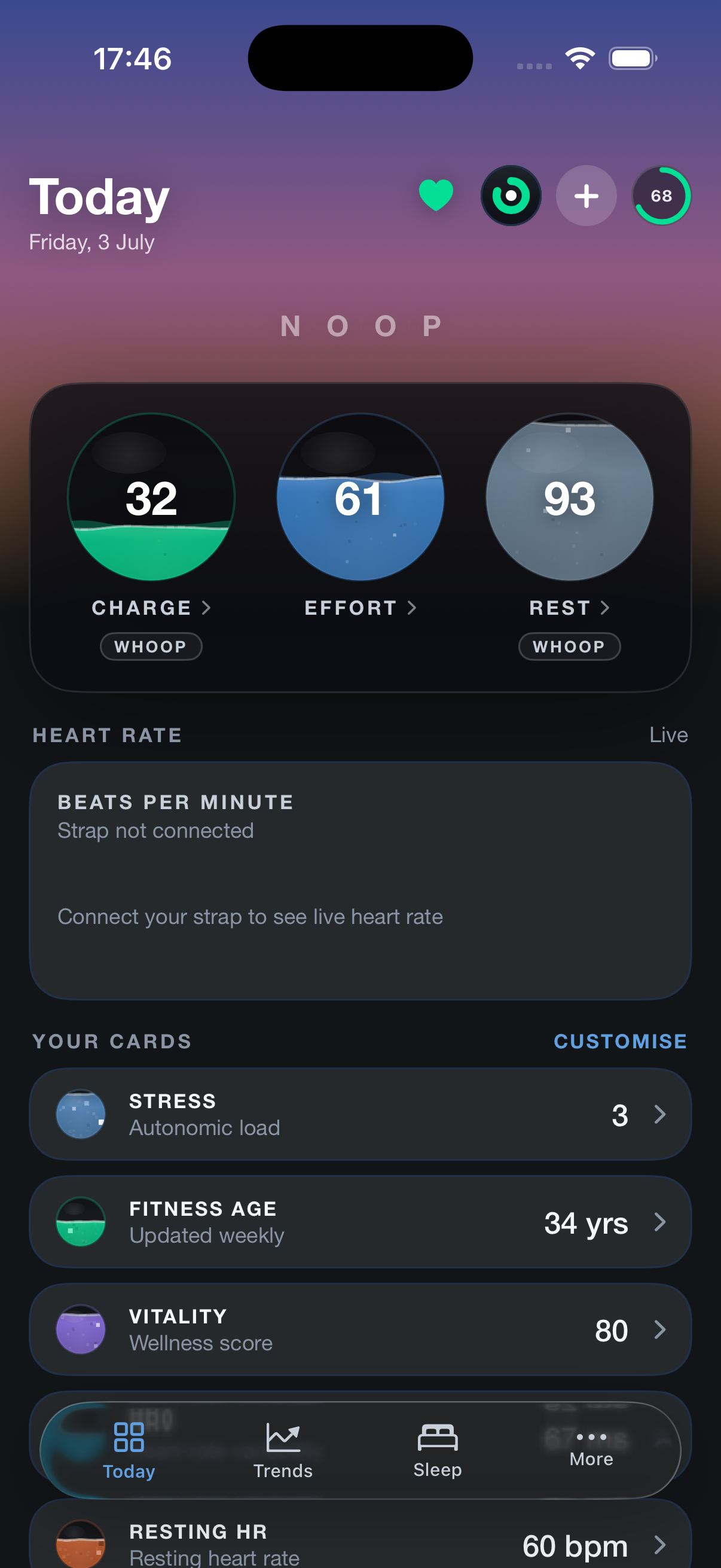
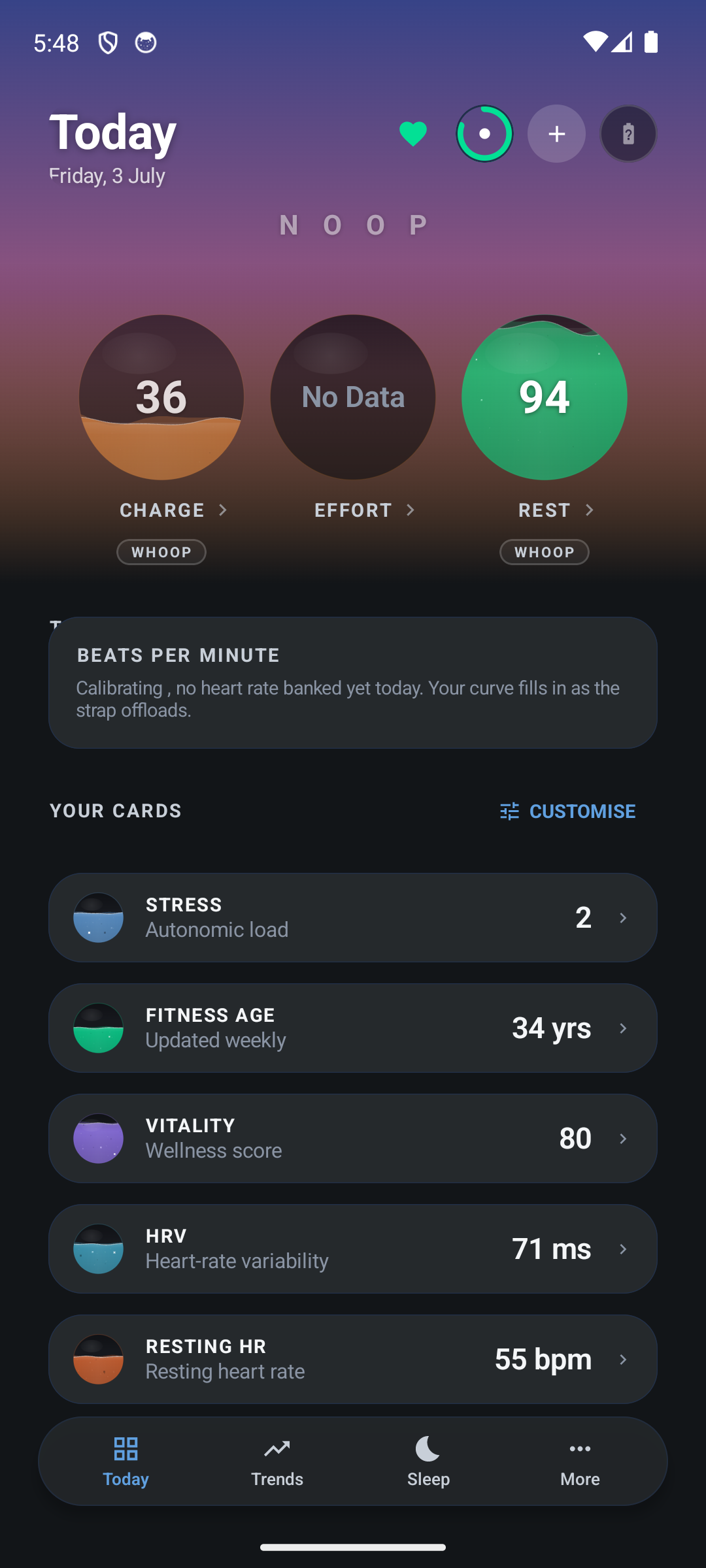
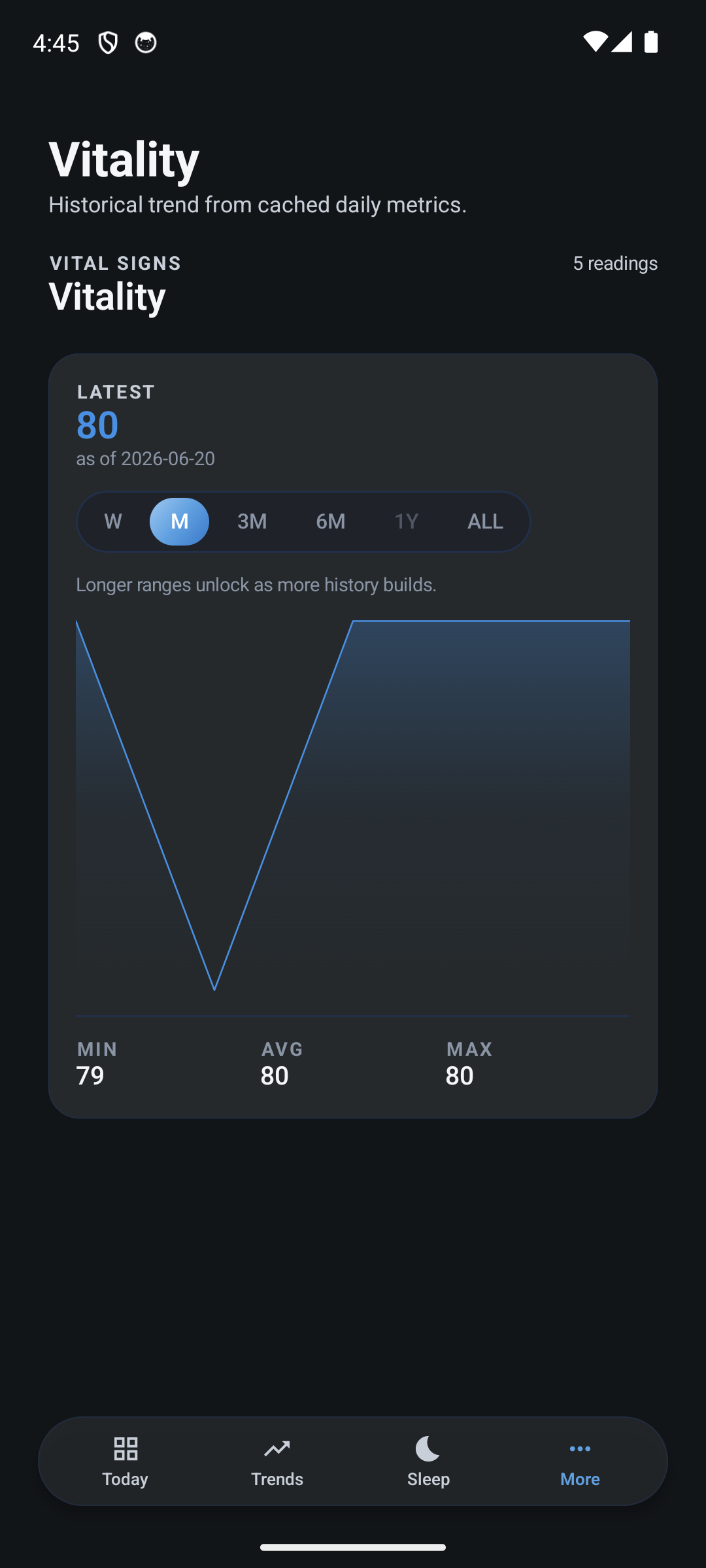
The all-new Liquid Metal look: living liquid scores, a sky that moves with your day, rebuilt on every screen. The same Today on iPhone and Android, and a metric’s own trend. One design across iPhone, Android & Mac.
Download
Pre-built apps you can run right now:

| Platform |
Build |
Notes |
| macOS |
NOOP.app (see Releases) |
Apple Silicon + Intel. Drag to Applications. Not notarized — see First launch on macOS below. (A Homebrew cask isn't currently published for this fork — grab the .app from Releases.) |
| Android |
NOOP-full.apk (see Releases) |
The full app. minSdk 26 (Android 8+). Sideload — enable "install unknown apps". Blocked by Play Protect? See Installing on Android below. |
| iOS |
AltStore / SideStore source (recommended — one-tap install + auto-updates): add https://raw.githubusercontent.com/ryanbr/noop/main/altstore-source.json as a source. Or a direct NOOP-vX-ios.ipa download. |
The .ipa is unsigned; you sign it on your iPhone with your own free Apple ID (no App Store, no developer account — NOOP stays anonymous). Re-signs every 7 days (AltStore/SideStore automates it). See docs/IOS.md. Or build from source in Xcode. |
First launch on macOS. NOOP is not notarized by Apple — notarization needs a paid Apple
Developer ID tied to a real identity, which doesn't fit an anonymous, free project. The app is
sandboxed and ad-hoc code-signed, and the full source is here to inspect. Because it isn't notarized,
macOS Gatekeeper blocks it on first open (you may see "damaged" or "unverified developer" — that's
the download quarantine flag, not real damage). To open it, do one of these once:
- Terminal (most reliable): drag
NOOP.app to Applications, then run
xattr -dr com.apple.quarantine /Applications/NOOP.app and open NOOP normally.
- No Terminal: double-click NOOP (it'll be blocked), then open System Settings → Privacy &
Security, scroll to the bottom, and click "Open Anyway" next to NOOP. (On macOS 14 and
earlier you can also right-click the app → Open.)
Prefer to avoid this entirely? Build from source — see Quickstart.
Installing on Android (Play Protect blocked it?). NOOP isn't on the Play Store — it's an
unsigned, source-available APK you sideload, because the project is anonymous and has no paid
Play identity to publish or sign under. So Android treats it as an "unknown app" and Google
Play Protect may warn or block on install (most stubbornly on stock Pixel / recent Android).
Nothing is wrong with the file — it's just missing a Play signature. To get it on:
- Tap "Install anyway." When the warning appears, choose More details → Install anyway.
- No "Install anyway" button? It can vanish after a first install + uninstall. Grant the source
directly: Settings → Apps → Special app access → Install unknown apps, pick the browser or
file manager you're installing from, turn on "Allow from this source", then open the APK again.
- Still blocked by Play Protect? It's your call to make for an unsigned app you trust: open the
Play Store → your profile icon → Play Protect → ⚙ Settings, toggle "Scan apps with Play
Protect" off, install NOOP, then switch it back on.
- Reinstalling is safe. Uninstalling and installing again won't hurt anything — NOOP keeps all
data on-device with
allowBackup=false, so a reinstall simply starts fresh. There's no cloud copy
to lose either way.
Prefer to build it yourself? See docs/BUILD.md.
Everything runs offline by default — nothing about you leaves the device unless you switch on a feature that sends it. NOOP makes only three kinds of network request, all described in docs/PRIVACY_SECURITY.md: the optional AI Coach (off until you add your own API key), a once-a-day check for a newer release, which sends nothing about you and never installs anything, and Android's default-off Experimental one-way push to an endpoint you own. Turn the check off in Settings → About and it makes no request at all. NOOP operates no server, account, or telemetry service.
NOOP is a standalone, fully offline companion app for WHOOP straps (4.0 and
5.0). It pairs directly with the strap over Bluetooth, stores everything on your
own device in SQLite, imports your existing WHOOP and Apple Health history, and
computes recovery, strain, HRV, and sleep locally, with no WHOOP account and
no WHOOP cloud.
There is also experimental support for the Oura Ring (measured on a Gen 3; a Ring 5 is
reported working over the same path) — real overnight data from a ring you own, on iOS and Android,
with real limits. See Oura ring support.
It is built on prior community interoperability work and exists for one
reason: to let someone who owns a WHOOP strap read their own biometric data
from their own device, on a machine they control.
Not affiliated with WHOOP. NOOP is an independent, unofficial
interoperability project. It is not affiliated with, endorsed by, or connected
to WHOOP, Inc. "WHOOP" is used only to identify the hardware NOOP talks to. Use
it only with a device you own, and not in breach of any agreement that applies
to you. NOOP is not a medical device; every derived metric is an
approximation, not clinical data. See DISCLAIMER.md.
Contents
Why NOOP
You bought the strap. The biometric stream it produces is yours. NOOP is built on
that premise:
- Own your data. NOOP reads heart rate, R-R intervals, SpO₂, skin temperature,
respiration, accelerometer/gravity, battery, and event data straight off the
strap over Bluetooth and writes it to a local SQLite database. Nothing is
uploaded anywhere.
- Account-free and local. NOOP never logs into a WHOOP account and never hits
a WHOOP server. It does not bypass any login, paywall, or DRM; it simply talks to
a device you own and reads data you generated.
- Bring your history. Already have years of data in the official app or in
Apple Health? Import the WHOOP CSV export and/or your Apple Health
export.xml
once, and it's permanently on your machine.
- Transparent math. Recovery, strain, HRV, and sleep are recomputed on-device
from documented, citable methods (Task Force 1996 HRV, Karvonen %HRR, Edwards /
Banister TRIMP, Tanaka HRmax, and so on). The algorithms are approximations of —
not reproductions of — any proprietary model, and every analyzer file documents
exactly what it does.
Features
The macOS reference app organizes everything behind a single sidebar
(Strand/App/RootView.swift). Each item below is a real screen in
Strand/Screens/. The same feature set ships on macOS, Android, and iOS via the
shared cross-platform code.
| Screen |
What it does |
| Today (Control Center) |
Home dashboard: recovery ring, a "today's synthesis" insight, a grid of stat tiles (recovery, strain, sleep, HRV, RHR, SpO₂, respiratory, steps, weight, calories) each with a 14-day sparkline, live strap battery % and HR trend, recent workouts, and a data-sources footer. |
| Readiness |
An on-device "should you push today?" read that synthesizes established sports-science signals from your own history — HRV vs your baseline (Plews/Buchheit), resting-HR drift (Lamberts), sleeping respiratory-rate drift, training-load balance (acute:chronic workload ratio, Gabbett) and training monotony (Foster) — into a single headline (Primed / Balanced / Strained / Run down) with the drivers behind it. Pure local math, not medical advice. |
| Live |
Real-time view of the connected strap — heart rate and frame stream as they arrive (~1 Hz). |
| Breathe |
HRV haptic breathing biofeedback. The strap both measures HRV (R-R intervals) and buzzes its haptic motor, so NOOP paces your breath with felt cues (one buzz inhale, two exhale) and shows live HR + rolling RMSSD responding as the session deepens. Presets: Relax 4-6, Coherence 5.5, Box 4-4. Each session reports a pre/post HRV outcome so you can see how much you settled. |
| Intervals |
Silent haptic HIIT timer. The strap buzzes every transition (triple-buzz into WORK, single into REST, 3-2-1 tick at phase ends, long buzz on finish) so you train hands-free. Falls back to a glanceable visual timer with no strap. |
| Explore (Metric Explorer) |
Interrogate any single metric over time, built from the metric catalog (Strand/Data/MetricCatalog.swift). |
| Compare |
Plot two metrics together / against each other over a shared timeline. |
| Insights |
Behavioral and correlational insights derived from your own series — including Activity Cost, which learns what each activity type typically costs your next-morning recovery (and how long you take to bounce back) from your own history. |
| Sleep |
Sleep sessions with a hypnogram, stage breakdown, efficiency, resting HR, and HRV — computed by the on-device sleep stager. Browse back through past nights, not just last night. |
| Trends |
Long-range trends across recovery, strain, sleep, and biometrics — and a shareable one-page PDF report (recovery / sleep / HRV / resting HR / strain over a range you choose), rendered entirely on-device for a doctor, coach, or your own records. |
| Workouts |
Detected and manual exercise sessions with strain and heart-rate detail. Tap any session for a full detail view — its HR curve over the workout, time in each HR zone, duration, avg/max HR, and the Effort it added. |
| Health |
Biometric overview (HR, HRV, SpO₂, skin temperature, respiratory rate, etc.). |
| Stress |
Day-level stress / autonomic load visualization. |
| Mind |
A quick daily mood check-in that correlates how you feel against your own recovery, sleep and HRV over time — so you can see what actually moves your mood. On-device and non-clinical: a self-reflection log, not a mental-health assessment. |
| Apple Health |
Browse and reconcile data imported from your Apple Health export. |
| Data Sources |
One-tap import of a WHOOP CSV export, an Apple Health export, or a nutrition CSV (Cronometer / MacroFactor), plus live-strap status. "Bring your history in once, then it's yours." |
| Notifications |
Configure local notifications and thresholds (Strand/Data/NotificationSettingsStore.swift). |
| Automations |
Turn the strap's physical inputs and live biometrics into Mac actions — all on-device (see below). |
| Coach |
An optional AI Coach you can ask about your data in plain language. It is off until you add your own key — Anthropic, OpenAI, or any OpenAI-compatible endpoint including a local/self-hosted model (Ollama, LM Studio) — and it sends only a short text summary of recent metrics plus your question, never raw streams or identifiers. With a local model the conversation never leaves your machine. Available on macOS, Android, and iOS. See docs/PRIVACY_SECURITY.md. |
| Settings |
Profile, preferences, step calibration (tune the stride/step estimate to your own walking), unit choices, the in-app What's new changelog, and an opt-in Experimental section (WHOOP 5/MG protocol probes). On iOS, also Export for Shortcuts — a HealthKit-free path that hands your metrics to Apple Health via the Shortcuts app. |
There is also a menu-bar extra (Strand/MenuBar/MenuBarContent.swift) with a
glanceable live HR readout and a compact popover, a first-run onboarding wizard
that sets expectations (independent/experimental, WHOOP 4.0 vs 5/MG, on-device only),
and an in-app "What's new" changelog shown after each update.
Automations (on-device)
Strand/Screens/AutomationsView.swift + Strand/System/MacActions.swift:
- Double-tap → Mac action. Double-tap the strap to lock the Mac, buzz back to
confirm, mark a moment, do nothing, or run any macOS Shortcut by name (via
the
shortcuts:// URL scheme, so it's sandbox-friendly).
- Wear & presence. Lock the Mac (or run a Shortcut) the moment the strap
leaves your wrist; run a Shortcut when it goes back on. (macOS reserves true
auto-unlock for Apple Watch — NOOP can lock, not unlock.)
- Haptic coaching. HR-zone coaching and an experimental resting-stress nudge —
the strap buzzes so you don't have to watch a screen.
- Inactivity reminder. An optional gentle wrist buzz after you've been sitting
still too long — your idle threshold, your active hours, a re-nudge cooldown,
respects quiet hours, off by default.
- Smart alarm. Arms the strap's own firmware alarm to buzz at your wake
time (still fires if the Mac is asleep or NOOP is closed), with an optional
light-sleep wake window when the Mac stays awake and connected.
NOOP's logic lives in cross-platform Swift packages, and the same protocol,
storage, analytics, and scoring is ported to Kotlin on Android. Both apps pair
with the strap and score recovery, strain and sleep on your own device — no
import required.



| Platform |
Status |
| macOS |
✅ Full app (Strand/, SwiftUI, macOS 13+). Pairs over BLE, offloads the strap's history, and scores recovery / strain / sleep on-device. The complete feature set above runs here. |
| Android |
✅ Full app (android/, Jetpack Compose, Android 8+). Pairs over BLE, persists and scores on-device, and imports WHOOP / Apple Health / Health Connect. Grab the APK from Releases. |
| iOS |
📲 Direct download: an unsigned .ipa you sideload with AltStore/SideStore — it signs on your iPhone with your own free Apple ID, so there's an anonymous install path with no App Store / developer account (see docs/IOS.md). Also still builds from source in Xcode. Shares the cross-platform Swift packages, so scoring matches macOS. Newer and less battle-tested than macOS/Android — live BLE on a real iPhone is still being validated; Apple Health + Live Activity widgets can be limited under a free signing identity. |
Strap support
NOOP is an independent, experimental project — capable, but a work in progress.
| Strap |
Status |
| WHOOP 4.0 |
✅ The tested, supported path. Live HR, recovery, strain, sleep, history offload — the full experience. (v1.95 also unlocked sleep + recovery on the newer "v25" 4.0 firmware layout that earlier versions could only read live HR from.) |
| WHOOP 5.0 / MG |
🧪 Live heart rate works (confirmed on real hardware). Pick "WHOOP 5.0 / MG" before connecting — and see the pairing note below, because you can't just scan for it. Deeper 5/MG metrics (recovery, strain, sleep) are still being mapped; there's an opt-in Settings → Experimental toggle for 5/MG owners who want to help document the protocol. |
| Oura Ring (Gen 3 measured; Ring 5 reported) |
🧪 Experimental, not a supported strap. Pairs on iOS / Android only and reads real overnight data — heart rate, sleep stages, skin temperature, SpO₂, motion. The ring's night feeds the scorer, so a ring-only day gets a Sleep and a Strain score but no Recovery (it needs an HRV baseline the ring cannot provide), and some metrics are permanently out of reach. See Oura ring support below before you expect anything from it. |
WHOOP 5.0 / MG analysis limits
NOOP's analysis screens and algorithms can only be as complete as the sensor inputs it can
reliably decode. On WHOOP 5.0 / MG, important overnight inputs remain unavailable or incomplete:
| Input / output |
Current direct-from-strap status |
| Sleep duration / detection |
Experimental; can fall back to heart rate when motion is sparse |
| Sleep stages |
Approximate and not reliable while full overnight motion and cardiorespiratory inputs remain incomplete |
| Skin temperature |
Raw values decode on supported historical layouts; not available consistently across 5/MG firmware |
| Blood oxygen / SpO₂ |
Not recoverable offline from current time-multiplexed PPG data |
| Overnight HRV and respiratory rate |
Incomplete unless sufficient R-R intervals are captured |
In short: seeing the Sleep, Health, Readiness, or Insights screens doesn't mean their deepest
analysis is available from a WHOOP 5.0 / MG alone yet — scoring and correlations can't conjure a
measurement the strap hasn't given up. Decoding these inputs reliably is what we're working on, and
it's the prerequisite for the full 5/MG picture. We'd always rather tell you that straight.
Pairing a WHOOP 5.0 / MG — read this first
A WHOOP strap holds an encrypted Bluetooth bond with only one device at a time, and yours is
normally bonded to the official WHOOP app on your phone. You can't just scan for it in NOOP —
if the strap is still bonded to the WHOOP app, NOOP's pairing is refused and the strap log shows
"Encryption is insufficient" / "bond refused." (Live heart rate is the exception — it rides the
standard Bluetooth heart-rate profile, so it streams without a bond. But pairing — needed for the
deeper features — does not.)
To pair properly:
- Close the official WHOOP app on your phone (fully quit it, or turn that phone's Bluetooth off) so
it isn't holding the bond.
- Put the strap in pairing mode — on a 5.0/MG, tap the band repeatedly (firm taps on the
sensor) until the LEDs flash blue.
- In NOOP: Live → choose "WHOOP 5.0 / MG" → Scan & Connect. Success looks like
"CLIENT_HELLO acked — link established" in the strap log (not "bond refused"). It can take a
couple of attempts.
Only one device at a time. Because the strap holds a single bond, don't leave it connected to your
phone and your Mac (or the WHOOP app) at once — live heart rate will still show on all of them
(that rides the bond-free standard profile), but none of them will have the real encrypted bond.
If HR streams fine yet buzz, alarm, double-tap and history don't work, that's the tell: the strap
isn't truly bonded to this device. Free it from everything else, then pair here.
Bonding to NOOP may take the strap's bond away from the WHOOP app, so the official app might need to
re-pair afterwards. This is the hardest part of 5/MG support — if it refuses, you're almost
certainly still bonded to the WHOOP app (or another device); free the strap and retry.
The app always tells you what's live now versus still building, both in onboarding and on each screen.
Oura ring support
NOOP has experimental, clean-room support for the Oura Ring. It is not a supported strap and
it is not on the same footing as a WHOOP 4.0: it lives behind the experimental-device path in the
pairing wizard, and parts of it are permanently limited by what the ring will hand over. It reads real
data from a ring you own, over Bluetooth, with no Oura account and no Oura cloud — the same rules as
everything else here.
Which ring. Every row in the table below was measured on a Gen 3. The framing, the auth
handshake and the event-record dictionary are the same across Gen 3, Ring 4 and Ring 5
(docs/OURA_PROTOCOL.md §7.2); what changes per generation is the MTU, which
characteristics are discovered and the live-HR enable command set — verified on Gen 3, expected the same
on 4/5. A Ring 5 has been reported working over that path (#2075: pairing/auth, live HR and
inter-beat intervals, skin temperature, battery), which is marked per row as Ring 5 ✓. Nothing has
been run on a Ring 4 yet. The two rows marked not possible from this data are about what the ring
banks, not which ring banks it, so they hold across the three until a newer ring is shown transmitting
true beat-to-beat intervals.
Not affiliated with Oura. Independent interoperability work with hardware you own. "Oura" is
used only to identify that hardware. NOOP does not use, decompile, or redistribute any Oura app
code, and does not bypass any login, paywall, or DRM.
⚠️ macOS pairing needs a factory-reset ring. Pairing an Oura ring that is still Bluetooth-bonded
to a phone (i.e. its only prior bond is with the official Oura app) reproducibly hangs on macOS —
connect() is issued cleanly and no CoreBluetooth callback ever arrives. Factory-resetting the ring
from the official Oura app first, then pairing with NOOP on macOS, works. Documented in
docs/OURA_PROTOCOL.md §3.8.
| Input / output |
Status |
| Overnight heart rate |
✅ Works. Reconstructed from the ring's banked inter-beat intervals; validated against a WHOOP strap worn the same night. Ring 5 ✓ (intervals stream). |
| Sleep stages & timeline |
✅ Works. Uses the ring's own hypnogram rather than re-staging it, so the stages are Oura's, shown in NOOP's Sleep screen. |
| Skin temperature |
✅ Works. Ring 5 ✓ |
| Motion |
✅ Stored. |
| Live wear status |
✅ Works — NOOP can tell whether the ring is on your finger. |
| Live heart rate |
🟡 Partial. Only one of the ring's channels ever arrives near-live, and it is quality-filtered, so it does not tile continuously the way a chest-strap or WHOOP feed does. Ring 5 ✓ |
| SpO₂ |
🟡 Mostly there. The ring's own overnight SpO₂ percentage is decoded, stored and drawn on the Deep Timeline, and NOOP can switch the ring's SpO₂ sensing on from its own Test Centre (iOS/macOS) — no Oura account needed. A nightly Blood Oxygen number (the per-sample ceiling-at-100 mean the wire's positive bias calls for) is available behind the SpO₂ candidate display toggle in Settings, default off; it has round-matched the value the Oura app displays on every paired night measured so far (4 of 4), which is why it is still labelled a candidate rather than promoted to a scored metric. |
| Recovery / strain score on a ring-only day |
🟡 Sleep and Strain, not Recovery. The ring's own hypnogram feeds the scorer (#1183), so a ring-only day gets a Sleep score and a Strain score (from the ring's banked and live HR — light on exercise HR, which stays server-gated, see the last row). Recovery does not score: it requires an HRV baseline, and the ring's banked intervals cannot give one (see the HRV row), so the Today screen shows no Recovery on a ring-only day. |
| Step count |
🚧 Estimated only, and not shown as a step count. The ring does not transmit a step total NOOP can read; what exists is a research estimate derived from activity intensity, which over-reads badly on very active days. |
| HRV (RMSSD / SDNN) and the Rhythm screen |
❌ Not possible from this data. The ring banks its intervals in records rather than sending true beat-to-beat values, which inflates HRV spread beyond anything physiological. NOOP refuses to show a number here rather than showing a plausible-looking wrong one. |
| Respiratory rate |
❌ Not possible from this data, for the same reason — it is derived from beat timing, and the ring's banked intervals carry no breathing signal (shuffling them at random produces the identical answer). The Oura app shows respiration because it computes it from data the ring does not transmit. |
| Exercise / activity heart rate |
❌ Server-gated by Oura's cloud; unreachable on a NOOP-only pairing (but see the Auth Key note below). |
Optional: pairing with your ring's own Auth Key
There are two ways to pair. The standard path provisions NOOP's own key, which requires a
factory reset of the ring and carries none of your Oura account's server-side entitlements.
The Advanced path reuses the auth_key the genuine Oura app already holds for your own ring,
extracted from your own local iPhone backup (Apple's standard, unencrypted backup — no jailbreak,
no decryption bypass). Because that key is tied to your account, the ring keeps whatever cloud
configuration the real app already unlocked for it, which is what makes otherwise server-gated
streams (SpO₂, Exercise HR, real steps) start arriving. Step-by-step recipe:
docs/OURA_PROTOCOL.md §3.7.
Read the limits honestly before counting on it:
- It requires an active paid Oura membership at the time you enable each feature. These are
account-side entitlements; NOOP cannot set them, and a free account does not carry them.
- What happens after a membership lapses is untested. We don't know whether the unlock persists,
needs a server re-check, or reverts. Treat it as good for the period actually tested (one billing
month), not as permanent.
- It does not unlock the ❌ rows above. HRV and respiratory rate are limited by what the ring's
interval stream physically contains, not by an entitlement — no key changes that.
- Treat the key like a password. NOOP stores it locally (Keychain / EncryptedSharedPreferences) and
transmits it nowhere.
What to expect when you start
NOOP computes your scores on your own device, so like any recovery wearable it
needs a little data before everything fills in:
- Live heart rate shows the moment the strap connects.
- Strain and sleep appear after you've worn it and synced — the strap's last
~14 days offload automatically over the first few minutes.
- Recovery needs a few nights for the app to learn your personal baseline,
then sharpens each night. WHOOP makes you wait for the same reason.
- In a hurry? Import your WHOOP export in Data Sources and your full history
fills in about a minute.
Architecture
The repository is split into platform-pure Swift packages plus a macOS app target.
All packages declare both .iOS(.v16) and .macOS(.v13); framework-specific UI is
guarded with #if canImport(UIKit) / #if canImport(AppKit).
Strand/                  macOS SwiftUI reference app (this is what you build)
Packages/
  WhoopProtocol/         BLE frame parsing, CRC, command/event/packet decode
  OuraProtocol/          clean-room Oura ring BLE protocol (framing, auth, decoders, driver)
  PolarProtocol/         Polar PMD decoder (HR / PPI / ECG / ACC streams)
  WhoopStore/            GRDB/SQLite persistence (migrations, streams, caches)
  StrandAnalytics/       HRV / recovery / strain / sleep / correlation math
  StrandImport/          WHOOP CSV + Apple Health importers
  StrandDesign/          SwiftUI design system (palette, components, charts)
  NoopLocalAccess/       local read-only data-access layer (on-device, no network)
Tools/Backfill/          CLI tool for backfilling decoded data
Fixtures/                sample WHOOP export for tests
WhoopProtocol — the protocol-support core
Platform-pure (no CoreBluetooth import) so it runs in tests and CLI tools
unchanged. It implements the on-wire frame format for both strap generations,
so NOOP can speak to a device you own:
public enum DeviceFamily: String, Sendable, CaseIterable {
    case whoop4   // CRC8 (poly 0x07) header check; service 61080001-…
    case whoop5   // CRC16-Modbus header check, "puffin" packet types; service fd4b0001-…
}
Decoding is schema-driven (Resources/whoop_protocol.json) and includes CRC8,
CRC16-Modbus, and zlib CRC-32 implementations, frame framing, value
interpretation, and historical-stream reassembly. The app layer (Strand/BLE/,
Strand/Collect/) wraps these UUID strings in CBUUID and handles bonding,
offload, and live notifications.
WhoopStore — local SQLite via GRDB
Everything is stored on-device in SQLite (using
GRDB.swift). The schema is a versioned
migrator (Database.swift, currently past v28). Examples of decoded-stream
tables created in v1–v3:
CREATE TABLE hrSample      (deviceId TEXT, ts INTEGER, bpm INTEGER, PRIMARY KEY(deviceId, ts));
CREATE TABLE rrInterval    (deviceId TEXT, ts INTEGER, rrMs INTEGER, PRIMARY KEY(deviceId, ts, rrMs));
CREATE TABLE spo2Sample    (deviceId TEXT, ts INTEGER, red INTEGER, ir INTEGER, PRIMARY KEY(deviceId, ts));
CREATE TABLE skinTempSample(deviceId TEXT, ts INTEGER, raw INTEGER, PRIMARY KEY(deviceId, ts));
CREATE TABLE respSample    (deviceId TEXT, ts INTEGER, raw INTEGER, PRIMARY KEY(deviceId, ts));
Later migrations add server-derived metric caches (sleepSession, dailyMetric),
cursors, a raw frame outbox, and more.
StrandAnalytics — transparent, on-device math
Pure, database-free analyzers. Each is documented and grounded in published
methods (and is explicitly an approximation, not a reproduction of any proprietary
model):
| File |
Computes |
HRVAnalyzer.swift |
RMSSD + SDNN from R-R intervals (Task Force 1996), with range + Malik ectopic filtering. |
RecoveryScorer.swift |
A 0–100 recovery score: HRV-dominant z-score + logistic composite vs personal baselines. |
StrainScorer.swift |
A 0–21 logarithmic strain scale from %HRR (Karvonen) and Edwards / Banister TRIMP. |
SleepStager.swift |
Sleep/wake detection + approximate 4-class staging from cardiorespiratory + gravity features. |
CorrelationEngine.swift |
Pearson r, OLS regression, day-aligned and lagged correlations between two series. |
WorkoutDetector.swift, Baselines.swift, BehaviorInsights.swift, AnalyticsEngine.swift |
Workout detection, rolling baselines, behavioral insights, and the per-day orchestrator. |
StrandImport — bring your own history
- WHOOP CSV export (
WhoopExportImporter.swift): header-name-driven, tolerant
parser for physiological_cycles.csv, sleeps.csv, workouts.csv, and
journal_entries.csv, from a folder or .zip. The same schema covers WHOOP 4 /
5 / MG.
- Apple Health export (
AppleHealthImporter.swift): a streaming SAX parser
(XMLParser) for export.xml (which can exceed 1 GB), with correlation-dedupe,
unit normalization (e.g. SpO₂ fraction → %), and sleep-stage mapping.
- Nutrition CSV — a tolerant importer for daily-nutrition exports from
Cronometer and MacroFactor, so calories and macros line up alongside your
recovery and sleep on a shared timeline.
StrandDesign — the SwiftUI design system
Palette, typography, motion, and reusable components/charts (RecoveryRing,
StrainGauge, Hypnogram, Sparkline, TrendChart, YearHeatStrip,
StrandCard, StatePill, …) — no external UI dependencies.
Quickstart (macOS)
Requirements: macOS 13+, Xcode 15+ (Swift 5.9), and a Mac with Bluetooth. To
pair live, you need your own WHOOP strap; to just explore, you can import a CSV /
Apple Health export instead.
The Xcode project is generated from project.yml with
XcodeGen.
# 1. Clone
git clone <your-fork-url> NOOP
cd NOOP

# 2. (Re)generate the Xcode project from project.yml
brew install xcodegen   # if you don't have it
xcodegen generate

# 3. Open and run
open Strand.xcodeproj
# Select the "Strand" scheme → Run (⌘R). The built app is named NOOP.
Notes:
- Bundle id
com.noopapp.noop, product name NOOP, sandboxed with the
Bluetooth and user-selected-files entitlements.
- Swift Package Manager resolves the only third-party dependencies automatically:
GRDB.swift (SQLite) and ZIPFoundation (export unzip).
- Run the tests from Xcode (the
StrandTests target + each package's test target),
or per-package with swift test inside Packages/<Name>/.
To explore without an Xcode project, the packages build on their own:
cd Packages/WhoopProtocol && swift build && swift test
How your data flows
WHOOP strap ──BLE──▶ Strand/BLE + Strand/Collect ──▶ WhoopProtocol (decode)
                                                          │
WHOOP CSV   ─┐                                            ▼
Apple Health ├─▶ StrandImport (parse) ──────────▶ WhoopStore (local SQLite)
Nutrition CSV┘                                            │
                                                          ▼
                                            StrandAnalytics (recovery/strain/
                                            HRV/sleep, on-device)
                                                          │
                                                          ▼
                                          Strand (SwiftUI) + StrandDesign
Every arrow stays on your machine.
Privacy
Offline by default. NOOP has no server, no telemetry, and no account. Your strap data, imports,
and computed metrics live in a local SQLite database on your device. They leave only through an
export or optional network feature you deliberately configure, including Android's default-off
Experimental one-way push to your own endpoint; see
docs/PRIVACY_SECURITY.md.
The app makes two kinds of network request, neither carrying anything about you: the optional
AI Coach (off until you add your own key), and a once-a-day read of the latest release number so a
sideloaded install can tell you an update exists — on by default, switchable off in Settings → About,
and it never installs anything. Both are detailed in
docs/PRIVACY_SECURITY.md.
Attribution
NOOP stands on community interoperability and protocol-documentation work. With
thanks:
johnmiddleton12/my-whoop — the WHOOP 4.0 BLE protocol; the WhoopProtocol
and WhoopStore packages and the collection logic are adapted from this work.b-nnett/goose — the WHOOP 5.0 / MG BLE protocol documentation (the fd4b0001-…
service family, CRC16-Modbus header, and "puffin" packet types) that NOOP's
WHOOP 5.0 path is ported from.groue/GRDB.swift — SQLite persistence.weichsel/ZIPFoundation — export unzipping.
NOOP contains no WHOOP proprietary code, firmware, logos, or assets, and performs
no DRM circumvention. Full detail in ATTRIBUTION.md.
Disclaimer
NOOP is an independent, unofficial, non-commercial interoperability project. It is
not affiliated with, endorsed by, or connected to WHOOP, Inc. All references to
"WHOOP" are nominative — used only to identify the third-party hardware NOOP
interoperates with.
NOOP is not a medical device. Heart rate, HRV, recovery, strain, sleep stages,
SpO₂, respiratory rate, and skin temperature are approximations computed from
published methods. They are not clinically validated and are not medical advice. Do
not use them to diagnose, treat, or make health decisions — consult a qualified
professional.
Provided as-is, with no warranty, for personal and educational use. You
use it at your own risk. Read the full notice in DISCLAIMER.md.
License
NOOP is source-available under the PolyForm Noncommercial License 1.0.0:
free for personal and other non-commercial use — read it, run it, fork it, and
contribute. Commercial use is not granted by this license. (PolyForm Noncommercial is
a proper software license with patent terms; it is deliberately not an OSI
"open-source" licence, because that would permit the commercial use this project's
non-commercial nature rules out.)
The license covers NOOP's own original code and docs. Protocol facts (frame layouts,
command numbers, byte offsets) are uncopyrightable and free to reuse; bundled
dependencies keep their own licenses (GRDB.swift and ZIPFoundation are MIT — see
NOTICE). By opening a pull request you agree your contribution is licensed
under the same terms — see docs/CONTRIBUTING.md.
Mirroring & forking
NOOP is public and built to be hard to erase. Clone it freely — git clone https://github.com/ryanbr/noop.git — and you're welcome to mirror or fork it to Codeberg, GitLab or your own server. More copies make the project more resilient, which is the whole point after being deplatformed.
Two simple asks:
- Keep it non-commercial and keep the
LICENSE + Copyright 2026 NoopApp notice intact (PolyForm Noncommercial — mirror and use freely, just don't sell it or ship it in a paid product).
- Point people back to the canonical home, github.com/ryanbr/noop, so everyone lands on the current code and releases rather than a stale fork.
That's it — copy away.
Docs
CHANGELOG.md — release history and what to expect (also shown in-app under What's new).DISCLAIMER.md — trademark, interoperability, and medical/legal notice.ATTRIBUTION.md — full credits and licensing notes.project.yml — XcodeGen project definition (source of Strand.xcodeproj).
Activity
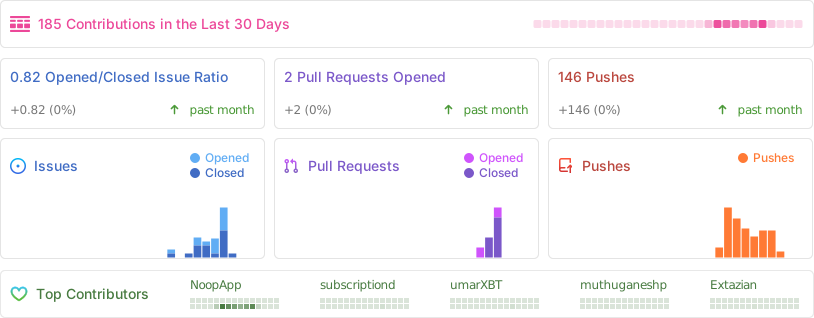
A live snapshot of the last 30 days — issues, pull requests, pushes, and the people moving NOOP
forward. Huge thanks to everyone filing reports, sharing strap logs, and reverse-engineering the
protocol alongside us — this project is built on it.


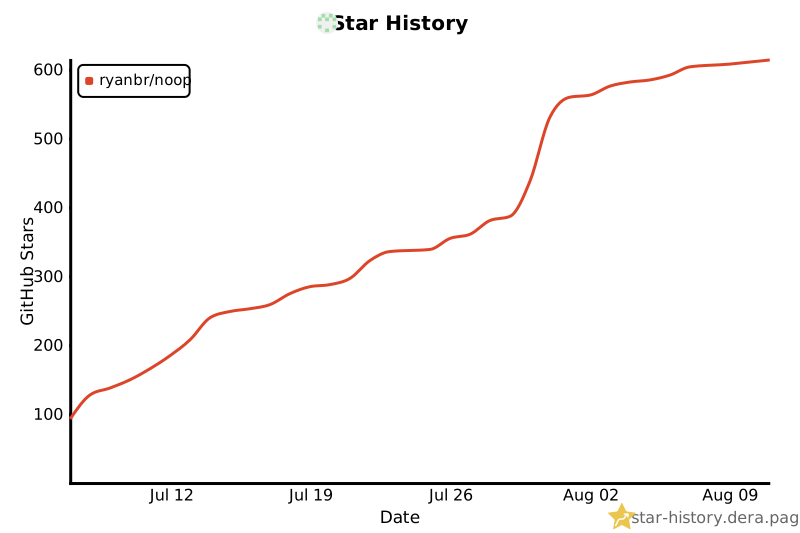
Star history
If NOOP's useful to you, a ⭐ genuinely helps it reach more WHOOP users — and it's the single best free way to support the project.

 NOOP 是 WHOOP 4.0 和 5.0 手环的配套应用:它通过蓝牙直接与手环配对,所有数据都保存在你自己的设备上的 SQLite 中,恢复度、训练负荷、HRV 和睡眠全部在本地计算——不用云端,不需要账号,也没有订阅。