






What is this?
 A step-by-step tutorial series that teaches you how to write your own embedded Operating System kernel from scratch in Rust, targeting the Raspberry Pi 3 and 4.
A step-by-step tutorial series that teaches you how to write your own embedded Operating System kernel from scratch in Rust, targeting the Raspberry Pi 3 and 4.Is this a ready-made OS or a learning course?It is a learning course made of sequential lessons, each containing a stand-alone, bootable kernel binary that builds on the previous one, with a diff against the prior tutorial so you can see exactly what changed.
It is a learning course made of sequential lessons, each containing a stand-alone, bootable kernel binary that builds on the previous one, with a diff against the prior tutorial so you can see exactly what changed.How do I run the kernel from a tutorial?Install Docker Engine, prepare the Rust toolchain (mostly handled automatically via rust-toolchain.toml), then build and run the kernel in QEMU; from tutorial 5 onward you can also load it onto a real Raspberry Pi over UART.
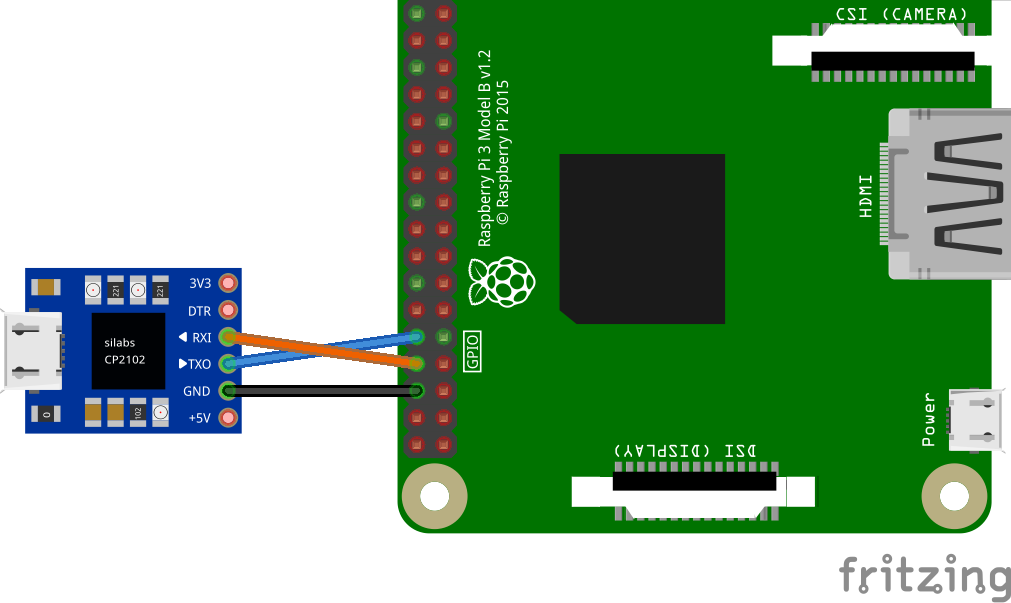
Install Docker Engine, prepare the Rust toolchain (mostly handled automatically via rust-toolchain.toml), then build and run the kernel in QEMU; from tutorial 5 onward you can also load it onto a real Raspberry Pi over UART.What tools do I need besides Rust itself?You need Docker (the project pulls a container with QEMU, OpenOCD and GDB pre-installed), rustup for cross-compilation, and on macOS a couple of Ruby gems; a USB-to-serial cable (ideally CP2102-based) is recommended for working with real hardware.
You need Docker (the project pulls a container with QEMU, OpenOCD and GDB pre-installed), rustup for cross-compilation, and on macOS a couple of Ruby gems; a USB-to-serial cable (ideally CP2102-based) is recommended for working with real hardware.Does this work the same on macOS as on Linux?The tutorials primarily target Linux; macOS support is only experimental, and tutorials 1-5 are groundwork meant to run only in QEMU, not on real hardware.
The tutorials primarily target Linux; macOS support is only experimental, and tutorials 1-5 are groundwork meant to run only in QEMU, not on real hardware.Who is this course for?Hobby OS developers who are new to the 64-bit ARMv8-A architecture and want a guided introduction to writing kernel-level code in Rust.
Hobby OS developers who are new to the 64-bit ARMv8-A architecture and want a guided introduction to writing kernel-level code in Rust.What topics does the series actually cover?Common OS tasks such as writing to the serial console, setting up virtual memory, and handling hardware exceptions, implemented step by step using Rust's safety features.
Common OS tasks such as writing to the serial console, setting up virtual memory, and handling hardware exceptions, implemented step by step using Rust's safety features.Do I need special hardware to follow along?No, the first five tutorials are groundwork that run entirely in QEMU; from tutorial 5 onward you can flash the kernel to a real Raspberry Pi 3 or 4 and watch output over a USB serial cable.
No, the first five tutorials are groundwork that run entirely in QEMU; from tutorial 5 onward you can flash the kernel to a real Raspberry Pi 3 or 4 and watch output over a USB serial cable.Can I port this to a different board or architecture?Yes, the author designed the code in a modular fashion specifically to ease porting to other CPU architectures or boards, and even invites contributors to attempt a RISC-V port.
Yes, the author designed the code in a modular fashion specifically to ease porting to other CPU architectures or boards, and even invites contributors to attempt a RISC-V port.What are similar projects?raspberry-pi-os, linux, lytlnyblOS, redox, mu300-linux, flash-linux0.11-talk, sherpa-onnx, zxdesk
raspberry-pi-os, linux, lytlnyblOS, redox, mu300-linux, flash-linux0.11-talk, sherpa-onnx, zxdeskWhich topics is it in?aarch64, bare-metal, os, embedded-systems, operating-system, arm64, kernel, raspberry-pi, embedded, hardware, guide, command-line
aarch64, bare-metal, os, embedded-systems, operating-system, arm64, kernel, raspberry-pi, embedded, hardware, guide, command-line