
What is this?
 rec is Recursive's custom inference engine for running their language models locally on your Mac, tuned for fast single-session use.
rec is Recursive's custom inference engine for running their language models locally on your Mac, tuned for fast single-session use.Is this a CLI tool or a background service?It is a command-line tool: you install the rec binary and run it from the terminal, where it starts a local model server you connect a harness or your own client to.
It is a command-line tool: you install the rec binary and run it from the terminal, where it starts a local model server you connect a harness or your own client to.How do I install and start rec?Run the install command, which places rec in ~/.local/bin and adds it to your PATH, then launch it with 'rec launch pi' or 'rec launch opencode' to start the server and open a harness.
Run the install command, which places rec in ~/.local/bin and adds it to your PATH, then launch it with 'rec launch pi' or 'rec launch opencode' to start the server and open a harness.What hardware and software do I need?An Apple Silicon Mac with an M4 Pro, M4 Max, M5 Pro, or M5 Max chip, at least 48 GB of unified memory, about 30 GB of free disk space, and Node.js 22 with npm if you want to use the pi harness.
An Apple Silicon Mac with an M4 Pro, M4 Max, M5 Pro, or M5 Max chip, at least 48 GB of unified memory, about 30 GB of free disk space, and Node.js 22 with npm if you want to use the pi harness.Can I run multiple agent sessions at once?No, rec is built for single-session usage; running several agents at the same time needs a different setup described in rec's separate documentation.
No, rec is built for single-session usage; running several agents at the same time needs a different setup described in rec's separate documentation.Will this run on any Mac?No, only on specific recent Apple Silicon chips (M4 Pro/Max or M5 Pro/Max) with at least 48 GB unified memory; lower-spec or Intel Macs aren't supported.
No, only on specific recent Apple Silicon chips (M4 Pro/Max or M5 Pro/Max) with at least 48 GB unified memory; lower-spec or Intel Macs aren't supported.Does it need an internet connection to run?Only the first run needs internet, to download the model and harness; after that, inference runs fully locally on your machine.
Only the first run needs internet, to download the model and harness; after that, inference runs fully locally on your machine.What is flint?flint is the language model that ships with rec, the model name you point your API client at when connecting to rec's local OpenAI- or Anthropic-compatible server.
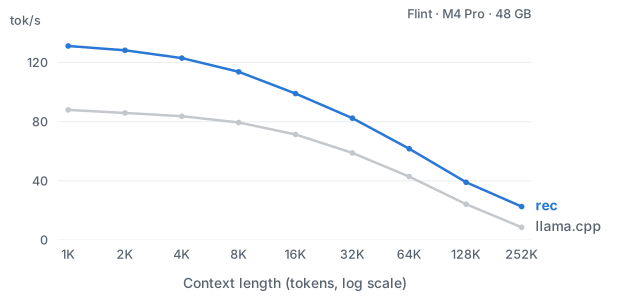
flint is the language model that ships with rec, the model name you point your API client at when connecting to rec's local OpenAI- or Anthropic-compatible server.How much faster is rec than llama.cpp?On an Apple M4 Pro with 4-bit weights, rec delivers 1.4-2.6x the token throughput of llama.cpp across context lengths from 1K to 252K tokens.
On an Apple M4 Pro with 4-bit weights, rec delivers 1.4-2.6x the token throughput of llama.cpp across context lengths from 1K to 252K tokens.Can I connect my own coding agent instead of pi or OpenCode?Yes, rec exposes OpenAI- and Anthropic-compatible chat-completion APIs, so any compatible client or your own harness install can connect via rec's local server using the token from 'rec auth token'.
Yes, rec exposes OpenAI- and Anthropic-compatible chat-completion APIs, so any compatible client or your own harness install can connect via rec's local server using the token from 'rec auth token'.What are similar projects?public-apis, free-programming-books, system-design-primer, developer-roadmap, awesome-python, project-based-learning, hermes-agent, Python
public-apis, free-programming-books, system-design-primer, developer-roadmap, awesome-python, project-based-learning, hermes-agent, PythonWhich topics is it in?python
python