Numa



DNS you own. Everywhere you go. — numa.rs
A portable DNS resolver in a single binary. Block ads on any network, name your local services (frontend.numa), override any hostname with auto-revert, and seal every outbound query with ODoH (RFC 9230) so no single party sees both who you are and what you asked — all from your laptop, no cloud account or Raspberry Pi required.
Built from scratch in Rust. Zero DNS libraries. Caching, ad blocking, and local service domains out of the box. Optional recursive resolution from root nameservers with full DNSSEC chain-of-trust validation, plus a DNS-over-TLS listener for encrypted client connections (iOS Private DNS, systemd-resolved, etc.). Run numa relay and the same binary becomes a public ODoH endpoint too — the curated DNSCrypt list currently has one surviving relay, so every Numa deploy materially expands the ecosystem. One ~8MB binary, everything embedded. The wire-protocol parser was written by hand as a learning project; later features (recursive resolver, DNSSEC, dashboard) were built with AI assistance.
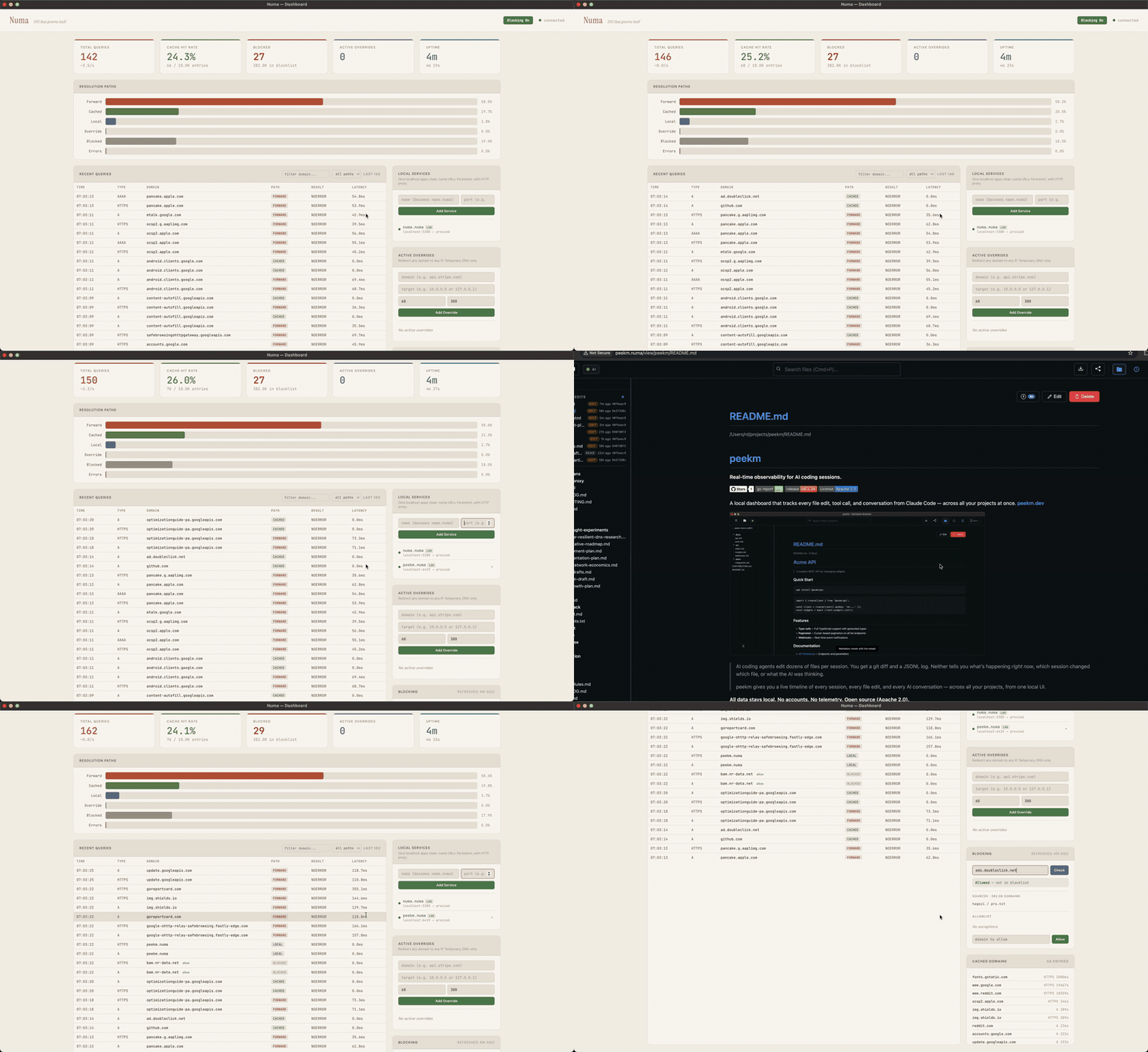
Quick Start
Three ways in, from least to most commitment. Only the third changes your system DNS.
1. Try it in Docker (nothing installed on the host)
docker run -d --name numa -p 127.0.0.1:5553:53/udp -p 127.0.0.1:5553:53/tcp \
  -p 127.0.0.1:5380:5380 ghcr.io/razvandimescu/numa
dig @127.0.0.1 -p 5553 example.com
docker exec numa numa token            # dashboard password
Open http://localhost:5380 and log in with any username and that token. Port 5553 sidesteps whatever already holds 53 on the host. numa.numa won't resolve here, because the host isn't using Numa for DNS. Clean up with docker rm -f numa.
2. Run in the foreground (system DNS untouched)
Install the binary:
# macOS
brew install razvandimescu/tap/numa

# Linux
curl -fsSL https://raw.githubusercontent.com/razvandimescu/numa/main/install.sh | sh

# Arch Linux
pacman -S numa

# Windows — download from GitHub Releases
# All platforms
cargo install numa

# Nix
nix profile install github:razvandimescu/numa
sudo numa # Ctrl-C to stop (port 53 requires root/admin)
Numa listens on port 53, but your system keeps its current resolver until you run numa install, so test with dig @127.0.0.1 example.com. The dashboard is at http://localhost:5380. If port 53 is taken (systemd-resolved on Ubuntu/Mint), set bind_addr in numa.toml or use Docker.
3. Set as system DNS
| Platform |
Install |
Upgrade |
Uninstall |
| macOS |
sudo numa install |
update the binary, then sudo numa install |
sudo numa uninstall |
| Linux |
sudo numa install |
update the binary, then sudo "$(command -v numa)" install |
sudo numa uninstall |
| Windows |
numa install (admin) + reboot |
run the new numa.exe install (admin) |
numa uninstall (admin) + reboot |
install registers a service, points system DNS at Numa and trusts its local CA. uninstall reverses all three. Once installed, the dashboard is also at http://numa.numa.
Update the binary the way you installed it (brew upgrade, cargo install numa, rerun install.sh). Re-running install restarts the service on the new binary and keeps the token and CA. On Linux, sudo searches its own secure_path and skips ~/.cargo/bin, ~/.nix-profile/bin and Linuxbrew, and an earlier install may have left a copy in /usr/local/bin, so call numa by its full path: sudo "$(command -v numa)".
On macOS and Linux, numa runs as a system service (launchd/systemd). The systemd unit is unprivileged (DynamicUser=yes, only CAP_NET_BIND_SERVICE); the launchd daemon runs as root. numa install reconfigures systemd-resolved through a drop-in that numa uninstall removes; any other process holding port 53 (dnsmasq, including NetworkManager's) has to be stopped by hand. On Windows, numa runs as a Windows service that starts at boot. Windows also binds 127.0.0.2:53 (the built-in Dnscache owns 127.0.0.1:53) and installs an NRPT rule to route queries to it — so edit bind_addr/api_bind_addr against 127.0.0.2, not 127.0.0.1.
Logging in
Over loopback (localhost, 127.0.0.1, numa.numa) no login is needed. Anything else, including Docker port mapping or this machine's LAN address, is asked for the API token, which Numa generates on first start. Print it with sudo numa token (an administrator shell on Windows) and log in with any username. Pin your own with [server] api_token or NUMA_API_TOKEN.
Removing every trace
uninstall restores DNS but keeps the data directory, so a reinstall keeps the same token and CA. To remove everything, uninstall first, then delete:
| Platform |
Left behind |
| macOS |
the binary, /usr/local/var/numa, /usr/local/var/log/numa.log |
| Linux |
the binary (/usr/local/bin/numa from install.sh), /var/lib/numa |
| Windows |
the binary, %PROGRAMDATA%\numa |
Package-manager installs remove the binary with brew uninstall, pacman -R or cargo uninstall. On Linux, numa install copies a binary it can't run from its original location (e.g. ~/.cargo/bin) to /usr/local/bin/numa, and uninstall leaves that copy.
Also delete ~/.config/numa if you created a user config, and the [server] data_dir path if you set one.
Local Services
Name your dev services instead of remembering port numbers:
curl -X POST localhost:5380/services \
  -d '{"name":"frontend","target_port":5173}'
Now https://frontend.numa works in your browser — green lock, valid cert, WebSocket passthrough for HMR. No mkcert, no nginx, no /etc/hosts.
Add path-based routing (app.numa/api → :5001), share services across machines via LAN discovery, or configure everything in numa.toml.
Ad Blocking & Privacy
Ad and tracker blocking via Hagezi Pro, refreshed daily. Works on any network — coffee shops, hotels, airports. Travels with your laptop.
Three resolution modes:
forward (default) — transparent proxy to your existing system DNS. Everything works as before, just with caching and ad blocking on top. Captive portals, VPNs, corporate DNS — all respected.recursive — resolve directly from root nameservers. No upstream dependency, no single entity sees your full query pattern. Add [dnssec] enabled = true for full chain-of-trust validation.auto — probe root servers on startup, recursive if reachable, otherwise forward over DoH to Quad9 (https://9.9.9.9/dns-query), which then sees your queries. Use forward with your own [upstream] to pick a different provider.
DNSSEC validates the full chain of trust: RRSIG signatures, DNSKEY verification, DS delegation, NSEC/NSEC3 denial proofs. Read how it works →
DNS-over-TLS listener (RFC 7858) — accept encrypted queries on port 853 from strict clients like iOS Private DNS, systemd-resolved, or stubby. Two modes:
- Self-signed (default) — numa generates a local CA automatically.
numa install adds it to the system trust store on macOS, Linux (Debian/Ubuntu, Fedora/RHEL/SUSE, Arch), and Windows, and numa uninstall removes it. On iOS, install the .mobileconfig from numa setup-phone. Firefox keeps its own NSS store and ignores the system one — trust the CA there manually if you need HTTPS for .numa services in Firefox.
- Bring-your-own cert — point
[dot] cert_path / key_path at a publicly-trusted cert (e.g., Let's Encrypt via DNS-01 challenge on a domain pointing at your numa instance). Clients connect without any trust-store setup — same UX as AdGuard Home or Cloudflare 1.1.1.1.
ALPN "dot" is advertised and enforced in both modes; a handshake with mismatched ALPN is rejected as a cross-protocol confusion defense.
Oblivious DoH (RFC 9230) — with [upstream] mode = "odoh" (recipe) each query is HPKE-sealed to the target and sent through a relay. The relay sees your IP and ciphertext, the target sees the question and the relay's IP, and a relay that redirects the query hands the new destination something it cannot decrypt. Numa refuses a relay and target that share a registrable domain. ODoH does not hide the connection you open afterwards: your ISP still sees the destination IP and, without ECH, the hostname in the TLS handshake.
Phone setup — point your iPhone or Android at Numa in one step:
numa setup-phone
Prints a QR code. Scan it, install the profile, toggle certificate trust — your phone's DNS now routes through Numa over TLS. Requires [mobile] enabled = true in numa.toml.
LAN Discovery
Run Numa on multiple machines. They find each other automatically via mDNS:
Machine A (192.168.1.5)              Machine B (192.168.1.20)
┌──────────────────────┐             ┌──────────────────────┐
│ Numa                 │    mDNS     │ Numa                 │
│  - api (port 8000)   │◄───────────►│  - grafana (3000)    │
│  - frontend (5173)   │  discovery  │                      │
└──────────────────────┘             └──────────────────────┘
From Machine B: curl http://api.numa → proxied to Machine A's port 8000. Enable with numa lan on.
Hub mode: run one instance with bind_addr = "0.0.0.0:53" and point other devices' DNS to it — they get ad blocking + .numa resolution without installing anything. bind_addr also accepts a list to bind a specific subset of interfaces. Step-by-step: network-wide recipe.
Docker
# Recommended — host networking (Linux)
docker run -d --name numa --network host -v numa-data:/var/lib/numa ghcr.io/razvandimescu/numa

# Port mapping (macOS/Windows Docker Desktop)
docker run -d --name numa -p 53:53/udp -p 53:53/tcp -p 5380:5380 -v numa-data:/var/lib/numa ghcr.io/razvandimescu/numa
Dashboard at http://localhost:5380. With port mapping or from another device, log in with any username and the token from docker exec numa numa token. The numa-data volume keeps the token and the local CA across container recreates. The image binds the API and proxy to 0.0.0.0 by default. Override with a custom config:
docker run -d --name numa --network host -v numa-data:/var/lib/numa \
  -v /path/to/numa.toml:/root/.config/numa/numa.toml \
  ghcr.io/razvandimescu/numa
Multi-arch: linux/amd64 and linux/arm64.
Turnkey compose recipes:
How It Compares
|
Pi-hole |
AdGuard Home |
Unbound |
Numa |
| Local service proxy + auto TLS |
— |
— |
— |
.numa domains, HTTPS, WebSocket |
| LAN service discovery |
— |
— |
— |
mDNS, zero config |
| Developer overrides (REST API) |
— |
— |
— |
Auto-revert, scriptable |
| Recursive resolver |
— |
— |
Yes |
Yes, with SRTT selection |
| DNSSEC validation |
— |
— |
Yes |
Yes (RSA, ECDSA, Ed25519) |
| Ad blocking |
Yes |
Yes |
— |
Hagezi Pro |
| Per-client rules |
Groups |
Yes |
Views / tags |
By CIDR ([[client_policy]]), config file only |
| Web admin UI |
Full |
Full |
— |
Dashboard |
| Encrypted upstream (DoH/DoT) |
Needs cloudflared |
DoH only |
DoT only |
DoH + DoT (tls://) |
| Encrypted clients (DoT listener) |
Needs stunnel sidecar |
Yes |
Yes |
Native (RFC 7858) |
| DoH server endpoint |
— |
Yes |
— |
Yes (RFC 8484) |
| Request hedging |
— |
— |
— |
All protocols (UDP, DoH, DoT) |
| Serve-stale + prefetch |
— |
— |
Prefetch at 90% TTL |
RFC 8767, prefetch at 90% TTL |
| Conditional forwarding |
— |
Yes |
Yes |
Yes (per-suffix rules) |
| Portable (laptop) |
No (appliance) |
No (appliance) |
Server |
Single binary, macOS/Linux/Windows |
| Community maturity |
56K stars, 10 years |
33K stars |
20 years |
New |
Running Numa as Your Primary DNS
If Numa stops. numa install registers Numa with launchd (macOS) or systemd (Linux), which restart it when it exits. If Numa is your only resolver, DNS lookups fail until it restarts. To stop using Numa and restore the machine's previous DNS settings, run sudo numa uninstall.
If Numa is running but upstreams are unreachable, it can serve cached answers for up to an hour past their TTL (RFC 8767). Names it hasn't cached fail.
Testing. The DNS parser is fuzzed on every pull request that touches it, with longer runs weekly (fuzz.yml). CI runs cargo audit on dependencies and installs, reinstalls and uninstalls Numa on macOS and Linux.
Resolver hardening. In recursive mode, Numa drops answer records outside the zone being queried, refuses to query nameservers at private or loopback addresses, and caps each lookup's upstream queries and referral depth. Replies over plain UDP must match the query's random transaction ID and question. ANY queries are refused. DNSSEC validation is off by default; numa dnssec on turns it on. To report a vulnerability privately, see SECURITY.md.
What Numa doesn't do. No DHCP, no clustering, no config sync between instances. Most settings live in numa.toml, not the dashboard. For a whole network, run it on a machine that stays on.
0.1ms cached queries — matches Unbound and AdGuard Home. Wire-level cache stores raw bytes with in-place TTL patching. Request hedging eliminates p99 spikes: cold recursive p99 538ms vs Unbound 748ms (−28%), σ 4× tighter. Benchmarks →
Learn More
Roadmap
- DNS forwarding, caching, ad blocking, developer overrides
-
.numa local domains — auto TLS, path routing, WebSocket proxy
- LAN service discovery — mDNS, cross-machine DNS + proxy
- DNS-over-HTTPS — encrypted upstream + server endpoint (RFC 8484)
- DNS-over-TLS — encrypted client listener (RFC 7858) + upstream forwarding (
tls://)
- Oblivious DoH — anonymized client mode + public relay (
numa relay, RFC 9230)
- Recursive resolution + DNSSEC — chain-of-trust, NSEC/NSEC3
- SRTT-based nameserver selection
- Multi-forwarder failover — multiple upstreams with SRTT ranking, fallback pool
- Request hedging — parallel requests rescue packet loss and tail latency (all protocols)
- Serve-stale + prefetch — RFC 8767, background refresh at <10% TTL and on stale serve
- Conditional forwarding — per-suffix rules for split-horizon DNS (Tailscale, VPNs)
- Cache warming — proactive resolution for configured domains
- Mobile onboarding —
setup-phone QR flow, mobile API, mobileconfig profiles
- pkarr integration — self-sovereign DNS via Mainline DHT
- Global
.numa names — DHT-backed, no registrar
License
MIT

 Numa is a single-binary DNS resolver written in Rust that blocks ads on any network, lets you name local dev services like 'frontend.numa', and can route every query through an Oblivious DoH relay so no single party sees both who you are and what you asked.