




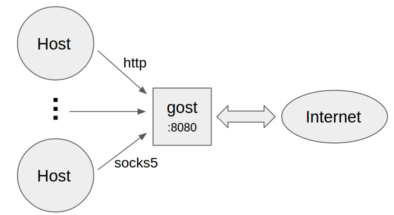
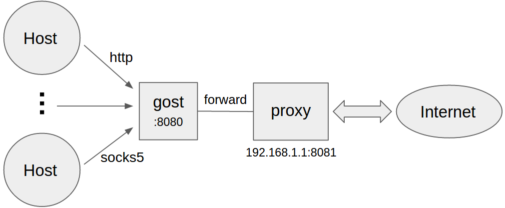
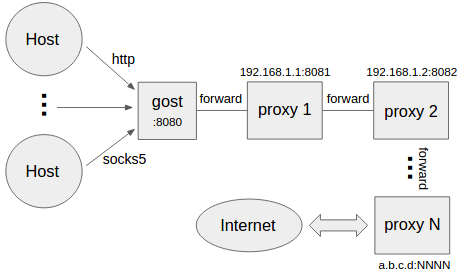
What is this?
 GOST (GO Simple Tunnel) is a secure, multi-protocol proxy and tunnel tool written in Go. It can act as an HTTP/SOCKS5 proxy, chain multiple proxies together, and forward local or remote TCP/UDP ports through encrypted channels.
GOST (GO Simple Tunnel) is a secure, multi-protocol proxy and tunnel tool written in Go. It can act as an HTTP/SOCKS5 proxy, chain multiple proxies together, and forward local or remote TCP/UDP ports through encrypted channels.Is this a GUI application or a command-line tool?It's a single command-line binary with no graphical interface; you configure servers and clients entirely through CLI flags.
It's a single command-line binary with no graphical interface; you configure servers and clients entirely through CLI flags.How do I start gost as a proxy or tunnel server?You build the Go binary (a Makefile is included) or use the provided Docker image, then launch it with flags to act as an HTTP/SOCKS5 proxy, or use -F to chain forward proxies and set up local/remote TCP or UDP port forwarding.
You build the Go binary (a Makefile is included) or use the provided Docker image, then launch it with flags to act as an HTTP/SOCKS5 proxy, or use -F to chain forward proxies and set up local/remote TCP or UDP port forwarding.Do I need the Go toolchain, or can I just use the Docker image?Either works: the project is written in Go and includes a Makefile for building from source, and it also ships a Docker image so you can run it without installing Go.
Either works: the project is written in Go and includes a Makefile for building from source, and it also ships a Docker image so you can run it without installing Go.Is this project still being actively developed?No — the maintainers put it in maintenance mode and say all new feature development now happens in the go-gost/gost repository instead.
No — the maintainers put it in maintenance mode and say all new feature development now happens in the go-gost/gost repository instead.What does the proxy chain (-F flag) let me do?You chain multiple forward proxies in order with repeated -F flags, where each hop can be HTTP/HTTPS/HTTP2/SOCKS4/SOCKS5 or Shadowsocks, and gost relays the connection through all of them to the final target.
You chain multiple forward proxies in order with repeated -F flags, where each hop can be HTTP/HTTPS/HTTP2/SOCKS4/SOCKS5 or Shadowsocks, and gost relays the connection through all of them to the final target.Can gost forward UDP traffic, not just TCP?Yes, both local and remote port forwarding support UDP; if you're using a proxy chain, the last hop must be a gost SOCKS5 proxy since UDP is tunneled over TCP.
Yes, both local and remote port forwarding support UDP; if you're using a proxy chain, the last hop must be a gost SOCKS5 proxy since UDP is tunneled over TCP.What transport protocols does gost support beyond plain TCP?It supports HTTP2 (as a proxy or as a tunnel), QUIC (via quic-go, only usable as the first chain node), KCP (via kcp-go/kcptun, also first-node only), and SSH forwarding or tunneling.
It supports HTTP2 (as a proxy or as a tunnel), QUIC (via quic-go, only usable as the first chain node), KCP (via kcp-go/kcptun, also first-node only), and SSH forwarding or tunneling.Can I use gost as a transparent proxy?Yes, it supports transparent proxying based on iptables redirection.
Yes, it supports transparent proxying based on iptables redirection.What are similar projects?chisel, Xray-core, tailcat, goproxy, nps, CFNext, MasterHttpRelayVPN, MasterHttpRelayVPN-RUST
chisel, Xray-core, tailcat, goproxy, nps, CFNext, MasterHttpRelayVPN, MasterHttpRelayVPN-RUST