










这是什么?
 这是一个 GitHub 个人主页 README 生成器:填写一份简短的表单,它就会生成包含热门插件的 markdown,直接粘贴到你的个人主页仓库就能用。
这是一个 GitHub 个人主页 README 生成器:填写一份简短的表单,它就会生成包含热门插件的 markdown,直接粘贴到你的个人主页仓库就能用。这是需要安装的软件,还是直接打开的网站?它是一个网页应用——在线演示直接在浏览器里打开,不用安装。源代码也是公开的,你也可以自己跑一份:克隆仓库、安装依赖、启动 Next.js 应用。
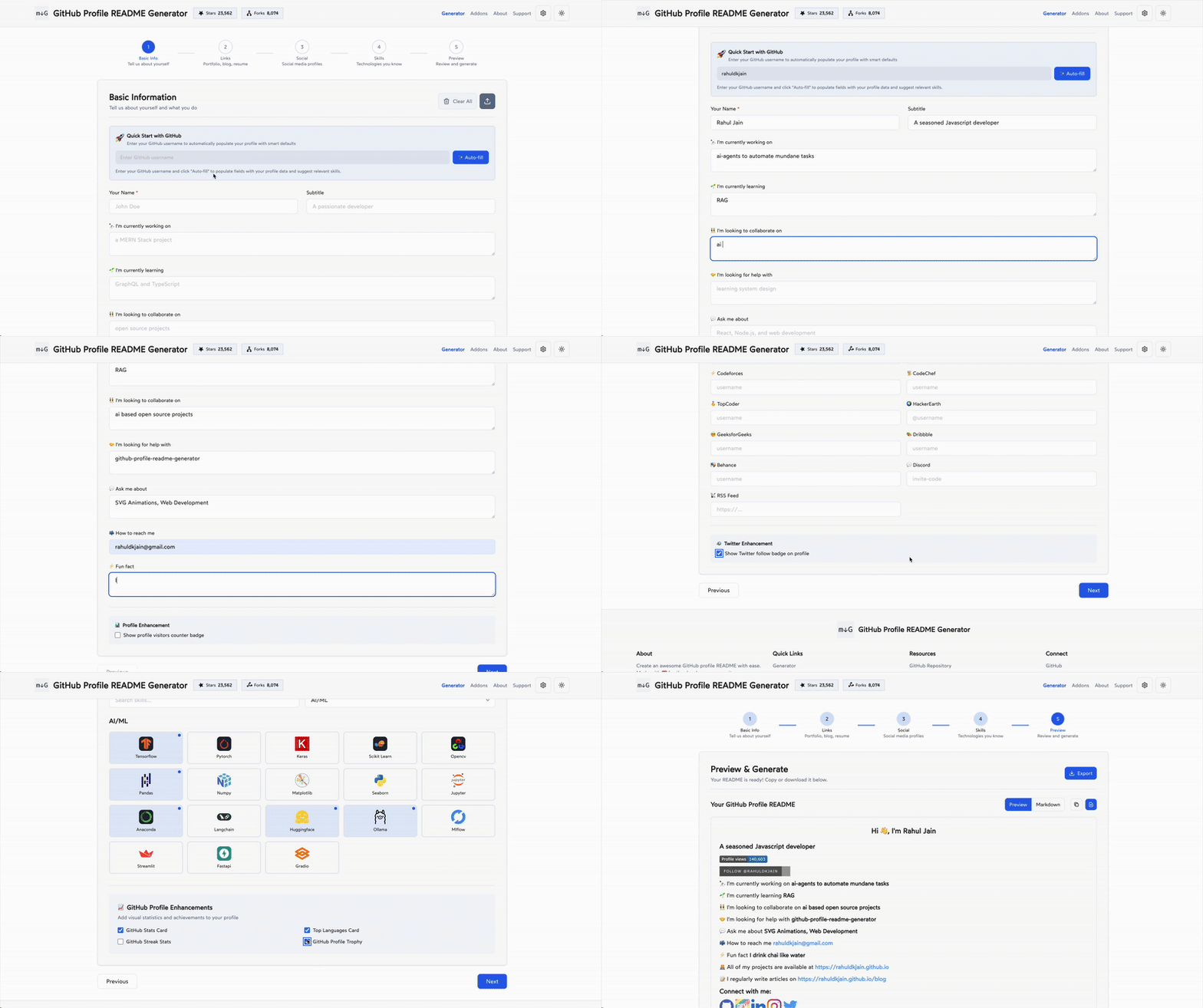
它是一个网页应用——在线演示直接在浏览器里打开,不用安装。源代码也是公开的,你也可以自己跑一份:克隆仓库、安装依赖、启动 Next.js 应用。我怎么从空白表单做到一份完成的个人主页 README?在这个极简界面里填写 Name、Tagline、各开发平台用户名、Current Work、Portfolio 和 Blog 等字段,点击 Generate README,然后预览生成的 markdown,再复制到你的个人主页仓库。
在这个极简界面里填写 Name、Tagline、各开发平台用户名、Current Work、Portfolio 和 Blog 等字段,点击 Generate README,然后预览生成的 markdown,再复制到你的个人主页仓库。有没有插件需要我在 GitHub 仓库里额外设置?博客类插件以 GitHub Actions 的形式提供,需要在你的个人主页仓库里配置,这样文章会自动拉取进来;统计徽章则由 github-readme-stats 这类外部服务渲染。
博客类插件以 GitHub Actions 的形式提供,需要在你的个人主页仓库里配置,这样文章会自动拉取进来;统计徽章则由 github-readme-stats 这类外部服务渲染。有什么需要注意的坑吗,比如用在商业项目上?README 里提到了字体授权问题:Wotfard 字体是按开源场景下的合理使用(fair use)来使用的,如果你想把这个项目用于商业用途,需要自行核实该字体的授权要求。
README 里提到了字体授权问题:Wotfard 字体是按开源场景下的合理使用(fair use)来使用的,如果你想把这个项目用于商业用途,需要自行核实该字体的授权要求。我使用这个网站时会被追踪吗?它使用注重隐私的统计分析:Google Analytics 4 并符合 GDPR 要求征得同意、对 IP 做匿名化处理,还提供可退出选项的 cookie 横幅,不收集个人数据——只记录匿名使用情况。
它使用注重隐私的统计分析:Google Analytics 4 并符合 GDPR 要求征得同意、对 IP 做匿名化处理,还提供可退出选项的 cookie 横幅,不收集个人数据——只记录匿名使用情况。它能在我的个人主页上放哪些东西?统一的开发者和社交图标、访客计数徽章、GitHub 个人统计卡片、最常用技能、连击(streak)统计、WakaTime 统计、Buy Me a Coffee 按钮,以及来自 dev.to、Medium 或任意 RSS 源的动态博客列表。
统一的开发者和社交图标、访客计数徽章、GitHub 个人统计卡片、最常用技能、连击(streak)统计、WakaTime 统计、Buy Me a Coffee 按钮,以及来自 dev.to、Medium 或任意 RSS 源的动态博客列表。作者为什么要做这个?手动编辑个人主页 README 来跟上新功能实在太麻烦;这个生成器把最新的插件——访客统计、GitHub 统计等等——打包进一个简单的表单里。
手动编辑个人主页 README 来跟上新功能实在太麻烦;这个生成器把最新的插件——访客统计、GitHub 统计等等——打包进一个简单的表单里。它免费吗?开源吗?是的——代码采用 Apache-2.0 许可证,在线生成器免费使用,项目还通过赞助板块接受捐助。它也是一个欢迎 hacktoberfest 贡献的仓库。
是的——代码采用 Apache-2.0 许可证,在线生成器免费使用,项目还通过赞助板块接受捐助。它也是一个欢迎 hacktoberfest 贡献的仓库。它是用什么做的?Next.js 15(App Router)、TypeScript、Tailwind CSS、Framer Motion、Lucide React 图标,表单处理用的是 React Hook Form。
Next.js 15(App Router)、TypeScript、Tailwind CSS、Framer Motion、Lucide React 图标,表单处理用的是 React Hook Form。What are similar projects?beautify-github-profile, metrics, gitdiagram, docs, markdown-badges, skill-icons, typebot.io, formbricks
beautify-github-profile, metrics, gitdiagram, docs, markdown-badges, skill-icons, typebot.io, formbricksWhich topics is it in?profile-readme, generator, readme, forms, icons, tailwindcss, github-actions, github, nextjs, hacktoberfest, web-app, markdown
profile-readme, generator, readme, forms, icons, tailwindcss, github-actions, github, nextjs, hacktoberfest, web-app, markdown