WideMelon
DS games in widescreen — with an optional phone touchscreen and controller. Enjoy DS games like never before.




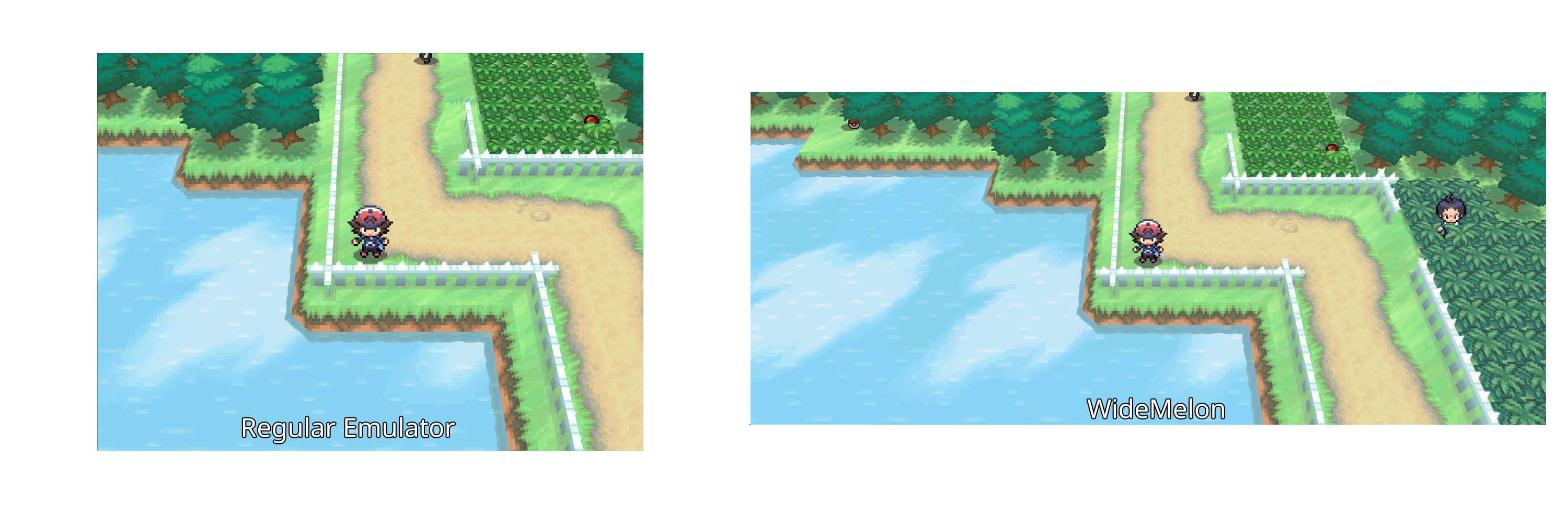
WideMelon is a DS emulator built from melonDS that gives supported
games a genuinely wider 3D view. It reveals more of the game world at the
sides while keeping menus, sprites, videos, and the touchscreen at their
original proportions.
For a more console-like setup, WideMelon can also send the bottom screen to
your phone and use it as a touch controller. No separate mobile app is needed:
scan the QR code and play from your phone's browser.
Highlights
- True widescreen 3D views from native 4:3 through 32:9.
- Unstretched 2D interfaces, menus, sprites, videos, and touchscreen content.
- Optional phone bottom screen, touch input, and customizable DS controls.
- Render scales from 1× to 8×, fullscreen, and integer scaling.
- Recent-ROM home screen, save states, drag and drop, and familiar melonDS tools.
- Separate configuration and saves from a standard melonDS installation.
Download
Download the latest build from the
WideMelon Releases page.
| Platform |
Download |
| Windows |
Download the x64 .exe and open it. |
| macOS |
Download the Apple Silicon or Intel .dmg, then drag WideMelon to Applications. |
| Linux |
Install the x86_64 or ARM64 Debian package or AppImage, or choose an AUR package below. |
Development builds from the newest commit are available from the
Release workflow.
Linux
Ubuntu and Debian
Download and install the current package:
VERSION=1.0.4
case "$(dpkg --print-architecture)" in
  amd64) ARCH=amd64 ;;
  arm64) ARCH=arm64 ;;
  *) echo "Unsupported architecture: $(dpkg --print-architecture)"; exit 1 ;;
esac
wget "https://github.com/pruefsumme/widemelon/releases/download/v${VERSION}/widemelon_${VERSION}-1_${ARCH}.deb"
sudo apt install "./widemelon_${VERSION}-1_${ARCH}.deb"
WideMelon will appear in your application menu and can also be started with
widemelon.
AppImage
The AppImage works on most x86_64 and ARM64 Linux distributions:
VERSION=1.0.4
case "$(uname -m)" in
  x86_64) ARCH=x86_64 ;;
  aarch64|arm64) ARCH=aarch64 ;;
  *) echo "Unsupported architecture: $(uname -m)"; exit 1 ;;
esac
wget "https://github.com/pruefsumme/widemelon/releases/download/v${VERSION}/WideMelon-${VERSION}-${ARCH}.AppImage"
chmod +x "WideMelon-${VERSION}-${ARCH}.AppImage"
./"WideMelon-${VERSION}-${ARCH}.AppImage"
Arch Linux and AUR
On Arch Linux x86_64, choose one package. All three install the same widemelon
command and desktop entry, so they cannot be installed together.
Stable release, built locally:
yay -S widemelon
Stable release, prebuilt binary:
yay -S widemelon-bin
Newest development revision from main:
yay -S widemelon-git
Quick start
- Open WideMelon. Use the display button on the home screen when you want to
change the viewport, window resolution, or render scale for the next launch.
- Open a legally obtained
.nds ROM with the folder button or File > Open ROM.
- The next time you start WideMelon, double-click the game in Recent ROMs.
- For phone play, start the phone server on the home screen and scan its QR code.
You can also drag a ROM directly onto the WideMelon window. WideMelon does not
include games, ROMs, commercial BIOS or firmware files, or saves.
Phone screen and controller
WideMelon can move the physical bottom screen and DS controls to a phone while
the wide top screen stays on your computer.
- Select Start phone server on the home screen and scan the QR code that appears.
- If you need to choose another private Wi-Fi or Ethernet address, select the
phone button or open Config > Phone screen & controller….
- Start the connection from that dialog, then scan the QR code on the home screen
or in the dialog.
- Use Edit controller layout… to move, resize, or customize the controls.
If a gamepad is connected to the phone, its standard face buttons, shoulders,
Start/Select, D-pad, and left stick control the DS. The on-screen DS buttons
hide automatically when the browser recognizes the gamepad. Tap Show controls
to bring them back, or Hide controls to clear the screen again. The bottom
screen remains touchable in either mode. If the controller does not appear,
press one of its buttons while the phone page is open; some browsers reveal
gamepads only after an input gesture.
Tap the small wrench on the phone page, select a DS control in the controller
diagram, then press the physical controller input to bind it. Extra buttons can
run melonDS actions such as fast forward, pause, fullscreen or screen swap. Add
as many hotkey rows as needed. L/R use the controller triggers by default, since
some mobile browsers reserve the shoulder buttons for page navigation. Mapping
is saved locally in the phone browser across WideMelon sessions; Restore
resets it. Newly customized controls turn green while unchanged defaults remain
grey.
Some Android Chrome versions incorrectly use LB/RB for switching browser tabs.
The page cannot cancel that browser-level action. Until the Chromium regression
is fixed, use LT/RT, remap the controller in Android's Game Controller settings,
or use a browser where the shoulder buttons are not reserved.
The bridge is off by default and requires session-only pairing. Keep the phone
and computer on the same trusted, non-guest network. If the phone disconnects,
the bottom screen automatically returns to the desktop window. The phone bridge
does not stream audio.
See the phone setup and troubleshooting guide
for firewall help, diagnostics, and network details.
How widescreen works
A Nintendo DS screen is normally 256 × 192 pixels. WideMelon expands the 3D
render target and adjusts the projection so compatible games reveal additional
geometry on both sides. The original view remains centered and keeps the same
scale; native 2D layers are composited over the middle without stretching.
Results depend on how each game draws its scene. Some games expose a great deal
of additional world detail, while others may cull objects outside the original
view. Menus, battles, videos, and special effects can remain 4:3 by design. The
expanded profiles require the classic OpenGL renderer; native 4:3 remains
available as the compatibility profile.
[!CAUTION]
Compatibility note: Widescreen support is game-dependent. It may not work correctly or provide much benefit in every game, because results depend on how that game renders its 3D scene.
Build from source
WideMelon is a C++17 and CMake project. The complete source, pinned dependencies,
platform prerequisites, build commands, test workflow, and packaging notes are
documented in BUILD.md.
On a supported Linux development system, the normal workflow is:
./scripts/build.sh
./widemelon
Project and credits
WideMelon is based on melonDS and is
maintained as an independent project. Thanks to the melonDS contributors and
everyone testing WideMelon, reporting compatibility results, and improving the
experience.
License
WideMelon is free software released under the
GNU General Public License v3.0 or later. Third-party components and
their licenses are documented in THIRD_PARTY.md.

 WideMelon 是从 melonDS 分支出来的 Nintendo DS 模拟器,它以真正的宽屏(从原生 4:3 最高到 32:9)渲染受支持游戏的 3D 场景,同时让 2D 菜单、精灵图、视频和触摸屏保持原有比例。