
npm install valtio makes proxy-state simple





Wrap your state object
Valtio turns the object you pass it into a self-aware proxy.
import { proxy, useSnapshot } from 'valtio'

const state = proxy({ count: 0, text: 'hello' })
Mutate from anywhere
You can make changes to it in the same way you would to a normal js-object.
setInterval(() => {
  ++state.count
}, 1000)
React via useSnapshot
Create a local snapshot that catches changes. Rule of thumb: read from snapshots in render function, otherwise use the source. The component will only re-render when the parts of the state you access have changed, it is render-optimized.
// This will re-render on `state.count` change but not on `state.text` change
function Counter() {
  const snap = useSnapshot(state)
  return (
    <div>
      {snap.count}
      <button onClick={() => ++state.count}>+1</button>
    </div>
  )
}
Note for TypeScript users: Return type of useSnapshot can be too strict.
The snap variable returned by useSnapshot is a (deeply) read-only object.
Its type has readonly attribute, which may be too strict for some use cases.
To mitigate typing difficulties, you might want to loosen the type definition:
declare module 'valtio' {
  function useSnapshot<T extends object>(p: T): T
}
See #327 for more information.
Note: useSnapshot returns a new proxy for render optimization.
Internally, useSnapshot calls snapshot in valtio/vanilla,
and wraps the snapshot object with another proxy to detect property access.
This feature is based on proxy-compare.
Two kinds of proxies are used for different purposes:
proxy() from valtio/vanilla is for mutation tracking or write tracking.createProxy() from proxy-compare is for usage tracking or read tracking.
Use of this is for expert users.
Valtio tries best to handle this behavior
but it's hard to understand without familiarity.
const state = proxy({
  count: 0,
  inc() {
    ++this.count
  },
})
state.inc() // `this` points to `state` and it works fine
const snap = useSnapshot(state)
snap.inc() // `this` points to `snap` and it doesn't work because snapshot is frozen
To avoid this pitfall, the recommended pattern is not to use this and prefer arrow function.
const state = proxy({
  count: 0,
  inc: () => {
    ++state.count
  },
})
If you are new to this, it's highly recommended to use
eslint-plugin-valtio.
Subscribe from anywhere
You can access state outside of your components and subscribe to changes.
import { subscribe } from 'valtio'

// Subscribe to all state changes
const unsubscribe = subscribe(state, () =>
  console.log('state has changed to', state),
)
// Unsubscribe by calling the result
unsubscribe()
You can also subscribe to a portion of state.
const state = proxy({ obj: { foo: 'bar' }, arr: ['hello'] })

subscribe(state.obj, () => console.log('state.obj has changed to', state.obj))
state.obj.foo = 'baz'

subscribe(state.arr, () => console.log('state.arr has changed to', state.arr))
state.arr.push('world')
To subscribe to a primitive value of state, consider subscribeKey in utils.
import { subscribeKey } from 'valtio/utils'

const state = proxy({ count: 0, text: 'hello' })
subscribeKey(state, 'count', (v) =>
  console.log('state.count has changed to', v),
)
There is another util watch which might be convenient in some cases.
import { watch } from 'valtio/utils'

const state = proxy({ count: 0 })
const stop = watch((get) => {
  console.log('state has changed to', get(state)) // auto-subscribe on use
})
Suspend your components
Valtio is compatible with React 19 use hook. This eliminates all the async back-and-forth, you can access your data directly while the parent is responsible for fallback state and error handling.
import { use } from 'react' // React 19
// import { use } from 'react18-use' // React 18

const state = proxy({ post: fetch(url).then((res) => res.json()) })

function Post() {
  const snap = useSnapshot(state)
  return <div>{use(snap.post).title}</div>
}

function App() {
  return (
    <Suspense fallback={<span>waiting...</span>}>
      <Post />
    </Suspense>
  )
}
It still suffers from "de-opt", which prevents useTransition to work well. To mitigate it, there is a third-party library use-valtio.
Holding objects in state without tracking them
This may be useful if you have large, nested objects with accessors that you don't want to proxy. ref allows you to keep these objects inside the state model.
See #61 and #178 for more information.
When ref is passed an existing Valtio proxy, it returns the same proxy and globally marks it as untracked, including in later proxy composition. See the ref API documentation for details.
import { proxy, ref } from 'valtio'

const state = proxy({
  count: 0,
  dom: ref(document.body),
})
Update transiently (for often occurring state-changes)
You can read state in a component without causing re-render.
function Foo() {
  const { count, text } = state
  // ...
Or, you can have more control with subscribing in useEffect.
function Foo() {
  const total = useRef(0)
  useEffect(() => subscribe(state.arr, () => {
    total.current = state.arr.reduce((p, c) => p + c)
  }), [])
  // ...
Update synchronously
By default, state mutations are batched before triggering re-render.
Sometimes, we want to disable the batching.
The known use case of this is <input> #270.
function TextBox() {
  const snap = useSnapshot(state, { sync: true })
  return (
    <input value={snap.text} onChange={(e) => (state.text = e.target.value)} />
  )
}
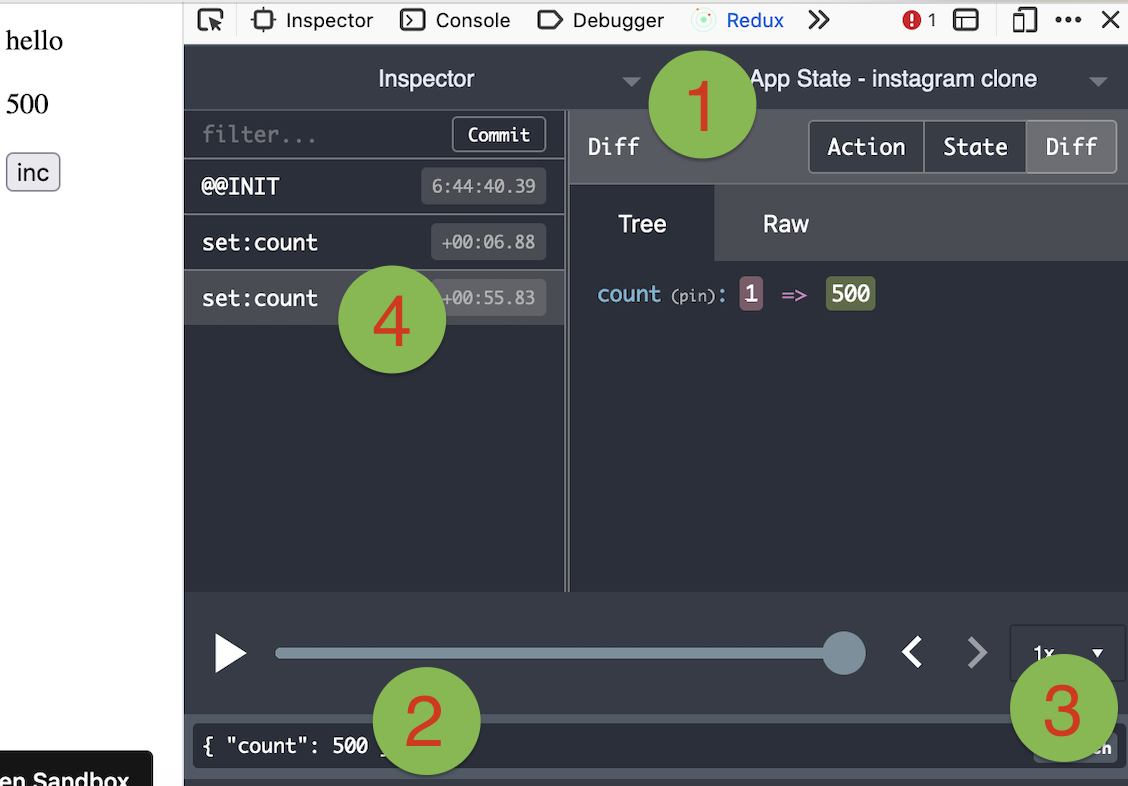
You can use Redux DevTools Extension for plain objects and arrays.
import { devtools } from 'valtio/utils'

const state = proxy({ count: 0, text: 'hello' })
const unsub = devtools(state, { name: 'state name', enabled: true })
Manipulating state with Redux DevTools
The screenshot below shows how to use Redux DevTools to manipulate state. First select the object from the instances drop down. Then type in a JSON object to dispatch. Then click "Dispatch". Notice how it changes the state.
Use it vanilla
Valtio is not tied to React, you can use it in vanilla-js.
import { proxy, subscribe, snapshot } from 'valtio/vanilla'
// import { ... } from 'valtio/vanilla/utils'

const state = proxy({ count: 0, text: 'hello' })

subscribe(state, () => {
  console.log('state is mutated')
  const obj = snapshot(state) // A snapshot is an immutable object
})
useProxy util
While the separation of proxy state and its snapshot is important,
it's confusing for beginners.
We have a convenient util to improve developer experience. useProxy returns shallow proxy state and its snapshot, meaning you can only mutate on root level.
import { useProxy } from 'valtio/utils'

const state = proxy({ count: 1 })

const Component = () => {
  // useProxy returns a special proxy that can be used both in render and callbacks
  // The special proxy has to be used directly in a function scope. You can't destructure it outside the scope.
  const $state = useProxy(state)
  return (
    <div>
      {$state.count}
      <button onClick={() => ++$state.count}>+1</button>
    </div>
  )
}
Computed properties
You can define computed properties with object getters.
const state = proxy({
  count: 1,
  get doubled() {
    return this.count * 2
  },
})
Consider it as an advanced usage, because the behavior of this is sometimes confusing.
For more information, check out this guide.
proxySet util
This is to create a proxy which mimic the native Set behavior. The API is the same as Set API
import { proxySet } from 'valtio/utils'

const state = proxySet([1, 2, 3])
//can be used inside a proxy as well
//const state = proxy({
//    count: 1,
//    set: proxySet()
//})

state.add(4)
state.delete(1)
state.forEach((v) => console.log(v)) // 2,3,4
proxyMap util
This is to create a proxy which emulate the native Map behavior. The API is the same as Map API
import { proxyMap } from 'valtio/utils'

const state = proxyMap([
  ['key', 'value'],
  ['key2', 'value2'],
])
state.set('key', 'value')
state.delete('key')
state.get('key') // ---> value
state.forEach((value, key) => console.log(key, value)) // ---> "key", "value", "key2", "value2"
Compatibility
Valtio v2 works with React 18 and up.
It only depends on react and works with any
renderers such as react-dom, react-native, react-three-fiber, and so on.
Valtio works on Node.js, Next.js and other frameworks.
Valtio also works without React. See vanilla.
Plugins
Recipes
Valtio is unopinionated about best practices.
The community is working on recipes.

 Valtio 是一个小型的状态管理库:你把任意 JS 对象包起来,它就会变成一个有感知能力的代理(proxy),当组件读取的数据发生变化时,React 组件会自动重新渲染。它也可以脱离 React 单独使用。