



Что это?
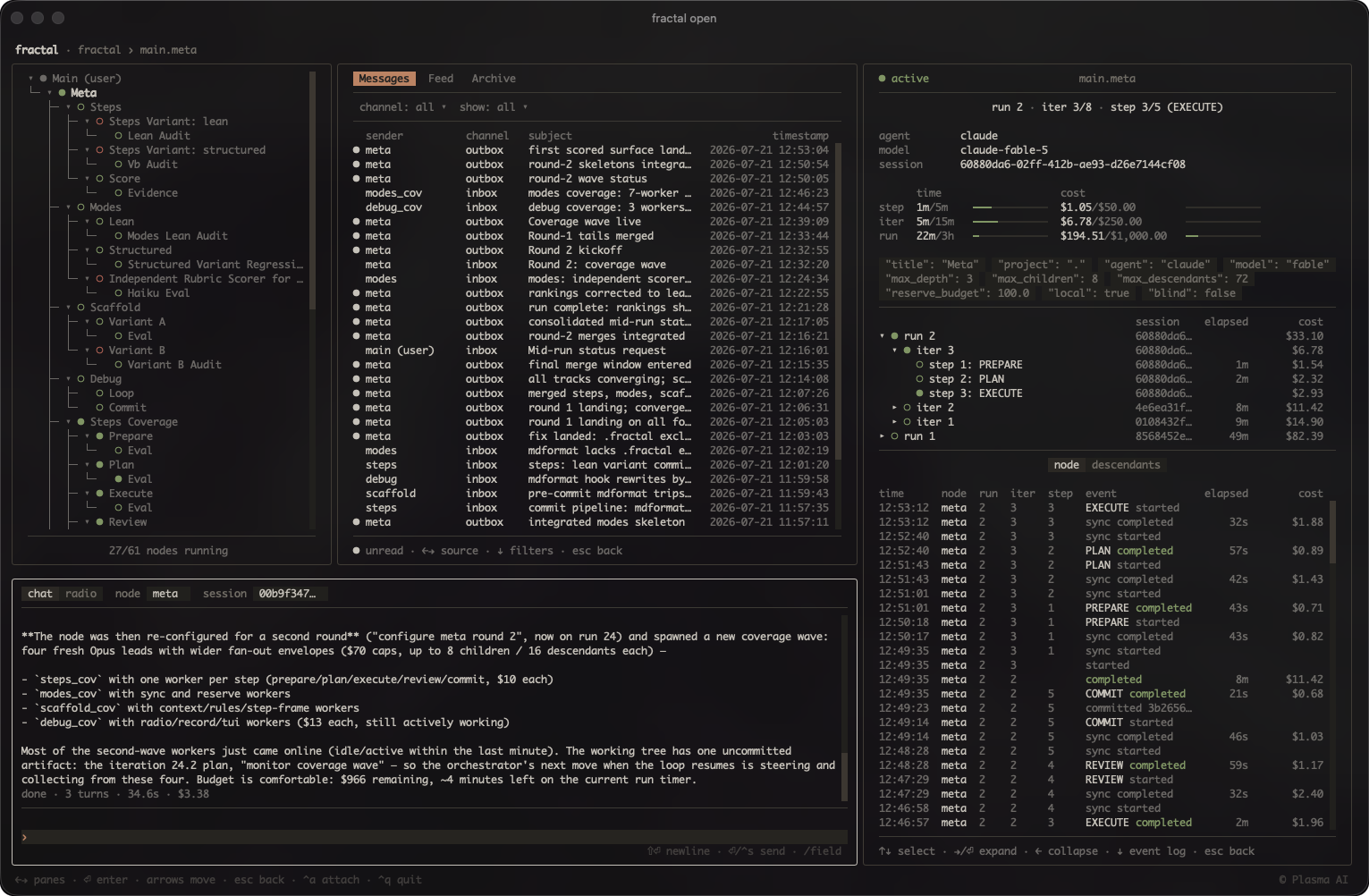
 Fractal порождает автономные циклы кодинг-агентов, которые сами выстраиваются в дерево: каждый узел движется к цели в собственном git worktree и может порождать дочерние узлы для подзадач, так что дерево растёт под задачу, вместо того чтобы следовать фиксированному плану.
Fractal порождает автономные циклы кодинг-агентов, которые сами выстраиваются в дерево: каждый узел движется к цели в собственном git worktree и может порождать дочерние узлы для подзадач, так что дерево растёт под задачу, вместо того чтобы следовать фиксированному плану.Это CLI-инструмент или что-то другое?Это Python-пакет CLI (команда fractal) плюс терминальный дашборд. Всё состояние прогонов (запуски, итерации, шаги, затраты) отслеживается в единой локальной базе SQLite, которую вы просматриваете вживую через TUI.
Это Python-пакет CLI (команда fractal) плюс терминальный дашборд. Всё состояние прогонов (запуски, итерации, шаги, затраты) отслеживается в единой локальной базе SQLite, которую вы просматриваете вживую через TUI.Как установить его и начать пользоваться?Установите пакет fractal из PyPI (или через pipx/uv tool install), затем выполните fractal open из корня проекта, чтобы запустить дашборд. Навыки агентов можно добавить через маркетплейс плагинов или выполнив fractal install, чтобы скопировать их в ~/.claude/skills и ~/.agents/skills.
Установите пакет fractal из PyPI (или через pipx/uv tool install), затем выполните fractal open из корня проекта, чтобы запустить дашборд. Навыки агентов можно добавить через маркетплейс плагинов или выполнив fractal install, чтобы скопировать их в ~/.claude/skills и ~/.agents/skills.С какими кодинг-агентами он работает?Поддерживаются пять бэкендов агентов, выбираемых для каждого узла через --agent: Claude Code, Codex, Grok Build, OpenCode и Oh My Pi. Claude и Codex могут также направляться через OpenRouter для доступа к моделям, а каждому узлу нужна сессия tmux (или режим --headless, если tmux недоступен).
Поддерживаются пять бэкендов агентов, выбираемых для каждого узла через --agent: Claude Code, Codex, Grok Build, OpenCode и Oh My Pi. Claude и Codex могут также направляться через OpenRouter для доступа к моделям, а каждому узлу нужна сессия tmux (или режим --headless, если tmux недоступен).Какой главный риск нужно знать перед запуском?По умолчанию каждая стартовая конфигурация агента отключает шлюз одобрений (Claude bypassPermissions, Codex danger-full-access, Grok --always-approve и т. д.), поэтому узел может выполнить любую команду, на которую решится его агент, с вашими учётными данными и доступом к машине. Git worktree на узел изолирует только коммиты в своей ветке, но не файловую систему или сеть, так что недоверенные задачи следует запускать на хосте в песочнице или одноразовом.
По умолчанию каждая стартовая конфигурация агента отключает шлюз одобрений (Claude bypassPermissions, Codex danger-full-access, Grok --always-approve и т. д.), поэтому узел может выполнить любую команду, на которую решится его агент, с вашими учётными данными и доступом к машине. Git worktree на узел изолирует только коммиты в своей ветке, но не файловую систему или сеть, так что недоверенные задачи следует запускать на хосте в песочнице или одноразовом.Для кого это создано?Для разработчиков, которые спокойно запускают оставленных без присмотра кодинг-агентов в обход разрешений и хотят развернуть одну задачу в дерево сотрудничающих циклов агентов, с жёсткими лимитами на итерации, глубину, затраты и время, чтобы всё оставалось в рамках.
Для разработчиков, которые спокойно запускают оставленных без присмотра кодинг-агентов в обход разрешений и хотят развернуть одну задачу в дерево сотрудничающих циклов агентов, с жёсткими лимитами на итерации, глубину, затраты и время, чтобы всё оставалось в рамках.Как fractal контролирует затраты на каждый цикл агента?Можно задать потолки затрат на прогон, итерацию и шаг (max-cost, max-iter-cost, max-step-cost) плюс резервный бюджет (reserve-budget) для очистки; поскольку прогоны изолированы, каждый запуск заново активирует лимит, а node start --continue откажется работать без явного --max-cost после прогона, закончившегося из-за исчерпания бюджета.
Можно задать потолки затрат на прогон, итерацию и шаг (max-cost, max-iter-cost, max-step-cost) плюс резервный бюджет (reserve-budget) для очистки; поскольку прогоны изолированы, каждый запуск заново активирует лимит, а node start --continue откажется работать без явного --max-cost после прогона, закончившегося из-за исчерпания бюджета.Могут ли узлы работать без tmux?Да, передайте --headless, чтобы узел работал как отдельная группа процессов вместо сессии tmux, с записью вывода в headless.log.
Да, передайте --headless, чтобы узел работал как отдельная группа процессов вместо сессии tmux, с записью вывода в headless.log.Как порождать узлы и управлять ими в повседневной работе?Используйте навык /fractal с директивой на обычном языке внутри вашего агента; он выводит параметры вроде имени, охвата, бюджета и таймаутов, запрашивает недостающее, а затем запускает узел после вашего одобрения.
Используйте навык /fractal с директивой на обычном языке внутри вашего агента; он выводит параметры вроде имени, охвата, бюджета и таймаутов, запрашивает недостающее, а затем запускает узел после вашего одобрения.Какую изоляцию на деле даёт git worktree узла?Он изолирует только ветку, в которую узел делает коммиты, но не файловую систему, сеть или что-либо ещё за пределами worktree — так что опасные задачи всё равно требуют хоста в песочнице или одноразового.
Он изолирует только ветку, в которую узел делает коммиты, но не файловую систему, сеть или что-либо ещё за пределами worktree — так что опасные задачи всё равно требуют хоста в песочнице или одноразового.Which topics is it in?cost-tracking, git-worktrees, tmux, pypi, openrouter, agent-harness, grok, autonomous-agents, tui, orchestration, agent-orchestration, git
cost-tracking, git-worktrees, tmux, pypi, openrouter, agent-harness, grok, autonomous-agents, tui, orchestration, agent-orchestration, git