









artifact-server README

The project's README from github.com/plannotator/artifact-server. As one markdown file: README.md.

Artifact Server

Artifact Server

The open-source, self-hostable alternative to Claude Code artifacts.

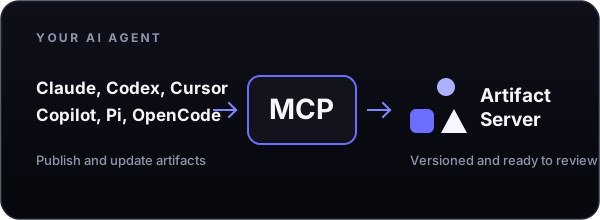
Artifact Server gives people and agents one place to publish, review, comment on, version, and share the artifacts they create while building products. Its built-in MCP server gives agents direct access to the same work.

Run it on a laptop for one developer. Deploy it for a private team on Cloudflare, one server, Kubernetes, AWS, or Google Cloud.

Artifact Server is created with Plannotator      Plannotator Workspaces is the planning layer for your software factory

Contents

Why Artifact Server

Teams now use HTML, images, and video for plans, mockups, prototypes, code reviews, and other work created during product development. That work quickly becomes disorganized, and providers try to lock it inside their platforms.

Artifact Server gives teams a self-hosted place to organize and collaborate on that work. Store artifacts by project, share them, comment on them, and keep control of the files and data.

Built for AI agents and team collaboration

Claude    Codex    Cursor    GitHub Copilot    Pi    OpenCode

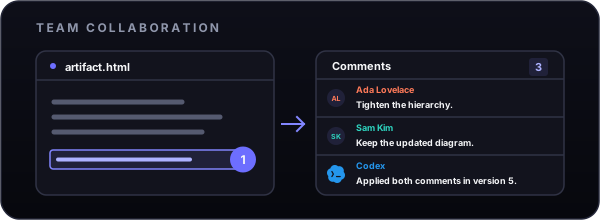
AI agents connect to Artifact Server through its built-in MCP server    Team members add comments to exact artifact versions

Artifact Server includes a built-in MCP server and a portable Agent Skill. Agents publish and update versioned artifacts. Teams review, comment on, and share the same work.

Connect the agent and install the skill:

artifactserver connect
npx skills add plannotator/artifact-server

Then ask:

/artifact-server upload that HTML design doc

The agent returns the full-screen review link first. Read the MCP guide for source checkouts, remote servers, permissions, and supported operations.

Live session delivery is available from source for Pi and Claude Code Channels. Claude Channels require its research-preview development flag and, on managed plans, the organization policy. The OpenCode adapter is not release-qualified; live-host verification and contributions are welcome.

Artifact Server has native Pi support for live integrated feedback Artifact Server supports live feedback through the Claude Code Channels research preview OpenCode live-host verification, features, and pull requests are welcome

Cloudflare and Artifact Server

Cloudflare is the main hosted deployment target. Cloudflare Artifacts can add private Git-backed history for selected projects. It is off by default and currently requires closed beta access.

Cloudflare Artifacts provides optional Git-backed history

Cloudflare is optional. Artifact Server also runs locally, on Compose, on Kubernetes, on AWS, and on Google Cloud.

Artifact Server supports Cloudflare, Docker Compose, Kubernetes, AWS, and Google Cloud

Deploy it for a team

Every remote deployment uses one trusted application origin and one isolated wildcard content domain.

Deployment Data layer Guide
Cloudflare D1 and R2 Cloudflare guide
Compact Compose SQLite and one file volume Compose guide
External-storage Compose PostgreSQL and S3-compatible storage Compose guide
Kubernetes PostgreSQL and object storage Helm guide
AWS ECS, RDS, and S3 AWS Pulumi guide
Google Cloud Cloud Run, Cloud SQL, and Cloud Storage Google Cloud Pulumi guide

Azure teams deploy through the Helm chart on AKS; there is no separate Azure installer. Azure Blob Storage is available as a preview adapter and has not passed live Azure qualification.

Read the deployment guide for shared requirements, storage choices, authentication, and backups.

Run it locally

Local mode stores metadata in SQLite and files on disk. It grants owner access only from the same loopback origin. Running from source requires Node.js 24.12 or newer and pnpm 10.34.3.

git clone https://github.com/plannotator/artifact-server.git
cd artifact-server
pnpm install
pnpm dev

Open the printed URL. You can also download the portable Node.js package from the latest GitHub release. See Get started locally for package verification and startup instructions.

Usage

Most artifacts are published by an agent through the Artifact Server Skill or MCP. For direct access, use the artifactserver CLI to publish files and directories, connect to remote servers, and create new versions. Read the CLI guide.

Security model

Artifact Server serves untrusted artifact content from isolated version hosts, separate from the trusted application origin used for authentication, review, comments, API, and MCP. Private content uses version-scoped browser sessions, and untrusted paths cannot select storage locations.

Read the security model or report a vulnerability.

Read about Artifact Server's software supply-chain security.

Development and project records

Install dependencies and run the focused development checks:

pnpm install
pnpm check
pnpm test:web

Run the complete iteration gate before a handoff:

pnpm verify:iteration

Repository engineering rules live in AGENTS.md.

The project directory contains specifications, conformance evidence, performance records, prototypes, and research. Start with:

Public guides live in the documentation index.

License

Artifact Server is licensed under the GNU Affero General Public License v3.0 (AGPL-3.0-only), © 2026 backnotprop.


Artifact Server is created with Plannotator      Plannotator Workspaces is the planning layer for your software factory

created by backnotprop

artifact-server (plannotator/artifact-server)

Searching Database…

这是什么?Artifact Server 是 Claude Code 的 artifacts 功能的开源、可自托管替代品。它为人和 AI 智能体提供一个统一的场所,用于发布、审阅、评论、版本管理和分享构建产品过程中产生的 artifact(HTML、图片、视频、代码),并内置 MCP 服务器供智能体直接访问。
这是托管服务,还是要我自己运行的东西?它是你自己部署的自托管服务器——单人开发者可以部署在笔记本上,团队可以部署到 Cloudflare、Docker Compose、Kubernetes、AWS 或 Google Cloud。没有托管 SaaS 版本。
怎么把它跑起来?本地使用的话,克隆仓库,用 Node.js 24.12+ 和 pnpm 10.34.3 从源码运行,然后打开打印出的 URL;也可以从最新的 GitHub release 下载便携 Node.js 包。团队使用请参考 Cloudflare、Compose、Kubernetes、AWS 或 Google Cloud 的部署指南。
试用之前需要装好什么?从源码运行需要 Node.js 24.12+ 和 pnpm 10.34.3。团队部署还需要一个数据层,比如 SQLite、带 S3 兼容存储的 PostgreSQL,或一个云账户(Cloudflare、AWS、GCP,或通过 Helm 使用 Azure)。
它哪些部分还没完全就绪?OpenCode 适配器尚未通过发布认证;Azure Blob Storage 适配器还是预览版,未通过 Azure 实测认证;Cloudflare 可选的基于 Git 的 artifact 历史处于封闭测试阶段,且默认关闭。
自托管它必须用 Cloudflare 吗?不必。Cloudflare 只是主要的托管部署目标;Artifact Server 也能在本地运行,或通过 Docker Compose、Kubernetes、AWS 和 Google Cloud 部署,Azure 则通过同一个 Kubernetes Helm chart 支持。
智能体实际是怎么使用 Artifact Server 的?智能体通过内置的 MCP 服务器和一个可移植的 Agent Skill 发布和更新带版本的 artifact,然后返回一个全屏审阅链接,让人可以审阅和评论同一份工作成果。
artifactserver CLI 能让我直接做什么?这个 CLI 可以让你不经过智能体,直接发布文件和目录、连接远程服务器,以及创建新的 artifact 版本。
不可信的 artifact 内容是怎么隔离的?artifact 由独立的通配符内容域上的隔离版本主机提供,与用于身份验证、审阅、评论、API 和 MCP 的可信应用源分开。
它配合哪些 AI 编程智能体使用?它面向 Claude Code、Codex、OpenCode 和 Pi,但成熟度不一——Claude Code Channels 需要研究预览开关,OpenCode 适配器尚未通过发布认证。
What are similar projects?omnigraph, jevbox, emdash, encore, overmind, ruflo, LibreChat, doop
Size
6.7 MB
Stars
215
Age
1mo
Commits · 90 Days