




Doop is the open-source alternative to Paper.design — a multiplayer
design canvas for humans and AI agents. Every design lives on a shareable Canvas
(/c/<id>) holding Frames — artboards that render real HTML in sandboxed iframes. People edit
in the browser; AI agents edit through the built-in MCP server, streaming their designs in
live. Everyone sees everything as it happens: cursors, presence, frame edits, agent status, and an
activity feed.
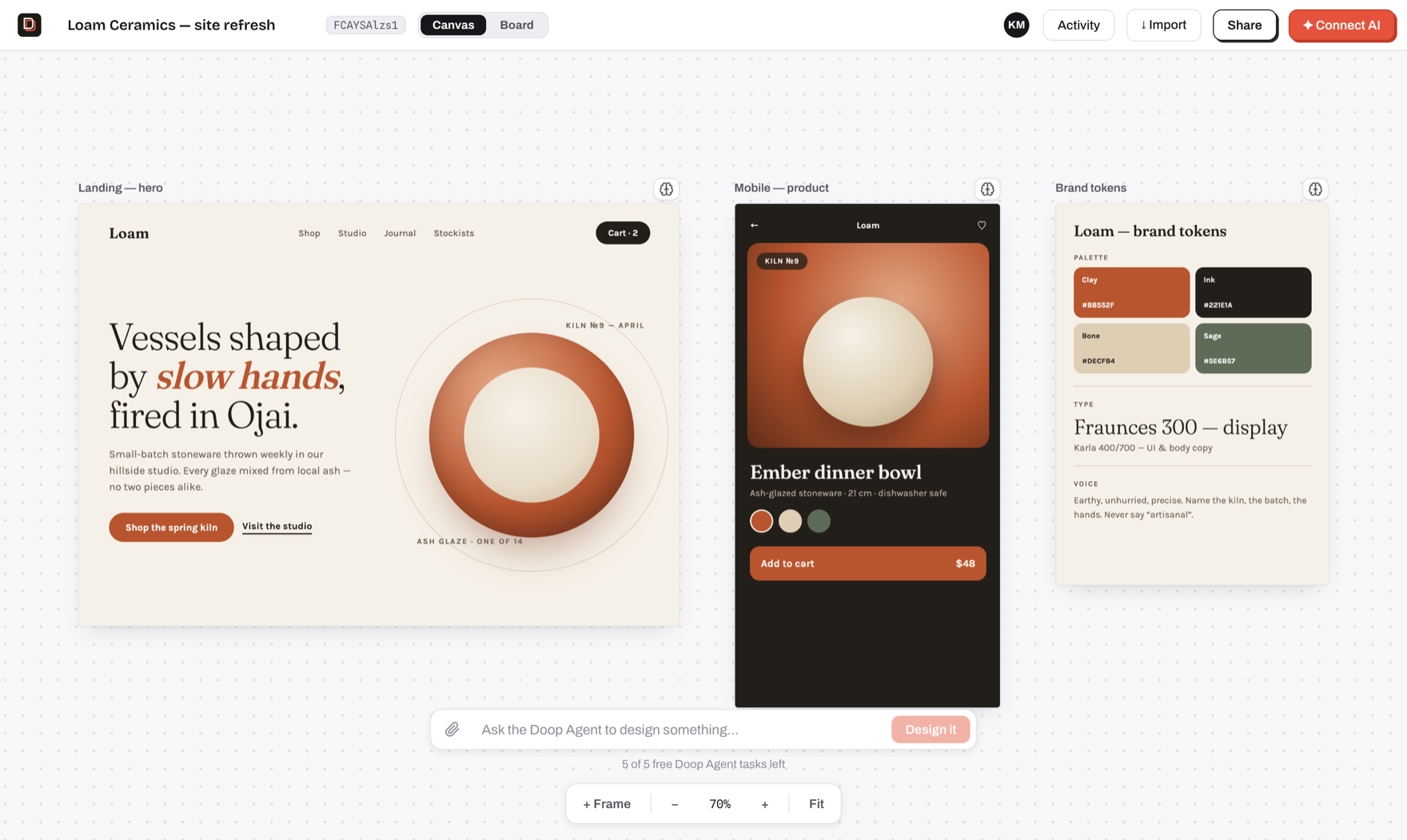
- Design with agents, not prompts-and-refresh — connect Claude Code (or any MCP client) once,
then watch it sketch, stream and self-review designs on your canvas, next to your cursor.
- A built-in Doop Agent — queue a card or @mention a role and it designs on its own, no client
to connect. Runs on the server's
ANTHROPIC_API_KEY for a handful of free tasks, then on the
ChatGPT subscription (or OpenAI key) each user connects (setup); the
first-canvas welcome performance is scripted and runs without any of it.
- True multiplayer — live cursors, presence, per-frame editing indicators, undo/redo, comments
pinned to elements, and an activity feed, all over one WebSocket room.
- Design memory — pin exemplar frames, capture decisions, and let the distiller propose durable
style rules that every agent follows.
- Private by default — invite collaborators by email or flip on link sharing per canvas;
agents inherit exactly their human's access.
- Self-host in one command —
docker compose up, or bun run dev with zero configuration
(embedded Postgres, no external services required).
Quickstart
git clone https://github.com/kgoedecke/doop && cd doop
bun install
bun run dev
Doop builds and installs with bun (bun.lock is the only
lockfile); the server itself runs on Node.
Everything works with no configuration: data persists to an embedded Postgres (PGlite) in data/pg,
and every optional integration (SMTP, stock photos, object storage, analytics) degrades gracefully
until its variable in .env.example is set. The one you will most likely want is
ANTHROPIC_API_KEY, which turns on the built-in Doop Agent — agents you connect
yourself over MCP need no key.
Or self-host the production build with Docker:
BETTER_AUTH_SECRET=$(openssl rand -hex 32) docker compose up -d # app + Postgres on :4400
Production build without Docker: bun run build && bun run start (single server on :4400 serving
everything). Set DATABASE_URL to use a real Postgres — same code path as PGlite.
Prefer not to run anything? doop.design is the hosted version.
Hook up Claude Code
One command connects Claude Code (or any MCP client) to your canvas:
claude mcp add --transport http doop http://localhost:4300/mcp
That triggers the standard MCP OAuth flow — a browser window opens, you approve, and from then on
the agent works as you. Ask it to design something on your canvas id and watch it happen live.
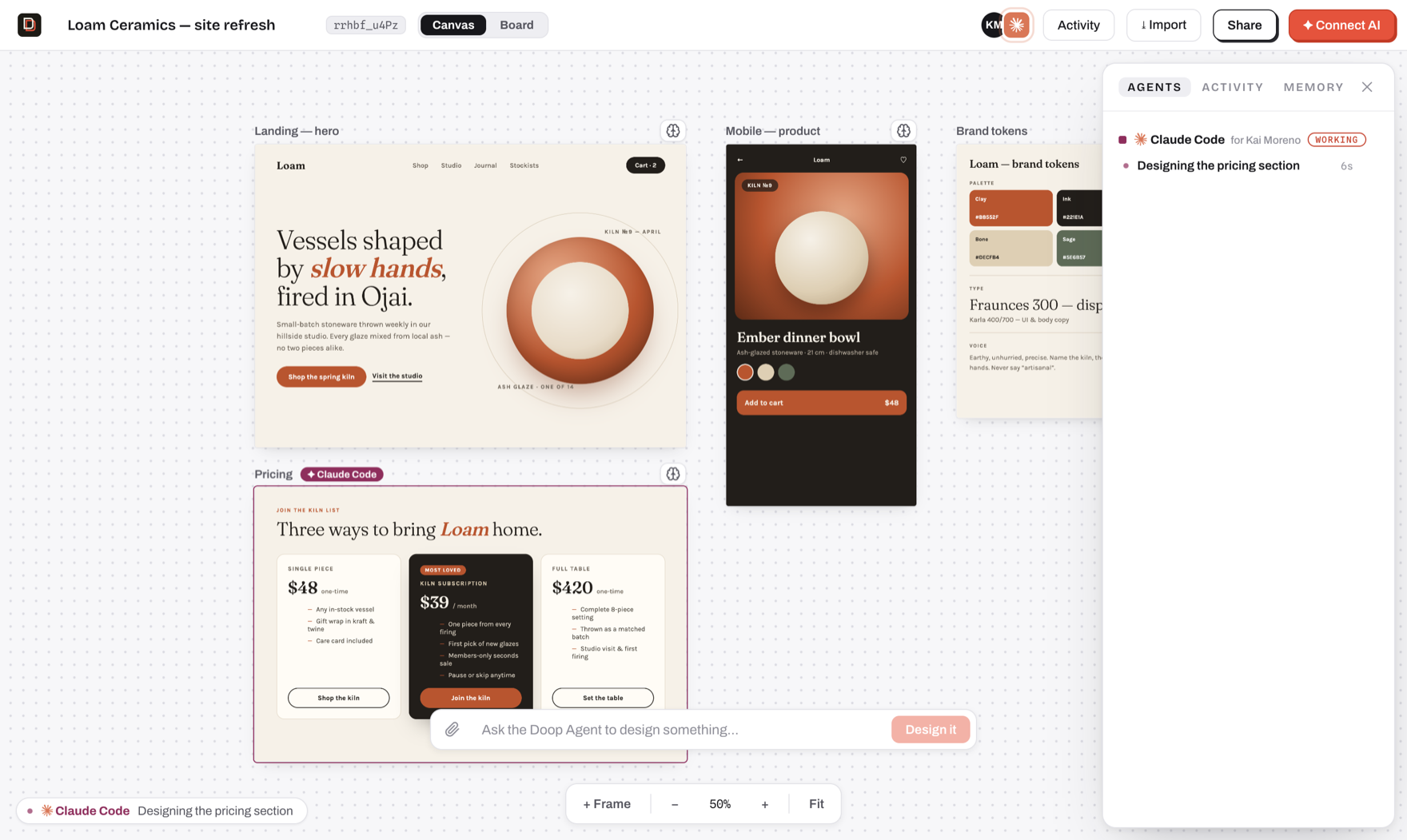
Everything in this shot is the real flow: Claude Code announced itself with set_status, created a
frame, and is streaming the pricing section in — presence avatar, "for Kai Moreno" attribution,
the frame chip, the working strip, and the task in the Agents panel.
Watch an agent design
The first canvas after signup comes with a performance: the Doop Agent streams a welcome
design in while you watch — status in the working strip, a task in the panel, a pulsing border on
the frame it's building.
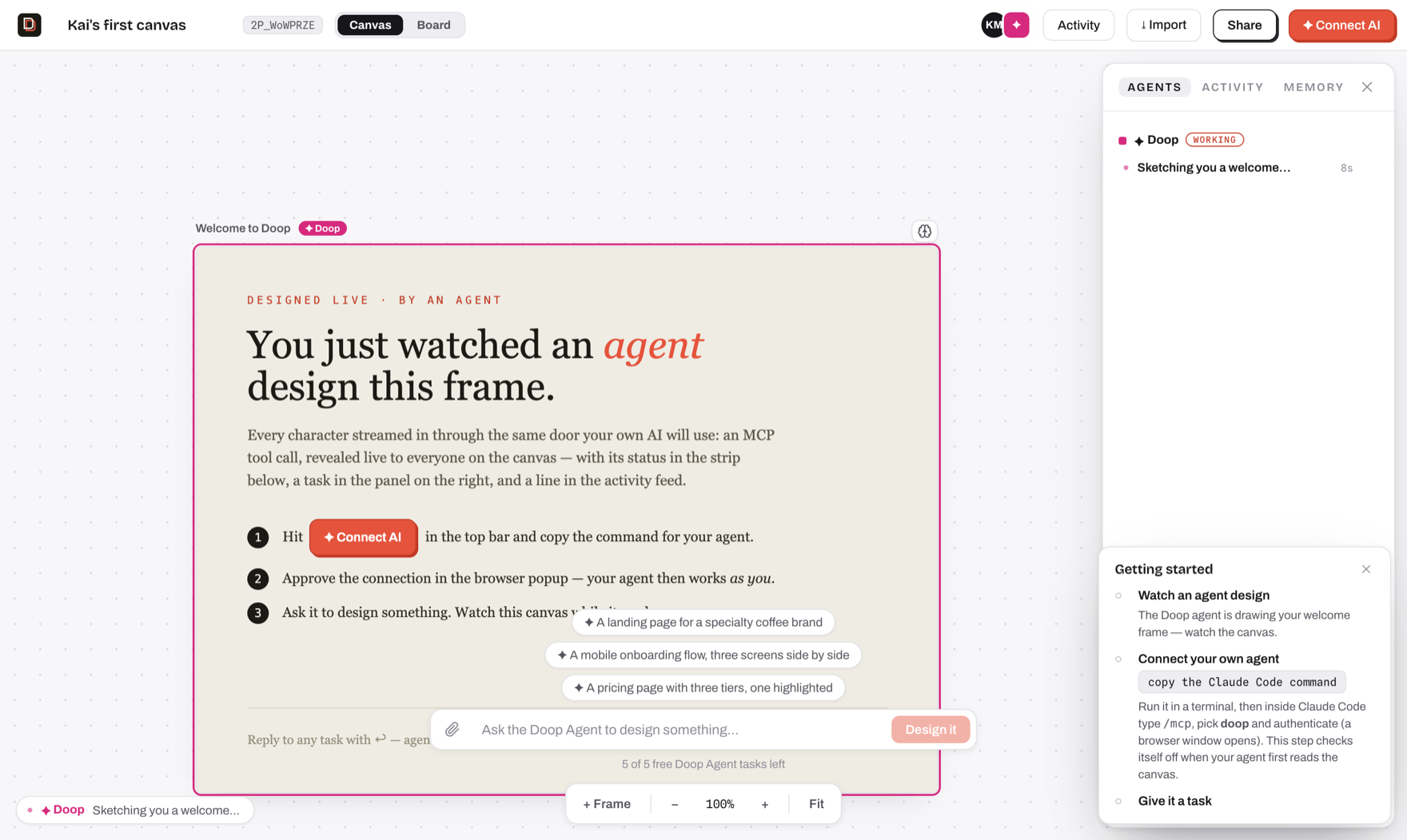
That welcome performance is scripted (server/demo.ts) — a pre-authored frame replayed through
the same machinery real agents use, so it runs with no configuration at all. The Doop Agent proper
needs a key.
The Doop Agent
Doop ships a built-in design team that lives in the server and picks work up on its own: queue a
board card, @mention a role on an element comment, or leave feedback on a task, and it runs
without a human in the loop. Roles (Doop builds; specialists own one pass each — UX, copy, brand,
accessibility) are defined in shared/agents.ts, and a card can be routed
through several in order.
The server pays for the free tier, on Anthropic by default:
ANTHROPIC_API_KEY=sk-ant-... # in .env, or the environment of your deployment
Same key gates the guideline distiller (server/distill.ts), which proposes
durable style rules from your canvas.
The free tier can run on Azure OpenAI instead — useful when your organisation's credits or
compliance rules live there:
DOOP_AGENT_PROVIDER=azure
AZURE_OPENAI_ENDPOINT=https://my-resource.openai.azure.com
AZURE_OPENAI_API_KEY=...
AZURE_OPENAI_DEPLOYMENT=my-deployment
The distiller stays on ANTHROPIC_API_KEY either way and quietly turns off without it.
Past the free tasks: connect your own ChatGPT
When a user's RESIDENT_TASK_LIMIT free tasks are gone, they don't lose the agent — they connect a
model account and the Doop Agent keeps running on it. A connected account takes over immediately,
from the very next task: the free tier is a trial that gets people here, not a balance to spend down
first, and connecting stops costing the server anything from that moment. The connection is
account-level, so it lives at /settings (Home → Settings); the free-tier wall links there rather
than carrying its own copy, and "Connect an AI agent" on a canvas stays about MCP clients only. Two
kinds of account:
- ChatGPT subscription — OAuth against
auth.openai.com, then inference through the Codex
backend that Plus/Pro/Business plans include. Tokens live in model_accounts and never reach a
browser.
- OpenAI API key — pay-as-you-go on the user's own OpenAI account, no subscription involved.
Azure OpenAI is deliberately not a connectable account kind: a user-supplied endpoint would be a
URL the server fetches with the run's full context — an SSRF vector — so Azure stays a server-level
provider only.
Either way the user picks their model tier in Settings — gpt-5.6-sol (flagship),
gpt-5.6-terra (the default workhorse) or gpt-5.6-luna (cheap and fast). They are paying for it,
so the choice is theirs; DOOP_AGENT_OPENAI_MODEL only sets the default they start on. Note that
gpt-5.4 and gpt-5.4-mini retire from ChatGPT-authenticated Codex on 31 August 2026, so
pinning a 5.4 id via that env var will break the subscription path after that date.
OpenAI registers no redirect URI for a hosted app, so connecting ChatGPT takes one of three shapes
and Doop picks the cheapest one available:
| Where Doop runs |
Flow |
What the user does |
| Same machine as the browser (dev, self-host) |
Loopback catch — Doop holds 127.0.0.1:1455 |
Approve in the OpenAI tab. Nothing to copy, no setup |
| Hosted (doop.design) |
Device code (/api/accounts/deviceauth/*) |
Type a short code at auth.openai.com/codex/device |
| Device codes disallowed |
Browser redirect + paste |
Paste the dead localhost:1455 page's address back into Doop |
The device flow needs device code authorization switched on in ChatGPT → Settings → Security
(workspace members need an admin to allow it) — that is why the loopback flow, which needs no
setting at all, stays the default when Doop is local. All three end at the same server-side PKCE
exchange.
Before you turn this on for real users: driving a ChatGPT subscription from a third-party
server is not something OpenAI's terms sanction, and heavy use can get an account rate-limited or
suspended. The API-key path is the fully supported alternative and shares all the same code.
CHATGPT_CONNECT_DISABLED=1 switches the subscription path off and leaves the key path.
Runs are attributed to the human whose card, comment or feedback they picked up, so the person who
asked for the work is the person whose account runs it. The translation between the agent's
Anthropic-shaped loop and OpenAI's Responses API lives in
server/openaiAgent.ts; which credential a run gets is decided in
server/agentModel.ts.
With no server key and no connected account the Doop Agent is off, and it fails quietly by
design — queued cards and @mentions simply wait for some agent to claim them. The startup banner
tells you which state you're in.
All of this is separate from connecting your own agent. Claude Code and any other MCP client
authenticate over OAuth and drive the canvas from outside, on your own subscription — never metered.
Three paths, same canvas: the Doop Agent on our key (free tier), the Doop Agent on your key, or your
own agent over MCP.
| Variable |
Default |
What it does |
DOOP_AGENT_PROVIDER |
anthropic |
What the free tier runs on: anthropic | azure |
ANTHROPIC_API_KEY |
unset |
Pays for the free Doop Agent tier (default provider) and the distiller |
AZURE_OPENAI_ENDPOINT |
unset |
The free tier's Azure OpenAI resource, when DOOP_AGENT_PROVIDER=azure |
AZURE_OPENAI_API_KEY |
unset |
A key of that resource |
AZURE_OPENAI_DEPLOYMENT |
unset |
The deployment the free tier runs on |
AZURE_OPENAI_API_VERSION |
unset |
Pins an api-version query parameter; the v1 surface needs none |
AZURE_OPENAI_REASONING_EFFORT |
unset |
Reasoning effort on Azure runs; unset sends none (non-reasoning-safe) |
RESIDENT_TASK_LIMIT |
0 |
Free Doop Agent tasks per account; 0 means a connected account from the first task |
DOOP_AGENT_MODEL |
claude-opus-5 |
Model for the Doop Agent on the server's Anthropic key |
DOOP_AGENT_OPENAI_MODEL |
gpt-5.6-terra |
Default tier on a user's account; each user can pick another in Settings |
CHATGPT_CONNECT_DISABLED |
unset |
1 hides the ChatGPT flow, leaving the API-key path |
DOOP_DISTILL_MODEL |
claude-haiku-4-5-20251001 |
Model for the guideline distiller |
RESIDENT_TASK_LIMIT is the free-tier meter. By default it is 0: the Doop Agent only runs once
the user connects a model account (their ChatGPT subscription or an OpenAI key) — a connected
account is never metered. Connecting your own MCP agent does not lift the meter: it runs on your
model when it designs, but resident tasks still bill a credential. Set the limit above 0 to
grant that many free tasks on the server's key; everything that triggers resident work counts,
including feedback and retries. There is no "unlimited" value: self-hosting with your own key, set
it to a large number, since you're paying Anthropic directly either way.
Accounts
The web app requires an account (better-auth, email/password — open signup). Your account
name is your identity everywhere: cursors, presence, the activity feed, and feedback
attribution are all server-authoritative from the session, and the WebSocket rejects
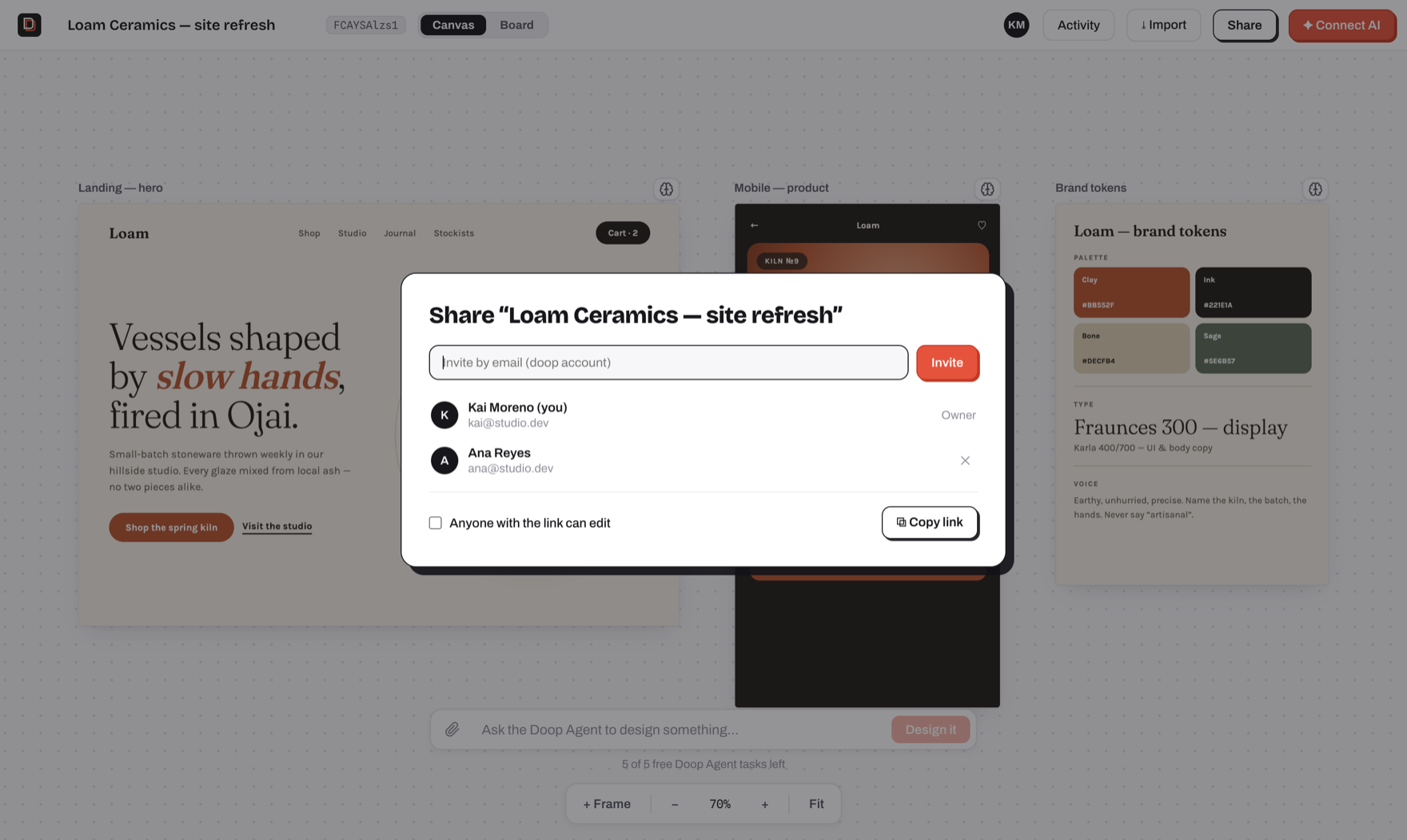
unauthenticated joins. Canvases are private by default, Figma-style: only the owner
and people they invite (Share → invite by email, existing doop accounts) can open one.
The Share modal can also turn on link sharing per canvas ("anyone with the link can
edit"), which restores drop-a-link collaboration for that canvas. Your home screen lists
your own canvases plus ones shared with you (plus unowned legacy ones, claimable there).
Agents connected over MCP act under the account that approved them and get exactly that
user's access.
With SMTP configured (SMTP_HOST etc. — see .env.example), signups require email
verification and "forgot password" sends real reset links. Without it, signup stays open and every
email is printed to the server log, links included — the flows still work in development.
Set SIGNUP_EMAIL_DOMAINS=jointhetroops.com to restrict new accounts to one email domain, or use a
comma-separated list for several domains. Matching is case-insensitive and exact; existing accounts
are unaffected. Leave it unset to keep public signup open.
Set REQUIRE_EMAIL_VERIFICATION=false to let people in before they verify — the link is still
emailed, it just stops gating sign-in. Admin promotion is deliberately not part of that trade:
ADMIN_EMAILS only ever promotes a verified address (see below).
If signup or password reset hangs rather than failing, the cause is almost always a host that
blocks outbound SMTP: Railway and most PaaS block 25/465/587. Resend also serves 2465/2587, so
SMTP_PORT=2587 is the usual fix.
Env: BETTER_AUTH_SECRET (required in production), TRUSTED_ORIGINS (comma-separated,
defaults to the localhost dev origins).
Instance admins
ADMIN_EMAILS (comma-separated) names the accounts that get the admin role, applied at
signup, on email verification, and at boot — so you can name an admin before or after they
have an account. This requires SMTP in production: an address only identifies someone
once they have proven they own it, and without a mailer signup is open, so anyone could sign
up as your address and take the role with it. A production instance without SMTP promotes
nobody and warns at boot; set the role directly in the database if that is your setup.
Admins get /admin: every canvas and account on the instance, and "view as", which hands
them a real but read-only 15-minute session as that user. Being an admin does not widen
canvas access itself: the gate in server/access.ts is shared with MCP,
so a privileged read there would give every agent holding an admin's token the run of the
instance. View-as sessions cannot write, cannot connect agents, and record who is behind
them in session.impersonated_by.
SSO (OIDC)
Optional login against an external OIDC provider (Zitadel, Okta, Authentik, Keycloak,
etc.), alongside email/password — not a replacement for it. Set OIDC_ISSUER,
OIDC_CLIENT_ID, and OIDC_CLIENT_SECRET together to enable it; a partial set refuses
to boot rather than run with SSO half-configured. OIDC_SCOPES (default
openid email profile) and OIDC_PROVIDER_NAME (default SSO, shown on the login
button — e.g. Zitadel) are optional. Signing in via SSO links to an existing
email/password account when the emails match and the provider marks the email
verified, and this works even on an instance with no SMTP configured, where a
local account could otherwise never verify on its own. SSO alone never grants
the admin role, even for an address listed in ADMIN_EMAILS — an IdP is not
trusted as an admin-promotion source, only as an email-ownership check;
promotion still requires the normal ADMIN_EMAILS path (verified signup, or
syncAdmins at boot for an account SSO has since verified).
Env: see the OIDC block in .env.example.
Sign in with Google
Optional, alongside email/password and SSO. Create an OAuth client (Web application) in
the Google Cloud console, add
<BETTER_AUTH_URL>/api/auth/callback/google as an authorised redirect URI, and set
GOOGLE_CLIENT_ID and GOOGLE_CLIENT_SECRET together (one without the other refuses to
boot). The login page shows a "Sign in with Google" button whenever both are set. Account
linking and admin promotion follow the same rules as SSO above; SIGNUP_EMAIL_DOMAINS
applies to Google (and SSO) sign-ups exactly as it does to email/password.
Sign in with Microsoft
Same shape as Google. Register an app in Microsoft Entra
(App registrations, platform Web) with <BETTER_AUTH_URL>/api/auth/callback/microsoft as a
redirect URI, create a client secret, and set MICROSOFT_CLIENT_ID and
MICROSOFT_CLIENT_SECRET together. MICROSOFT_TENANT_ID (default common, any Microsoft
account) can be organizations, consumers, or your tenant id to make the button an
org-only door. Microsoft does not assert email ownership unless the app registration's
ID token includes the email and verified_primary_email optional claims; without them a
Microsoft sign-in still works but only links to an existing account that is already
verified. Everything else (allowlist, admin promotion) follows the SSO rules above.
Agent auth (MCP OAuth)
The /mcp endpoint requires OAuth. Adding the server in Claude Code / Codex triggers
the standard MCP OAuth flow: a browser window opens, you sign in to Doop and approve,
and the client stores a bearer token. Every tool call then carries your identity —
agent tasks show "for ⟨you⟩" in the Tasks panel, and presence tooltips name the owner.
Unauthenticated calls get a 401 with WWW-Authenticate discovery pointers
(/.well-known/oauth-authorization-server + oauth-protected-resource), which is what
kicks off the flow. Dynamic client registration is enabled, so no manual client setup.
In producti

 Doop is an open-source, self-hosted alternative to Paper.design: a multiplayer design canvas where humans design in the browser while AI agents design through a built-in MCP server, with every edit streaming live to everyone watching.