







9.7K ·GitHub
Что это такое?
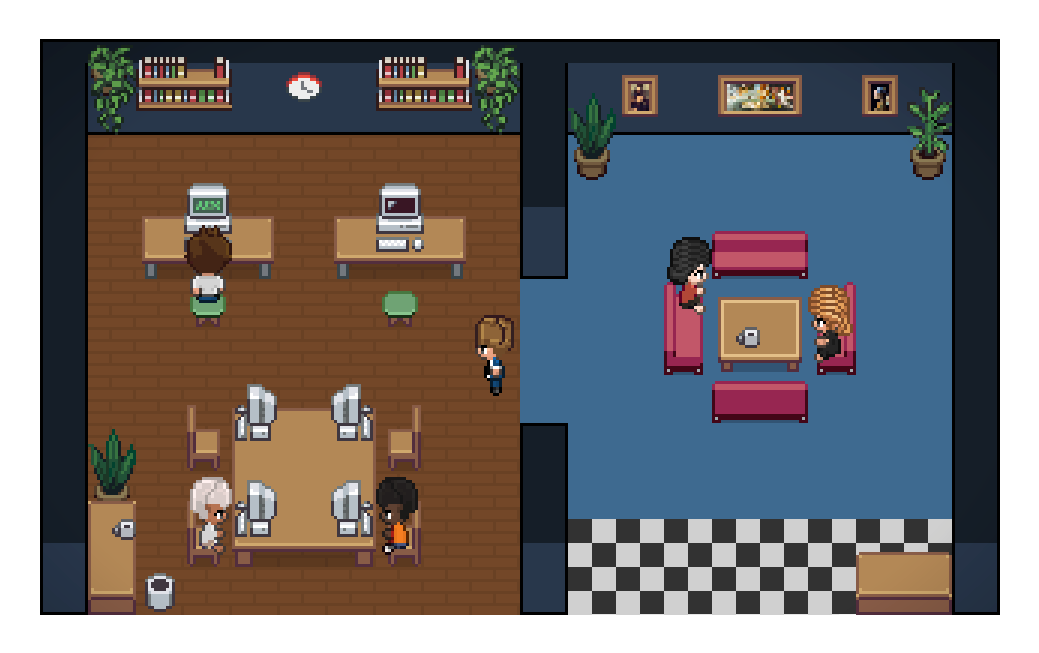
 Pixel Agents превращает ИИ-агентов для программирования, работающих в ваших терминалах, в анимированных персонажей в пиксельной графике, которые трудятся в маленьком офисе: ходят к столам, печатают, когда редактируют файлы, читают, когда что-то ищут, и наглядно сигнализируют вам, когда застряли и ждут ввода.
Pixel Agents превращает ИИ-агентов для программирования, работающих в ваших терминалах, в анимированных персонажей в пиксельной графике, которые трудятся в маленьком офисе: ходят к столам, печатают, когда редактируют файлы, читают, когда что-то ищут, и наглядно сигнализируют вам, когда застряли и ждут ввода.Это расширение VS Code или самостоятельное приложение?И то, и другое, из одной кодовой базы: расширение VS Code, которое рисует персонажей в панели, и отдельный CLI (npx pixel-agents), который запускает локальный сервер и показывает тот же офис в браузере. Это удобно для tmux, удалённой работы или сценариев без VS Code.
И то, и другое, из одной кодовой базы: расширение VS Code, которое рисует персонажей в панели, и отдельный CLI (npx pixel-agents), который запускает локальный сервер и показывает тот же офис в браузере. Это удобно для tmux, удалённой работы или сценариев без VS Code.Как всё запустить?Для VS Code установите расширение из Marketplace или Open VSX, откройте панель Pixel Agents и нажмите '+ Agent', чтобы запустить Claude Code. Для CLI выполните 'npx pixel-agents' в папке проекта, которую хотите отслеживать: он выведет локальный URL с токеном сессии.
Для VS Code установите расширение из Marketplace или Open VSX, откройте панель Pixel Agents и нажмите '+ Agent', чтобы запустить Claude Code. Для CLI выполните 'npx pixel-agents' в папке проекта, которую хотите отслеживать: он выведет локальный URL с токеном сессии.Какие ИИ-агенты поддерживаются и что нужно установить?Нужно установить и настроить CLI Claude Code. Пока это единственная эталонная реализация, а Codex, Gemini и Cursor запланированы на будущее. Для расширения VS Code нужна версия VS Code 1.105.0+, а для отдельного CLI — Node.js 20+.
Нужно установить и настроить CLI Claude Code. Пока это единственная эталонная реализация, а Codex, Gemini и Cursor запланированы на будущее. Для расширения VS Code нужна версия VS Code 1.105.0+, а для отдельного CLI — Node.js 20+.Есть ли подводные камни с безопасностью в URL отдельного CLI?Выведенный URL содержит токен сессии, который работает как ключ доступа: любой, у кого он есть, может удалённо подтверждать установку хуков. Кроме того, он без маскировки попадает в историю браузера и в логи сервера, поэтому не передавайте его другим и не привязывайте сервер к 0.0.0.0 в недоверенных сетях.
Выведенный URL содержит токен сессии, который работает как ключ доступа: любой, у кого он есть, может удалённо подтверждать установку хуков. Кроме того, он без маскировки попадает в историю браузера и в логи сервера, поэтому не передавайте его другим и не привязывайте сервер к 0.0.0.0 в недоверенных сетях.Изменяет ли он Claude Code или трогает мои файлы?Нет. Pixel Agents не меняет сам Claude Code: его конфигурация хуков хранится в ~/.claude/, а постоянные данные — в ~/.pixel-agents/.
Нет. Pixel Agents не меняет сам Claude Code: его конфигурация хуков хранится в ~/.claude/, а постоянные данные — в ~/.pixel-agents/.Как он понимает, что делает агент?Используются два способа. Режим хуков, где скрипт получает события Claude, такие как SessionStart, PreToolUse и Stop. И запасной эвристический режим, который сканирует JSONL-файлы сессий Claude в ~/.claude/projects/, если хуки недоступны.
Используются два способа. Режим хуков, где скрипт получает события Claude, такие как SessionStart, PreToolUse и Stop. И запасной эвристический режим, который сканирует JSONL-файлы сессий Claude в ~/.claude/projects/, если хуки недоступны.Можно ли изменить планировку офиса?Да. Встроенный редактор позволяет рисовать полы и стены, расставлять и поворачивать мебель, добавлять питомцев, создавать именованные зоны, привязанные к папкам проекта, и импортировать или экспортировать планировку в JSON. Планировка может достигать 64x64 клеток.
Да. Встроенный редактор позволяет рисовать полы и стены, расставлять и поворачивать мебель, добавлять питомцев, создавать именованные зоны, привязанные к папкам проекта, и импортировать или экспортировать планировку в JSON. Планировка может достигать 64x64 клеток.Что происходит, когда работают несколько агентов или субагентов?Каждый терминал с агентом получает своего анимированного персонажа. Временные субагенты и постоянные напарники Claude (Agent Teams) появляются отдельными персонажами с разными ролями и своими изменениями жизненного цикла.
Каждый терминал с агентом получает своего анимированного персонажа. Временные субагенты и постоянные напарники Claude (Agent Teams) появляются отдельными персонажами с разными ролями и своими изменениями жизненного цикла.Можно ли запустить расширение VS Code и CLI одновременно?Да, они могут работать одновременно. Каждый регистрируется в ~/.pixel-agents/servers/ и ведёт своих агентов, места и настройки, при этом оба используют одну и ту же планировку офиса.
Да, они могут работать одновременно. Каждый регистрируется в ~/.pixel-agents/servers/ и ведёт своих агентов, места и настройки, при этом оба используют одну и ту же планировку офиса.What are similar projects?ordewell, agentbox, wicked-studio, openrig, qwen-code, dsh-TUI, context-mode, plannotator
ordewell, agentbox, wicked-studio, openrig, qwen-code, dsh-TUI, context-mode, plannotator