



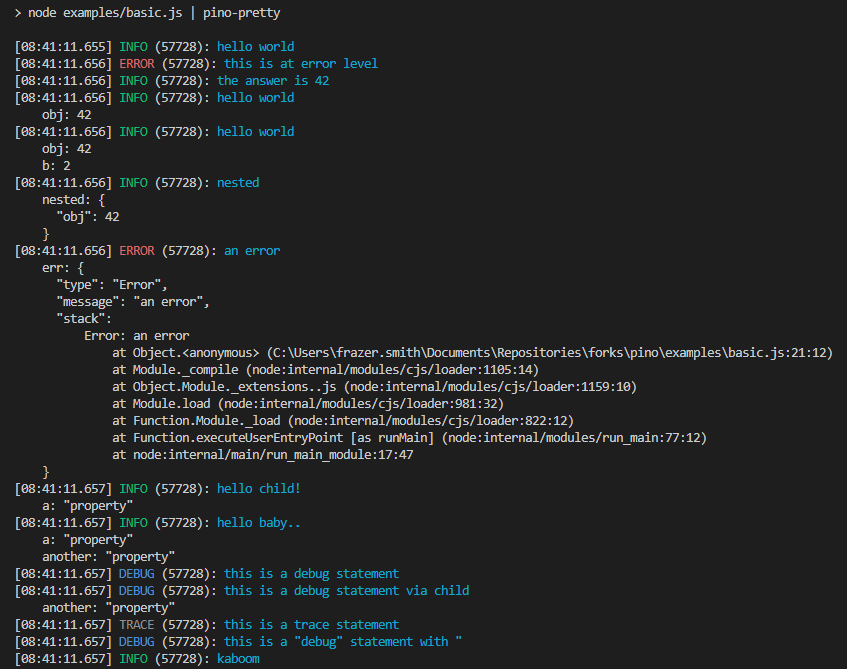
这是什么东西?
 Pino 是一个开销极低的 JavaScript JSON 日志库。它能在 Node.js 应用内部直接输出结构化的 JSON 日志,同时把性能损耗控制在很低的水平。
Pino 是一个开销极低的 JavaScript JSON 日志库。它能在 Node.js 应用内部直接输出结构化的 JSON 日志,同时把性能损耗控制在很低的水平。它是我在自己代码里调用的库,还是一个需要单独运行的服务?是一个库:通过 npm 或 yarn 安装,然后在你的应用里创建一个日志记录器即可。不需要运行任何服务器或后台进程。
是一个库:通过 npm 或 yarn 安装,然后在你的应用里创建一个日志记录器即可。不需要运行任何服务器或后台进程。怎么把它加到项目里?用 npm 或 yarn 安装,在代码里引入它,然后就可以开始记录日志了。官方为 Fastify、Express、Hapi、Restify、Koa、Node 核心 http、Nest 和 Hono 提供了现成的集成指南。
用 npm 或 yarn 安装,在代码里引入它,然后就可以开始记录日志了。官方为 Fastify、Express、Hapi、Restify、Koa、Node 核心 http、Nest 和 Hono 提供了现成的集成指南。它只能在 Node.js 下运行,还是也支持其他运行时?Node.js 是它的目标运行时,不过 README 也提到可以通过 pino-bare 兼容模块支持 Bare 和 Pear。它以普通的 npm 包形式发布。
Node.js 是它的目标运行时,不过 README 也提到可以通过 pino-bare 兼容模块支持 Bare 和 Pear。它以普通的 npm 包形式发布。如果每行日志都是原始 JSON,终端岂不是没法看?这是换取快速、机器可解析输出的代价。开发时可以用 pino-pretty 模块把 JSON 格式化成人类易读的日志。
这是换取快速、机器可解析输出的代价。开发时可以用 pino-pretty 模块把 JSON 格式化成人类易读的日志。浏览器端或打包后的代码里也能用吗?可以——有专门的浏览器端 API 文档,而且 Pino 明确支持用 webpack、esbuild 这类工具进行打包。
可以——有专门的浏览器端 API 文档,而且 Pino 明确支持用 webpack、esbuild 这类工具进行打包。可以免费使用吗,包括商业项目?可以——Pino 采用 MIT 许可证,任何项目都可以自由使用,商业项目也不例外。
可以——Pino 采用 MIT 许可证,任何项目都可以自由使用,商业项目也不例外。Pino 比其他日志库快多少?README 声称在很多场景下 Pino 比同类方案快 5 倍以上,并链接了一份 Benchmarks 文档提供详细对比。低开销的意义在于:大量的日志记录不会拖慢你应用的每秒请求数。
README 声称在很多场景下 Pino 比同类方案快 5 倍以上,并链接了一份 Benchmarks 文档提供详细对比。低开销的意义在于:大量的日志记录不会拖慢你应用的每秒请求数。在生产环境里,日志的传输、格式转换或告警应该怎么处理?不要放在应用的主线程里做:由于 Node 的事件循环是单线程的,README 建议通过 pino.transport API 把所有日志处理都作为 transport 放到 worker 线程中运行。
不要放在应用的主线程里做:由于 Node 的事件循环是单线程的,README 建议通过 pino.transport API 把所有日志处理都作为 transport 放到 worker 线程中运行。能把密码这类敏感字段从日志里抹掉吗?可以——README 除了子日志记录器和 transport 之外,还提供了 Redaction API(脱敏接口)的文档,可以从日志输出中移除敏感值。
可以——README 除了子日志记录器和 transport 之外,还提供了 Redaction API(脱敏接口)的文档,可以从日志输出中移除敏感值。What are similar projects?fastify, loguru, monolog, fiber, winston, http-proxy-middleware, express, koa
fastify, loguru, monolog, fiber, winston, http-proxy-middleware, express, koaWhich topics is it in?logger, fastify, fast, logging, express, observability, json, browser, benchmark, backend, web-development, performance
logger, fastify, fast, logging, express, observability, json, browser, benchmark, backend, web-development, performance