limen

Explore the full workflow → Towards Autonomous Product Development
This MEGA Drop explains the workflow behind limen, including a live video walkthrough with Pi, Herdr, and Grok Bot. MEGA.dev shares practical articles, repos, and tools for working with AI.
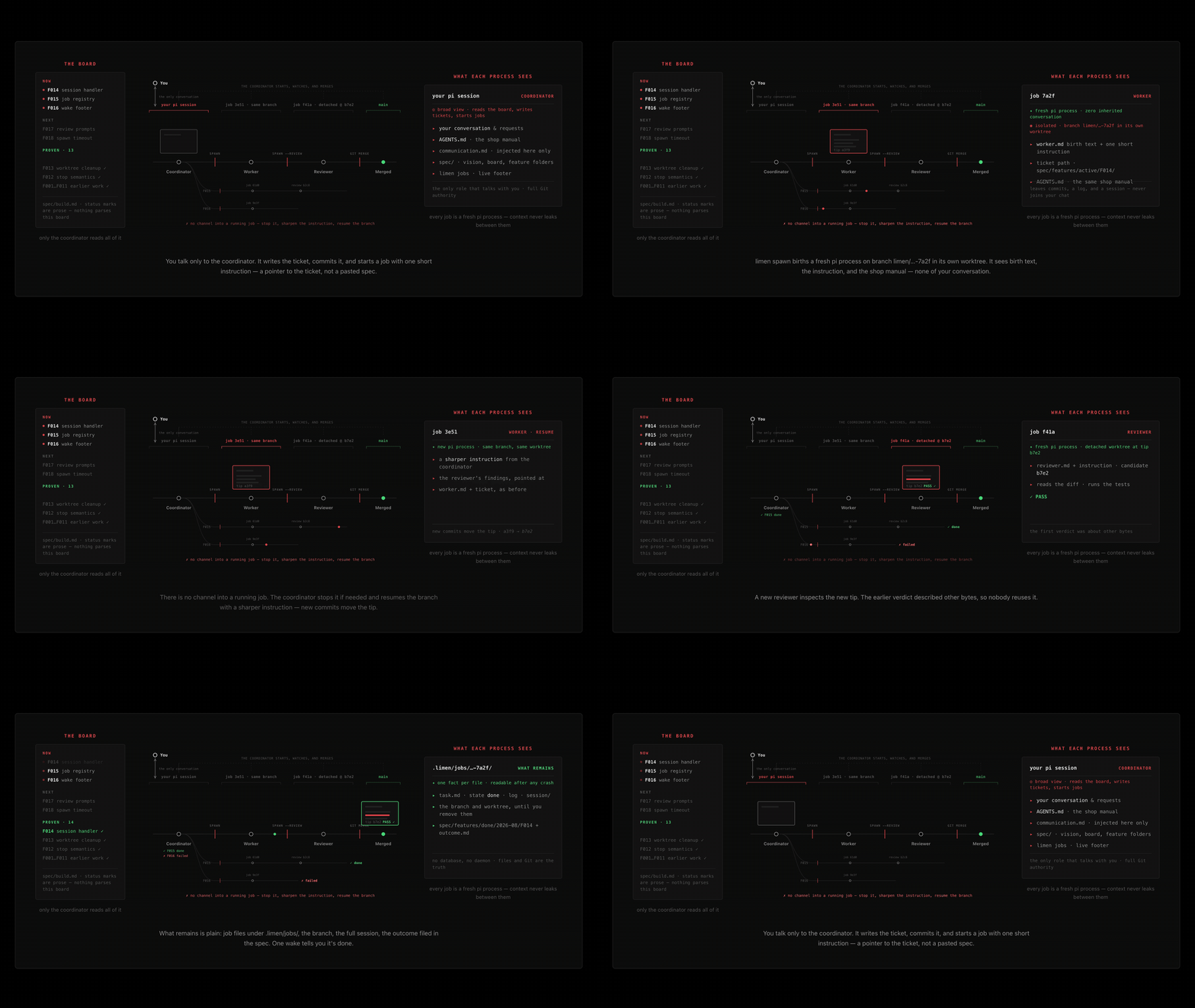
You talk to one coordinator in Herdr. It starts OMP or Pi workers and reviewers in isolated Git worktrees. Each job leaves a branch, task, log, state, and session. You decide what to build and what to merge. The coordinator runs the harness.
Experimental. Commands, prompts, and project files may still change.
Requires macOS or Linux, Node.js 24+, Git, and the selected engine (omp or pi) on PATH. Windows is unsupported. Last known-good: pi 0.84.2, Herdr 0.8.0 — recorded on each job, not a runtime gate.
Jobs can live on an always-on seat (a VPS on Tailscale) while your laptop is only a window. See docs/remote.md. The walkthrough we actually ran is docs/vps.md.
Finish webhooks (opt-in)
When a job reaches a terminal state (done / failed / stopped), limen can POST {job, status, branch} to one or more destinations so a bot or routine can wake. Off by default. Installing limen does not enable any project.
Opt in per project with a private, git-excluded file:
# <project>/.limen/finish-webhook.env  (mode 600; never commit)
LIMEN_FINISH_WEBHOOK_TARGETS='[{"url":"https://api2.cursor.sh/automations/webhook/…","auth":"Bearer …"}]'
Put that file beside the primary Git checkout (linked worktrees use the canonical root). Fresh spawns snapshot the path onto the job; continuations inherit the parent's choice. Home/legacy config does not opt a project into automation. An optional LIMEN_FINISH_WEBHOOK_AUTHOR_TARGETS map sends each finish only to the ticket author's configured bots; without it, every target still gets every finish.
What “accepted” means. HTTP 2xx means the sender reached the endpoint. It does not mean a bot finished a turn — expect latency, and confirm the wake in the bot chat / routine run. Inspect with limen jobs <id> (finish-webhook-env, finish-webhook-attempt, finish-webhook).
Configuration uses only LIMEN_FINISH_WEBHOOK_* keys; retired bot-specific keys no longer work. Existing private files and launchers need the migration steps. The helper filename remains tony-finish-ping.sh.
Full setup, multi-target notes, deliberate retry, and troubleshooting: docs/finish-webhooks.md.
Trust boundary
A spawned Pi job runs pi --approve as you; an OMP job runs omp --auto-approve. A worktree and process group provide separation, not a security sandbox. A worker can do anything your account can do. Look at the branch before you merge. See SECURITY.md.
Install
This part is yours. Once:
git clone https://github.com/overment/limen.git
cd limen
npm install
npm link
npm link puts that clone on PATH. The binary reads hook/ and templates/ next to itself. Projects do not copy those files. After git pull on the clone, /reload the coordinator.
Then in each project:
cd /path/to/your-project
limen init
export LIMEN_ENGINE=omp
LIMEN_COORDINATOR=1 omp --provider openai-codex --model gpt-6-sol --thinking xhigh
limen init plants what the project owns (vision, board, feature lanes, styleguide) and a stub that loads package hooks. It never overwrites existing project files. It always deletes leftover .pi/extensions/limen-*.ts hook copies so they cannot load beside the stub. limen init --drop-leftovers deletes only prompt copies that still match the package.
That interactive session is the coordinator (LIMEN_COORDINATOR=1), not a spawned job. From here you talk. You do not drive the job CLI. limen spawn starts workers and reviewers — not a coordinator; the same env var on a spawn shell does not change the job's role. Prefer a Herdr space named for the plant (limen, or alice limen), not a space named only workers. Label the coordinator tab clearly. Worker tabs come from spawn. The inherited shop manual (templates/agents.md; a project AGENTS.md overlays it) carries the same layout rules.
How you work
Tell the coordinator the outcome you want. It writes or moves the ticket, keeps spec/build.md aligned, commits the ticket so the worker can see it, and starts a job. Stay in that conversation. A wake arrives when a job finishes. Ask only when something looks wrong, or when the coordinator asks you — product ambiguity, a real tradeoff, credentials, or a merge.
A useful ask names the outcome and the first artifact, not a tour of the repo. The coordinator turns that into a short spawn plus a Ticket: pointer. It does not paste the ticket into the prompt.
done means the run ended cleanly: the selected engine exited 0, or a hosted session ended, without a final error or aborted stop reason. A provider-errored run records failed with that reason. Neither state means the ticket is finished or the branch is safe to merge. The coordinator inspects the record, the diff, and the checks, then either merges, resumes a repair, or asks you.
When the blast radius earns a second pair of eyes, the coordinator starts a fresh reviewer against the candidate. The reviewer reports a verdict; it does not rewrite the branch. You still merge.
What the coordinator runs
These commands are the harness. The coordinator types them. They are here so you can recognize a job ID, a wake, or a recovery step — not as a daily script.
limen spawn --label "F001 auth handler" \
  "Implement F001's session-handler slice. Start with the failing session test. One commit. Ticket: spec/features/active/F001-auth/ticket.md"

limen jobs
limen jobs <id|suffix|label>
git diff HEAD...<branch>

limen spawn --review --branch limen/<job-id> --label "F001 auth review" \
  "Review the F001 candidate against spec/features/active/F001-auth/ticket.md. Name the commit reviewed."

limen steer <id> "stay on the session test; do not widen"
limen stop <id> "reason"
limen spawn --branch limen/<job-id> "Focused resume instruction"
The last line of spawn is the durable job ID. A running job picks up a steer between tool calls. Stop sends TERM, then escalates. Resume reuses the branch and its worktree, uncommitted files included. The coordinator inspects that state first.
Finished jobs keep their files under .limen/jobs/. Extra checkouts do not stay: the next spawn drops finished worktrees, and limen prune does the same on demand. Resume with --branch keeps that checkout. limen prune --retire deletes finished job records whose branches are already merged or dropped; --dry-run prints the ids and removes nothing. Spawn and sweep never retire records.
To keep a finished job's conversation, run limen continue <job-id> "Follow-up instruction". If its checkout was pruned, Limen restores the recorded path from the surviving local branch and copies the saved session into a new linked job. Only committed branch contents return; pruned uncommitted files are lost. A missing branch or transcript prevents recovery, and a branch checked out elsewhere is not taken over.
A job is bounded by 90 minutes (--timeout 20m) and 900 tool-start events (LIMEN_MAX_TOOL_CALLS). A bound records failed; it does not finish the ticket. Do not run limen wait in the coordinator conversation — it blocks you.
Ticket authorship
For collaborators sharing a project, limen ticket-author spec/features/active/F001-auth/ticket.md reports the name, email, and commit that first added the ticket, following Git-recognized renames between lanes. Paths are relative to the current directory; absolute paths within the repository also work. The lookup reads the current branch's committed HEAD, never the current operator's Git config or GitHub session, and writes nothing.
A GitHub noreply email also yields its recorded login. Ordinary emails remain usable identities without a GitHub account or network access. This is the creation author, not the committer or latest editor; it is evidence from Git, not verified human identity. Shared bot credentials identify the bot, not the person who asked it to file the ticket. Keep distinct authors on filing commits when collaborators need distinct attribution.
Spawn records that creation @login (or an unavailable reason) on the job for finish routing. Uncommitted paths and shallow history report authorship unavailable rather than guessing. Commit a new ticket before looking it up; fetch complete history for a shallow clone. A move Git cannot recognize, a squash, or rewritten history can lose original attribution. Deleting and recreating a path starts a new ticket history. No author tags are added to ticket Markdown.
Models
Adam's standing defaults for Overment limen/Herdr plants (2026-09-23): prefer OMP for new sessions and jobs; use Pi only when the task truly needs it. Project choices live in spec/build.md, not another policy file.
| Work |
Provider |
Model |
| Ordinary work, including coordination |
openai-codex (Codex on OMP) |
gpt-6-sol |
| Simple / cheap tasks |
xai-oauth |
grok-4.7 |
| UI-related work |
anthropic |
claude-opus-5-5 |
Pass the engine, provider, model, and chosen reasoning explicitly. pi-claude is a Pi provider; on OMP use anthropic. New jobs default to OMP; use --engine pi or LIMEN_ENGINE=pi only when Pi is required.
Start a coordinator in an existing Herdr pane at a shell prompt, with the project as its working directory:
herdr agent start limen-peer --kind omp --pane <pane-id> -- \
  --provider openai-codex --model gpt-6-sol --thinking xhigh
Herdr forwards the arguments after --; it does not select Limen's model. Do not rely on old Pi project settings or a global model default. This policy does not rewrite either engine's settings or credentials.
For an ordinary worker:
limen spawn --engine omp \
  --provider openai-codex --model gpt-6-sol --thinking high \
  --label "short worker task" 'Implement the requested slice.'
In Herdr this is hosted; use --detached for a requested background worker. --provider, --model, and --thinking reach the selected engine as separate flag/value pairs in both modes. limen continue accepts the same flags, copies the parent engine, and refuses a conflicting --engine; continuing a Pi transcript still requires Pi.
Model precedence remains --model, then LIMEN_WORKER_MODEL (or LIMEN_REVIEWER_MODEL for --review), then the built-in fallback. Pass the standing choices explicitly rather than relying on that legacy fallback. Adam performs reviews; do not start an independent reviewer unless asked.
--engine pi|omp selects the job binary, overriding LIMEN_ENGINE. With neither set, new jobs use OMP. Old job records without an engine remain Pi for compatibility; continuation keeps the parent's engine. Pi and OMP keep separate auth stores (~/.pi, ~/.omp); authenticate OMP yourself. One wrapper and one stream parser serve both.
Adjacent-repository workspaces
A non-Git parent can hold several independent Git children. You initialize once at the parent (limen workspace init) and map the children in spec/workspace.md. After that, tell the coordinator which repo the work belongs in. It passes exactly one --repo per job. Tickets stay under the parent; branches, worktrees, diffs, and review stay in the selected child.
Project files
The installed limen is the default shop manual, role prompts, speech register, and hooks. limen init only creates what the project owns:
.agents/limen/styleguide.md           project coding practice
spec/vision.md                        durable product intent
spec/build.md                         TRACK / NOW / NEXT / PROVEN
spec/features/                        planned, active, done, and dropped work
.pi/extensions/limen.ts               stub: load hooks from the package
.limen/jobs/<id>/                     runtime evidence
Optional overlays replace a package default for that file only: AGENTS.md, .agents/limen/worker.md, .agents/limen/reviewer.md, .agents/limen/communication.md. A file that still matches the package is a leftover copy; the coordinator names it. Different bytes are an overlay — keep, drop, or edit. Never overwrite an overlay.
The communication hook puts the shop manual, speech register, vision, and styleguide on the system prompt once per model call (board digest last, so a NOW/NEXT change does not break the cached prefix). A short per-turn note names the audience and the reply rules; a wake cue lives there, not in the system prompt. After a write or edit, the tool result recalls the rule that applies. Updating the clone updates every project on that machine.
Recovery
The coordinator does this. You only need it if you are looking at a stuck tab yourself.
| Symptom |
Safe next step |
| Quiet or repetitive job |
limen jobs <id>, the log, and the worktree. Stop only on evidence, then resume narrower. |
| Worker has a real question |
Read its durable note, answer it, resume the branch. |
Wrapper is dead but state says running |
Verify the recorded PID, correct the plain state file, then resume. |
| Completion wake was missed |
Inspect .limen/jobs/ and Git. Job files remain canonical if a notification is missed. |
Command reference
limen init
limen init --drop-leftovers
limen workspace init
limen spawn "instruction" [--label L] [--engine pi|omp] [--provider P] [--model M] [--thinking T] [--branch B] [--role NAME] [--timeout 20m] [--task-file F|-] [--prepare CMD]
limen spawn --repo R "instruction" [--label L] [--model M]
limen spawn --review --branch B --label L "instruction"
limen jobs [--running|--active|--all|--label PREFIX|<id|suffix|label>]
limen diff <id|suffix|label>
limen prune [--retire [--dry-run]]
limen steer <id|suffix|label> | --running "correction"
limen stop <id|suffix|label> [reason]
limen wait <id|suffix|label>
limen watch <id|suffix|label> | --running
limen unwatch <id|suffix|label> | --all
limen open <id|suffix|label>
limen close <FNNN>
IDs, unique suffixes, and unique labels are interchangeable where shown.
At a terminal, jobs renders an aligned table for eyes; piped, it prints the compact format tools parse. LIMEN_VIEW=human|compact forces a view; NO_COLOR drops the paint.
Develop
See CONTRIBUTING.md. CI runs the same checks on Linux and macOS:
npm run check
Limen has zero runtime dependencies. Capability belongs in src/; operating judgment belongs in templates and project files.

 limen is a minimal one-human-many-agents harness built from files, Git, and one CLI: you talk to a single coordinator that starts OMP or Pi coding agents as workers and reviewers in isolated Git worktrees.