OpenSandbox is a general-purpose sandbox platform for AI applications, offering multi-language SDKs, unified sandbox APIs, and Docker/Kubernetes runtimes for scenarios like Coding Agents, GUI Agents, Agent Evaluation, AI Code Execution, and RL Training.
Features
- 🧩 SDKs, CLI, and MCP: Provides multi-language SDKs, the osb CLI, and MCP server integration for sandbox creation, command execution, and file operations. See SDKs, CLI, and MCP.
- 📜 Sandbox Protocol: Defines sandbox lifecycle management APIs and sandbox execution APIs so you can extend custom sandbox runtimes. See API specs.
- 🚀 Sandbox Runtime: Built-in lifecycle management supporting Docker and high-performance Kubernetes runtime, enabling both local runs and large-scale distributed scheduling. See Kubernetes runtime.
- 🖥️ Sandbox Environments: Built-in Command, Filesystem, and Code Interpreter implementations. Examples cover Coding Agents (e.g., Claude Code), browser automation (Chrome, Playwright), and desktop environments (VNC, VS Code).
- 🚦 Network Policy: Unified ingress gateway with multiple routing strategies plus per-sandbox egress controls. See Ingress Gateway and egress controls.
- 🔑 Credential Vault: Secure credential injection for sandbox outbound requests without exposing real secrets to workloads. See Credential Vault.
- 🏰 Strong Isolation: Supports secure container runtimes like gVisor, Kata Containers, and Firecracker microVM for enhanced isolation between sandbox workloads and the host. See Secure Container Runtime Guide for details.
Official Container Images
OpenSandbox release images are published under the same component name in
three official registries:
- Docker Hub:
docker.io/opensandbox/<component>
- GitHub Container Registry:
ghcr.io/opensandbox-group/opensandbox/<component>
- Alibaba Cloud Container Registry:
sandbox-registry.cn-zhangjiakou.cr.aliyuncs.com/opensandbox/<component>
Tagged release images are signed keylessly with Cosign and include provenance
attestations. Pin production images by digest and follow the
release verification guide to verify
the image against the OpenSandbox GitHub Actions identity before deployment.
SDKs
Python:
pip install opensandbox
Java/Kotlin (Gradle Kotlin DSL):
dependencies {
    implementation("com.alibaba.opensandbox:sandbox:{latest_version}")
}
Java/Kotlin (Maven):
<dependency>
    <groupId>com.alibaba.opensandbox</groupId>
    <artifactId>sandbox</artifactId>
    <version>{latest_version}</version>
</dependency>
JavaScript/TypeScript:
npm install @alibaba-group/opensandbox
C#/.NET:
dotnet add package Alibaba.OpenSandbox
Go:
go get github.com/alibaba/OpenSandbox/sdks/sandbox/go
CLI
OpenSandbox also provides osb, a terminal CLI for the common sandbox workflow: create sandboxes, run commands, move files, inspect diagnostics, and manage runtime egress policy.
Install:
pip install opensandbox-cli
# or
uv tool install opensandbox-cli
Quick start:
osb config init
osb config set connection.domain localhost:8080
osb config set connection.protocol http
osb config set connection.api_key <your-api-key>
osb sandbox create --image python:3.12 --timeout 30m -o json
osb command run <sandbox-id> -o raw -- python -c "print(1 + 1)"
See the CLI README for the full command reference.
MCP
The OpenSandbox MCP server exposes sandbox creation, command execution, and text file operations to MCP-capable clients such as Claude Code and Cursor.
Install and run:
pip install opensandbox-mcp
opensandbox-mcp --domain localhost:8080 --protocol http
Minimal stdio config:
{
  "mcpServers": {
    "opensandbox": {
      "command": "opensandbox-mcp",
      "args": ["--domain", "localhost:8080", "--protocol", "http"]
    }
  }
}
See the MCP README for client-specific setup.
Getting Started
Requirements:
- Docker (required for local execution)
- Python 3.10+ (required for examples and local runtime)
uvx opensandbox-server init-config ~/.sandbox.toml --example docker

uvx opensandbox-server

# Show help
# uvx opensandbox-server -h
Create a Code Interpreter and Execute Commands/Codes
Install the Code Interpreter SDK
uv pip install opensandbox-code-interpreter
Create a sandbox and execute commands and codes.
import asyncio
from datetime import timedelta

from code_interpreter import CodeInterpreter, SupportedLanguage
from opensandbox import Sandbox
from opensandbox.models import WriteEntry

async def main() -> None:
    # 1. Create a sandbox
    sandbox = await Sandbox.create(
        "opensandbox/code-interpreter:v1.1.0",
        entrypoint=["/opt/code-interpreter/code-interpreter.sh"],
        env={"PYTHON_VERSION": "3.11"},
        timeout=timedelta(minutes=10),
    )

    async with sandbox:

        # 2. Execute a shell command
        execution = await sandbox.commands.run("echo 'Hello OpenSandbox!'")
        print(execution.logs.stdout[0].text)

        # 3. Write a file
        await sandbox.files.write_files([
            WriteEntry(path="/tmp/hello.txt", data="Hello World", mode=644)
        ])

        # 4. Read a file
        content = await sandbox.files.read_file("/tmp/hello.txt")
        print(f"Content: {content}") # Content: Hello World

        # 5. Create a code interpreter
        interpreter = await CodeInterpreter.create(sandbox)

        # 6. Execute Python code (single-run, pass language directly)
        result = await interpreter.codes.run(
              """
                  import sys
                  print(sys.version)
                  result = 2 + 2
                  result
              """,
              language=SupportedLanguage.PYTHON,
        )

        print(result.result[0].text) # 4
        print(result.logs.stdout[0].text) # 3.11.14

        # 7. Cleanup the sandbox
        await sandbox.kill()

if __name__ == "__main__":
    asyncio.run(main())
More Examples
OpenSandbox provides examples covering SDK usage, agent integrations, browser automation, and training workloads. All example code is located in the examples/ directory.
🎯 Basic Examples
🤖 Coding Agent Integrations
🌐 Browser and Desktop Environments
- chrome - Chromium sandbox with VNC and DevTools access for automation and debugging.
- playwright - Playwright + Chromium headless scraping and testing example.
- desktop - Full desktop environment in a sandbox with VNC access.
- vscode - code-server (VS Code Web) running inside a sandbox for remote dev.
🧠 Training and Evaluation
For more details, please refer to the examples documentation.
Project Structure
| Directory |
Description |
sdks/ |
Multi-language SDKs (Python, Java/Kotlin, TypeScript/JavaScript, C#/.NET) |
specs/ |
OpenAPI specs and lifecycle specifications |
server/ |
Python FastAPI sandbox lifecycle server |
cli/ |
OpenSandbox command-line interface |
kubernetes/ |
Kubernetes deployment and examples |
components/execd/ |
Sandbox execution daemon (commands and file operations) |
components/ingress/ |
Sandbox traffic ingress proxy |
components/egress/ |
Sandbox network egress control |
examples/ |
Runnable example code |
docs/examples/ |
Example documentation and use cases |
oseps/ |
OpenSandbox Enhancement Proposals |
docs/ |
Architecture and design documentation |
tests/ |
Cross-component E2E tests |
scripts/ |
Development and maintenance scripts |
For detailed architecture, see Architecture.
Documentation
License
This project is open source under the Apache 2.0 License.
Roadmap
See ROADMAP.md for the current project roadmap, planning scope,
and how roadmap items are managed.
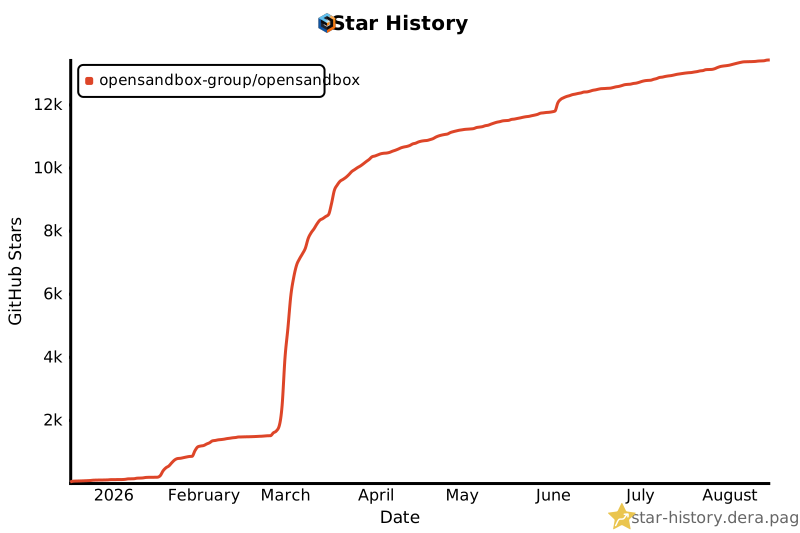
Star History






 OpenSandbox 是一个面向 AI 应用的通用沙箱平台,提供多语言 SDK、统一的沙箱 API,以及 Docker/Kubernetes 运行时,适用于编程智能体、GUI 智能体、智能体评测、AI 代码执行和强化学习训练等场景。