








5.3K ·GitHub
What is this?
 AstronRPA is an open-source, enterprise-grade Robotic Process Automation (RPA) desktop application with a visual designer that lets you build low-code/no-code workflows to automate desktop software and web pages, with native integration into iFlytek's Astron Agent platform.
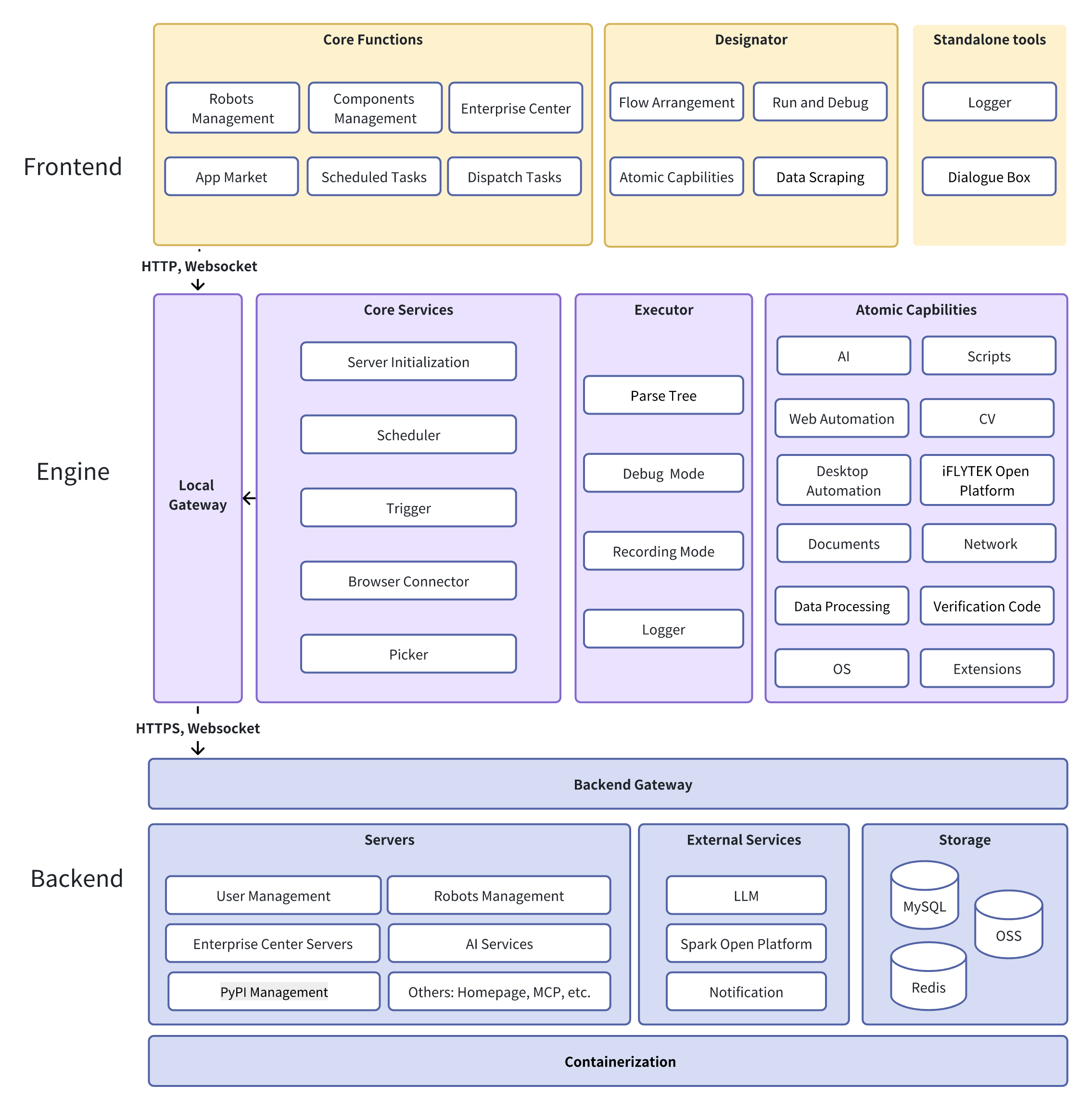
AstronRPA is an open-source, enterprise-grade Robotic Process Automation (RPA) desktop application with a visual designer that lets you build low-code/no-code workflows to automate desktop software and web pages, with native integration into iFlytek's Astron Agent platform.Is this just a desktop app, or is there a server component too?Both: a Windows desktop client built with Vue 3, TypeScript and Electron for designing/running workflows, plus a backend built with Java Spring Boot and Python FastAPI microservices (deployed via Docker) that handles orchestration and AI/Agent capabilities.
Both: a Windows desktop client built with Vue 3, TypeScript and Electron for designing/running workflows, plus a backend built with Java Spring Boot and Python FastAPI microservices (deployed via Docker) that handles orchestration and AI/Agent capabilities.How do I get it running?Deploy the server side with Docker for quick setup, then install the client either by downloading the latest pre-built release package or by running the one-click build script from source.
Deploy the server side with Docker for quick setup, then install the client either by downloading the latest pre-built release package or by running the one-click build script from source.Does the client run on macOS or Linux too?No, the client only officially supports Windows 10/11 and needs at least 8 GiB of RAM; cross-platform desktop support isn't mentioned.
No, the client only officially supports Windows 10/11 and needs at least 8 GiB of RAM; cross-platform desktop support isn't mentioned.Is this built for individual users or enterprise teams?Both — it targets individuals and enterprises, with enterprise-grade features like an excellence center, team marketplace, terminal monitoring, scheduling modes, and robot-team sharing for cross-team collaboration.
Both — it targets individuals and enterprises, with enterprise-grade features like an excellence center, team marketplace, terminal monitoring, scheduling modes, and robot-team sharing for cross-team collaboration.What is Astron Agent and how does it connect to AstronRPA?Astron Agent is iFlytek's native AI agent platform. AstronRPA integrates with it bidirectionally, so RPA workflow nodes can be called from Agent flows and Agent workflows can be used inside AstronRPA, blending automation with AI decision-making.
Astron Agent is iFlytek's native AI agent platform. AstronRPA integrates with it bidirectionally, so RPA workflow nodes can be called from Agent flows and Agent workflows can be used inside AstronRPA, blending automation with AI decision-making.Can workflows be triggered by something other than clicking run?Yes, workflows support direct execution, scheduled tasks, scheduling modes, API calls, and MCP services as trigger channels, making it easy to embed RPA into external systems.
Yes, workflows support direct execution, scheduled tasks, scheduling modes, API calls, and MCP services as trigger channels, making it easy to embed RPA into external systems.Why would I use this instead of a generic automation script?AstronRPA packages 300+ ready-made atomic actions, a visual low-code designer, and enterprise collaboration/security tooling, so non-developers can assemble cross-application workflows (desktop + web) without scripting everything from scratch.
AstronRPA packages 300+ ready-made atomic actions, a visual low-code designer, and enterprise collaboration/security tooling, so non-developers can assemble cross-application workflows (desktop + web) without scripting everything from scratch.What are similar projects?astron-agent, skyvern, kestra, evenfire, JeecgBoot, holaOS, airbyte, maxun
astron-agent, skyvern, kestra, evenfire, JeecgBoot, holaOS, airbyte, maxunWhich topics is it in?on-premise, data-privacy, rpa, gui-automation, spring-boot, low-code, no-code, fastapi, email, microservices, enterprise, workflow-automation
on-premise, data-privacy, rpa, gui-automation, spring-boot, low-code, no-code, fastapi, email, microservices, enterprise, workflow-automation