
iCode README

The project's README from github.com/openJiuwen-ai/iCode. As one markdown file: README.md.

   ▄   ▄▄▄▄
   ▀██████▀          █▄
 ▀▀  ██              ██
 ██  ██     ▄███▄ ▄████ ▄█▀█▄
 ██  ██     ██ ██ ██ ██ ██▄█▀
▄██  ▀█████▄▀███▀▄█▀███▄▀█▄▄▄

English | 简体中文

Work in progress. Interfaces, file formats, and defaults still change between releases.

What is iCode?

Let the screenshots speak for themselves.

Use a modern terminal. iCode works best in one such as Windows Terminal on Windows or Ghostty on macOS and Linux.

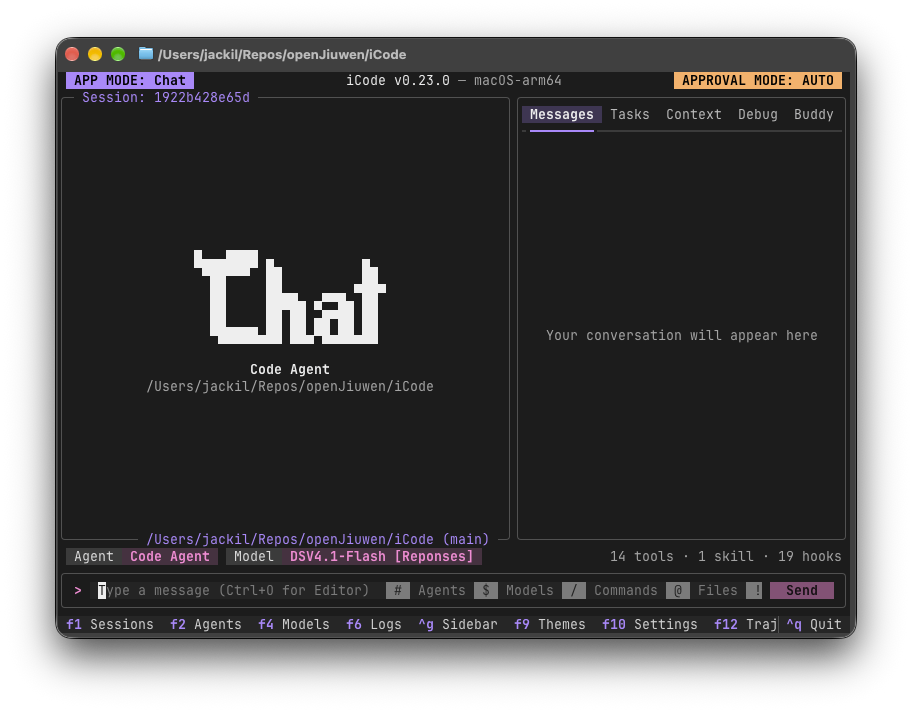
Home

The agent, model, approval mode and session at a glance, with agents (#), models ($), commands (/), files (@) and the shell (!) a keystroke away from the input bar.

iCode start screen with the Code Agent selected and an empty conversation sidebar

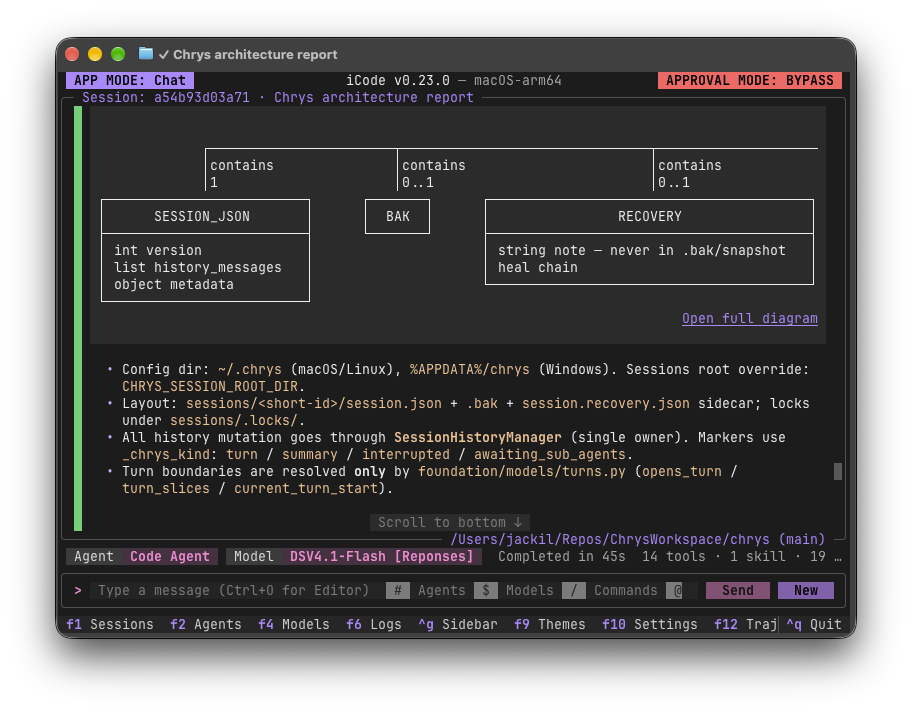
Chat

Answers render as rich Markdown in the terminal, diagrams included.

A chat answer rendering an entity diagram and a formatted bullet list

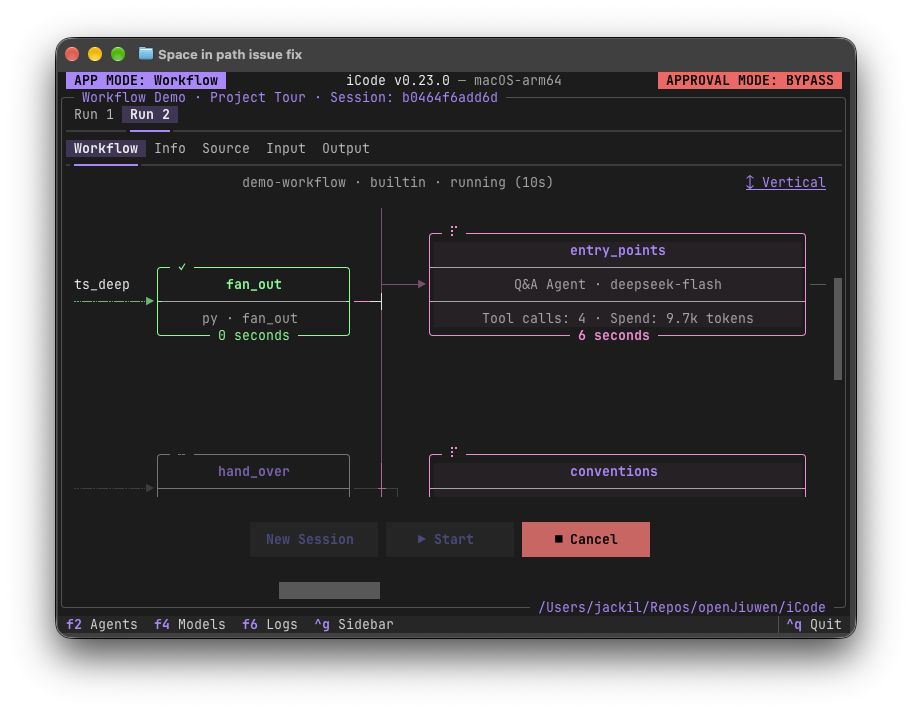
Workflows

Watch a workflow run node by node, with each agent node's model, tool calls and token spend.

Workflow mode running the demo workflow, showing its node graph mid-run

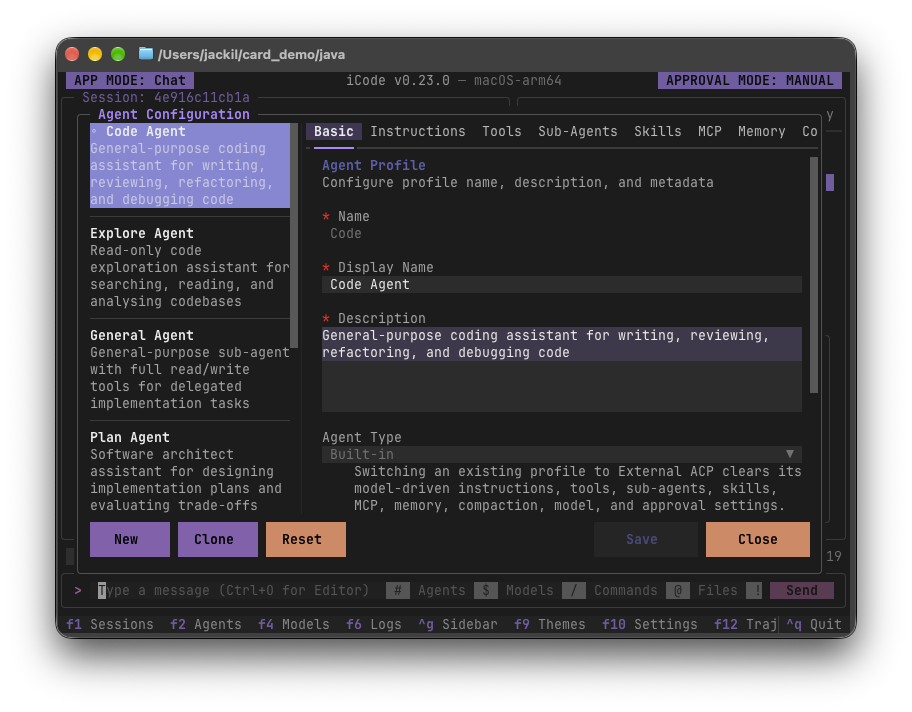
Agents

An agent is configuration, not code: instructions, tools, sub-agents, skills, MCP servers and memory, all edited in one place (F2).

The Agent Configuration screen editing the built-in Code Agent

Models

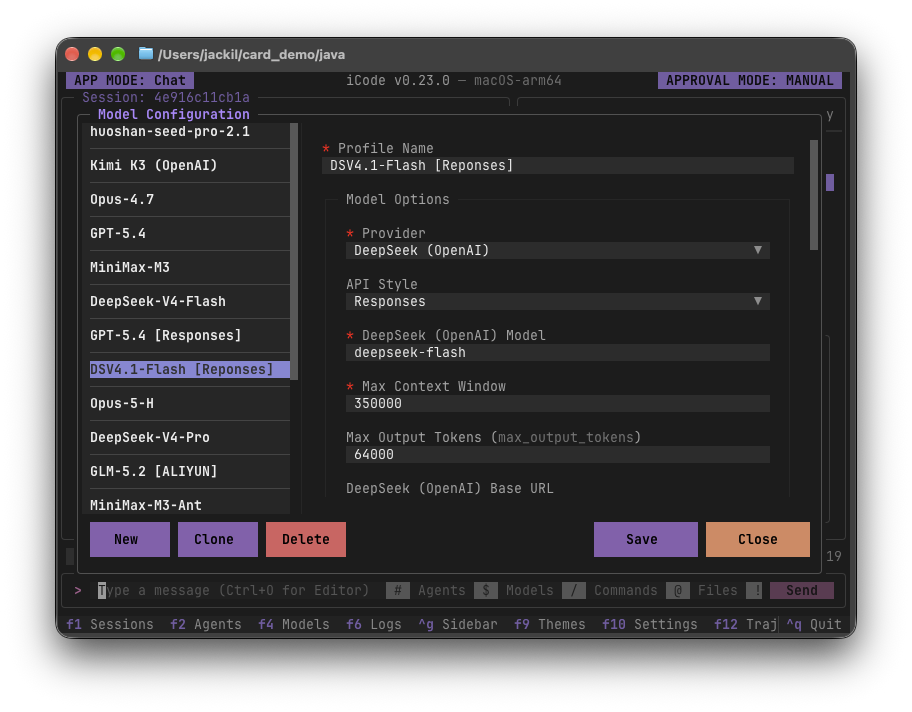
Model profiles from different providers side by side, switchable mid-conversation (F4).

The Model Configuration screen editing a DeepSeek profile that uses the Responses API

Diff

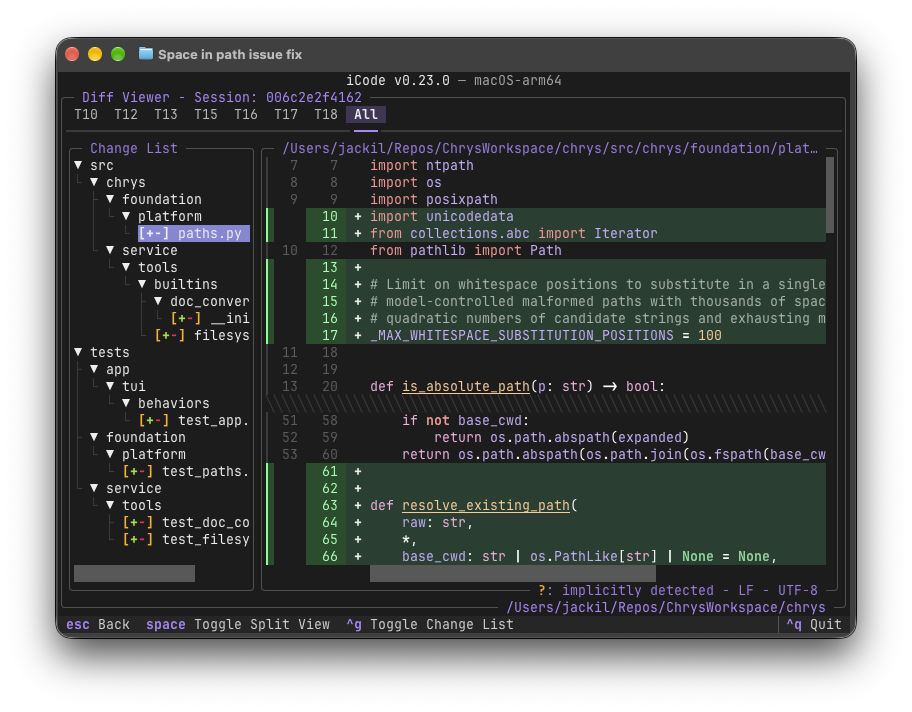
Every file the agent changed, turn by turn or all at once, in unified or split view.

The diff viewer showing a change tree and a unified diff of a Python file

Rollback

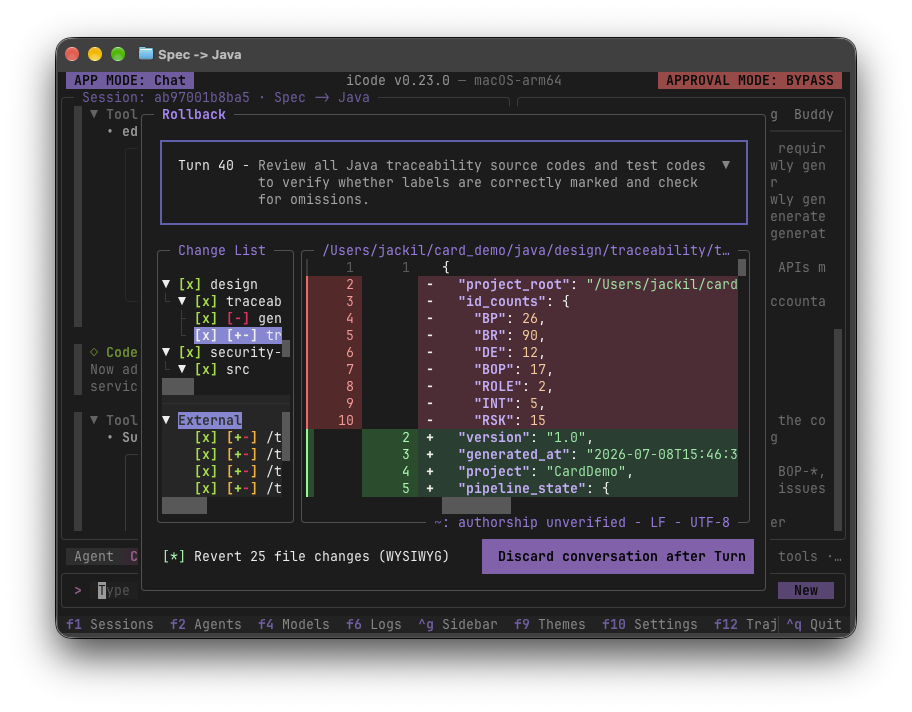
Pick a turn, review the file changes that would be reverted, then discard the conversation after it.

The rollback dialog listing the file changes to revert after a chosen turn

Trajectory

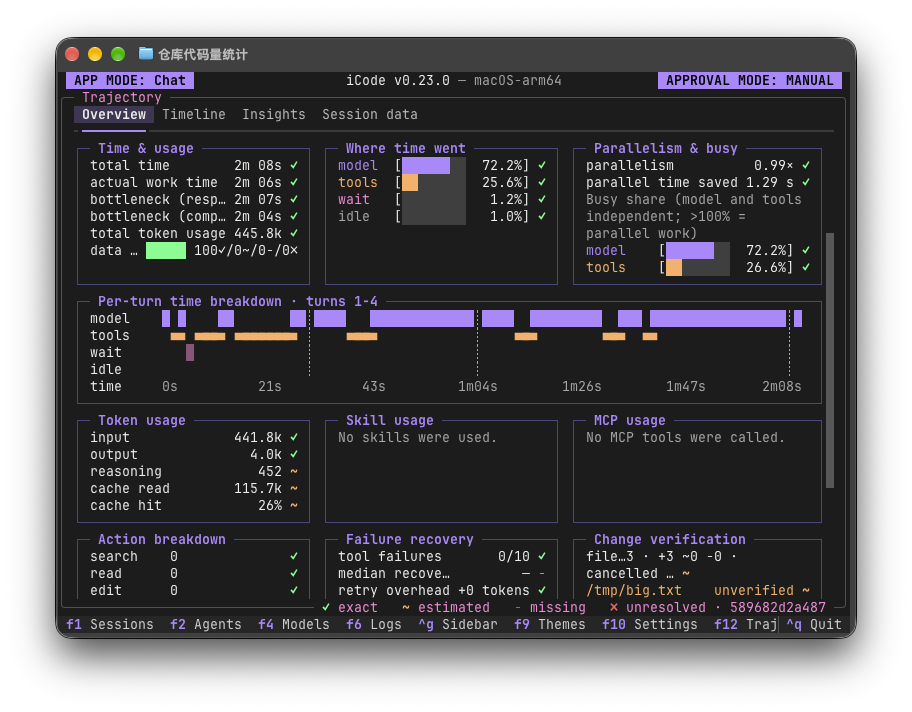
Where the time and tokens went (F12): model versus tools versus waiting, a per-turn breakdown, and token and cache usage.

The trajectory overview with time, token and parallelism breakdowns

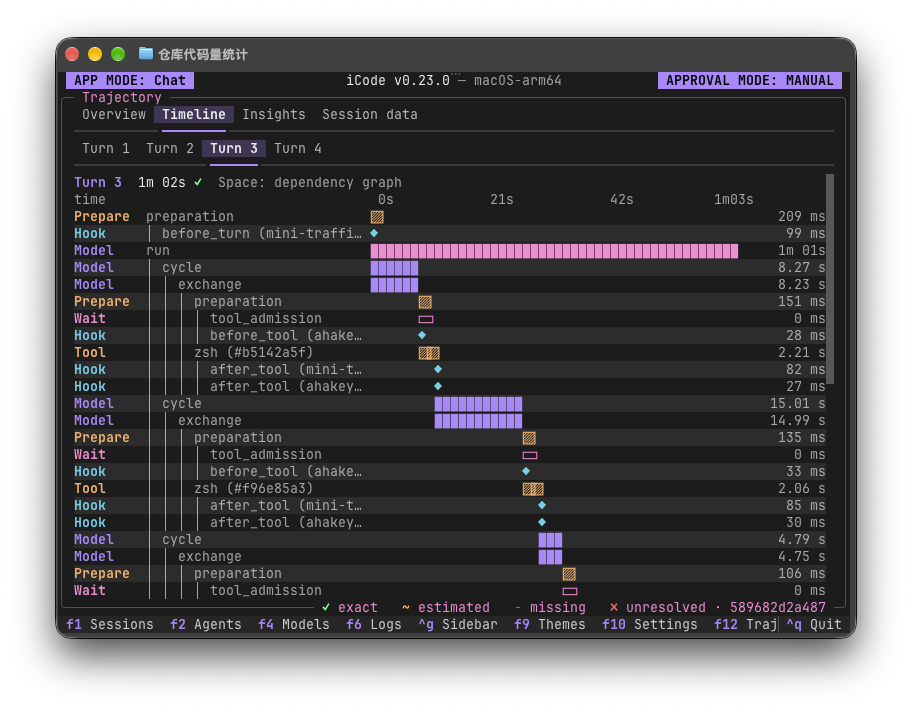
Every model call, hook and tool call in a turn, laid out on a timeline.

The trajectory timeline showing a turn's model cycles, hooks and tool calls

Shell

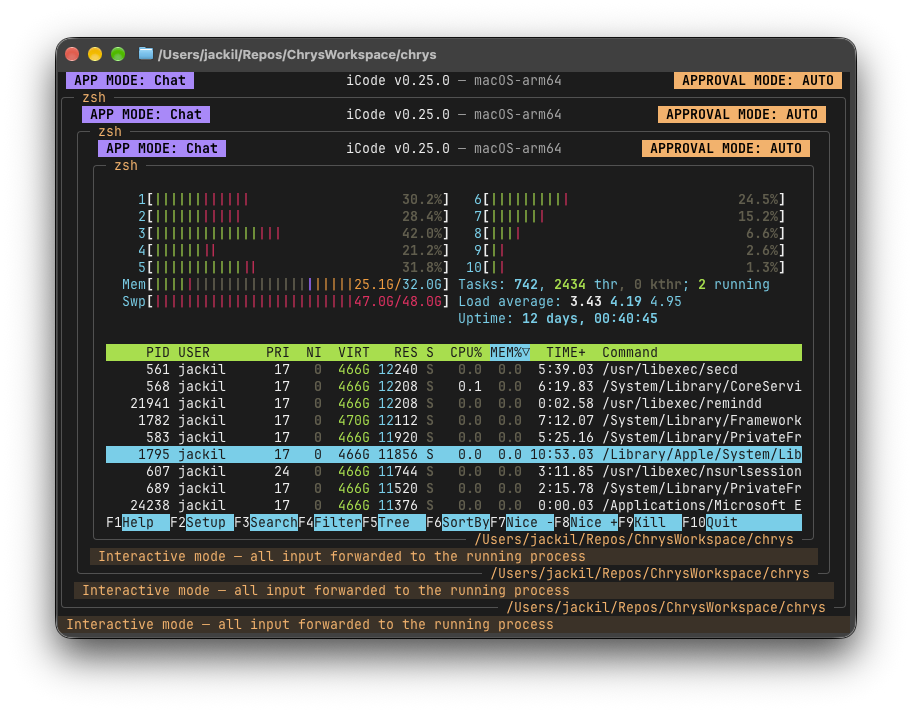
The shell (!) is a real terminal, so full-screen programs run in place with every keystroke forwarded to them: here htop, inside iCode, inside iCode, inside iCode.

Three nested iCode shells, the innermost running htop

How to run

uv is the only prerequisite; it provisions Python 3.14 for you. From a checkout:

uv sync --extra all        # not bare `uv sync`, not `--all-extras`
./scripts/fetch_rg.sh      # downloads the vendored ripgrep; Windows: .\scripts\fetch_rg.ps1
uv run icode               # `uv run chrys` starts the same thing (`Chrys` is our code name)

iCode ships no model profiles, so press F4 on first launch to add one.

User guide

Press F8 inside iCode to open the built-in user guide, a complete walkthrough of using it. The same pages live in docs/, in English and 简体中文.

Privacy

iCode does not collect your data. It has no telemetry, analytics or crash reporting, and by default it sends nothing, usage data included, to us or to any other third party. What iCode itself sends goes only to destinations you configure: the model providers you add, the MCP servers your agents use, and any hooks or OpenTelemetry export you set up. The web tools are off by default. If you turn them on for an agent, its search queries go to the search provider you configure, or to Exa's public search service (mcp.exa.ai) if you configure none, and the pages it reads are requested directly from their websites. Shell commands, skill scripts and workflows that you or your agents run are programs in their own right, with your network access, so what they send is up to them. Your data is yours alone, and we respect your privacy.

Regulatory compliance

iCode is solely a tool for orchestrating agents and workflows. It does not include or provide any AI model; every model it uses is one you connect to it. When you integrate AI models into iCode for a particular business or engineering use, you bear full responsibility for meeting the compliance obligations that use carries under the EU AI Act (Regulation (EU) 2024/1689) and any other applicable legal or regulatory framework.

License

iCode is open source under the Apache License 2.0. It also contains and bundles third-party software, each part under its own license; NOTICE lists them with their copyright notices and license terms.

iCode (openJiuwen-ai/iCode)

Searching Database…

359 ·GitHub
这是什么?iCode 是一个轻量、完全离线的终端(TUI)平台,用于运行和编排 AI 智能体及多智能体工作流,让你对自己的智能体、模型和数据拥有完全控制权。
这是简单的聊天界面,还是完整的智能体编排平台?它不只是聊天机器人:智能体是纯配置(指令、工具、子智能体、技能、MCP 服务器和记忆),你可以把它们串成多步工作流,逐节点观看运行,并用 diff 和回滚工具进行审查。
怎么让它跑起来?安装 uv,然后从仓库的检出版本运行 iCode;uv 会自动为你配置 Python 3.14。
需要自带 AI 模型或 API 密钥吗?需要——iCode 不内置任何模型配置文件,本身也不包含 AI 模型,所以首次启动时你要按 F4 添加自己的模型提供商。
现在它稳定到可以依赖了吗?还未完全稳定:项目明确警告,接口、文件格式和默认值在版本之间仍会变动。
它支持 Windows、macOS 和 Linux 吗?支持,三个平台都能运行;最好在现代终端中使用,例如 Windows 上的 Windows Terminal,或 macOS 和 Linux 上的 Ghostty。
iCode 会把我的数据发送到别处吗?默认情况下它什么都不发送——没有遥测、分析或崩溃报告——只与你明确配置的目标通信,比如你的模型提供商或 MCP 服务器。
工作流运行时我能看到它在做什么吗?可以——Workflows 视图实时显示每个智能体节点使用的模型、工具调用和 token 消耗,Trajectory 视图(F12)则按轮次拆解整个运行的时间和 token 用量。
如果我不满意智能体做的修改怎么办?Diff 视图会显示智能体改动的每个文件,可以按轮次查看或一次性全部查看;Rollback 则让你选择某一轮、预览将被还原的更改并丢弃对话。
智能体能运行真实的终端程序,而不只是文本命令吗?可以,内置 shell(用 ! 触发)是一个真实终端,会转发每一次按键,因此 htop 这类全屏程序可以在 iCode 内原地运行。
对话中途切换模型是什么体验?按下 F4 会并排打开来自不同提供商的模型配置,你可以在它们之间切换,而无需结束当前对话。
What are similar projects?hyperfide, turnstone, epiq, ruflo, openrig, foreman, brigade, lean-ctx
Size
26.4 MB
Stars
359
Age
21d
Commits · 90 Days