




CodePilot README

The project's README from github.com/op7418/CodePilot. As one markdown file: README.md.

CodePilot CodePilot

A multi-model AI agent desktop client -- connect any AI provider, extend with MCP & skills, control from your phone, and let your assistant learn your workflow.

GitHub release Downloads GitHub stars Platform License

中文文档 | 日本語


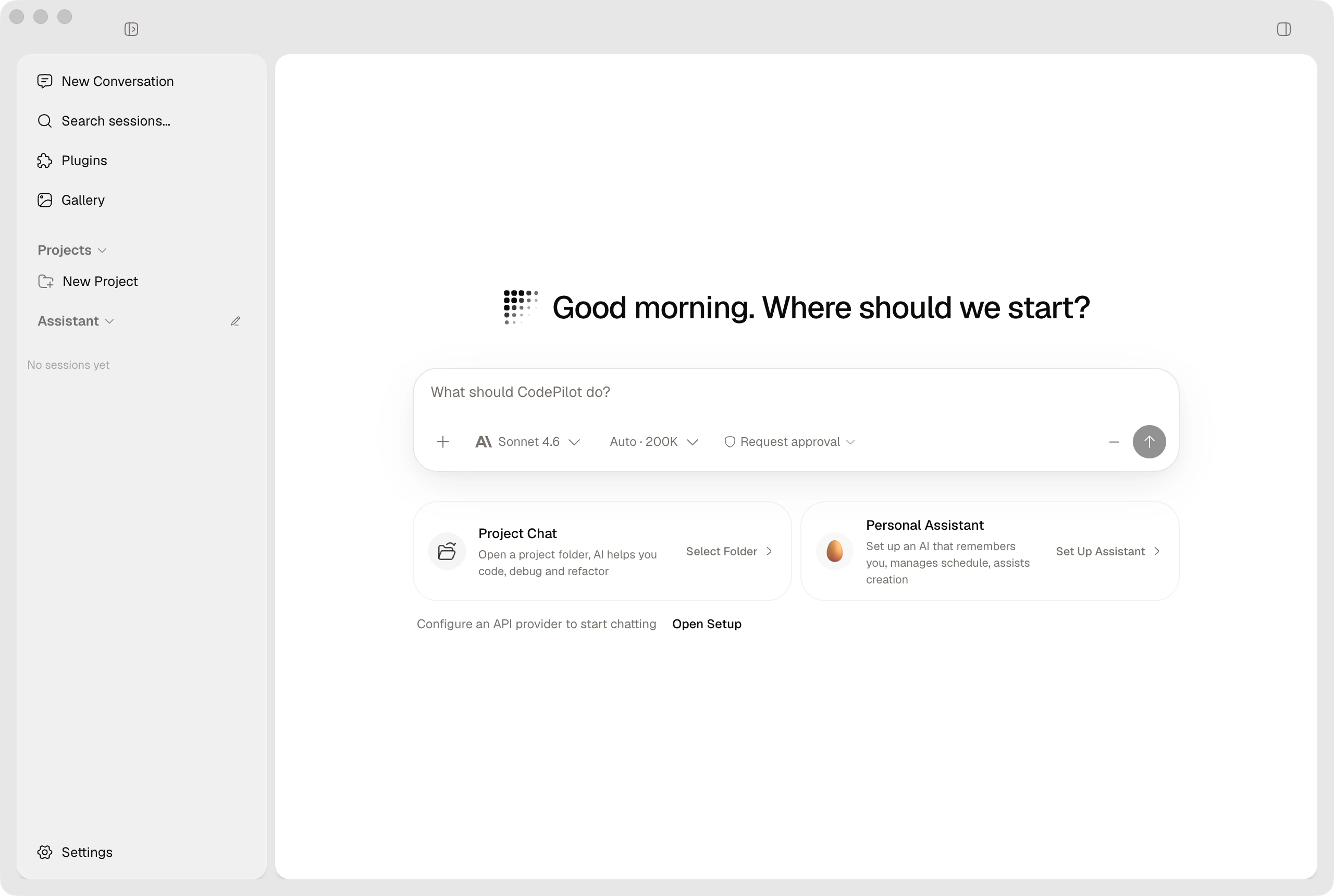
CodePilot

More of the current interface
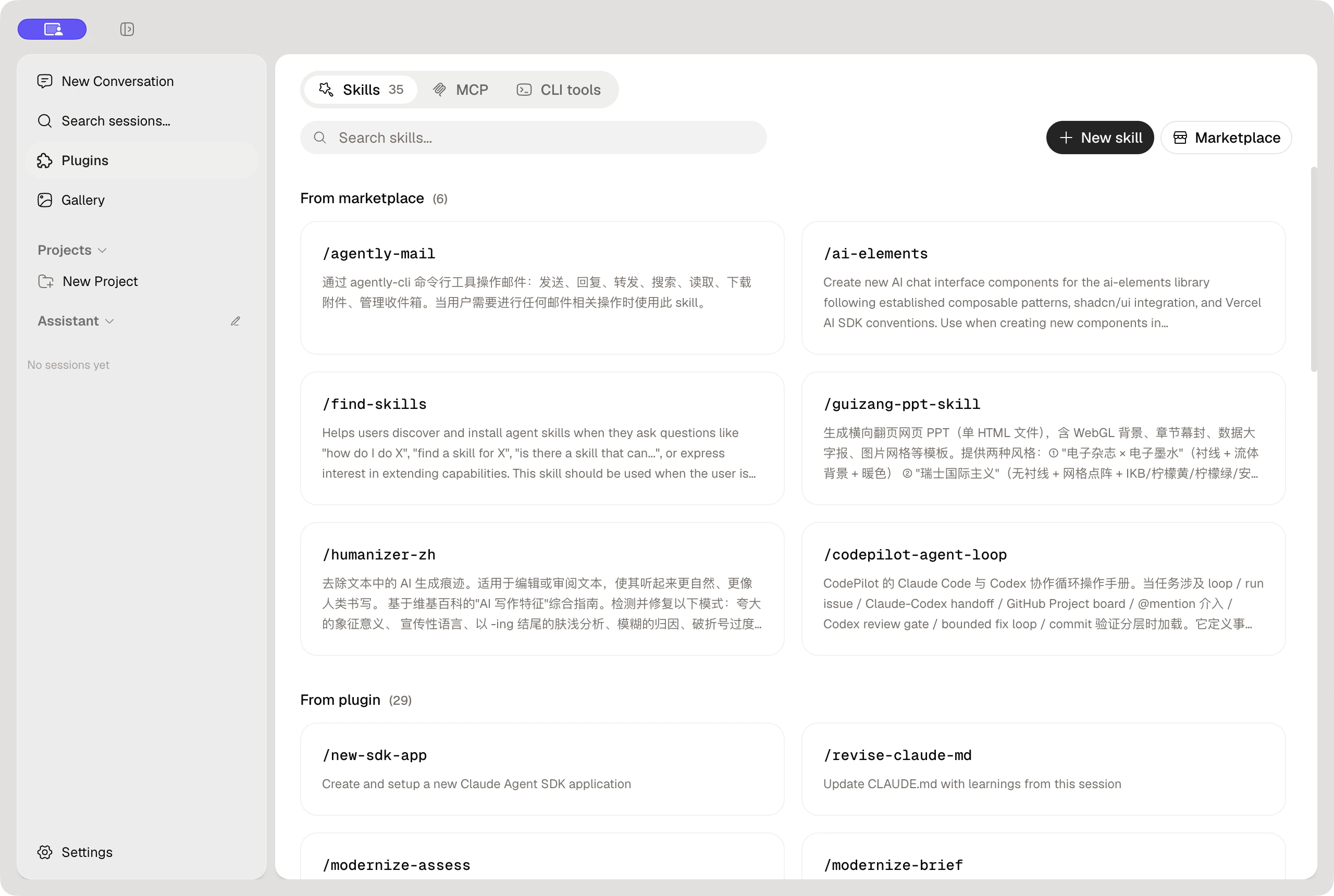
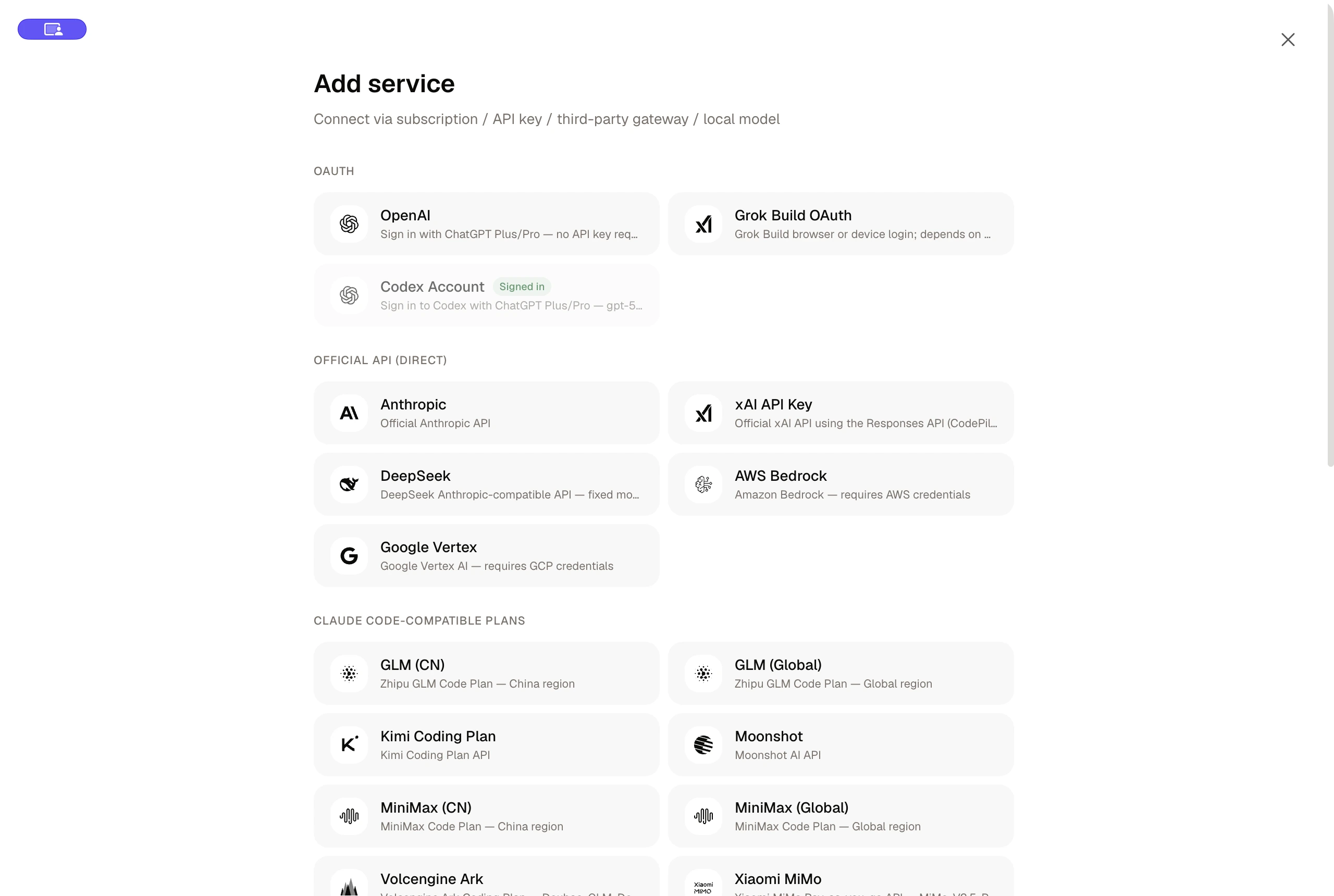
Skills and extensions Connect AI services

Download | Quick Start | Documentation | Contributing | Community


Download

Platform Download Architecture
macOS Apple Silicon (.dmg) · Intel (.dmg) arm64 / x64
Windows Installer (.exe) x64
Linux AppImage / deb / rpm x64 / arm64

Official macOS stable builds can check, download, and install signed updates in the app. After manually installing the first supported Windows version, later Windows releases can update in the app using unsigned packages from the official GitHub Release; Linux releases remain manual downloads.

Or visit the Releases page for all versions.


Why CodePilot

Multi-provider, one interface

Connect to 17+ AI providers out of the box. Switch providers and models mid-conversation without losing context.

Category Providers
Direct API Anthropic, OpenRouter
Cloud platforms AWS Bedrock, Google Vertex AI
Chinese AI providers Zhipu GLM (CN/Global), Kimi, Moonshot, MiniMax (CN/Global), Volcengine Ark (Doubao), Xiaomi MiMo, Aliyun Bailian (Qwen)
Local & self-hosted Ollama, LiteLLM
Custom Any Anthropic-compatible or OpenAI-compatible endpoint
Media Google Gemini (image generation)

Beyond coding — a full AI agent

CodePilot started as a coding tool but has grown into a general-purpose AI agent desktop:

Built for daily use


Quick Start

Path A: Download a release (most users)

  1. Download the installer for your platform from the Download section above
  2. Launch CodePilot
  3. Configure a Provider in Settings > Providers — add your API key for any supported provider
  4. Start a conversation

Note: Installing the Claude Code CLI (npm install -g @anthropic-ai/claude-code) unlocks additional capabilities like direct file editing, terminal commands, and git operations. It is recommended but not required for basic chat.

Path B: Build from source (developers)

Prerequisite Minimum version
Node.js 18+
npm 9+ (ships with Node 18)
git clone https://github.com/op7418/CodePilot.git
cd CodePilot
npm install
npm run dev              # browser mode at http://localhost:3000
# -- or --
npm run electron:dev     # full desktop app

Core Capabilities

Conversation & Interaction

Capability Details
Interaction modes Code / Plan / Ask
Reasoning effort Low / Medium / High / Max + Thinking mode
Permission control Default / Full Access, per-action approval
Session control Pause, resume, rewind to checkpoint, archive
Model switching Change model mid-conversation
Split screen Side-by-side dual sessions
Attachments Files and images with multimodal vision support
Slash commands /help /clear /cost /compact /doctor /review and more

Extensions & Integrations

Capability Details
Providers 17+ providers: Anthropic, OpenRouter, Bedrock, Vertex, Zhipu GLM, Kimi, Moonshot, MiniMax, Volcengine, MiMo, Bailian, Ollama, LiteLLM, custom endpoints
MCP servers stdio / sse / http, runtime status monitoring
Skills Custom / project / global skills, skills.sh marketplace
Bridge Telegram / Feishu / Discord / QQ / WeChat remote control
CLI import Import Claude Code CLI .jsonl session history
Image generation Gemini image gen, batch tasks, gallery

Data & Workspace

Capability Details
Assistant Workspace Persona files (soul.md, user.md, claude.md, memory.md), onboarding, daily check-ins, persistent memory
Generative UI AI-created interactive dashboards and visual widgets
File browser Project file tree with syntax-highlighted preview
Git panel Status, branches, commits, worktree management
Usage analytics Token counts, cost estimates, daily usage charts
Task scheduler Cron-based and interval scheduling with persistence
Local storage SQLite (WAL mode), all data stays on your machine
i18n English + Chinese
Themes Dark / Light, one-click toggle

First Launch

  1. Configure a Provider — Go to Settings > Providers and add credentials for the provider you want to use. CodePilot includes presets for all major providers — just pick one and enter your API key.
  2. Create a conversation — Pick a working directory, select a mode (Code / Plan / Ask), and choose a model.
  3. Set up Assistant Workspace (optional) — Go to Settings > Assistant, choose a workspace directory, and enable Onboarding. CodePilot creates soul.md, user.md, claude.md, and memory.md at the workspace root.
  4. Add MCP servers (optional) — Go to the MCP page in the sidebar to add and manage MCP servers. Custom skills are managed on the separate Skills page.
  5. Install Claude Code CLI (optional) — For advanced features like file editing and terminal commands, install the CLI: npm install -g @anthropic-ai/claude-code

Platform & Installation Notes

macOS stable builds are signed with Developer ID, notarized, stapled, and verified by Gatekeeper. If macOS reports that the developer cannot be verified or the file is damaged, stop and report it instead of bypassing the warning. Windows builds are unsigned and may show SmartScreen. After manually installing the first Windows updater-capable release, later stable versions can update in-app from the official op7418/CodePilot GitHub Release; the app verifies the metadata SHA-512 but does not claim independent Authenticode publisher verification. Linux updates remain manual.

macOS: Gatekeeper rejects the download
  1. Delete the rejected copy and download it again from the official GitHub Release.
  2. Verify the file against SHA256SUMS.txt from the same Release.
  3. If Gatekeeper still rejects it, do not remove quarantine attributes or bypass the warning; report the macOS version, download URL, and checksum on GitHub Issues.
Windows: SmartScreen blocks the installer

Verify the installer against SHA256SUMS.txt from the same official Release first. If the checksum matches and the source is op7418/CodePilot, click "More info", then "Run anyway". If organization policy removes that option, contact the device administrator instead of weakening system-wide protection.


Documentation

📖 Full documentation: English | 中文

Getting started:

User guides:

Developer docs:


FAQ

Do I need the Claude Code CLI?

No. You can use CodePilot with any supported provider (OpenRouter, Zhipu GLM, Volcengine, Ollama, etc.) without the Claude Code CLI. The CLI is only needed if you want Claude to directly edit files, run terminal commands, or use git operations on your machine. For chat and assistant features, just configure a provider and start a conversation.

Configured a Provider but no models appear

Verify the API key is valid and the endpoint is reachable. Some providers (Bedrock, Vertex) require additional environment variables or IAM configuration beyond the API key. Use the built-in diagnostics (Settings > Providers > Run Diagnostics) to check connectivity.

What is the difference between npm run dev and npm run electron:dev?

npm run dev starts only the Next.js dev server -- you use CodePilot in your browser at http://localhost:3000. npm run electron:dev starts both Next.js and the Electron shell, giving you the full desktop app experience with native window controls.

Where are the Assistant Workspace files?

When you set up a workspace, CodePilot creates four Markdown files at the workspace root directory: soul.md (personality), user.md (user profile), claude.md (rules), and memory.md (long-term notes). State tracking (onboarding progress, check-in dates) is stored in the .assistant/ subdirectory. Daily memories go to memory/daily/.

Bridge requires additional setup per platform

Each Bridge channel (Telegram, Feishu, Discord, QQ, WeChat) requires its own bot token or app credentials. Go to the Bridge page in the sidebar to configure channels. You will need to create a bot on the target platform first and provide the token to CodePilot.


Community

WeChat Group QR Code

Scan the QR code to join the WeChat user group for discussions, feedback, and updates.


Contributing

  1. Fork the repository and create a feature branch
  2. npm install and npm run electron:dev to develop locally
  3. Run npm run test before opening a PR
  4. Submit a PR against main with a clear description

Keep PRs focused -- one feature or fix per pull request.

Development commands
npm run dev                    # Next.js dev server (browser)
npm run electron:dev           # Full Electron app (dev mode)
npm run build                  # Production build
npm run electron:build         # Build Electron distributable
npm run electron:pack:mac      # macOS DMG (arm64 + x64)
npm run electron:pack:win      # Windows NSIS installer
npm run electron:pack:linux    # Linux AppImage, deb, rpm

CI/CD: Pushing a stable vX.Y.Z tag builds signed/notarized macOS arm64, x64, and universal packages plus latest-mac.yml; an unsigned Windows x64 NSIS updater plus latest.yml; and Linux arm64/x64 manual packages. The Release is made public only after signing/notarization where applicable, packaged health, checksum, attestation, Intel ABI, GitHub single-trust-root safeguards, and complete asset-graph checks pass. The unsigned Windows trust gate requires a fresh administrator audit of immutable Releases and no-bypass branch/tag rulesets; Actions compares the live ruleset IDs and update timestamps with that audit and fails closed on drift. Windows publishes an EXE blockmap for opportunistic differential updates with full-installer fallback; Linux updater metadata is intentionally not published.

Notes:

  • Electron forks a Next.js standalone server on 127.0.0.1 with a random free port
  • Chat data is stored in ~/.codepilot/codepilot.db (dev mode: ./data/)
  • SQLite uses WAL mode for fast concurrent reads

License

Business Source License 1.1 (BSL-1.1)

CodePilot (op7418/CodePilot)

Searching Database…

Что это такое?CodePilot — это десктопный клиент ИИ-агента, который позволяет общаться с более чем 17 провайдерами ИИ (Anthropic, OpenRouter, Bedrock, Zhipu GLM, Ollama и др.), расширять их с помощью серверов MCP и навыков, а также управлять сессиями удалённо с телефона через Telegram, Feishu, Discord, QQ или WeChat.
Это просто обёртка над Claude Code для программирования или что-то более широкое?Начиналось как инструмент для программирования на основе Electron и Next.js, но вырос в универсального помощника с постоянной памятью, генеративным интерфейсом, генерацией изображений и планированием задач. Консольная утилита Claude Code (CLI) необязательна.
Как это запустить?Скачайте установщик для своей ОС (macOS .dmg, Windows .exe, Linux AppImage/deb/rpm) на странице Releases, запустите его, затем добавьте API-ключ в Settings > Providers, чтобы начать общение. Разработчики могут вместо этого клонировать репозиторий и выполнить 'npm install' и 'npm run electron:dev' с Node 18+.
Нужны ли мне CLI Claude Code или особые API-ключи?Для общения CLI не нужен: любой поддерживаемый провайдер работает сразу после добавления его API-ключа. Установка CLI Claude Code необязательна и нужна только для прямого редактирования файлов, команд терминала и операций git.
Можно ли использовать это в коммерческих целях бесплатно?Лицензия BSL-1.1: личное, академическое и некоммерческое использование бесплатно, а для коммерческого использования нужна отдельная лицензия от автора; код перейдёт под Apache 2.0 16 марта 2029 года.
Подписаны ли сборки для Windows и Linux так же, как для macOS?Нет: подписаны, прошли нотариальную проверку и обновляются прямо в приложении только стабильные сборки для macOS. Установщики Windows не подписаны и могут вызывать предупреждение SmartScreen (обновления внутри приложения работают после ручной первой установки), а релизы для Linux всегда нужно скачивать вручную.
Куда попадают данные моих чатов?Всё хранится локально в базе данных SQLite на вашем компьютере (в режиме WAL) — ничего не отправляется на сервер CodePilot.
Что такое функция Remote Bridge?Bridge позволяет подключить CodePilot к Telegram, Feishu, Discord, QQ или WeChat, чтобы отправлять сообщения с телефона и получать ответы от вашего десктопного агента; каждому каналу нужен собственный токен бота или учётные данные приложения.
Что такое Assistant Workspace?Это система персон, которая создаёт в папке рабочего пространства четыре файла Markdown (soul.md, user.md, claude.md, memory.md). Благодаря им ассистент может формировать постоянную память, проходить сценарии первичного знакомства и делать ежедневные чек-ины.
Можно ли делиться навыками или скачивать их?Да, пользовательские и проектные навыки можно написать локально или установить из маркетплейса skills.sh.
Может ли он генерировать изображения или интерактивный интерфейс, а не только текст?Да: Media Studio выполняет пакетную генерацию изображений с ИИ (через Google Gemini) с галереей и тегами, а Generative UI позволяет ИИ выводить живые интерактивные дашборды и виджеты прямо в чате.
Creator
op7418
Size
33.8 MB
Stars
6.5K
Age
8mo
Commits · 90 Days
