

RemoveMacAI README

The project's README from github.com/omlahore/RemoveMacAI. As one markdown file: README.md.

RemoveMacAI

RemoveMacAI

Turn off Apple Intelligence on macOS 27 and remove its downloaded models.

macOS 27 no longer has a single switch for Apple Intelligence, and its models stay on disk after the features are turned off. RemoveMacAI turns the features off, removes the models and prevents macOS from downloading them again. All changes can be reverted.

RemoveMacAI turning off Apple Intelligence

Demo video

Install

curl -fsSL https://raw.githubusercontent.com/omlahore/RemoveMacAI/main/install.sh | bash

The script downloads the latest release, verifies its SHA-256 checksum and runs it from a temporary directory. Nothing is installed.

Every release is built from its tag by GitHub Actions and carries a build provenance attestation. To check that a download came from this repository's source:

gh attestation verify removemacai-darwin-arm64.tar.gz -R omlahore/RemoveMacAI

With Homebrew:

brew install omlahore/tap/removemacai
removemacai

RemoveMacAI shows the current state and asks for confirmation. It then opens System Settings to install its configuration profile, which macOS requires the user to approve, and removes the models.

Usage

Command Description
removemacai Show the current state, then turn Apple Intelligence off
removemacai status Show each feature and the size of the models on disk
removemacai off --keep <features> Leave the listed features on
removemacai off --dry-run Show the changes without applying them
removemacai revert Undo all changes
removemacai features List the feature names accepted by --keep

To revert with the one-line installer:

curl -fsSL https://raw.githubusercontent.com/omlahore/RemoveMacAI/main/install.sh | bash -s revert

What it changes

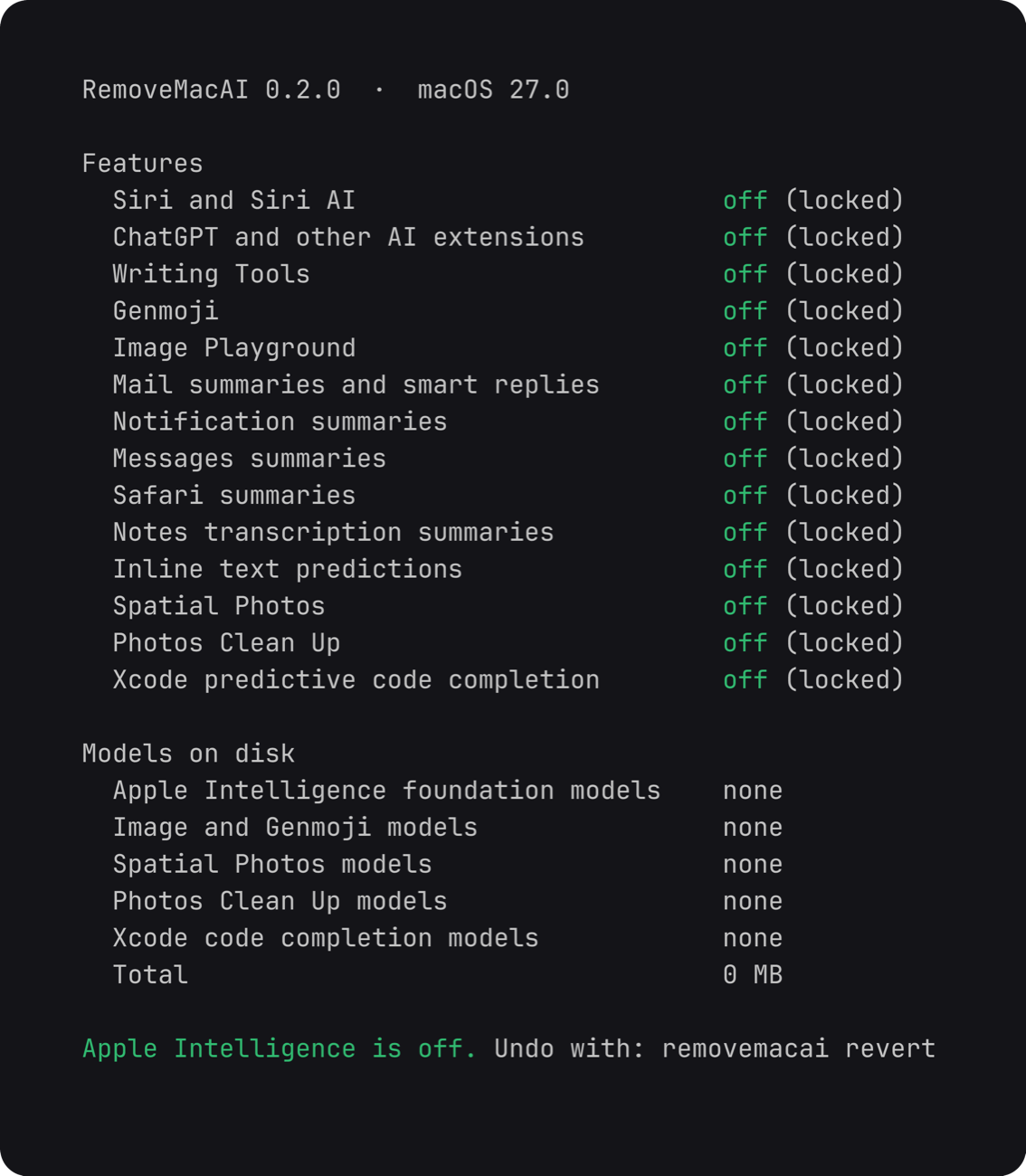
Features turned off: Siri (including "Hey Siri" and the menu bar icon), Writing Tools, Genmoji, Image Playground, the ChatGPT extension, summaries in Mail, Messages, Safari, Notes and notifications, Mail smart replies, inline text predictions, Spatial Photos, Photos Clean Up and Xcode predictive code completion.

Models removed: the Apple Intelligence foundation models and the models for image generation and Genmoji, Spatial Photos, Photos Clean Up and Xcode code completion.

Output of removemacai status

How it works

RemoveMacAI makes no network requests and collects no data.

FAQ

Does dictation still work? Yes. Dictation is a separate setting, and its speech models are not removed.

Do macOS updates undo the changes? No. The profile, including the download block, persists across updates.

Storage settings still lists Apple Intelligence after the models were deleted. Apple's asset service releases the models right away, but macOS deletes the files on its own schedule. Until then, System Settings > General > Storage keeps counting them under Apple Intelligence.

Why is a process named Siri still running? In macOS 27 the Spotlight window runs as a process named Siri. Some system services also stay loaded; they are protected by System Integrity Protection.

What stops working? The features listed above, apps that use Apple's on-device models (the Foundation Models framework and the Use Model action in Shortcuts), Visual Intelligence and natural-language editing in Calendar.

Requirements

Apple silicon.

macOS Status
27 Supported, tested on 27.0. On 27.0.1, use 0.2.3 or later.
26 and earlier Not supported

Uninstall

Run removemacai revert, then brew uninstall removemacai if it was installed with Homebrew.

Acknowledgements

RemoveMacAI is built on pared, a complete working tool by 4evy that first mapped the asset service, the model sets and several of the settings keys. Its license is in THIRD-PARTY-NOTICES.md.

License

MIT

RemoveMacAI (omlahore/RemoveMacAI)

Searching Database…

这是什么?RemoveMacAI 是一款 macOS 27 工具,能关闭 Apple Intelligence 功能(Siri、写作工具、Genmoji、图像生成等),删除已为这些功能下载的 AI 模型,并阻止 macOS 再次下载这些模型,且每项更改都可撤销。
这是图形界面应用,还是我要在终端里运行的东西?它同时以原生 macOS 应用和名为 removemacai 的 CLI 形式发布,提供 status、off、revert、features 等命令,便于脚本化或终端使用。
这需要 Apple Silicon 芯片吗?是的,必须使用 Apple Silicon,而且只支持 macOS 27;具体到 27.0.1,你需要 0.2.3 或更高版本。
它能在 Intel Mac 或 macOS 26 上用吗?不行,macOS 26 及更早版本不受支持,而且由于必须使用 Apple Silicon,Intel Mac 也被排除在外。
RemoveMacAI 会把我的数据发送到别处吗?不会,它完全在本地运行:自身不发起任何网络请求,也不收集数据。
它具体会关闭哪些东西?它会关闭 Siri(包括「嘿 Siri」)、写作工具、Genmoji、Image Playground、ChatGPT 扩展、邮件/信息/Safari/备忘录中的摘要、内联文本预测、空间照片、照片清理和 Xcode 预测性代码补全,并删除对应的设备端模型。
我以后能撤销这些更改吗?可以,运行 removemacai revert 会撤销所有更改,下次某个功能需要这些模型时,macOS 会重新下载。
关闭这些也会禁用听写吗?不会,听写使用单独的设置,其语音模型不受影响。
它是如何阻止 macOS 重新下载已删除的模型的?安装的配置描述文件会把每个模型的下载请求重定向到一个已关闭的本地端口,因此在移除该描述文件之前,Apple 的资源服务无法再次获取模型。
Creator
omlahore
Size
6.2 MB
Stars
4.9K
Age
19d
Commits · 90 Days