





powercontext README

The project's README from github.com/oceanbase/powercontext. As one markdown file: README.md.

PowerContext

Context for work that humans and agents hand off and continue.

PyPI version License Apache 2.0 Discord

English · 中文 · 日本語

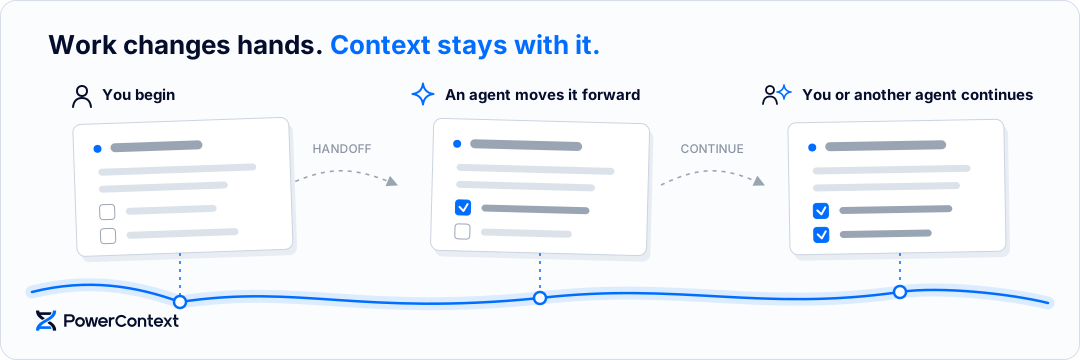
Work rarely ends with whoever starts it. You hand a task to an agent, the agent gets part of the way, and later you or someone else takes over. The reasoning and current state often stay behind in that conversation.

PowerContext keeps context with the work across conversations. When you return, you can see what happened and continue from the current state. A new agent can do the same.

You and agents hand work off and continue with stored context

Website · Installation walkthrough

PowerContext 1.1.0 includes the guided setup. The commands below install the stable release and connect the matching Agent integration.

Pick up where the work left off

You see the context the work needs now: confirmed decisions, constraints, progress, evidence, and next steps. You can continue from there or hand the work to another person or agent without rereading the full history.

You decide what will matter later and what needs to move with the task. PowerContext stores durable information as Memory and organizes the current objective and state into a Handoff. You can record reusable approaches as Experience or Skill. PowerContext keeps every item within the scope of the work and preserves its sources and earlier revisions.

Install, configure, and connect your Agent

You need Git, uv, and your Agent's CLI. Python 3.11+ is required; uv can provision it. macOS and Linux are supported; Windows support is experimental.

Install 1.1.0 and open the interactive configuration wizard in a dedicated directory:

uv tool install --force "powercontext[cli,server]==1.1.0"
mkdir -p powercontext-config
cd powercontext-config
powercontext config init --language en --output .env

If Python dependency downloads are slow or fail, follow the mirror retry instructions.

The wizard asks about storage, local or remote access, memory capabilities, Dashboard, model APIs, and Agent connections. Choose Full memory capabilities to test automatic Memory and Topic Memory; this requires separate Generation and Embedding API credentials. An Agent subscription does not provide those Server credentials. Choose Basic memory to save and retrieve memories explicitly without additional model APIs.

The wizard writes one .env environment file and .env.next-steps.md. If seekdb needs installing, it asks once and installs the dependency in the background. Follow the printed connection details and start Server in this terminal:

powercontext server run --env-file .env

Keep Server running. In another terminal, return to powercontext-config, load only the client settings, and check the connection:

set -a
. ./.env
set +a
powercontext ready
powercontext capabilities

Continue with .env.next-steps.md to create and bind the selected Scopes, install the matching plugins, and launch a new Agent session. The complete walkthrough covers Codex and Claude Code, Dashboard login, SSH forwarding, HTTPS prerequisites, and observable acceptance checks. For example, the matching Codex installation is:

powercontext setup codex --ref powercontext-v1.1.0
powercontext doctor codex

doctor verifies integration setup. To verify automatic memory, check that a real prompt becomes a Source, produces a Topic, evolves after a related prompt, and can be recalled in a new session using the same Scope.

For a Server on another machine, use HTTPS or follow the remote connection guide. Setup recognizes remote HTTP URLs from flags or environment variables and asks for explicit consent; automated setup uses --allow-insecure-http.

Codex is official; other hosts and Python Agent frameworks are community; Bub is evaluation only. These tags describe PowerContext integration maintenance and use. See the capability matrix for supported features and availability.

Codex
Codex
Claude Code
Claude Code
DeepSeek Harness
DeepSeek Harness
Hermes Agent
Hermes Agent
Pi Coding Agent
Pi Coding Agent
OpenClaw
OpenClaw
OpenCode
OpenCode
WorkBuddy
WorkBuddy
Bub
Bub
Pydantic AI
Pydantic AI
LangChain
LangChain
LangGraph
LangGraph

Applications can use PowerContext through the async Python client, HTTP API, MCP, or the in-process Core SDK. See the interface reference to choose an entry point.

Explore the 22 Chinese Jupyter tutorials and a complete team workflow to run Memory, context preparation, Handoff, Experience, Skill, and a real Agent step by step. The first seven tutorials need no model or API key.

What changes with PowerContext

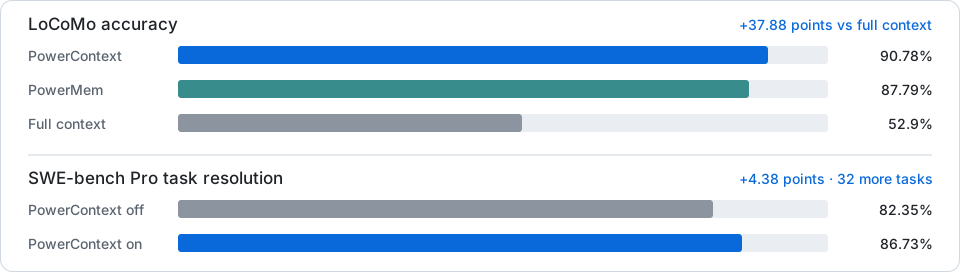
Compact comparison of PowerContext results on LoCoMo and SWE-bench Pro

See the methods, full results, and limitations behind these comparisons.

Build PowerContext

make install
make check
make test

See CONTRIBUTING.md for the complete development workflow.

Learn more

PowerContext is the successor to PowerMem.

Contributors

Thank you to everyone who contributes to PowerContext. ❤️

PowerContext contributors

See all contributors · Start contributing

License

PowerContext is licensed under the Apache License 2.0.

powercontext (oceanbase/powercontext)

Searching Database…

这是做什么用的?PowerContext 是 OceanBase 团队推出的一个可自行部署的上下文服务。它把决策、依据和任务状态与项目保存在一起,这样你或另一个智能体在以后的会话中就能接着继续之前的工作。
那它是需要导入代码里的库,还是我自己运行的服务?它是一个需要你自己运行的 Server,外加客户端集成:应用可以通过异步 Python 客户端、HTTP API、MCP 或进程内的 Core SDK 连接。
怎么安装配置?使用 Git 和 uv 安装 1.1.0 版本(uv 会自动准备 Python 3.11+),在一个专用目录中打开交互式配置向导,然后在自己的终端里启动 Server 并保持运行。
我需要自己准备模型的 API 密钥吗?只有 Full memory 功能需要:自动 Memory 和 Topic Memory 需要单独的 Generation 和 Embedding API 凭据,智能体订阅不包含这些。基础 memory 无需任何额外的模型 API。
现在能在 Windows 上用吗?支持 macOS 和 Linux;Windows 支持尚处于实验阶段。如果 Python 依赖下载缓慢或失败,README 中提供了镜像重试的说明。
Server 能跑在和我的智能体不同的机器上吗?可以。Server 部署在其他机器上时请使用 HTTPS 或远程连接指南;远程明文 HTTP 地址需要明确同意,自动化安装可以通过 --allow-insecure-http 来放行。
上下文数据存在哪里?存在你自己运行的 Server 里:向导会询问存储和访问是本地还是远程,远程连接通过 HTTPS 进行并需要明确同意。
Memory 和 Handoff 有什么区别?Memory 保存持久的信息,比如已确认的决策和依据,可复用的做法还可以保存为 Experience 或 Skill。Handoff 则把当前目标和状态打包在一起,让下一个人或智能体无需重读全部历史就能继续工作。每条内容都限定在其对应的工作范围内,并保留其来源和早期版本。
有没有教程可以学习这套工作流程?有 —— 22 个 Jupyter 教程(中文),外加一套完整的团队工作流程,逐步演示 Memory、上下文准备、Handoff、Experience、Skill 以及真实的智能体操作。前七个教程不需要模型或 API 密钥。
它和 PowerMem 是什么关系?PowerContext 是 PowerMem 的后继版本,新部署应该从这里开始。1.1.0 版本包含引导式的安装配置向导。
安装时安装的 seekdb 依赖是什么?它是 PowerContext 的一个依赖:如果缺少它,安装向导会询问一次,然后在后台自动为你安装。
What are similar projects?deer-flow, mem0, brigade, EverOS, OpenMetadata, hindsight, Memori, Raven
Creator
oceanbase
Size
51.3 MB
Stars
1.3K
Age
11mo
Commits · 90 Days
