







Memori README

The project's README from github.com/MemoriLabs/Memori. As one markdown file: README.md.

Memori Labs

Memory from what agents do, not just what they say.

Memori plugs into the software and infrastructure you already use. It is LLM, datastore and framework agnostic and seamlessly integrates into the architecture you've already designed.

→ Memori Cloud — Zero config. Get an API key and start building in minutes.

MemoriLabs%2FMemori | Trendshift

PyPI version NPM version Downloads License Discord

Give a Star

Choose memory that performs

Memori Labs


Getting Started

Installation

TypeScript SDK
npm install @memorilabs/memori
Python SDK
pip install memori

Quickstart

Sign up at app.memorilabs.ai, get a Memori API key, and start building. Full docs: memorilabs.ai/docs/memori-cloud/.

Set MEMORI_API_KEY and your LLM API key (e.g. OPENAI_API_KEY), then:

TypeScript SDK
import { OpenAI } from 'openai';
import { Memori } from '@memorilabs/memori';

// Requires MEMORI_API_KEY and OPENAI_API_KEY in your environment
const client = new OpenAI();
const mem = new Memori().llm
  .register(client)
  .attribution('user_123', 'support_agent');

async function main() {
  await client.chat.completions.create({
    model: 'gpt-4o-mini',
    messages: [{ role: 'user', content: 'My favorite color is blue.' }],
  });
  // Conversations are persisted and recalled automatically in the background.

  const response = await client.chat.completions.create({
    model: 'gpt-4o-mini',
    messages: [{ role: 'user', content: "What's my favorite color?" }],
  });
  // Memori recalls that your favorite color is blue.
}
Python SDK
from memori import Memori
from openai import OpenAI

# Requires MEMORI_API_KEY and OPENAI_API_KEY in your environment
client = OpenAI()
mem = Memori().llm.register(client)

mem.attribution(entity_id="user_123", process_id="support_agent")

response = client.chat.completions.create(
    model="gpt-4o-mini",
    messages=[{"role": "user", "content": "My favorite color is blue."}]
)
# Conversations are persisted and recalled automatically.

response = client.chat.completions.create(
    model="gpt-4o-mini",
    messages=[{"role": "user", "content": "What's my favorite color?"}]
)
# Memori recalls that your favorite color is blue.

Explore the Memories

Use the Dashboard — Memories, Analytics, Playground, and API Keys.

[!TIP] Want to use your own database? Check out docs for Memori BYODB here: https://memorilabs.ai/docs/memori-byodb/. For disposable BYODB development databases, see the TiDB Zero provisioning guide: docs/memori-byodb/databases/tidb.mdx.

LoCoMo Benchmark

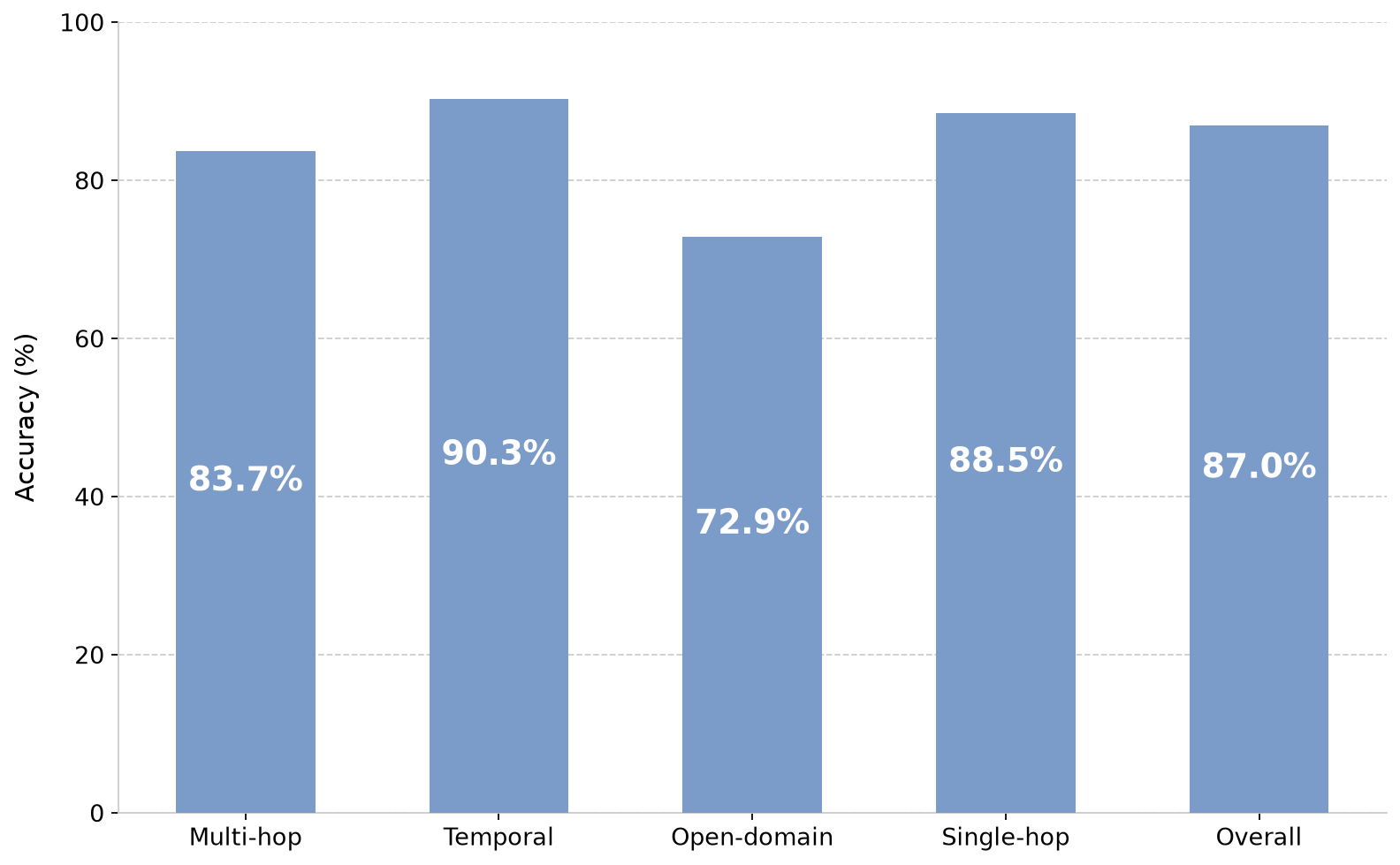
Memori was evaluated on the LoCoMo benchmark for long-conversation memory and achieved 87% overall accuracy while using an average of 721 tokens per query. That is just 2.8% of the full-context footprint, showing that structured memory can preserve reasoning quality without forcing large prompts into every request.

Compared with other retrieval-based memory systems, Memori outperformed Zep, LangMem, and Mem0 while reducing prompt size by roughly 67% vs. Zep and lowering context cost by more than 36x vs. full-context prompting.

Read the benchmark overview, see the results, or download the paper.

OpenClaw (Persistent Memory for Your Gateway)

By default, OpenClaw agents forget everything between sessions. The Memori plugin fixes that. It automatically captures structured memory from conversation and agent execution after each turn — including tool calls, decisions, and outcomes — and makes it available for agents to recall on demand.

No changes to your agent code or prompts are required. The plugin hooks into OpenClaw's lifecycle, so you get structured memory, agent-controlled recall, and Advanced Augmentation with a drop-in plugin.

openclaw plugins install @memorilabs/openclaw-memori
openclaw plugins enable openclaw-memori

openclaw memori init \
  --api-key "YOUR_MEMORI_API_KEY" \
  --entity-id "your-app-user-id" \
  --project-id "my-project"

openclaw gateway restart

For setup and configuration, see the OpenClaw Quickstart. For architecture and lifecycle details, see the OpenClaw Overview.

Hermes Agent (Persistent Memory Provider)

Memori also ships as a Hermes Agent memory provider. It captures completed conversations in the background and gives Hermes explicit memori_recall and memori_recall_summary tools for agent-controlled recall.

pip install hermes-memori
hermes-memori install

hermes config set memory.provider memori
HERMES_HOME="${HERMES_HOME:-$HOME/.hermes}"
mkdir -p "$HERMES_HOME"
echo "MEMORI_API_KEY=YOUR_MEMORI_API_KEY" >> "$HERMES_HOME/.env"
echo "MEMORI_ENTITY_ID=your-app-user-id" >> "$HERMES_HOME/.env"

MEMORI_PROJECT_ID is optional; when omitted, the provider uses Hermes' active project context for scoping.

For setup and configuration, see the Hermes Quickstart. For architecture and lifecycle details, see the Hermes Overview.

MCP (Connect Your Agent in One Command)

Your agent forgets everything between sessions. Memori fixes that. It remembers your stack, your conventions, and how you like things done so you stop repeating yourself.

Works for solo developers and teams. Your agent learns coding patterns, reviewer preferences, and project conventions over time. For teams, that means shared context that new engineers pick up on day one instead of absorbing tribal knowledge over months.

If you use Claude Code, Cursor, Codex, Warp, or Antigravity, you can connect Memori with no SDK integration needed:

claude mcp add --transport http memori https://api.memorilabs.ai/mcp/ \
  --header "X-Memori-API-Key: ${MEMORI_API_KEY}" \
  --header "X-Memori-Entity-Id: your_username" \
  --header "X-Memori-Process-Id: claude-code"

For Cursor, Codex, Warp, and other clients, see the MCP client setup guide.

Attribution

To get the most out of Memori, you want to attribute your LLM interactions to an entity (think person, place or thing; like a user) and a process (think your agent, LLM interaction or program).

If you do not provide any attribution, Memori cannot make memories for you.

TypeScript SDK
mem.attribution("12345", "my-ai-bot");
Python SDK
mem.attribution(entity_id="12345", process_id="my-ai-bot")

Session Management

Memori uses sessions to group your LLM interactions together. For example, if you have an agent that executes multiple steps you want those to be recorded in a single session.

By default, Memori handles setting the session for you but you can start a new session or override the session by executing the following:

TypeScript SDK
mem.resetSession();
// or
mem.setSession(sessionId);
Python SDK
mem.new_session()
# or
mem.set_session(session_id)

Supported LLMs

(unstreamed, streamed, synchronous and asynchronous)

Supported Frameworks

Supported Platforms

Examples

For more examples and demos, check out the Memori Cookbook.

Memori Advanced Augmentation

Memories are tracked at several different levels:

Memori's Advanced Augmentation enhances memories at each of these levels with:

Memori knows who your user is, what tasks your agent handles and creates unparalleled context between the two. Augmentation occurs in the background incurring no latency.

By default, Memori Advanced Augmentation is available without an account but rate-limited. When you need increased limits, sign up for Memori Advanced Augmentation or use the Memori CLI:

# Install the CLI via pip to manage your account
python -m memori sign-up <email_address>

Memori Advanced Augmentation is always free for developers!

Once you've obtained an API key, set the following environment variable (used by both Python and TypeScript SDKs):

export MEMORI_API_KEY=[api_key]

The Memori CLI uses your exported environment first, then fills missing values from a .env file in the directory where you run the command.

Managing Your Quota

At any time, you can check your quota using the Memori CLI (works for both SDKs):

python -m memori quota

Or by checking your account at https://app.memorilabs.ai/. If you have reached your IP address quota, sign up and get an API key for increased limits.

If your API key exceeds its quota limits, we will email you and let you know.

Command Line Interface (CLI)

The Memori CLI is the unified tool for managing your account, keys, and quotas across all SDKs. To use it, execute the following from the command line:

# Requires Python installed
python -m memori

This will display a menu of the available options. For more information about what you can do with the Memori CLI, please reference Command Line Interface.

Contributing

We welcome contributions from the community! Please see our Contributing Guidelines for details on:


Support


Memori Enterprise

Memori Enterprise is built for any enterprise running production agents, particularly high-volume ones such as internal SDLC.

Recently, a major project management platform automating QA with AI agents faced severe inefficiency as its agents suffered from session amnesia, repeatedly burning excessive tool calls.

By integrating Memori's agent-native memory layer in a secure private VPC, the platform captured execution traces to stop redundant discoveries and improve run over run.

This deployment delivered:

Following this success, this enterprise has already identified four additional high-priority agentic workflows for Memori integration.

Please email us at [email protected] if you'd like a preview.


License

Apache 2.0 - see LICENSE

Memori (MemoriLabs/Memori)

Searching Database…

17.2K ·GitHub
What is this?Memori is an LLM-agnostic memory infrastructure layer that turns what agents do and say into structured, persistent state you can query across sessions, instead of starting every run from amnesia.
Is this a library I install, or a hosted service?It is primarily a cloud memory service you call via TypeScript or Python SDKs (or a CLI/dashboard), but enterprise customers can deploy the same layer as single-tenant cloud, VPC, or fully on-premises instead of the managed cloud.
How do I start using Memori?Sign up at app.memorilabs.ai to get a Memori API key, install the TypeScript or Python SDK, set MEMORI_API_KEY plus your LLM provider key, and you can start building with zero extra config.
Do I need my own LLM API key too?Yes, alongside the Memori key you supply your underlying LLM provider's key such as OPENAI_API_KEY; Memori supports Anthropic, Bedrock, DeepSeek, Gemini, Grok, and OpenAI out of the box.
Does the free tier have limits?Memori's Advanced Augmentation works without an account but is rate-limited by default; hitting your IP-based quota requires an API key, and exceeding a key's quota triggers an email notice rather than a hard cutoff.
Is this just for solo developers, or built for enterprise teams too?Both: solo developers and teams can use the free SDK/CLI flow, while Memori Enterprise targets high-volume production agents (e.g. one QA automation deployment cut token spend by $2.1M/year running in a secure private VPC).
How does Memori's memory quality compare to Mem0 or Zep?On the LoCoMo long-conversation benchmark Memori scored 87% accuracy using an average of just 721 tokens per query (2.8% of a full-context prompt), outperforming Zep, LangMem, and Mem0 while cutting prompt size roughly 67% versus Zep.
What does the OpenClaw plugin actually do?It automatically captures structured memory from conversations and agent tool calls after every turn and makes it recallable later, hooking into OpenClaw's lifecycle with no changes to your agent code or prompts.
Can I connect Memori to coding agents like Claude Code or Cursor?Yes, via MCP you can connect Claude Code, Cursor, Codex, Warp, or Antigravity with no SDK integration, so the agent remembers your stack, conventions, and reviewer preferences across sessions.
What frameworks and models does Memori plug into?It integrates with Agno, LangChain, and Pydantic AI, and works across Anthropic, Bedrock, DeepSeek, Gemini, Grok, and OpenAI models, plus a Hermes Agent memory provider for background conversation capture.
What are similar projects?MemOS, EverOS, hindsight, mem0, brigade, supermemory, powercontext, Raven
Creator
MemoriLabs
Size
30.7 MB
Stars
17.2K
Age
1y
Commits · 90 Days